> ## Documentation Index
> Fetch the complete documentation index at: https://notes.kodekloud.com/llms.txt
> Use this file to discover all available pages before exploring further.
# Containers vs VMs
> Comparison of containers and virtual machines explaining architectures, trade-offs, use cases, and how they interoperate in modern infrastructure.
In this lesson we compare containers and virtual machines (VMs) to clarify their architectures, trade-offs, and how they’re commonly used together in modern infrastructures.
## What is a container?
* Containers (for example, with Docker) package an application together with its runtime, libraries, and dependencies into a single image.
* The Docker Engine runs on a host OS and uses that host’s kernel on Linux. On macOS or Windows, Docker Desktop typically runs a lightweight VM to provide a Linux kernel for Linux containers.
* At runtime, containers share the host kernel but get isolated views of processes, network, and filesystems via namespaces and cgroups.
* Because containers share the kernel and only include the minimal user-space components, container images are usually lightweight (often megabytes) and start quickly (typically seconds). Some images based on full distributions may be larger.
Useful references:
* Docker: [https://www.docker.com/](https://www.docker.com/)
* Docker Engine docs: [https://docs.docker.com/engine/](https://docs.docker.com/engine/)
* Namespaces: [https://man7.org/linux/man-pages/man7/namespaces.7.html](https://man7.org/linux/man-pages/man7/namespaces.7.html)
* cgroups: [https://man7.org/linux/man-pages/man7/cgroups.7.html](https://man7.org/linux/man-pages/man7/cgroups.7.html)
## What is a virtual machine (VM)?
* A hypervisor (for example, ESXi, Hyper-V, or KVM) runs on the physical host and presents virtual hardware to each guest.
* Each VM runs a full guest operating system with its own kernel; the application and dependencies run inside that OS.
* Because VMs include a full OS, VM images are larger (often gigabytes), consume more disk and memory, and take longer to boot (minutes) than containers.
* VMs provide strong isolation since each VM runs an independent kernel and OS instance.
Hypervisor examples:
* ESXi: [https://www.vmware.com/products/esxi-and-esx.html](https://www.vmware.com/products/esxi-and-esx.html)
* Hyper-V: [https://learn.microsoft.com/en-us/virtualization/hyper-v-on-windows/about/](https://learn.microsoft.com/en-us/virtualization/hyper-v-on-windows/about/)
* KVM: [https://www.linux-kvm.org/page/Main\_Page](https://www.linux-kvm.org/page/Main_Page)
## Side-by-side comparison
| Dimension | Containers | Virtual Machines (VMs) |
| - | - | - |
| Runtime model | Share host kernel; lightweight user-space images | Full guest OS with its own kernel |
| Typical image size | Megabytes (small) | Gigabytes (large) |
| Startup time | Seconds | Minutes |
| Isolation | Process-level via `namespaces`, `cgroups` | Strong kernel-level isolation |
| Resource overhead | Low (shares kernel) | Higher (each VM runs full OS) |
| OS heterogeneity | Requires same kernel type as host (Linux vs Windows) | Can run different OS types concurrently |
| Use case examples | Microservices, CI pipelines, scalable apps | Multi-OS workloads, strong isolation requirements |
## Key trade-offs (summary)
* Resource overhead: VMs have higher resource and storage overhead because each runs a separate kernel and full OS. Containers are more resource-efficient.
* Startup time: Containers start faster than VMs, enabling rapid scale-out.
* Isolation and security: VMs provide stronger isolation since kernels are separate. Containers provide lighter, process-level isolation, although projects like gVisor and Kata Containers can increase container isolation.
* OS heterogeneity: VMs let you run different OS types (e.g., Linux and Windows) on the same host. Containers generally require the same kernel type as the host; utility VMs or platform layers bridge that gap.
## When to use which
* Use containers when:
* You need fast startup and efficient resource usage.
* You want to package applications consistently across environments.
* You run many microservices on shared infrastructure.
* Use VMs when:
* You require strong kernel-level isolation or multi-OS support.
* You need to run legacy systems that expect a full OS.
* Compliance or security policy mandates full-machine separation.
Containers share the host OS kernel (process-level isolation via [namespaces](https://man7.org/linux/man-pages/man7/namespaces.7.html) and [cgroups](https://man7.org/linux/man-pages/man7/cgroups.7.html)). If you need to run different kernel types concurrently (for example, Linux and Windows), VMs are the straightforward option.
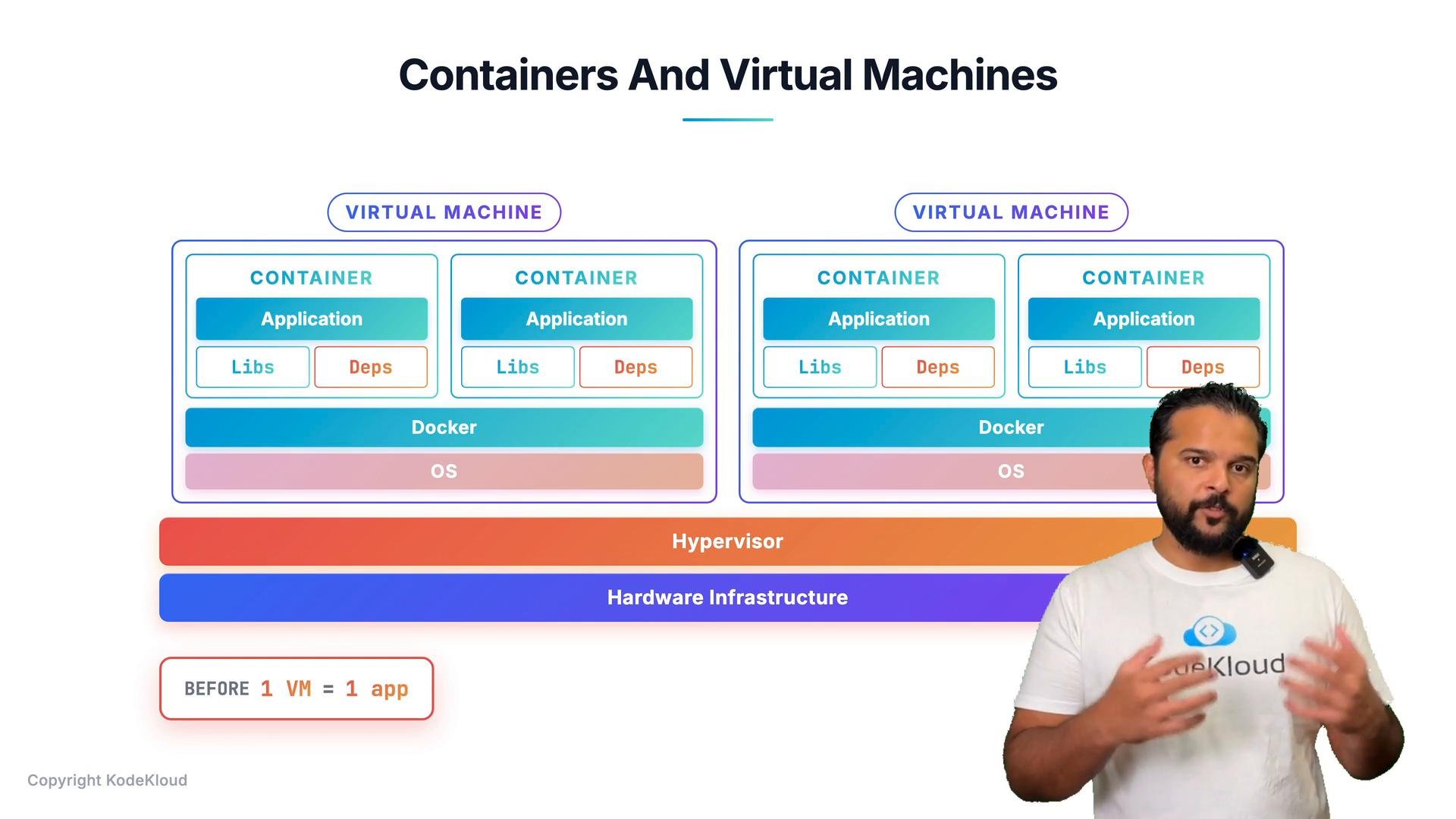 ## Combining containers and VMs
It’s not an either/or choice — containers and VMs often complement each other:
* Provision virtual machines to manage, isolate, and lifecycle hosts at the infrastructure level.
* Run many containers inside those VMs to package, deploy, and scale applications efficiently.
In practice, you usually provision far fewer VMs than if every application required its own VM. Instead, you run multiple containers on each virtual host—reducing VM sprawl while keeping the management and isolation benefits of virtualization.
## Further reading and references
* Kubernetes Basics: [https://kubernetes.io/docs/concepts/overview/what-is-kubernetes/](https://kubernetes.io/docs/concepts/overview/what-is-kubernetes/)
* Docker: [https://www.docker.com/](https://www.docker.com/)
* gVisor: [https://gvisor.dev/](https://gvisor.dev/)
* Kata Containers: [https://katacontainers.io/](https://katacontainers.io/)
This documentation is built and hosted on [Mintlify](https://mintlify.com), a developer documentation platform.
## Combining containers and VMs
It’s not an either/or choice — containers and VMs often complement each other:
* Provision virtual machines to manage, isolate, and lifecycle hosts at the infrastructure level.
* Run many containers inside those VMs to package, deploy, and scale applications efficiently.
In practice, you usually provision far fewer VMs than if every application required its own VM. Instead, you run multiple containers on each virtual host—reducing VM sprawl while keeping the management and isolation benefits of virtualization.
## Further reading and references
* Kubernetes Basics: [https://kubernetes.io/docs/concepts/overview/what-is-kubernetes/](https://kubernetes.io/docs/concepts/overview/what-is-kubernetes/)
* Docker: [https://www.docker.com/](https://www.docker.com/)
* gVisor: [https://gvisor.dev/](https://gvisor.dev/)
* Kata Containers: [https://katacontainers.io/](https://katacontainers.io/)
This documentation is built and hosted on [Mintlify](https://mintlify.com), a developer documentation platform.