> ## Documentation Index
> Fetch the complete documentation index at: https://notes.kodekloud.com/llms.txt
> Use this file to discover all available pages before exploring further.
# How Docker Works
> Explains how Docker packages userland into containers that reuse the host kernel using namespaces and cgroups, contrasts containers with virtual machines, and notes Windows and macOS VM usage
To understand how Docker works, it helps to first revisit a few fundamental operating system concepts.
Most Linux-based operating systems (Ubuntu, Fedora, openSUSE, AlmaLinux, etc.) are composed of two broad parts:
* the kernel — the low-level component that interacts with hardware and exposes system calls; and
* the userland — the collection of system utilities, libraries, shells, package managers, desktop environments, developer tools, and application binaries that run on top of the kernel.
The kernel is often the same across distributions (Linux), while the userland is what makes Ubuntu behave differently from Fedora or Debian. Docker packages the userland (binaries, libraries, and application code) into images, and those images run as containers that rely on the host kernel for system calls and hardware interaction. That is why you can run a Debian-based container on an Ubuntu host: both share the same Linux kernel, so only the userland needs to be packaged inside the container.
Key points:
* Container images include userland components (libraries, binaries, app code).
* Containers reuse the host kernel — they do not contain their own kernel.
* Kernel features provide the isolation and resource control containers rely on:
* namespaces — isolate process trees, network, mount points, etc.
* cgroups (control groups) — limit and account for resource usage (CPU, memory, I/O).
A typical container start looks like this:
```bash theme={null}
$ docker run linux-image
✓ Linux container started
```
Containers are not full virtual machines. They don’t include a separate kernel; instead they reuse the host kernel and leverage kernel features (namespaces and cgroups) to isolate processes and control resources.
 What about Windows and macOS?
* Windows and macOS use different kernels (Windows uses the Windows NT kernel; macOS uses the XNU kernel). You cannot run a Windows kernel inside a Linux host or vice versa.
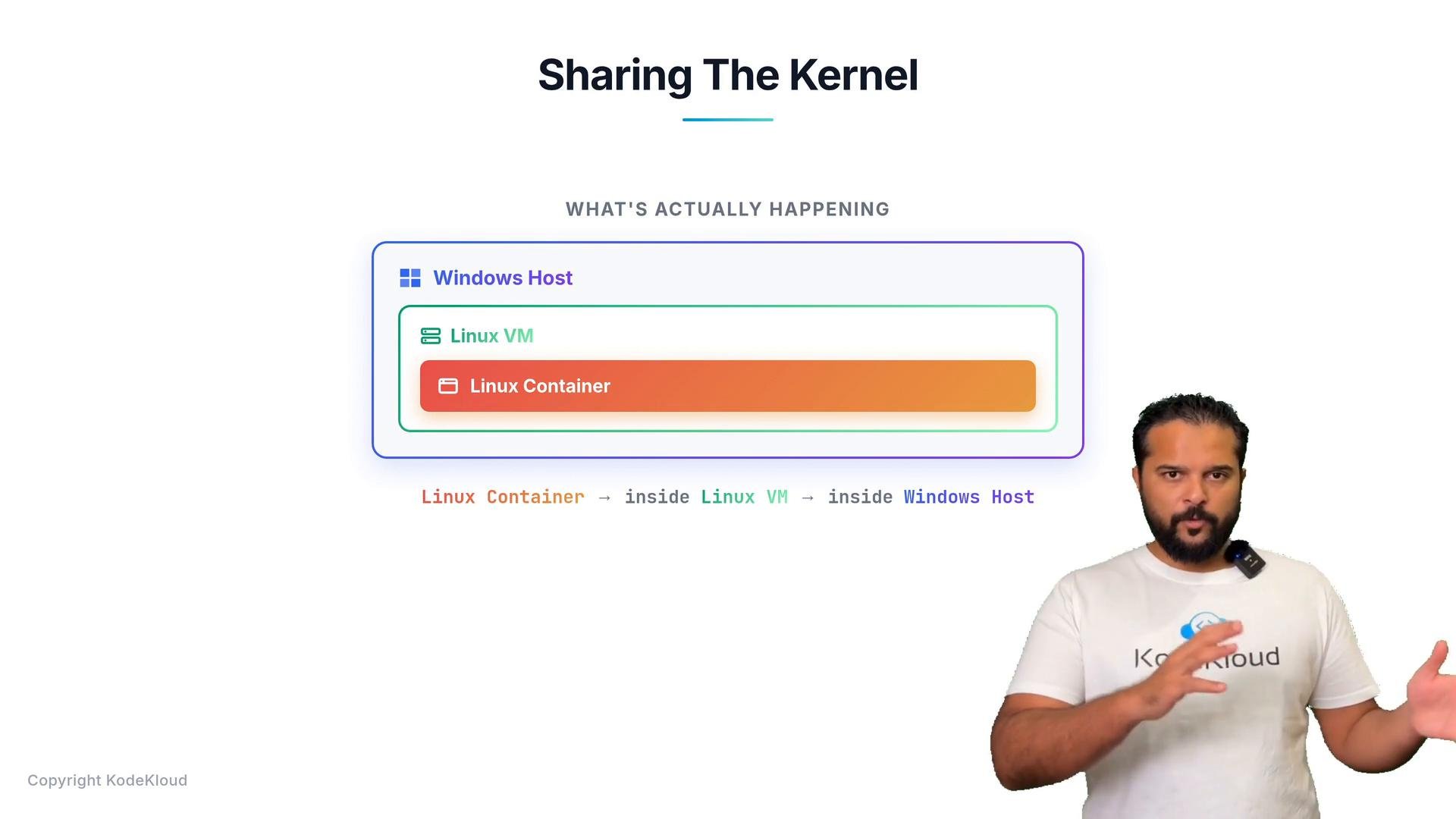
* When you run Linux containers on a Windows or macOS machine, Docker provides a small Linux VM under the hood (for example, via WSL2 or Hyper-V on Windows, or a thin virtual machine on macOS). The Linux container runs inside that VM, which in turn runs on the host OS — effectively: Linux container → Linux VM → Windows (or macOS) host.
On Windows and macOS, Docker uses a lightweight Linux VM to host Linux containers. This is why running Linux containers on these platforms still works even though their kernels differ from Linux.
Why this design?
Docker intentionally focuses on packaging and shipping application userlands — not on virtualizing entire machines. The main differences between containers and hypervisor-based VMs are:
| Aspect | Containers | Virtual Machines |
| - | - | - |
| Kernel | Reuse host kernel (no kernel in image) | Each VM runs its own kernel |
| Isolation mechanism | Kernel namespaces and cgroups | Hardware virtualization via hypervisor |
| Overhead | Lightweight, fast start-up | Higher overhead, slower start-up |
| Typical use case | Microservices, app packaging, CI/CD | Running multiple OS environments, legacy apps |
Docker pairs portability and lightweight isolation: images encapsulate application dependencies so apps run consistently across environments while remaining efficient in resource use.
Further reading and references:
* [Docker official docs](https://docs.docker.com/)
* [Linux namespaces](https://man7.org/linux/man-pages/man7/namespaces.7.html)
* [Linux cgroups](https://man7.org/linux/man-pages/man7/cgroups.7.html)
* [Windows Subsystem for Linux (WSL2)](https://learn.microsoft.com/windows/wsl/)
This documentation is built and hosted on [Mintlify](https://mintlify.com), a developer documentation platform.
What about Windows and macOS?
* Windows and macOS use different kernels (Windows uses the Windows NT kernel; macOS uses the XNU kernel). You cannot run a Windows kernel inside a Linux host or vice versa.
* When you run Linux containers on a Windows or macOS machine, Docker provides a small Linux VM under the hood (for example, via WSL2 or Hyper-V on Windows, or a thin virtual machine on macOS). The Linux container runs inside that VM, which in turn runs on the host OS — effectively: Linux container → Linux VM → Windows (or macOS) host.
On Windows and macOS, Docker uses a lightweight Linux VM to host Linux containers. This is why running Linux containers on these platforms still works even though their kernels differ from Linux.
Why this design?
Docker intentionally focuses on packaging and shipping application userlands — not on virtualizing entire machines. The main differences between containers and hypervisor-based VMs are:
| Aspect | Containers | Virtual Machines |
| - | - | - |
| Kernel | Reuse host kernel (no kernel in image) | Each VM runs its own kernel |
| Isolation mechanism | Kernel namespaces and cgroups | Hardware virtualization via hypervisor |
| Overhead | Lightweight, fast start-up | Higher overhead, slower start-up |
| Typical use case | Microservices, app packaging, CI/CD | Running multiple OS environments, legacy apps |
Docker pairs portability and lightweight isolation: images encapsulate application dependencies so apps run consistently across environments while remaining efficient in resource use.
Further reading and references:
* [Docker official docs](https://docs.docker.com/)
* [Linux namespaces](https://man7.org/linux/man-pages/man7/namespaces.7.html)
* [Linux cgroups](https://man7.org/linux/man-pages/man7/cgroups.7.html)
* [Windows Subsystem for Linux (WSL2)](https://learn.microsoft.com/windows/wsl/)
This documentation is built and hosted on [Mintlify](https://mintlify.com), a developer documentation platform.