> ## Documentation Index
> Fetch the complete documentation index at: https://notes.kodekloud.com/llms.txt
> Use this file to discover all available pages before exploring further.
# Building an MCP Client
> Guide to building a minimal MCP client and server, covering configuration, tools, resources, prompts, contexts, roots, client-side sampling, and elicitation.
In this lesson we'll build a minimal end-to-end MCP (Model Context Protocol) client and server. You’ll see a complete example for:
* MCP configuration (`mcp.json`) that points a client to a server
* A minimal MCP server exposing tools, resources, and prompts
* A minimal client that lists tools, calls tools, reads resources, and fetches prompts
* How to wire up Contexts, Roots, Sampling, and Elicitation so server and client coordinate during long-running or interactive operations
Many tools and IDEs (for example, [Cursor AI](https://learn.kodekloud.com/user/courses/cursor-ai) or [Claude Code for Beginners](https://learn.kodekloud.com/user/courses/claude-code-for-beginners)) automatically read an `mcp.json` configuration to find MCP servers. This guide shows how to implement a custom client and server if you want more control.
## Example MCP configuration
A simple `mcp.json` pointing a client to an MCP server:
```json theme={null}
{
"mcpServers": {
"flight-mcp": {
"url": "https://joyair.com/mcp",
"headers": {
"API_KEY": "value"
}
}
}
}
```
This tells the client where the MCP server is and supplies any request headers (for example, API keys).
## Overview: Server and Client roles
* Server (FastMCP) — defines tools, resources, and prompts and can request client-side LLM sampling or elicit user input.
* Client (ClientSession) — connects to the server, enumerates capabilities, calls tools, reads resources, returns prompts, answers elicitations, and performs sampling when requested.
We first create a super-simple MCP server, then a client that calls it.
## Server (FastMCP) — minimal example
This FastMCP server exposes a tool, a resource, and a prompt:
```python theme={null}
from mcp.server.fastmcp import FastMCP
from mcp.server.context import Context
mcp = FastMCP("flight-server")
@mcp.tool()
async def search_flights(origin: str, destination: str):
return {"flights": ["flight1", "flight2"]}
@mcp.resource("flight://status/{id}")
async def get_status(id: str):
return {"status": "on_time"}
@mcp.prompt()
async def find_flight(details: str):
return f"Suggestions for {details}"
if __name__ == "__main__":
# Start an HTTP MCP server on port 8080
mcp.run(transport="http", port=8080)
```
* `@mcp.tool()` — registers a callable tool (synchronous or async).
* `@mcp.resource(...)` — exposes a resource accessible via a URI pattern.
* `@mcp.prompt()` — returns a text prompt the client can request.
## Client (ClientSession) — minimal example
This client connects to the server, lists available tools, calls a tool, reads a resource, and fetches a prompt:
```python theme={null}
from mcp.client.session import ClientSession
import asyncio
async def client():
# Connect to the MCP server
client = ClientSession("http://localhost:8080/mcp")
async with client:
# List what's available
tools = await client.list_tools()
print("Available tools:", tools)
# Use tools
flights = await client.call_tool("search_flights", {
"origin": "SFO",
"destination": "JFK"
})
print("search_flights result:", flights)
# Read resources
status = await client.read_resource("flight://status/UA123")
print("resource status:", status)
# Get prompts
advice = await client.get_prompt("find_flight", {
"details": "SFO to JFK"
})
print("prompt advice:", advice)
asyncio.run(client())
```
Client-side convenience methods you will use frequently include `list_tools()`, `call_tool()`, `read_resource()`, and `get_prompt()`. Use them to discover and invoke the server-side capabilities.
## Contexts — server-to-client progress & logging
Contexts let a server stream messages back to the client during long-running tool executions (progress updates, info logs, or debug messages). On the server side, the `Context` object provides helpers such as:
* `ctx.info(...)` — send informational messages
* `ctx.report_progress(...)` — send progress updates
* `ctx.debug(...)` — send debug messages
The client receives and can surface those updates in UI elements or logs.
## Roots — controlled client filesystem access
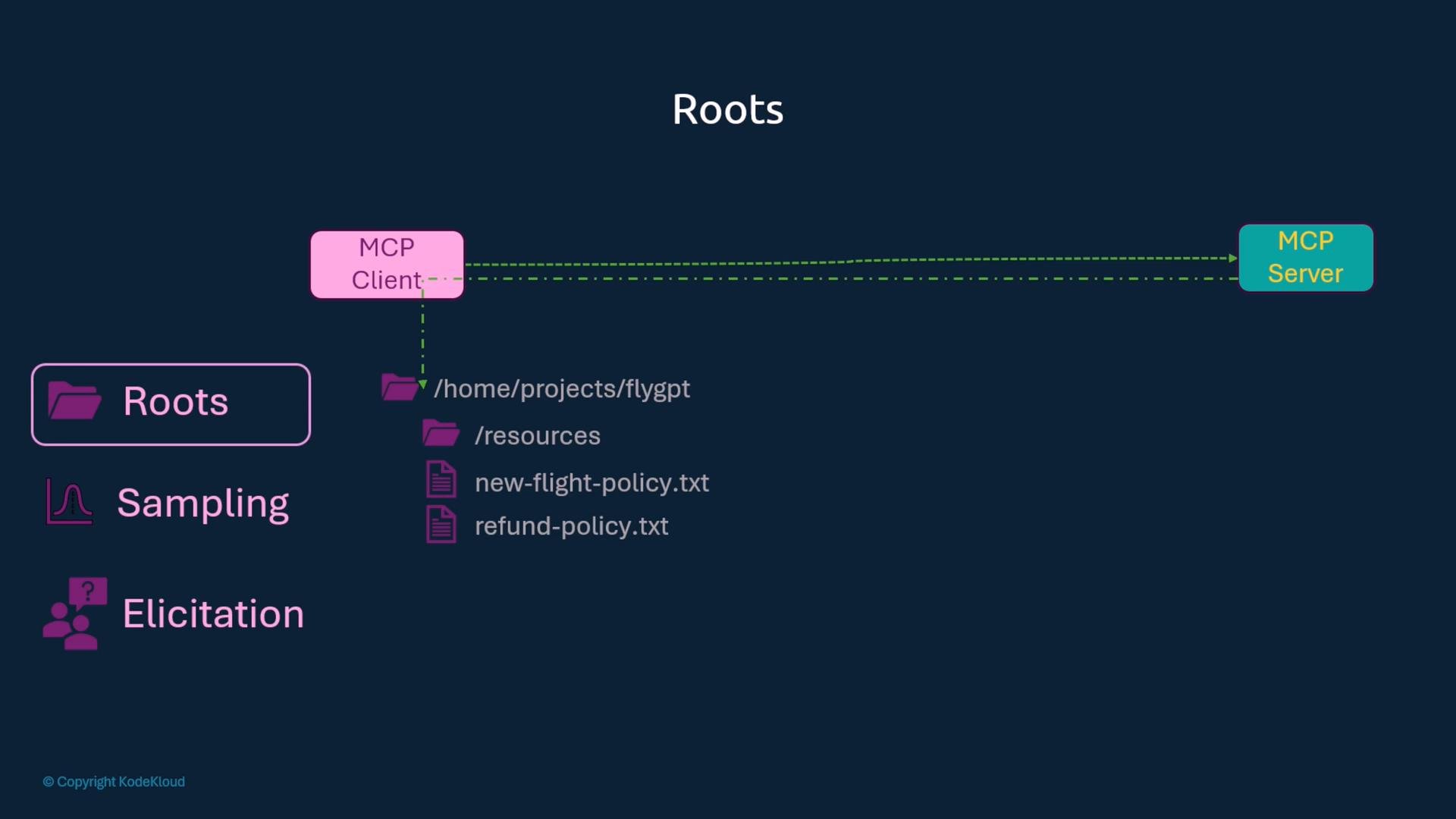
Roots are client-defined folders the MCP server may access or reference. Think of them as shared folders: you explicitly expose only safe paths so the server cannot access the entire client filesystem. The client provides allowed roots when creating a session and the server can inspect them with `context.session.list_roots()`.
 Only expose directories you trust. Roots grant the server limited access to client files — avoid adding sensitive or system directories.
## Sampling — client-driven LLM calls
Why sampling? A server may request that the client perform LLM generation instead of hosting or calling an LLM itself. This keeps the server lightweight and lets each client control model selection, token limits, and billing.
Server requests sampling via the context/session; the client supplies a sampling handler when creating the session.
Client-side sampling handler example:
```python theme={null}
# Client-side sampling handler
from mcp.client.session import ClientSession
from mcp.types import SamplingMessage, TextContent
import asyncio
async def call_my_llm_service(prompt: str) -> str:
# Replace this with your LLM invocation
# Example placeholder: echo prompt back for demo
return f"LLM response for: {prompt}"
async def my_llm_handler(messages, params, context):
# 1. EXTRACT prompt from messages
prompt = messages[0].content.text
# 2. GENERATE response (call your LLM)
response_text = await call_my_llm_service(prompt)
# 3. RETURN generated text as a SamplingMessage/TextContent-like structure
# The exact return type may depend on the client API; return plain text here.
return response_text
async def run_client():
client = ClientSession("http://localhost:8080/mcp",
sampling_handler=my_llm_handler)
async with client:
await client.initialize()
# client remains ready to handle sampling requests from the server
asyncio.run(run_client())
```
Server-side tool requesting sampling via the context:
```python theme={null}
from mcp.server.fastmcp import FastMCP
from mcp.server.context import Context
from mcp.types import SamplingMessage, TextContent
mcp = FastMCP("sampling-server")
@mcp.tool()
async def generate_content(topic: str, ctx: Context):
# 1. CREATE prompt
prompt = f"Write something about {topic}"
# 2. REQUEST LLM generation from the client via sampling
result = await ctx.session.create_message([
SamplingMessage(role="user", content=TextContent(text=prompt))
])
# 3. RETURN generated content (result content structure may vary)
return result.content.text
```
## Elicitation — prompt end users for structured input
Elicitation allows the server to ask the client to prompt the end user for more data during tool execution. The server calls `ctx.elicit(...)` with a message and optional schema. The client must provide an elicitation callback that captures, validates, and returns the structured response.
Client-side elicitation handler (streamable HTTP transport example):
```python theme={null}
from mcp.client.session import ClientSession
from mcp.client.streamable_http import streamablehttp_client
from mcp.types import ElicitRequestParams, ElicitResult
import asyncio
async def handle_elicitation(context, params: ElicitRequestParams) -> ElicitResult:
print(f"🔔 Server requests: {params.message}")
# 👥 Get real user input (blocking input for demo; adapt for your UI)
name = input("Enter your name: ")
age = int(input("Enter your age: "))
user_response = {"name": name, "age": age}
# 📝 Return structured response expected by the server
return ElicitResult(action="accept", data=user_response)
async def main():
# Connect to a streamable HTTP MCP server; adjust URL/port as needed
async with streamablehttp_client("http://localhost:8000") as (read, write, _):
async with ClientSession(read, write,
elicitation_callback=handle_elicitation) as session:
await session.initialize()
# 🚀 Call tool that uses elicitation on the server side
result = await session.call_tool("ask_user_info", {})
print(f"✅ Result: {result}")
asyncio.run(main())
```
Server-side tool using elicitation (FastMCP):
```python theme={null}
from mcp.server.fastmcp import FastMCP, Context
from pydantic import BaseModel
mcp = FastMCP("elicitation-demo")
class UserInfo(BaseModel):
name: str
age: int
@mcp.tool()
async def ask_user_info(ctx: Context) -> str:
# 🔔 Request structured input from user
result = await ctx.elicit(
message="Please provide your information:",
schema=UserInfo
)
# ✅ Use validated data
user_data = result.data
return f"Hello {user_data.name}, {user_data.age}"
# Start server using the streamable HTTP transport
if __name__ == "__main__":
mcp.run(transport="streamable-http")
```
## Feature quick-reference
| Feature | Client API | Server API / Usage |
| - | - | - |
| Discover tools | `await client.list_tools()` | `@mcp.tool()` |
| Invoke tool | `await client.call_tool("name", params)` | `@mcp.tool()` |
| Read resource | `await client.read_resource("scheme://...")` | `@mcp.resource("...")` |
| Get prompt | `await client.get_prompt("name", params)` | `@mcp.prompt()` |
| Sampling (client-run LLM) | provide `sampling_handler` to `ClientSession` | call `ctx.session.create_message([...SamplingMessage...])` |
| Elicitation (ask user) | provide `elicitation_callback` (returns `ElicitResult`) | call `await ctx.elicit(message=..., schema=...)` |
| Roots (client filesystem) | supply allowed `roots` when creating session | use `context.session.list_roots()` to inspect allowed paths |
Notes:
* In the table, any examples like `{"name":"value"}` or `flight://status/ID` are safe to use as literal examples inside backticks.
* Use streaming transports (e.g., streamable-http) when you need real-time progress, elicitation, or streaming responses.
## Summary
* The MCP server defines tools, resources, and prompts and can request client-side actions (sampling, elicitation).
* The client connects via a session, discovers capabilities, invokes tools, reads resources, and obtains prompts.
* Contexts let servers stream info, progress, and debug messages to clients during execution.
* Roots let clients limit which local folders the server can access.
* Sampling delegates LLM calls to the client, enabling clients to control model choice, token limits, and costs.
* Elicitation allows servers to request structured input from end users via the client.
## Links and references
* [Model Context Protocol (MCP) concepts and API](/) (project docs)
* [Kubernetes Documentation](https://kubernetes.io/docs/)
* [Cursor AI course (example)](https://learn.kodekloud.com/user/courses/cursor-ai)
* [Claude Code for Beginners (example)](https://learn.kodekloud.com/user/courses/claude-code-for-beginners)
* [LangGraph course (next lesson preview)](https://learn.kodekloud.com/user/courses/langgraph)
In the next lesson we’ll explore [AI Agents](https://learn.kodekloud.com/user/courses/ai-agents) in action and build a custom agent using [LangGraph](https://learn.kodekloud.com/user/courses/langgraph).
This documentation is built and hosted on [Mintlify](https://mintlify.com), a developer documentation platform.
Only expose directories you trust. Roots grant the server limited access to client files — avoid adding sensitive or system directories.
## Sampling — client-driven LLM calls
Why sampling? A server may request that the client perform LLM generation instead of hosting or calling an LLM itself. This keeps the server lightweight and lets each client control model selection, token limits, and billing.
Server requests sampling via the context/session; the client supplies a sampling handler when creating the session.
Client-side sampling handler example:
```python theme={null}
# Client-side sampling handler
from mcp.client.session import ClientSession
from mcp.types import SamplingMessage, TextContent
import asyncio
async def call_my_llm_service(prompt: str) -> str:
# Replace this with your LLM invocation
# Example placeholder: echo prompt back for demo
return f"LLM response for: {prompt}"
async def my_llm_handler(messages, params, context):
# 1. EXTRACT prompt from messages
prompt = messages[0].content.text
# 2. GENERATE response (call your LLM)
response_text = await call_my_llm_service(prompt)
# 3. RETURN generated text as a SamplingMessage/TextContent-like structure
# The exact return type may depend on the client API; return plain text here.
return response_text
async def run_client():
client = ClientSession("http://localhost:8080/mcp",
sampling_handler=my_llm_handler)
async with client:
await client.initialize()
# client remains ready to handle sampling requests from the server
asyncio.run(run_client())
```
Server-side tool requesting sampling via the context:
```python theme={null}
from mcp.server.fastmcp import FastMCP
from mcp.server.context import Context
from mcp.types import SamplingMessage, TextContent
mcp = FastMCP("sampling-server")
@mcp.tool()
async def generate_content(topic: str, ctx: Context):
# 1. CREATE prompt
prompt = f"Write something about {topic}"
# 2. REQUEST LLM generation from the client via sampling
result = await ctx.session.create_message([
SamplingMessage(role="user", content=TextContent(text=prompt))
])
# 3. RETURN generated content (result content structure may vary)
return result.content.text
```
## Elicitation — prompt end users for structured input
Elicitation allows the server to ask the client to prompt the end user for more data during tool execution. The server calls `ctx.elicit(...)` with a message and optional schema. The client must provide an elicitation callback that captures, validates, and returns the structured response.
Client-side elicitation handler (streamable HTTP transport example):
```python theme={null}
from mcp.client.session import ClientSession
from mcp.client.streamable_http import streamablehttp_client
from mcp.types import ElicitRequestParams, ElicitResult
import asyncio
async def handle_elicitation(context, params: ElicitRequestParams) -> ElicitResult:
print(f"🔔 Server requests: {params.message}")
# 👥 Get real user input (blocking input for demo; adapt for your UI)
name = input("Enter your name: ")
age = int(input("Enter your age: "))
user_response = {"name": name, "age": age}
# 📝 Return structured response expected by the server
return ElicitResult(action="accept", data=user_response)
async def main():
# Connect to a streamable HTTP MCP server; adjust URL/port as needed
async with streamablehttp_client("http://localhost:8000") as (read, write, _):
async with ClientSession(read, write,
elicitation_callback=handle_elicitation) as session:
await session.initialize()
# 🚀 Call tool that uses elicitation on the server side
result = await session.call_tool("ask_user_info", {})
print(f"✅ Result: {result}")
asyncio.run(main())
```
Server-side tool using elicitation (FastMCP):
```python theme={null}
from mcp.server.fastmcp import FastMCP, Context
from pydantic import BaseModel
mcp = FastMCP("elicitation-demo")
class UserInfo(BaseModel):
name: str
age: int
@mcp.tool()
async def ask_user_info(ctx: Context) -> str:
# 🔔 Request structured input from user
result = await ctx.elicit(
message="Please provide your information:",
schema=UserInfo
)
# ✅ Use validated data
user_data = result.data
return f"Hello {user_data.name}, {user_data.age}"
# Start server using the streamable HTTP transport
if __name__ == "__main__":
mcp.run(transport="streamable-http")
```
## Feature quick-reference
| Feature | Client API | Server API / Usage |
| - | - | - |
| Discover tools | `await client.list_tools()` | `@mcp.tool()` |
| Invoke tool | `await client.call_tool("name", params)` | `@mcp.tool()` |
| Read resource | `await client.read_resource("scheme://...")` | `@mcp.resource("...")` |
| Get prompt | `await client.get_prompt("name", params)` | `@mcp.prompt()` |
| Sampling (client-run LLM) | provide `sampling_handler` to `ClientSession` | call `ctx.session.create_message([...SamplingMessage...])` |
| Elicitation (ask user) | provide `elicitation_callback` (returns `ElicitResult`) | call `await ctx.elicit(message=..., schema=...)` |
| Roots (client filesystem) | supply allowed `roots` when creating session | use `context.session.list_roots()` to inspect allowed paths |
Notes:
* In the table, any examples like `{"name":"value"}` or `flight://status/ID` are safe to use as literal examples inside backticks.
* Use streaming transports (e.g., streamable-http) when you need real-time progress, elicitation, or streaming responses.
## Summary
* The MCP server defines tools, resources, and prompts and can request client-side actions (sampling, elicitation).
* The client connects via a session, discovers capabilities, invokes tools, reads resources, and obtains prompts.
* Contexts let servers stream info, progress, and debug messages to clients during execution.
* Roots let clients limit which local folders the server can access.
* Sampling delegates LLM calls to the client, enabling clients to control model choice, token limits, and costs.
* Elicitation allows servers to request structured input from end users via the client.
## Links and references
* [Model Context Protocol (MCP) concepts and API](/) (project docs)
* [Kubernetes Documentation](https://kubernetes.io/docs/)
* [Cursor AI course (example)](https://learn.kodekloud.com/user/courses/cursor-ai)
* [Claude Code for Beginners (example)](https://learn.kodekloud.com/user/courses/claude-code-for-beginners)
* [LangGraph course (next lesson preview)](https://learn.kodekloud.com/user/courses/langgraph)
In the next lesson we’ll explore [AI Agents](https://learn.kodekloud.com/user/courses/ai-agents) in action and build a custom agent using [LangGraph](https://learn.kodekloud.com/user/courses/langgraph).
This documentation is built and hosted on [Mintlify](https://mintlify.com), a developer documentation platform.