> ## Documentation Index
> Fetch the complete documentation index at: https://notes.kodekloud.com/llms.txt
> Use this file to discover all available pages before exploring further.
# Building an MCP Server
> Guide to building a minimal Model Context Protocol server with Python FastMCP, explaining resources, tools, prompts, runtime modes, transports, and a runnable example
This guide shows how to build a minimal MCP (Model Context Protocol) server using the Python SDK (FastMCP). It explains the three core MCP building blocks — resources, tools, and prompts — then demonstrates a compact, runnable server example and the available runtime modes and transports.
Keywords: MCP server, Model Context Protocol, FastMCP, resources, tools, prompts, Python SDK, async, stateless, stateful
## MCP core concepts
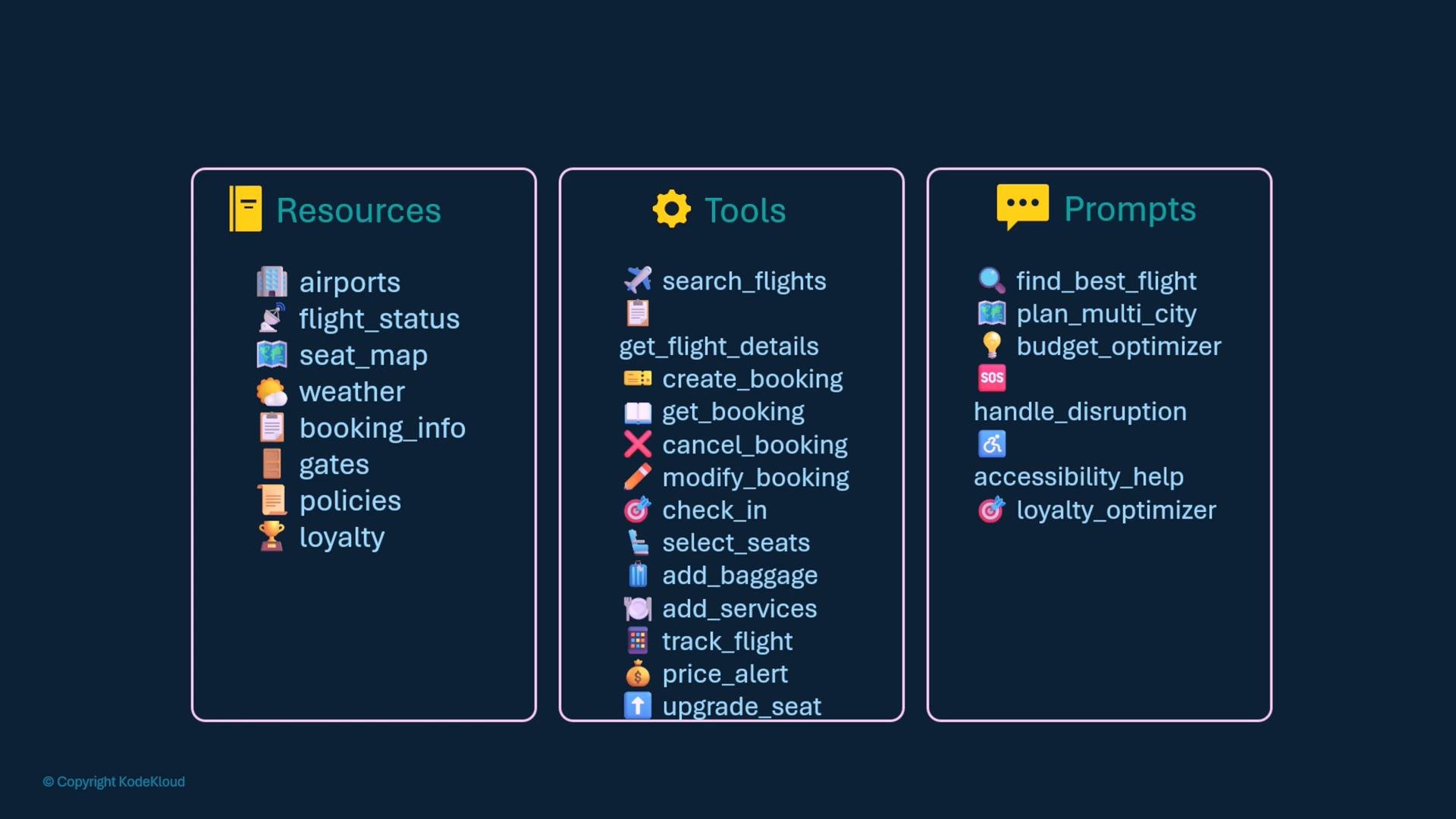
MCP servers expose three coordinated layers:
* Resources: read-oriented data endpoints or accessors (e.g., airports, flight statuses, seat maps, weather, bookings, gate info, policies, loyalty programs).
* Tools: actionable functions that modify or query systems (e.g., search\_flights, get\_flight\_details, create\_booking, check\_in, select\_seat, add\_baggage).
* Prompts: developer-authored templates that guide model behavior for tasks like finding a best flight, optimizing for budget, or handling disruptions.
Once you determine the desired behavior and capabilities, implement the MCP server using the SDK and the MCP specification/SDK docs.
| Component | Purpose | Example |
| - | - | - |
| Resources | Stable, typed data endpoints | `flight://airports/{code}` |
| Tools | Actions that perform work | `search_flights(origin, destination, departure_date)` |
| Prompts | Templates used by the model | `@mcp.prompt("find_best_flight")` |
For SDK reference and implementation details, see the FastMCP docs: `/docs/mcp/fastmcp` (or your project's documentation location).
 ## Implementation approach (high level)
1. Import the FastMCP library and create an MCP server instance.
2. Define resources with `@mcp.resource(...)` (async functions that return typed data).
3. Define tools with `@mcp.tool()` (async functions performing actions).
4. Define prompts with `@mcp.prompt("name")` (string- or template-returning async functions).
5. Run the server with your chosen transport: `stdio`, `http`, or `streamable-http`. Choose `stateless_http=True` for stateless HTTP mode.
Below is a minimal, practical example using the Python FastMCP SDK. The example demonstrates a resource, a tool, and a prompt, plus how to run the server locally.
Example: a minimal MCP server (Python)
```python theme={null}
# minimal_mcp_server.py
from mcp.server.fastmcp import FastMCP
from data.mock_db import db
# 1. Initialize MCP Server
mcp = FastMCP(name="airline-mcp", version="1.0.0")
# 2. RESOURCES - data endpoints
# A resource that returns airport details
@mcp.resource("flight://airports/{code}")
async def get_airport_info(code: str):
"""Get airport details like timezone and terminals."""
return {
"code": code.upper(),
"name": "San Francisco International Airport",
"city": "San Francisco",
"timezone": "America/Los_Angeles",
"terminals": ["1", "2", "3", "International"]
}
# 3. TOOLS - functions that perform actions
# A tool that searches for flights in an internal DB
@mcp.tool()
async def search_flights(
origin: str,
destination: str,
departure_date: str,
passengers: int = 1
) -> dict:
"""Search for flights between airports."""
flights = db.search_flights(origin, destination, departure_date)
return {
"success": True,
"flights": flights,
"total_results": len(flights)
}
# 4. PROMPTS - developer-provided templates for AI
@mcp.prompt("find_best_flight")
async def find_best_flight(
travel_details: str,
preferences: str = "best value"
) -> str:
"""AI-assisted flight search with smart recommendations."""
return f"""
Based on your travel details: "{travel_details}"
And your preferences: "{preferences}"
I'll help you find the perfect flight by:
1. Analyzing your needs:
- Extracting cities, dates, passenger count
- Understanding your priorities (price vs time vs comfort)
2. Smart recommendations:
- Best value options if budget-focused
- Fastest routes if time-sensitive
- Premium options if comfort-focused
3. Pro tips:
- Alternative airports nearby
- Best days to fly for savings
- Optimal booking timing
Let me search for flights that match your criteria and suggest the best options!
"""
# 5. Run the server (choose transport)
if __name__ == "__main__":
# Run with standard I/O transport (useful for local testing or integration)
mcp.run(transport="stdio")
```
Note that:
* Resources and tools are standard async functions decorated with `@mcp.resource(...)` and `@mcp.tool()` respectively.
* Prompts are defined by developers and decorated with `@mcp.prompt(name)` so the AI assistant has reliable templates to call.
Choose resource and tool interfaces that match your backend systems (databases, caches, third-party APIs). Keep resource responses stable and typed so callers can rely on consistent schemas.
## Server modes: stateful vs stateless
* Stateful server (default): session state is maintained across requests and model conversations.
* Stateless server: no session persistence. Use for simple HTTP request/response patterns or horizontally scalable APIs. Create with `stateless_http=True`.
Example:
```python theme={null}
from mcp.server.fastmcp import FastMCP
# Stateful server (maintains session state)
mcp_stateful = FastMCP(name="StatefulServer")
# Stateless server (no session persistence for HTTP)
mcp_stateless = FastMCP(name="StatelessServer", stateless_http=True)
```
## Run-time transport options
Choose the transport that fits your deployment and client integration needs:
| Transport | Use case | Example |
| -: | - | - |
| `stdio` | Local testing, CLI integrations | `mcp.run(transport="stdio")` |
| `http` | Standard HTTP clients | `mcp.run(transport="http", host="localhost", port=8000)` |
| `streamable-http` | Stream partial responses (e.g., stepwise search) | `mcp.run(transport="streamable-http", host="localhost", port=8000)` |
Run examples:
```python theme={null}
# Run with stdio transport (local/integration testing)
mcp.run(transport="stdio")
# Run with http transport (host and port for HTTP clients)
mcp.run(transport="http", host="localhost", port=8000)
# Run with streamable-http transport (streams responses)
mcp.run(transport="streamable-http", host="localhost", port=8000)
```
Streamable HTTP is useful when you want to deliver incremental updates (for example, stepwise flight search results or streaming AI responses) to clients.
## Best practices and next steps
* Design resource schemas and tool interfaces to be stable and typed — this reduces runtime errors and simplifies client integrations.
* Keep prompts concise but structured, making it easier for models to follow multi-step instructions.
* For production, add monitoring, metrics, and authentication on HTTP transports.
* Prototype locally with `stdio` for quick iteration, then deploy with an HTTP transport and stateless mode if you require horizontal scaling.
References and further reading
* FastMCP SDK docs: `/docs/mcp/fastmcp`
* Model Context Protocol specification: refer to your organization’s MCP spec documentation
* Python async programming: [https://docs.python.org/3/library/asyncio.html](https://docs.python.org/3/library/asyncio.html)
Try implementing this example in a lab or sandbox environment, then extend resources, tools, and prompts to match your backend systems and product requirements.
This documentation is built and hosted on [Mintlify](https://mintlify.com), a developer documentation platform.
## Implementation approach (high level)
1. Import the FastMCP library and create an MCP server instance.
2. Define resources with `@mcp.resource(...)` (async functions that return typed data).
3. Define tools with `@mcp.tool()` (async functions performing actions).
4. Define prompts with `@mcp.prompt("name")` (string- or template-returning async functions).
5. Run the server with your chosen transport: `stdio`, `http`, or `streamable-http`. Choose `stateless_http=True` for stateless HTTP mode.
Below is a minimal, practical example using the Python FastMCP SDK. The example demonstrates a resource, a tool, and a prompt, plus how to run the server locally.
Example: a minimal MCP server (Python)
```python theme={null}
# minimal_mcp_server.py
from mcp.server.fastmcp import FastMCP
from data.mock_db import db
# 1. Initialize MCP Server
mcp = FastMCP(name="airline-mcp", version="1.0.0")
# 2. RESOURCES - data endpoints
# A resource that returns airport details
@mcp.resource("flight://airports/{code}")
async def get_airport_info(code: str):
"""Get airport details like timezone and terminals."""
return {
"code": code.upper(),
"name": "San Francisco International Airport",
"city": "San Francisco",
"timezone": "America/Los_Angeles",
"terminals": ["1", "2", "3", "International"]
}
# 3. TOOLS - functions that perform actions
# A tool that searches for flights in an internal DB
@mcp.tool()
async def search_flights(
origin: str,
destination: str,
departure_date: str,
passengers: int = 1
) -> dict:
"""Search for flights between airports."""
flights = db.search_flights(origin, destination, departure_date)
return {
"success": True,
"flights": flights,
"total_results": len(flights)
}
# 4. PROMPTS - developer-provided templates for AI
@mcp.prompt("find_best_flight")
async def find_best_flight(
travel_details: str,
preferences: str = "best value"
) -> str:
"""AI-assisted flight search with smart recommendations."""
return f"""
Based on your travel details: "{travel_details}"
And your preferences: "{preferences}"
I'll help you find the perfect flight by:
1. Analyzing your needs:
- Extracting cities, dates, passenger count
- Understanding your priorities (price vs time vs comfort)
2. Smart recommendations:
- Best value options if budget-focused
- Fastest routes if time-sensitive
- Premium options if comfort-focused
3. Pro tips:
- Alternative airports nearby
- Best days to fly for savings
- Optimal booking timing
Let me search for flights that match your criteria and suggest the best options!
"""
# 5. Run the server (choose transport)
if __name__ == "__main__":
# Run with standard I/O transport (useful for local testing or integration)
mcp.run(transport="stdio")
```
Note that:
* Resources and tools are standard async functions decorated with `@mcp.resource(...)` and `@mcp.tool()` respectively.
* Prompts are defined by developers and decorated with `@mcp.prompt(name)` so the AI assistant has reliable templates to call.
Choose resource and tool interfaces that match your backend systems (databases, caches, third-party APIs). Keep resource responses stable and typed so callers can rely on consistent schemas.
## Server modes: stateful vs stateless
* Stateful server (default): session state is maintained across requests and model conversations.
* Stateless server: no session persistence. Use for simple HTTP request/response patterns or horizontally scalable APIs. Create with `stateless_http=True`.
Example:
```python theme={null}
from mcp.server.fastmcp import FastMCP
# Stateful server (maintains session state)
mcp_stateful = FastMCP(name="StatefulServer")
# Stateless server (no session persistence for HTTP)
mcp_stateless = FastMCP(name="StatelessServer", stateless_http=True)
```
## Run-time transport options
Choose the transport that fits your deployment and client integration needs:
| Transport | Use case | Example |
| -: | - | - |
| `stdio` | Local testing, CLI integrations | `mcp.run(transport="stdio")` |
| `http` | Standard HTTP clients | `mcp.run(transport="http", host="localhost", port=8000)` |
| `streamable-http` | Stream partial responses (e.g., stepwise search) | `mcp.run(transport="streamable-http", host="localhost", port=8000)` |
Run examples:
```python theme={null}
# Run with stdio transport (local/integration testing)
mcp.run(transport="stdio")
# Run with http transport (host and port for HTTP clients)
mcp.run(transport="http", host="localhost", port=8000)
# Run with streamable-http transport (streams responses)
mcp.run(transport="streamable-http", host="localhost", port=8000)
```
Streamable HTTP is useful when you want to deliver incremental updates (for example, stepwise flight search results or streaming AI responses) to clients.
## Best practices and next steps
* Design resource schemas and tool interfaces to be stable and typed — this reduces runtime errors and simplifies client integrations.
* Keep prompts concise but structured, making it easier for models to follow multi-step instructions.
* For production, add monitoring, metrics, and authentication on HTTP transports.
* Prototype locally with `stdio` for quick iteration, then deploy with an HTTP transport and stateless mode if you require horizontal scaling.
References and further reading
* FastMCP SDK docs: `/docs/mcp/fastmcp`
* Model Context Protocol specification: refer to your organization’s MCP spec documentation
* Python async programming: [https://docs.python.org/3/library/asyncio.html](https://docs.python.org/3/library/asyncio.html)
Try implementing this example in a lab or sandbox environment, then extend resources, tools, and prompts to match your backend systems and product requirements.
This documentation is built and hosted on [Mintlify](https://mintlify.com), a developer documentation platform.