> ## Documentation Index
> Fetch the complete documentation index at: https://notes.kodekloud.com/llms.txt
> Use this file to discover all available pages before exploring further.
# MCP Architecture
> Explains the Model Context Protocol architecture and how clients discover and invoke server tools resources and prompts using JSON RPC over various transports
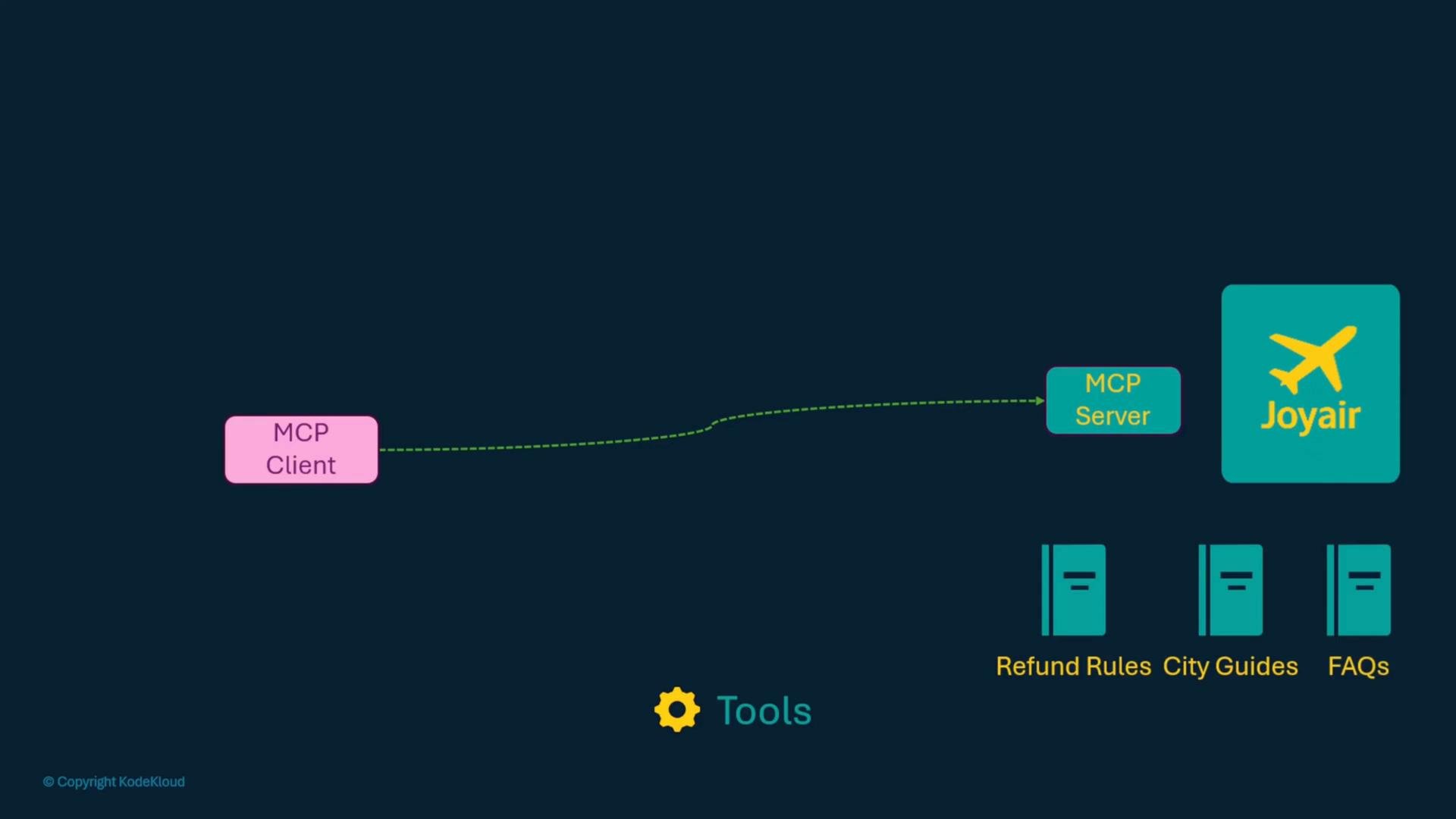
This page explains the Model Context Protocol (MCP) architecture and how clients and servers interact. It starts from a blank state (no MCP servers) so you can reason about what a client needs to discover and call, and what a server must provide.
## Overview
An MCP server exposes three high-level things that clients rely on:
* Tools — callable functions or APIs the server offers.
* Resources — documents or data to help model reasoning (policies, guides, FAQs).
* Prompts — pre-defined instructions or behavior templates for LLMs.
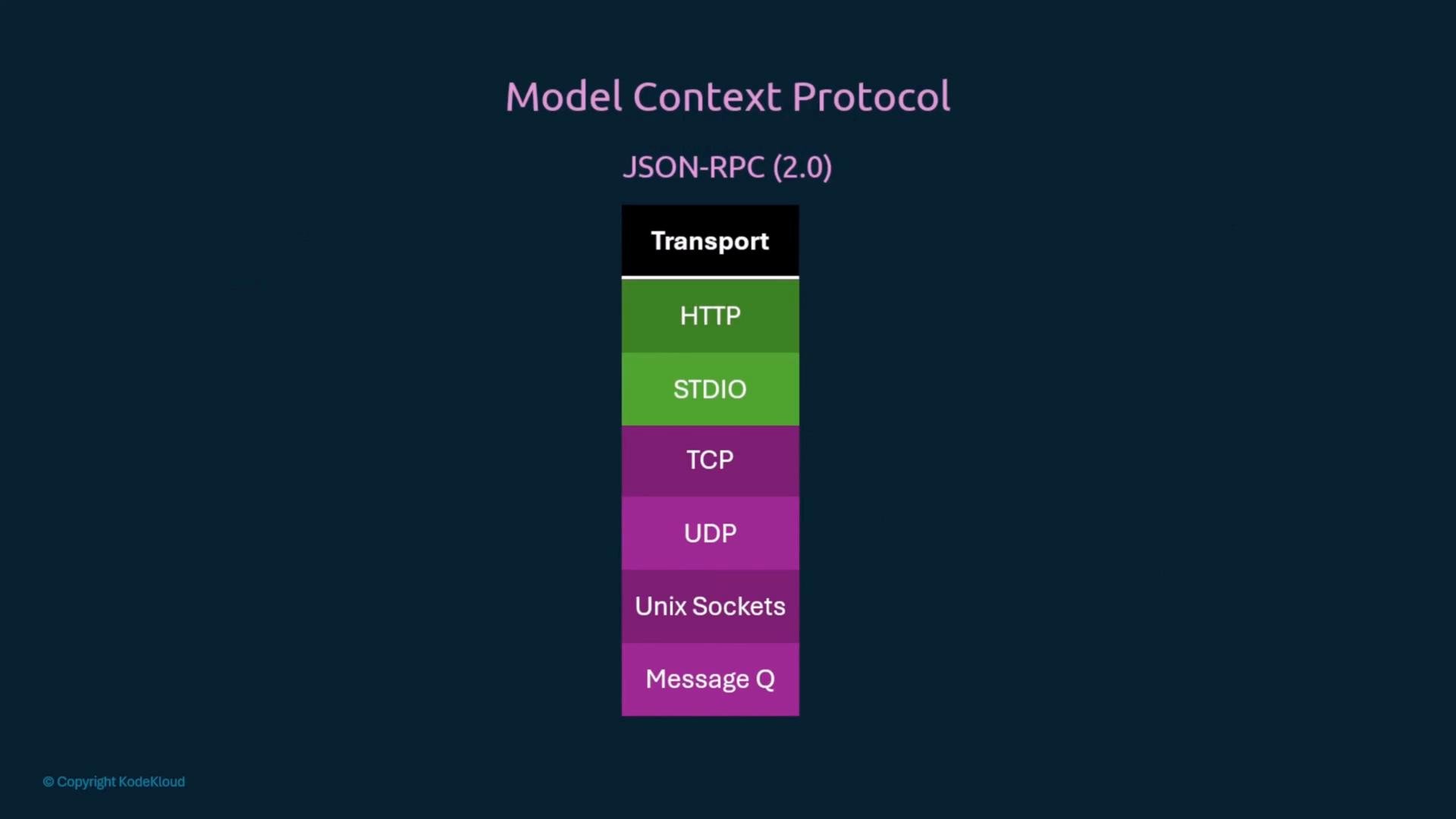
Clients discover available tools, fetch supporting resources, follow prompts, and invoke tools via a JSON-RPC-based protocol that can be carried over multiple transports (HTTP, STDIO, TCP, etc.).
## Key entities exposed by an MCP server
| Entity | Purpose | Minimal fields / example |
| - | - | - |
| Tools | Callable APIs (e.g., flight search) with input/output schemas | Example: `search_flights` — signature, description, input/output schema |
| Resources | Documents (refund policy, city guides, FAQs) used by the model to reason | Example JSON: `{"uri":"file:///resources/refund-policy.md","name":"refund-policy","title":"Airline Refund Policy","mimeType":"text/markdown"}` |
| Prompts | Pre-defined instructions or behavior templates for the LLM | Example: prompt that instructs the LLM to format dates as `YYYY-MM-DD` and call `search_flights` with specific fields |
### Tools: what a client needs to know
When building a client you must first discover what tools a server offers — what can it do? Each tool includes:
* A name and human-friendly title,
* A description,
* Input and output schemas (so the client and LLM know how to call and parse results).
Example: a flight search API and a sample response.
```http theme={null}
GET https://api.joyair.com/v1/flights
GET https://api.joyair.com/v1/flights?from=SFO&to=JFK&date=2025-07-15
```
```json theme={null}
{
"flights": [
{
"id": "FL123",
"airline": "JoyAir",
"departure": "2025-07-15T08:00:00Z",
"arrival": "2025-07-15T16:00:00Z",
"price": 199.99
}
]
}
```
### Resources: structured supporting data
Resources are referenced by URI and contain metadata so models and clients know how to fetch and interpret them. A resource object typically includes: `uri`, `name`, `title`, `description`, and `mimeType`. URIs can be HTTPS, file URIs, or Git locations.
Example JSON-RPC result listing resources:
```json theme={null}
{
"jsonrpc": "2.0",
"id": 1,
"result": {
"resources": [
{
"uri": "file:///resources/refund-policy.md",
"name": "refund-policy",
"title": "Airline Refund Policy",
"description": "Describes refund policy for different ticket types and timelines.",
"mimeType": "text/markdown"
}
],
"nextCursor": null
}
}
```
 ### Prompts: instructing the LLM
Prompts encode behavior or constraints the LLM should follow when using tools or reasoning with resources. They can include argument schemas so the model knows what inputs to provide.
Example user utterance and a prompt instruction:
```text theme={null}
"Find me a flight to Bangalore."
"You are a travel assistant. When the user asks about flights, you must call the `search_flights` tool with origin, destination, and date. Format all dates as YYYY-MM-DD. Be helpful and concise."
```
Example JSON-RPC response listing prompts:
```json theme={null}
{
"jsonrpc": "2.0",
"id": 1,
"result": {
"prompts": [
{
"name": "flight_search_instruction",
"title": "Flight Search Instruction",
"description": "Guides the LLM to behave as a flight assistant and use the searchFlights tool effectively.",
"arguments": [
{
"name": "userRequest",
"description": "The user's flight search request in natural language",
"required": true
}
]
}
],
"nextCursor": null
}
}
```
## How server and client communicate: JSON-RPC
MCP uses JSON-RPC 2.0 as the RPC layer. JSON-RPC defines the envelope for requests and responses. Important fields:
* Request: `jsonrpc` (must be `"2.0"`), `method`, `params`, `id`
* Response: `jsonrpc`, `result` (or `error`), `id`
Example JSON-RPC request and response:
```json theme={null}
{
"jsonrpc": "2.0",
"method": "add",
"params": {
"a": 10,
"b": 5
},
"id": 42
}
```
```json theme={null}
{
"jsonrpc": "2.0",
"result": 15,
"id": 42
}
```
Example minimal Python client and server handler (illustrative):
```python theme={null}
# Client-side (sending the JSON-RPC request over HTTP)
import requests
payload = {
"jsonrpc": "2.0",
"method": "add",
"params": {"a": 3, "b": 2},
"id": 1
}
resp = requests.post("http://localhost:8000/jsonrpc", json=payload)
print(resp.json())
```
```python theme={null}
# Server-side handler (pseudocode)
def add(a: float, b: float) -> float:
"""Add two numbers."""
return a + b
# The JSON-RPC server dispatches incoming requests to the `add` function
# based on the 'method' field. Implementation details depend on your SDK.
```
JSON-RPC is transport-agnostic — the same messages can travel over different transports.
## Transports MCP commonly supports
| Transport | Typical use case |
| - | - |
| HTTP(S) | Remote servers and secured connections over TLS |
| STDIO | Local IDE integrations and spawned processes |
| TCP / UDP | Custom networked transports (less common) |
| Unix Sockets | Local high-performance IPC on Unix systems |
| Message Queues | Asynchronous workflows with brokers |
### Prompts: instructing the LLM
Prompts encode behavior or constraints the LLM should follow when using tools or reasoning with resources. They can include argument schemas so the model knows what inputs to provide.
Example user utterance and a prompt instruction:
```text theme={null}
"Find me a flight to Bangalore."
"You are a travel assistant. When the user asks about flights, you must call the `search_flights` tool with origin, destination, and date. Format all dates as YYYY-MM-DD. Be helpful and concise."
```
Example JSON-RPC response listing prompts:
```json theme={null}
{
"jsonrpc": "2.0",
"id": 1,
"result": {
"prompts": [
{
"name": "flight_search_instruction",
"title": "Flight Search Instruction",
"description": "Guides the LLM to behave as a flight assistant and use the searchFlights tool effectively.",
"arguments": [
{
"name": "userRequest",
"description": "The user's flight search request in natural language",
"required": true
}
]
}
],
"nextCursor": null
}
}
```
## How server and client communicate: JSON-RPC
MCP uses JSON-RPC 2.0 as the RPC layer. JSON-RPC defines the envelope for requests and responses. Important fields:
* Request: `jsonrpc` (must be `"2.0"`), `method`, `params`, `id`
* Response: `jsonrpc`, `result` (or `error`), `id`
Example JSON-RPC request and response:
```json theme={null}
{
"jsonrpc": "2.0",
"method": "add",
"params": {
"a": 10,
"b": 5
},
"id": 42
}
```
```json theme={null}
{
"jsonrpc": "2.0",
"result": 15,
"id": 42
}
```
Example minimal Python client and server handler (illustrative):
```python theme={null}
# Client-side (sending the JSON-RPC request over HTTP)
import requests
payload = {
"jsonrpc": "2.0",
"method": "add",
"params": {"a": 3, "b": 2},
"id": 1
}
resp = requests.post("http://localhost:8000/jsonrpc", json=payload)
print(resp.json())
```
```python theme={null}
# Server-side handler (pseudocode)
def add(a: float, b: float) -> float:
"""Add two numbers."""
return a + b
# The JSON-RPC server dispatches incoming requests to the `add` function
# based on the 'method' field. Implementation details depend on your SDK.
```
JSON-RPC is transport-agnostic — the same messages can travel over different transports.
## Transports MCP commonly supports
| Transport | Typical use case |
| - | - |
| HTTP(S) | Remote servers and secured connections over TLS |
| STDIO | Local IDE integrations and spawned processes |
| TCP / UDP | Custom networked transports (less common) |
| Unix Sockets | Local high-performance IPC on Unix systems |
| Message Queues | Asynchronous workflows with brokers |
 ## Local vs Remote MCP servers
* Local hosting: run a server locally and connect over STDIO or HTTP. STDIO is common for IDE extensions because the editor spawns the server process and uses fast two-process communication.
* Remote hosting: connect to a vendor or central server over HTTPS. Remote hosting introduces security, authentication, and privacy concerns.
If you connect to a remote MCP server, ensure you understand the security and privacy implications. Transmitting sensitive user data to a third-party server requires clear policies and controls.
Best practice: prefer local servers or vetted private endpoints when handling sensitive data. If using remote MCP servers, enforce authentication, encrypt transport, and limit the scope of what is shared.
## Why use MCP instead of calling upstream APIs directly?
Using an MCP server centralizes integration logic:
* The server aggregates and standardizes third-party APIs into tools with consistent schemas.
* Resources and prompts live with the server, so the model can reference authoritative documents.
* Clients simply discover tools and call them via the MCP client, rather than re-implementing many API integrations.
Example: direct API call vs. calling through an MCP client
Direct API call:
```python theme={null}
import requests
response = requests.get(
"https://joyair.com/api/flights/search",
headers=headers,
params=search_params,
timeout=30
)
```
Via MCP client:
```python theme={null}
# Example using an async MCP client
available_tools = await mcp_client.list_tools()
# Call the flight_search tool (pseudo-API)
flights = await mcp_client.call_tool(
"flight_search",
{
"origin": "NYC",
"destination": "LAX",
"departure_date": "2024-08-15",
"return_date": "2024-08-20",
"passengers": 1
}
)
```
## Connecting an IDE or client to an MCP server: configuration examples
Clients typically configure MCP endpoints in a JSON file (e.g., `mcp.json`) that lists servers and how to connect to them.
Example: spawn a local server via STDIO (useful for IDEs):
```json theme={null}
{
"mcpServers": {
"flight-mcp": {
"command": "python",
"args": ["flight-mcp-server.py"],
"env": {
"API_KEY": "value"
}
}
}
}
```
Example: connect to an HTTP MCP server that is already running locally:
```json theme={null}
{
"mcpServers": {
"flight-mcp": {
"url": "http://localhost:3000/mcp",
"headers": {
"API_KEY": "value"
}
}
}
}
```
Example: connect to a remote HTTPS MCP server:
```json theme={null}
{
"mcpServers": {
"flight-mcp": {
"url": "https://joyair.com/mcp",
"headers": {
"API_KEY": "value"
}
}
}
}
```
Commands to start a local MCP server (examples):
```bash theme={null}
$ python3 flight-mcp.py
# OR
$ npx flight-mcp
```
## Typical client session flow (pseudocode)
A common flow when building an app or agent that uses MCP:
```python theme={null}
# Setup MCP session to connect to JoyAir MCP server
session = connect_to_mcp_server("joyair")
# Step 1: Initialize the session
session.initialize()
# Step 2: List tools
tools = session.list_tools()
print("Tools available:", tools)
# Step 3: Call the searchFlights tool
result = session.call_tool("searchFlights", {
"origin": "SIN",
"destination": "DXB",
"date": "2025-08-01"
})
# Step 4: Print the result
print("Available flights:", result)
```
## Recap
This lesson covered:
* The three core MCP entities: tools, resources, and prompts.
* How MCP uses JSON-RPC 2.0 as the RPC layer and supports multiple transports (HTTP, STDIO, TCP, etc.).
* How clients discover tools, fetch resources, and invoke tools through an MCP client.
* Configuration patterns for local STDIO-based servers and remote HTTP(S) servers.
* A typical session flow for integrating an MCP client into an application.
Further reading:
* JSON-RPC 2.0 specification: [https://www.jsonrpc.org/specification](https://www.jsonrpc.org/specification)
* If you plan to deploy MCP servers in production, document authentication, authorization, logging, and data retention policies for compliance and privacy.
This documentation is built and hosted on [Mintlify](https://mintlify.com), a developer documentation platform.
## Local vs Remote MCP servers
* Local hosting: run a server locally and connect over STDIO or HTTP. STDIO is common for IDE extensions because the editor spawns the server process and uses fast two-process communication.
* Remote hosting: connect to a vendor or central server over HTTPS. Remote hosting introduces security, authentication, and privacy concerns.
If you connect to a remote MCP server, ensure you understand the security and privacy implications. Transmitting sensitive user data to a third-party server requires clear policies and controls.
Best practice: prefer local servers or vetted private endpoints when handling sensitive data. If using remote MCP servers, enforce authentication, encrypt transport, and limit the scope of what is shared.
## Why use MCP instead of calling upstream APIs directly?
Using an MCP server centralizes integration logic:
* The server aggregates and standardizes third-party APIs into tools with consistent schemas.
* Resources and prompts live with the server, so the model can reference authoritative documents.
* Clients simply discover tools and call them via the MCP client, rather than re-implementing many API integrations.
Example: direct API call vs. calling through an MCP client
Direct API call:
```python theme={null}
import requests
response = requests.get(
"https://joyair.com/api/flights/search",
headers=headers,
params=search_params,
timeout=30
)
```
Via MCP client:
```python theme={null}
# Example using an async MCP client
available_tools = await mcp_client.list_tools()
# Call the flight_search tool (pseudo-API)
flights = await mcp_client.call_tool(
"flight_search",
{
"origin": "NYC",
"destination": "LAX",
"departure_date": "2024-08-15",
"return_date": "2024-08-20",
"passengers": 1
}
)
```
## Connecting an IDE or client to an MCP server: configuration examples
Clients typically configure MCP endpoints in a JSON file (e.g., `mcp.json`) that lists servers and how to connect to them.
Example: spawn a local server via STDIO (useful for IDEs):
```json theme={null}
{
"mcpServers": {
"flight-mcp": {
"command": "python",
"args": ["flight-mcp-server.py"],
"env": {
"API_KEY": "value"
}
}
}
}
```
Example: connect to an HTTP MCP server that is already running locally:
```json theme={null}
{
"mcpServers": {
"flight-mcp": {
"url": "http://localhost:3000/mcp",
"headers": {
"API_KEY": "value"
}
}
}
}
```
Example: connect to a remote HTTPS MCP server:
```json theme={null}
{
"mcpServers": {
"flight-mcp": {
"url": "https://joyair.com/mcp",
"headers": {
"API_KEY": "value"
}
}
}
}
```
Commands to start a local MCP server (examples):
```bash theme={null}
$ python3 flight-mcp.py
# OR
$ npx flight-mcp
```
## Typical client session flow (pseudocode)
A common flow when building an app or agent that uses MCP:
```python theme={null}
# Setup MCP session to connect to JoyAir MCP server
session = connect_to_mcp_server("joyair")
# Step 1: Initialize the session
session.initialize()
# Step 2: List tools
tools = session.list_tools()
print("Tools available:", tools)
# Step 3: Call the searchFlights tool
result = session.call_tool("searchFlights", {
"origin": "SIN",
"destination": "DXB",
"date": "2025-08-01"
})
# Step 4: Print the result
print("Available flights:", result)
```
## Recap
This lesson covered:
* The three core MCP entities: tools, resources, and prompts.
* How MCP uses JSON-RPC 2.0 as the RPC layer and supports multiple transports (HTTP, STDIO, TCP, etc.).
* How clients discover tools, fetch resources, and invoke tools through an MCP client.
* Configuration patterns for local STDIO-based servers and remote HTTP(S) servers.
* A typical session flow for integrating an MCP client into an application.
Further reading:
* JSON-RPC 2.0 specification: [https://www.jsonrpc.org/specification](https://www.jsonrpc.org/specification)
* If you plan to deploy MCP servers in production, document authentication, authorization, logging, and data retention policies for compliance and privacy.
This documentation is built and hosted on [Mintlify](https://mintlify.com), a developer documentation platform.