> ## Documentation Index
> Fetch the complete documentation index at: https://notes.kodekloud.com/llms.txt
> Use this file to discover all available pages before exploring further.
# Demo Best Practices for Querying
> Learn effective querying techniques for large language models in code, documentation, and web searches using a simple Flask application.
Discover how to craft effective queries for large language models (LLMs) when working with code, documentation, and web searches. We’ll demonstrate each principle using a simple Flask application.
## Prerequisites
* Python 3.x
* Flask ([https://flask.palletsprojects.com/](https://flask.palletsprojects.com/))
* SQLite ([https://www.sqlite.org/](https://www.sqlite.org/))
* Basic HTML/CSS (for templates)
## Sample Flask Application
```python theme={null}
import csv
import sqlite3
import os
from flask import Flask, render_template, request, redirect, url_for, flash, session, g
from datetime import datetime
import hashlib
import logging
# Initialize Flask app
app = Flask(__name__)
app.config['SECRET_KEY'] = 'dev' # Change in production
app.config['DATABASE'] = os.path.join(app.instance_path, 'task_manager.sqlite')
def read_csv(file_path):
with open(file_path, 'r') as f:
csvreader = csv.reader(f)
for row in csvreader:
print(row)
# Ensure the instance folder exists
os.makedirs(app.instance_path, exist_ok=True)
# Database connection functions
def get_db():
if 'db' not in g:
g.db = sqlite3.connect(
app.config['DATABASE'],
detect_types=sqlite3.PARSE_DECLTYPES
)
return g.db
def close_db(e=None):
db = g.pop('db', None)
if db is not None:
db.close()
```
Never use a hardcoded `SECRET_KEY` in production. Store secrets securely using environment variables or a secrets manager.
***
## Querying Best Practices at a Glance
| Practice | Description |
| --------------------------- | ------------------------------------------------------------ |
| Be Specific & Clear | Define the framework, library, and goal in your query |
| Provide Just Enough Context | Share only the code or data snippets relevant to your issue |
| Use Structured Formats | Present examples in JSON, YAML, tables, or bullet lists |
| Specify Output Formats | Ask for code snippets, pseudocode, or documentation excerpts |
***
## 1. Follow Your Querying Guidelines
Maintain a concise set of rules when interacting with LLMs:
* **Be specific and clear:** “How do I implement JWT authentication in Flask?”
* **Provide context:** Mention Flask extensions or database libraries you’re using.
* **Use structured formats:** Wrap code in markdown, share JSON schemas, etc.
* **Specify output formats:** Request a complete function, YAML config, or a step-by-step tutorial.
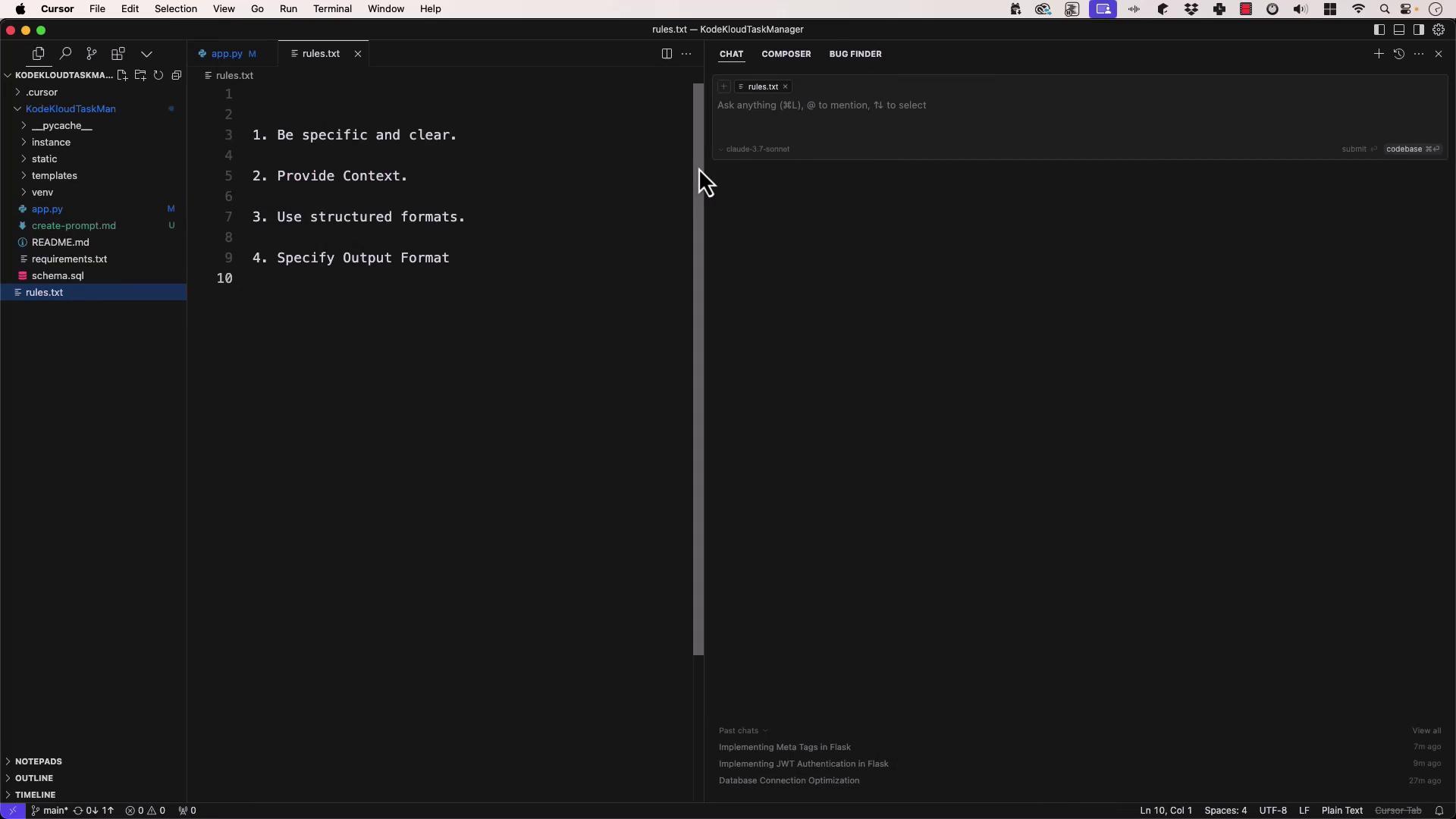
Example:
* Instead of “How do I do authentication?”, ask “What is the best way to implement JWT authentication in Flask using PyJWT?”
***
## 2. Provide Only the Context You Need
Adopt the **principle of least privilege** for your context:
* Share only the snippet that’s directly related to your question.
* Exclude unrelated files (e.g., CSS or frontend templates).
* Start minimal, then iterate if you need more detail.
Begin with the smallest code snippet that reproduces the issue, then expand only as necessary.
Workflow:
1. Submit a targeted snippet.
2. Evaluate the response.
3. Add relevant code if the answer is incomplete.
4. Refine your question to remove any noise.
***
## 3. Treat Web Searches Like LLM Queries
Search engines and Q\&A sites respond best to precise, action-oriented queries:
* Include the framework, library, and desired outcome.
* Example: “React hook for fetching API data with loading and error handling.”
* Iterate: refine keywords, add sample code, or specify browser support.
Resources:
* [Stack Overflow](https://stackoverflow.com)
* [Official Flask Docs](https://flask.palletsprojects.com/)
* [SQLite Documentation](https://sqlite.org/docs.html)
***
## 4. Iterate and Refine
Think of each query as a draft:
1. Review the LLM’s response.
2. Add or remove context based on accuracy.
3. Clarify output requirements (e.g., “Return JSON only”).
4. Leverage external references and official docs for edge cases.
By combining clear rules, minimal context, structured queries, and iterative refinement, you’ll get more accurate, actionable answers from both LLMs and search engines.
***
Thank you for following this demo. In our next lesson, we’ll dive into editing and debugging techniques for AI-generated code.
## Links and References
* [Flask Documentation](https://flask.palletsprojects.com/)
* [SQLite Official Site](https://sqlite.org/)
* [JWT.io Introduction](https://jwt.io/)
* [Stack Overflow](https://stackoverflow.com)