> ## Documentation Index
> Fetch the complete documentation index at: https://notes.kodekloud.com/llms.txt
> Use this file to discover all available pages before exploring further.
# Demo Contextual References
> This guide explores using Cursor AI’s contextual references for precise code exploration and review by including or excluding specific contexts.
In this guide, we’ll explore how to harness Cursor AI’s contextual references to focus on exactly the code you need—whether it’s specific files, functions, or even GitHub pull requests. By including or excluding contexts, you’ll get sharper, more relevant answers for code exploration and review.
## 1. Adding Context from Your Codebase
You can click **Add Context** on any file (or even just select particular functions) to include them in your AI session. For example, here’s our `app.py`:
```python theme={null}
import csv
import sqlite3
import os
from flask import Flask, render_template, request, redirect, url_for, flash, session, g
from datetime import datetime
import h5lib
import logging
# Initialize Flask app
app = Flask(__name__)
app.config['SECRET_KEY'] = 'dev' # Change this to a random secret key in production
app.config['DATABASE'] = os.path.join(app.instance_path, 'task_manager.sqlite')
# Read CSV utility function
def read_csv(file_path):
with open(file_path, 'r') as f:
reader = csv.reader(f)
for row in reader:
print(row)
# Ensure the instance folder exists
try:
os.makedirs(app.instance_path)
except OSError:
pass
# Basic database connection
def get_db():
if 'db' not in g:
g.db = sqlite3.connect(
app.config['DATABASE'],
detect_types=sqlite3.PARSE_DECLTYPES
)
g.db.row_factory = sqlite3.Row
return g.db
```
Never commit sensitive values like `SECRET_KEY` or database credentials in your production code. Use environment variables or a secrets manager instead.
## 2. Querying Specific Contexts: Templates & Templating Engines
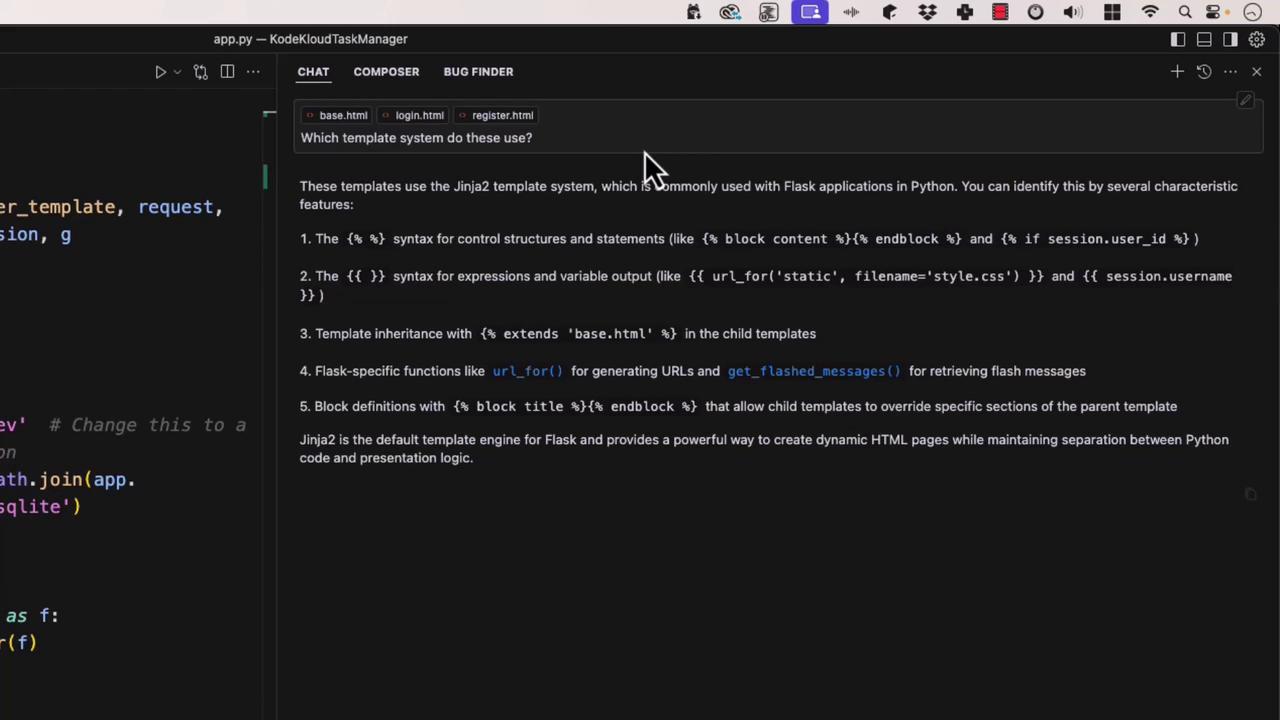
You can narrow your search to HTML templates and ask, “Which templating system do these use?” The AI will identify **Jinja2**, Flask’s default engine:
## 3. Excluding Irrelevant Files
Context exclusion is just as powerful. You can omit JavaScript files, tests, or any directories that aren’t relevant:
| Context Selection | Purpose | Example |
| ------------------ | --------------------------------------- | -------------------------------------- |
| Include: `app.py` | Analyze core Flask application logic | Select `get_db()` for DB optimizations |
| Exclude: `tests/` | Remove unit tests from AI consideration | Focus on production code |
| Exclude: `static/` | Skip frontend assets | Avoid noise from CSS/JS files |
## 4. Focusing on Individual Functions
To optimize a specific routine, just select the function. For example, a simple password hashing utility:
```python theme={null}
def hash_password(password):
return hashlib.sha1(password.encode()).hexdigest()
```
Or isolate the `get_db()` function to ask for performance improvements. The AI might suggest enabling WAL mode, tuning cache sizes, and using autocommit:
```python theme={null}
def get_db():
if 'db' not in g:
g.db = sqlite3.connect(
app.config['DATABASE'],
detect_types=sqlite3.PARSE_DECLTYPES,
isolation_level=None, # Autocommit mode
cached_statements=128 # Prepared-statement cache
)
g.db.execute('PRAGMA journal_mode = WAL;') # Write-Ahead Logging
g.db.execute('PRAGMA synchronous = NORMAL;') # Balance durability and I/O
g.db.execute('PRAGMA cache_size = 10000;') # Larger page cache
g.db.execute('PRAGMA temp_store = MEMORY;') # In-memory temp tables
g.db.row_factory = sqlite3.Row
return g.db
```
Performance tuning PRAGMAs can greatly reduce disk I/O and improve concurrency for SQLite-based applications.
## 5. Integrating with GitHub Contexts
Cursor can also pull in GitHub data—search commits, PRs, or specific files in a repo. For instance, to review database-layer changes in your pull requests:
```python theme={null}
from flask import render_template, request, redirect, session, g
import os
import sqlite3
DATABASE = 'database.db' # Change this as needed
def connect_db():
return sqlite3.connect(os.path.join(app.root_path, DATABASE))
with connect_db() as conn:
# ...database logic here...
pass
```
By mixing and matching contexts—local files, folders, or GitHub references—you guide the AI to focus on exactly what matters. This precision leads to more accurate insights and a streamlined code review process.
***
## Links and References
* [Cursor AI Documentation](https://cursor.so/docs)
* [Flask Official Docs](https://flask.palletsprojects.com/)
* [Jinja2 Template Engine](https://jinja.palletsprojects.com/)
* [SQLite PRAGMA Statements](https://www.sqlite.org/pragma.html)