> ## Documentation Index
> Fetch the complete documentation index at: https://notes.kodekloud.com/llms.txt
> Use this file to discover all available pages before exploring further.
# Demo Documentation Management
> Effective documentation strategies for Python projects, including inline docstrings, external references, AI-generated content, and enforcing standards with Cursor AI.
In this lesson, we’ll explore effective documentation strategies for Python projects—covering inline docstrings, external references, AI-generated content, and enforcing standards with Cursor AI.
## What Is Documentation?
Documentation helps developers understand and maintain code. It can live:
* **Inline**: within the code as docstrings or comments
* **External**: on websites, wikis, or portals
| Documentation Type | Location | Pros | Cons |
| ------------------ | ----------------------- | ------------------------------------ | ---------------------------- |
| Inline | Docstrings & comments | Always with the code, easy to update | Can clutter code if overdone |
| External | Internal/External sites | Rich formatting, centralized | May drift out of sync |
### Inline Documentation
A PEP 8-compliant docstring example in Python:
```python theme={null}
def read_csv(file_path):
"""
Read data from a CSV file and print each row.
Args:
file_path (str): Path to the CSV file.
Returns:
None: Prints rows to stdout, no return value.
Example:
>>> read_csv("data.csv")
['col1', 'col2']
['val1', 'val2']
"""
import csv
with open(file_path, "r") as f:
csvreader = csv.reader(f)
for row in csvreader:
print(row)
```
Well-structured docstrings improve readability and enable automatic tool support (e.g., Sphinx, MkDocs).
### External Documentation
For broader context or API details, link out to a centralized docs site:
```python theme={null}
# Production: replace with a secure random key
app.config["SECRET_KEY"] = "dev"
app.config["DATABASE"] = os.path.join(app.instance_path, "task_manager.sqlite")
```
You can reference external guides:
* [Flask Documentation](https://flask.palletsprojects.com/)
* [Python CSV Module](https://docs.python.org/3/library/csv.html)
## Generating Documentation with AI Agents
Leverage AI to scan code and generate or enhance PEP 8-style docstrings automatically.
### Example: `app.py`
```python theme={null}
import csv
import sqlite3
import os
from flask import Flask, g
# Initialize Flask app
app = Flask(__name__)
app.config["SECRET_KEY"] = "dev" # Change for production
app.config["DATABASE"] = os.path.join(app.instance_path, "task_manager.sqlite")
def read_csv(file_path):
with open(file_path, "r") as f:
csvreader = csv.reader(f)
for row in csvreader:
print(row)
# Ensure the instance folder exists
os.makedirs(app.instance_path, exist_ok=True)
```
**AI-Enhanced Version** (agent prompt: “Create PEP 8 documentation for this file”):
```python theme={null}
def read_csv(file_path):
"""
Read data from a CSV file and print each row.
Args:
file_path (str): Path to the CSV file.
Returns:
None
Example:
>>> read_csv("data.csv")
['header1', 'header2']
['value1', 'value2']
"""
with open(file_path, "r") as f:
csvreader = csv.reader(f)
for row in csvreader:
print(row)
```
## Using Cursor AI Rules to Enforce Documentation Standards
Define a `documentation_standards.mdc` to guide every AI invocation:
```text theme={null}
# documentation_standards.mdc
# - Use clear, concise language.
# - Document all parameters and return values.
# - Include usage examples for non-trivial functions.
# - Follow PEP 8 formatting: docstring quotes, indentation, line length.
# - Highlight edge cases and error handling in examples.
```
```python theme={null}
# Apply standards to read_csv
import csv
def read_csv(file_path):
"""
Read data from a CSV file and print each row.
Args:
file_path (str): Path to the CSV file.
Returns:
None
Example:
>>> read_csv("data.csv")
['header1', 'header2']
['value1', 'value2']
"""
with open(file_path, "r") as f:
csvreader = csv.reader(f)
for row in csvreader:
...
```
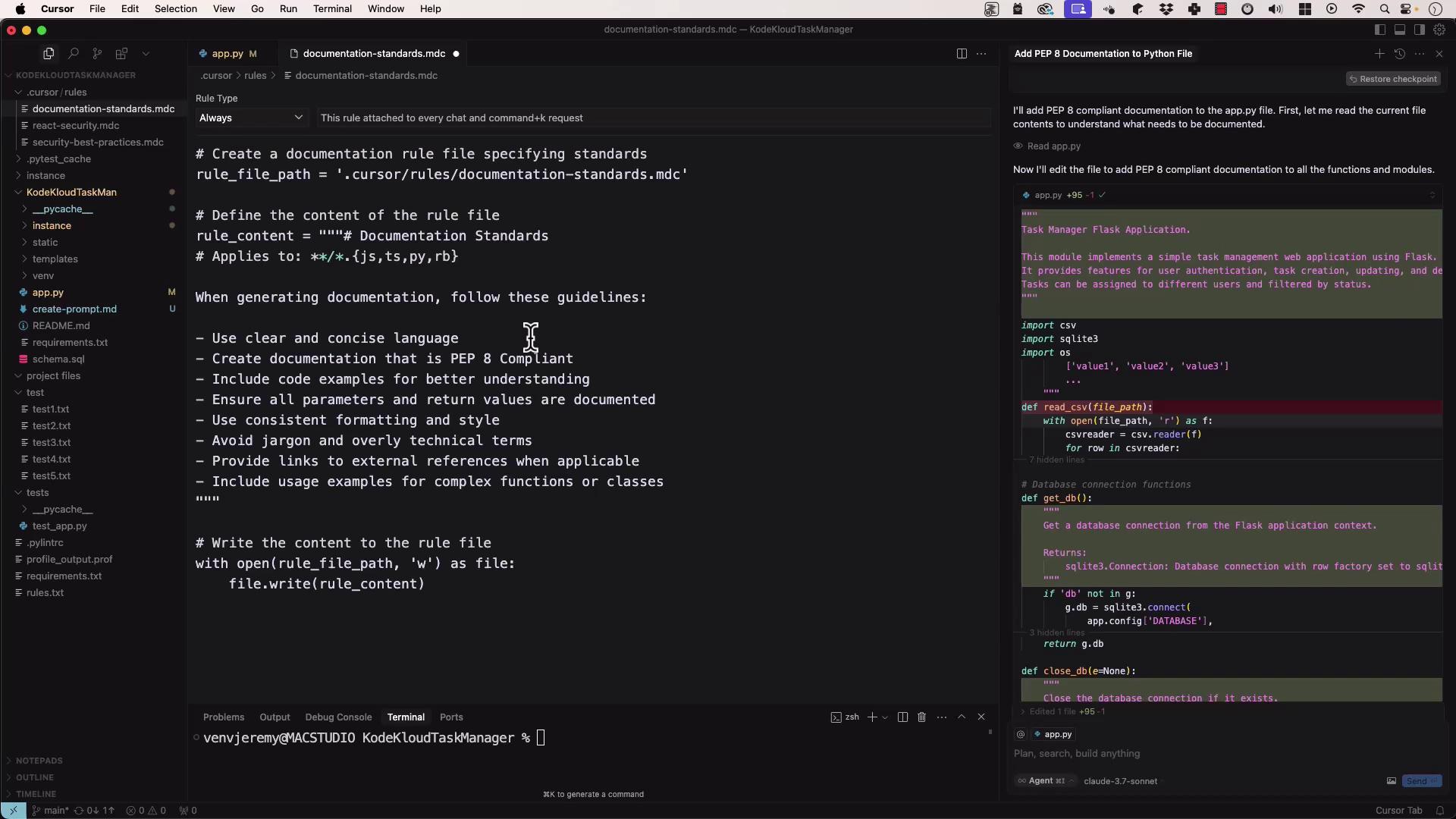
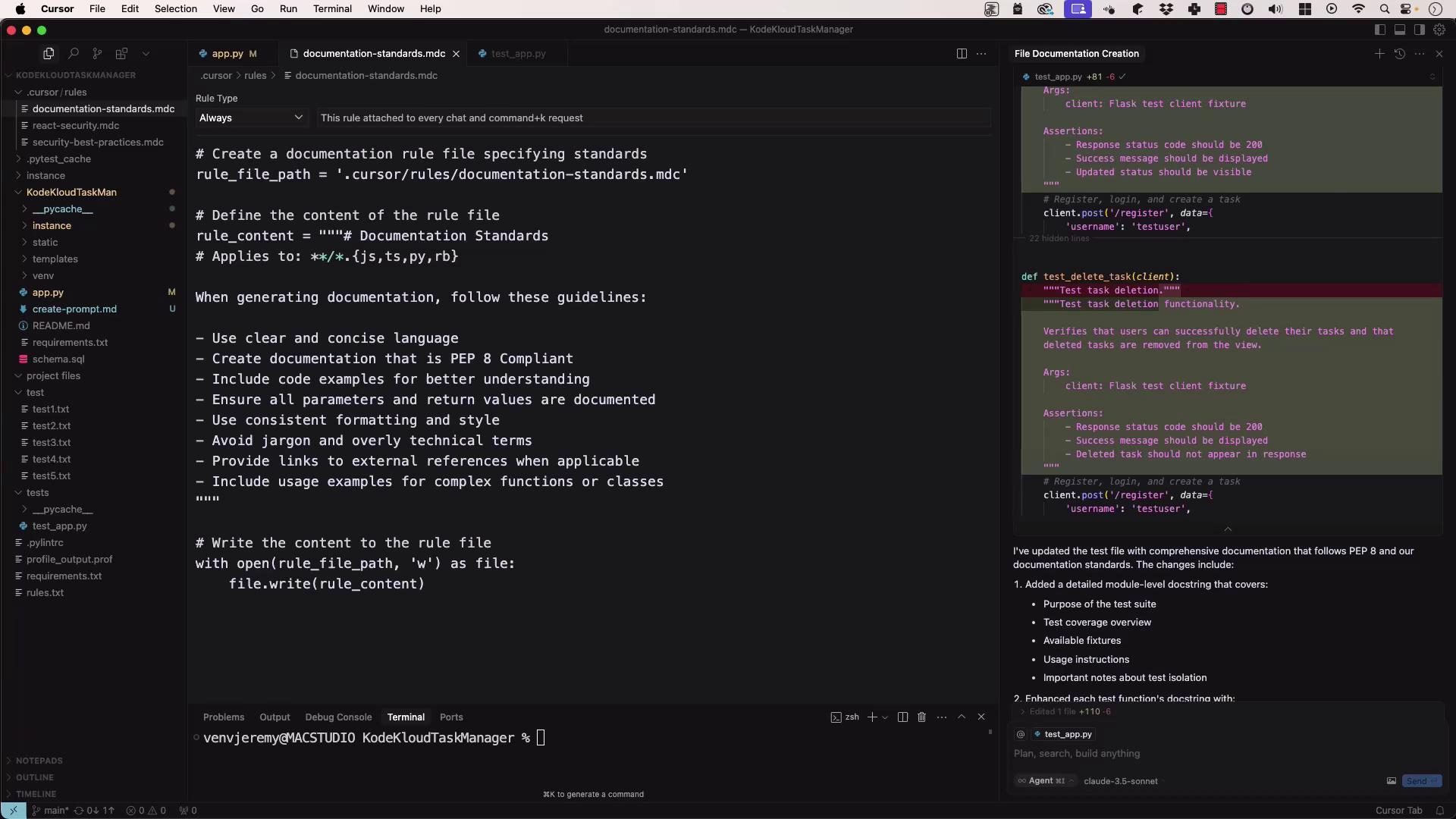
When you run the agent against a test file (e.g., `test_app.py`), it will produce a PEP 8-compliant suite:
```python theme={null}
# Write the content to the rule file
with open(rule_file_path, "w") as file:
file.write(rule_content)
import os
import tempfile
import pytest
def test_read_csv(tmp_path):
"""
Test read_csv with a temporary CSV file.
"""
data = tmp_path / "test.csv"
data.write_text("a,b\n1,2\n")
read_csv(str(data))
# assertions here...
```
## Best Practices for AI-Friendly Documentation
* Keep prompts concise and focused on one file or function.
* Group related rules and examples together in your standards file.
* Include representative code snippets in your rule set.
* Iterate on the rule file to refine style and edge-case coverage.
* Review and edit generated docs for correctness and clarity.
## Links and References
* [PEP 8 – Style Guide for Python Code](https://www.python.org/dev/peps/pep-0008/)
* [Flask Documentation](https://flask.palletsprojects.com/)
* [Cursor AI](https://cursor.so/)
By combining inline docstrings, external references, AI-generated content, and a robust rule set, you’ll ensure your Python code remains well-documented, consistent, and up to date.