> ## Documentation Index
> Fetch the complete documentation index at: https://notes.kodekloud.com/llms.txt
> Use this file to discover all available pages before exploring further.
# DIY Database
> Guide to designing and implementing a simple MySQL relational schema for a food delivery app, including tables, types, foreign keys, sample data, and example queries.
In this lesson you'll combine schema design and SQL to build a small relational database from scratch. The goal is a simple backend for a food delivery app called Feline Foods where customers order a single meal-deal combo for delivery. We'll design the entity-relationship model, choose data types, implement the schema in MySQL, load sample data, and run queries that show how the tables relate.
Design the ERD
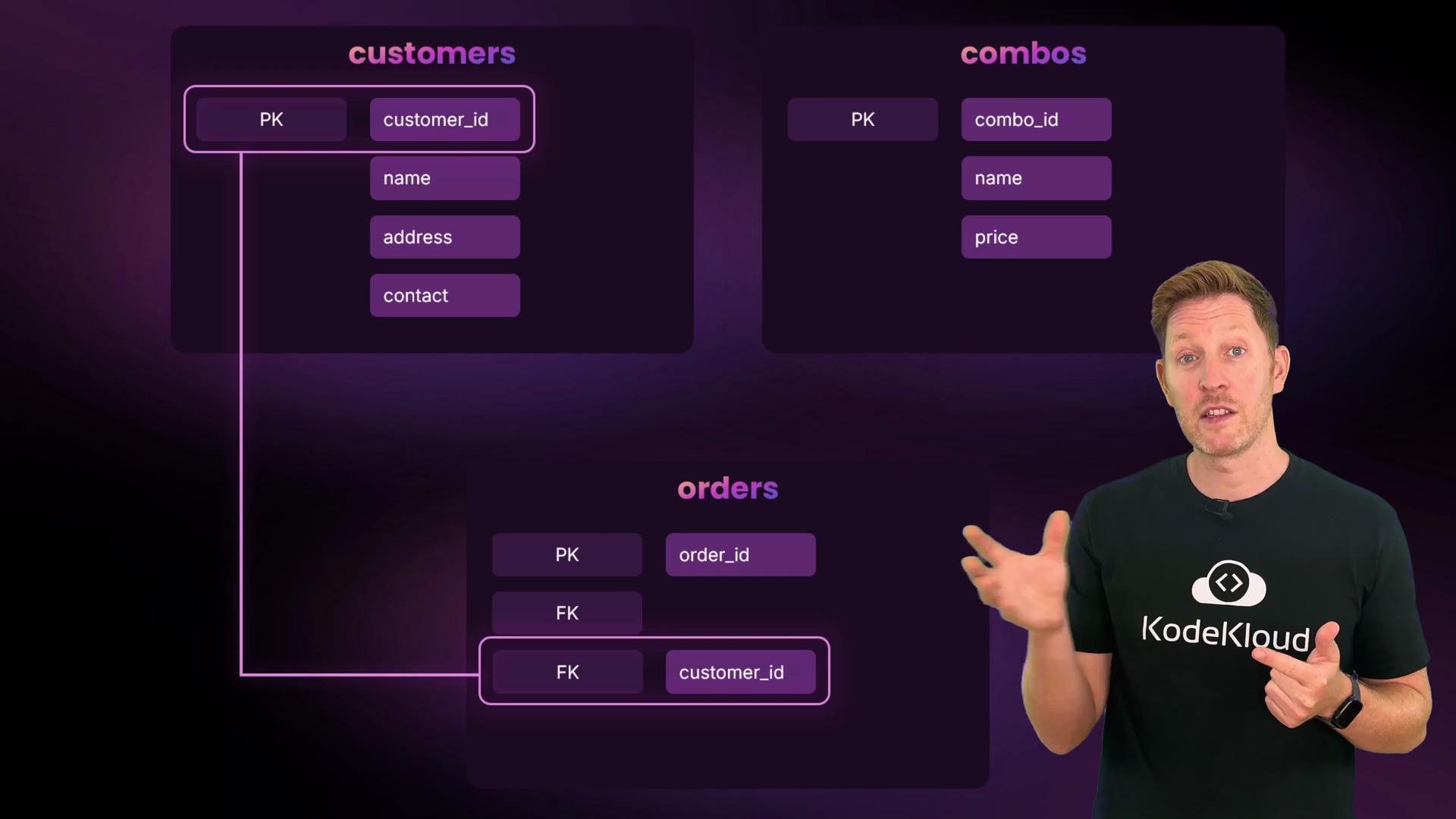
Start by sketching the entities and their attributes. We have three tables: customers, combos, and orders.
* Customers
* customer\_id — unique identifier, primary key
* name
* address
* contact
* Combos
* combo\_id — unique identifier, primary key
* name
* price
* Orders
* order\_id — unique identifier, primary key
* customer\_id — foreign key to customers(customer\_id)
* combo\_id — foreign key to combos(combo\_id)
* order\_time
 Choose types for each column
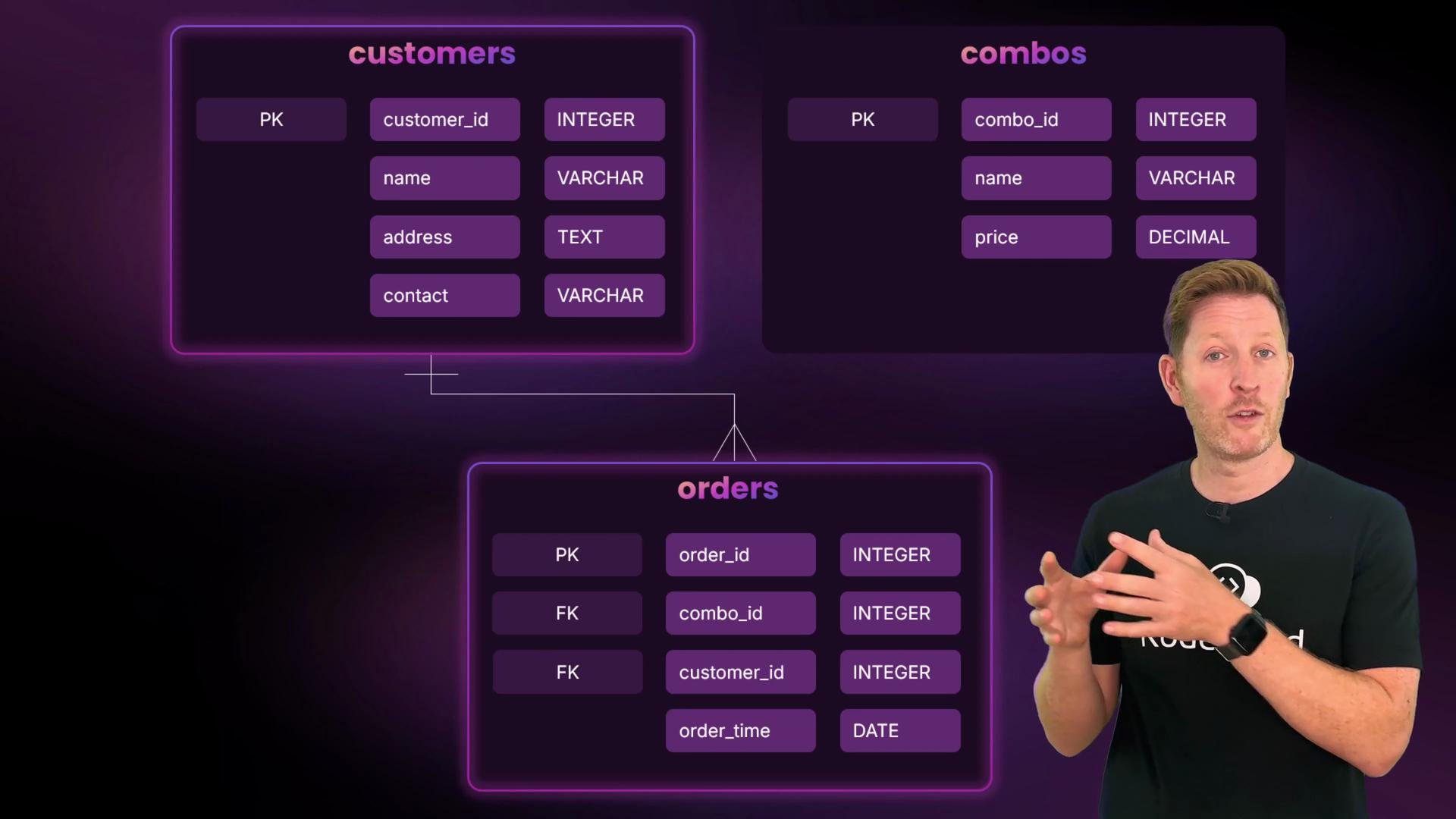
Use types that match the data and common best practices for small transactional systems:
* IDs: INT with `AUTO_INCREMENT` for simple unique identifiers.
* Names: `VARCHAR(100)` — variable length and index-friendly.
* Address: `TEXT` — can be long and is rarely filtered by equality.
* Price: `DECIMAL` — exact storage for currency, e.g., `DECIMAL(4,2)`.
* Order time: `DATETIME`.
* Contact: `VARCHAR(20)` — phone numbers stored as strings.
Table: Columns and chosen types
| Table | Column | Type / Constraint | Notes |
| --------- | ------------- | -------------------------------- | ----------------------------------- |
| customers | `customer_id` | `INT PRIMARY KEY AUTO_INCREMENT` | Unique customer identifier |
| customers | `name` | `VARCHAR(100) NOT NULL` | Human names |
| customers | `address` | `TEXT NOT NULL` | Free-form address |
| customers | `contact` | `VARCHAR(20) NOT NULL` | Phone numbers stored as text |
| combos | `combo_id` | `INT PRIMARY KEY AUTO_INCREMENT` | Unique combo identifier |
| combos | `name` | `VARCHAR(100) NOT NULL` | Combo name |
| combos | `price` | `DECIMAL(4,2) NOT NULL` | Currency: up to `99.99` |
| orders | `order_id` | `INT PRIMARY KEY AUTO_INCREMENT` | Unique order identifier |
| orders | `customer_id` | `INT` | FK -> `customers(customer_id)` |
| orders | `combo_id` | `INT` | FK -> `combos(combo_id)` |
| orders | `order_time` | `DATETIME` | Timestamp when the order was placed |
Store phone numbers as `VARCHAR` because they may include leading zeros, country codes, plus signs, or formatting characters (dashes, spaces, parentheses). Numeric types will drop leading zeros and lose formatting.
Define relationships
* One customer can place zero or many orders (1:N).
* One combo can appear in zero or many orders (1:N).
* Each order belongs to exactly one customer and one combo.
* No separate join table is necessary — the orders table models the association.
Choose types for each column
Use types that match the data and common best practices for small transactional systems:
* IDs: INT with `AUTO_INCREMENT` for simple unique identifiers.
* Names: `VARCHAR(100)` — variable length and index-friendly.
* Address: `TEXT` — can be long and is rarely filtered by equality.
* Price: `DECIMAL` — exact storage for currency, e.g., `DECIMAL(4,2)`.
* Order time: `DATETIME`.
* Contact: `VARCHAR(20)` — phone numbers stored as strings.
Table: Columns and chosen types
| Table | Column | Type / Constraint | Notes |
| --------- | ------------- | -------------------------------- | ----------------------------------- |
| customers | `customer_id` | `INT PRIMARY KEY AUTO_INCREMENT` | Unique customer identifier |
| customers | `name` | `VARCHAR(100) NOT NULL` | Human names |
| customers | `address` | `TEXT NOT NULL` | Free-form address |
| customers | `contact` | `VARCHAR(20) NOT NULL` | Phone numbers stored as text |
| combos | `combo_id` | `INT PRIMARY KEY AUTO_INCREMENT` | Unique combo identifier |
| combos | `name` | `VARCHAR(100) NOT NULL` | Combo name |
| combos | `price` | `DECIMAL(4,2) NOT NULL` | Currency: up to `99.99` |
| orders | `order_id` | `INT PRIMARY KEY AUTO_INCREMENT` | Unique order identifier |
| orders | `customer_id` | `INT` | FK -> `customers(customer_id)` |
| orders | `combo_id` | `INT` | FK -> `combos(combo_id)` |
| orders | `order_time` | `DATETIME` | Timestamp when the order was placed |
Store phone numbers as `VARCHAR` because they may include leading zeros, country codes, plus signs, or formatting characters (dashes, spaces, parentheses). Numeric types will drop leading zeros and lose formatting.
Define relationships
* One customer can place zero or many orders (1:N).
* One combo can appear in zero or many orders (1:N).
* Each order belongs to exactly one customer and one combo.
* No separate join table is necessary — the orders table models the association.
 Build the schema in MySQL
Create and switch to a new database:
```sql theme={null}
CREATE DATABASE felinefoods;
SHOW DATABASES;
USE felinefoods;
SELECT DATABASE();
```
Example mysql session (illustrative):
```text theme={null}
mysql> CREATE DATABASE felinefoods;
Query OK, 1 row affected (0.00 sec)
mysql> SHOW DATABASES;
+---------------------+
| Database |
+---------------------+
| employees |
| felinefoods |
| information_schema |
| mysql |
| performance_schema |
+---------------------+
5 rows in set (0.00 sec)
mysql> USE felinefoods;
Database changed
mysql> SELECT DATABASE();
+-------------+
| DATABASE() |
+-------------+
| felinefoods |
+-------------+
1 row in set (0.00 sec)
```
Create the three tables with appropriate types and foreign key constraints:
```sql theme={null}
CREATE TABLE customers (
customer_id INT PRIMARY KEY AUTO_INCREMENT,
name VARCHAR(100) NOT NULL,
address TEXT NOT NULL,
contact VARCHAR(20) NOT NULL
);
CREATE TABLE combos (
combo_id INT PRIMARY KEY AUTO_INCREMENT,
name VARCHAR(100) NOT NULL,
price DECIMAL(4,2) NOT NULL
);
CREATE TABLE orders (
order_id INT PRIMARY KEY AUTO_INCREMENT,
customer_id INT,
combo_id INT,
order_time DATETIME,
FOREIGN KEY (customer_id) REFERENCES customers(customer_id),
FOREIGN KEY (combo_id) REFERENCES combos(combo_id)
);
```
Expected confirmation from MySQL:
```text theme={null}
Query OK, 0 rows affected (0.00 sec)
```
Foreign key constraints require a storage engine that supports them (e.g., InnoDB). If you get errors creating FKs, ensure your tables use `ENGINE=InnoDB` or the server default supports foreign keys.
Populate the tables with sample data
Insert some customers, combos, and orders. Use proper quoting and valid datetime strings:
```sql theme={null}
INSERT INTO customers (name, address, contact)
VALUES
('Kody', '42 Feline Farm', '555-0100'),
('Fluffy','12 Catnip Close', '555-0111'),
('Paws', '99 Whisker Way', '555-0120');
INSERT INTO combos (name, price)
VALUES
('Fish & Chips', 8.50),
('Sushi Bento', 12.80),
('Pasta Combo', 10.00);
INSERT INTO orders (customer_id, combo_id, order_time)
VALUES
(1, 3, '2025-08-10 12:30:00'),
(2, 2, '2025-08-10 13:15:00'),
(3, 1, '2025-08-11 10:00:00');
```
Sample output confirming inserts:
```text theme={null}
Query OK, 3 rows affected (0.00 sec)
Records: 3 Duplicates: 0 Warnings: 0
```
Referential integrity
Because `orders.customer_id` and `orders.combo_id` are foreign keys, every row in `orders` must reference existing rows in `customers` and `combos`. This prevents orphaned references and keeps your data consistent.
Reading the data
A simple SELECT on the orders table shows only IDs and FK references:
```sql theme={null}
SELECT * FROM orders;
```
Sample output:
```text theme={null}
+----------+-------------+----------+---------------------+
| order_id | customer_id | combo_id | order_time |
+----------+-------------+----------+---------------------+
| 1 | 1 | 3 | 2025-08-10 12:30:00 |
| 2 | 2 | 2 | 2025-08-10 13:15:00 |
| 3 | 3 | 1 | 2025-08-11 10:00:00 |
+----------+-------------+----------+---------------------+
3 rows in set (0.00 sec)
```
Join tables to produce meaningful results
Use JOINs to show which customer ordered which combo and how much it cost:
```sql theme={null}
SELECT
o.order_id,
c.name AS customer_name,
cb.name AS combo_name,
cb.price,
o.order_time
FROM orders o
JOIN customers c ON o.customer_id = c.customer_id
JOIN combos cb ON o.combo_id = cb.combo_id
ORDER BY o.order_time;
```
Result example:
```text theme={null}
+----------+---------------+-------------+-------+---------------------+
| order_id | customer_name | combo_name | price | order_time |
+----------+---------------+-------------+-------+---------------------+
| 1 | Kody | Pasta Combo | 10.00 | 2025-08-10 12:30:00 |
| 2 | Fluffy | Sushi Bento | 12.80 | 2025-08-10 13:15:00 |
| 3 | Paws | Fish & Chips| 8.50 | 2025-08-11 10:00:00 |
+----------+---------------+-------------+-------+---------------------+
3 rows in set (0.00 sec)
```
Wrap-up and next steps
You now have a compact, working relational schema for Feline Foods: customers, combos, and orders linked by foreign keys. The design enforces referential integrity, uses `VARCHAR` for phone numbers, `DECIMAL` for currency, and `DATETIME` for timestamps.
Consider these extensions to make the model more production-ready:
* Add indexes on frequently queried columns (e.g., `customers(name)`, `orders(order_time)`).
* Add `order_status`, `delivery_instructions`, or `delivery_address` to `orders`.
* Normalize or denormalize further depending on read/write patterns.
* Add constraints for data quality (e.g., `CHECK` on `price >= 0`).
Links and references
* MySQL Documentation: [https://dev.mysql.com/doc/](https://dev.mysql.com/doc/)
* MySQL CREATE TABLE: [https://dev.mysql.com/doc/refman/en/create-table.html](https://dev.mysql.com/doc/refman/en/create-table.html)
* DECIMAL type details: [https://dev.mysql.com/doc/refman/en/precision-math.html](https://dev.mysql.com/doc/refman/en/precision-math.html)
Build the schema in MySQL
Create and switch to a new database:
```sql theme={null}
CREATE DATABASE felinefoods;
SHOW DATABASES;
USE felinefoods;
SELECT DATABASE();
```
Example mysql session (illustrative):
```text theme={null}
mysql> CREATE DATABASE felinefoods;
Query OK, 1 row affected (0.00 sec)
mysql> SHOW DATABASES;
+---------------------+
| Database |
+---------------------+
| employees |
| felinefoods |
| information_schema |
| mysql |
| performance_schema |
+---------------------+
5 rows in set (0.00 sec)
mysql> USE felinefoods;
Database changed
mysql> SELECT DATABASE();
+-------------+
| DATABASE() |
+-------------+
| felinefoods |
+-------------+
1 row in set (0.00 sec)
```
Create the three tables with appropriate types and foreign key constraints:
```sql theme={null}
CREATE TABLE customers (
customer_id INT PRIMARY KEY AUTO_INCREMENT,
name VARCHAR(100) NOT NULL,
address TEXT NOT NULL,
contact VARCHAR(20) NOT NULL
);
CREATE TABLE combos (
combo_id INT PRIMARY KEY AUTO_INCREMENT,
name VARCHAR(100) NOT NULL,
price DECIMAL(4,2) NOT NULL
);
CREATE TABLE orders (
order_id INT PRIMARY KEY AUTO_INCREMENT,
customer_id INT,
combo_id INT,
order_time DATETIME,
FOREIGN KEY (customer_id) REFERENCES customers(customer_id),
FOREIGN KEY (combo_id) REFERENCES combos(combo_id)
);
```
Expected confirmation from MySQL:
```text theme={null}
Query OK, 0 rows affected (0.00 sec)
```
Foreign key constraints require a storage engine that supports them (e.g., InnoDB). If you get errors creating FKs, ensure your tables use `ENGINE=InnoDB` or the server default supports foreign keys.
Populate the tables with sample data
Insert some customers, combos, and orders. Use proper quoting and valid datetime strings:
```sql theme={null}
INSERT INTO customers (name, address, contact)
VALUES
('Kody', '42 Feline Farm', '555-0100'),
('Fluffy','12 Catnip Close', '555-0111'),
('Paws', '99 Whisker Way', '555-0120');
INSERT INTO combos (name, price)
VALUES
('Fish & Chips', 8.50),
('Sushi Bento', 12.80),
('Pasta Combo', 10.00);
INSERT INTO orders (customer_id, combo_id, order_time)
VALUES
(1, 3, '2025-08-10 12:30:00'),
(2, 2, '2025-08-10 13:15:00'),
(3, 1, '2025-08-11 10:00:00');
```
Sample output confirming inserts:
```text theme={null}
Query OK, 3 rows affected (0.00 sec)
Records: 3 Duplicates: 0 Warnings: 0
```
Referential integrity
Because `orders.customer_id` and `orders.combo_id` are foreign keys, every row in `orders` must reference existing rows in `customers` and `combos`. This prevents orphaned references and keeps your data consistent.
Reading the data
A simple SELECT on the orders table shows only IDs and FK references:
```sql theme={null}
SELECT * FROM orders;
```
Sample output:
```text theme={null}
+----------+-------------+----------+---------------------+
| order_id | customer_id | combo_id | order_time |
+----------+-------------+----------+---------------------+
| 1 | 1 | 3 | 2025-08-10 12:30:00 |
| 2 | 2 | 2 | 2025-08-10 13:15:00 |
| 3 | 3 | 1 | 2025-08-11 10:00:00 |
+----------+-------------+----------+---------------------+
3 rows in set (0.00 sec)
```
Join tables to produce meaningful results
Use JOINs to show which customer ordered which combo and how much it cost:
```sql theme={null}
SELECT
o.order_id,
c.name AS customer_name,
cb.name AS combo_name,
cb.price,
o.order_time
FROM orders o
JOIN customers c ON o.customer_id = c.customer_id
JOIN combos cb ON o.combo_id = cb.combo_id
ORDER BY o.order_time;
```
Result example:
```text theme={null}
+----------+---------------+-------------+-------+---------------------+
| order_id | customer_name | combo_name | price | order_time |
+----------+---------------+-------------+-------+---------------------+
| 1 | Kody | Pasta Combo | 10.00 | 2025-08-10 12:30:00 |
| 2 | Fluffy | Sushi Bento | 12.80 | 2025-08-10 13:15:00 |
| 3 | Paws | Fish & Chips| 8.50 | 2025-08-11 10:00:00 |
+----------+---------------+-------------+-------+---------------------+
3 rows in set (0.00 sec)
```
Wrap-up and next steps
You now have a compact, working relational schema for Feline Foods: customers, combos, and orders linked by foreign keys. The design enforces referential integrity, uses `VARCHAR` for phone numbers, `DECIMAL` for currency, and `DATETIME` for timestamps.
Consider these extensions to make the model more production-ready:
* Add indexes on frequently queried columns (e.g., `customers(name)`, `orders(order_time)`).
* Add `order_status`, `delivery_instructions`, or `delivery_address` to `orders`.
* Normalize or denormalize further depending on read/write patterns.
* Add constraints for data quality (e.g., `CHECK` on `price >= 0`).
Links and references
* MySQL Documentation: [https://dev.mysql.com/doc/](https://dev.mysql.com/doc/)
* MySQL CREATE TABLE: [https://dev.mysql.com/doc/refman/en/create-table.html](https://dev.mysql.com/doc/refman/en/create-table.html)
* DECIMAL type details: [https://dev.mysql.com/doc/refman/en/precision-math.html](https://dev.mysql.com/doc/refman/en/precision-math.html)