> ## Documentation Index
> Fetch the complete documentation index at: https://notes.kodekloud.com/llms.txt
> Use this file to discover all available pages before exploring further.
# CRUD Commands in Action
> Introduction to CRUD operations and creating MySQL users and videos tables with primary and foreign keys, data types, and example SQL for creating reading updating and deleting records
Earlier we designed an Entity Relationship Diagram (ERD) for Cody's cat video club. We split her messy spreadsheet into two normalized tables—`users` and `videos`—and added primary keys, foreign keys, data types and relationships.
Now we'll convert that spreadsheet into a relational database using MySQL. In this lesson you'll learn what CRUD means, create a new database, and run basic SQL to Create, Read, Update and Delete records.
What is CRUD?
* CRUD stands for Create, Read, Update, Delete. These are the four fundamental operations any application or service performs on persistent data.
* SQL (Structured Query Language) is the standard language you use to perform CRUD operations in a relational DBMS like MySQL.
 Getting started with MySQL
* We'll use MySQL in the KodeKloud Playground (or your local MySQL instance). The playground provides login details and an interactive MySQL shell.
* If you need help in the MySQL client, use the built-in `HELP` command or consult the official MySQL documentation.
Example: connect and run a simple SELECT in the MySQL client
```sql theme={null}
mysql> SELECT * FROM my_table;
+----+------------+-----------+-------------------------+
| id | first_name | last_name | email |
+----+------------+-----------+-------------------------+
| 1 | John | Smith | johnsmith@newemail.com |
+----+------------+-----------+-------------------------+
1 row in set (0.00 sec)
# connect as user 'bob'
mysql -u bob -p
```
Create and select a database
* A database in MySQL is a logical namespace that holds tables and other objects. Create a database, list available databases, and switch to the new one:
```sql theme={null}
CREATE DATABASE miaowtube;
SHOW DATABASES;
USE miaowtube;
SELECT DATABASE();
```
* `CREATE DATABASE miaowtube;` creates an empty database named `miaowtube`.
* `SHOW DATABASES;` lists all databases on the server.
* `USE miaowtube;` selects the database for subsequent commands.
* `SELECT DATABASE();` confirms the current database.
Why create `users` first?
* The `videos` table references `users.user_id` with a foreign key. MySQL requires the referenced table to exist when adding a foreign key (unless both are created in a single statement where supported). Creating `users` first avoids needing an extra `ALTER TABLE` later.
Getting started with MySQL
* We'll use MySQL in the KodeKloud Playground (or your local MySQL instance). The playground provides login details and an interactive MySQL shell.
* If you need help in the MySQL client, use the built-in `HELP` command or consult the official MySQL documentation.
Example: connect and run a simple SELECT in the MySQL client
```sql theme={null}
mysql> SELECT * FROM my_table;
+----+------------+-----------+-------------------------+
| id | first_name | last_name | email |
+----+------------+-----------+-------------------------+
| 1 | John | Smith | johnsmith@newemail.com |
+----+------------+-----------+-------------------------+
1 row in set (0.00 sec)
# connect as user 'bob'
mysql -u bob -p
```
Create and select a database
* A database in MySQL is a logical namespace that holds tables and other objects. Create a database, list available databases, and switch to the new one:
```sql theme={null}
CREATE DATABASE miaowtube;
SHOW DATABASES;
USE miaowtube;
SELECT DATABASE();
```
* `CREATE DATABASE miaowtube;` creates an empty database named `miaowtube`.
* `SHOW DATABASES;` lists all databases on the server.
* `USE miaowtube;` selects the database for subsequent commands.
* `SELECT DATABASE();` confirms the current database.
Why create `users` first?
* The `videos` table references `users.user_id` with a foreign key. MySQL requires the referenced table to exist when adding a foreign key (unless both are created in a single statement where supported). Creating `users` first avoids needing an extra `ALTER TABLE` later.
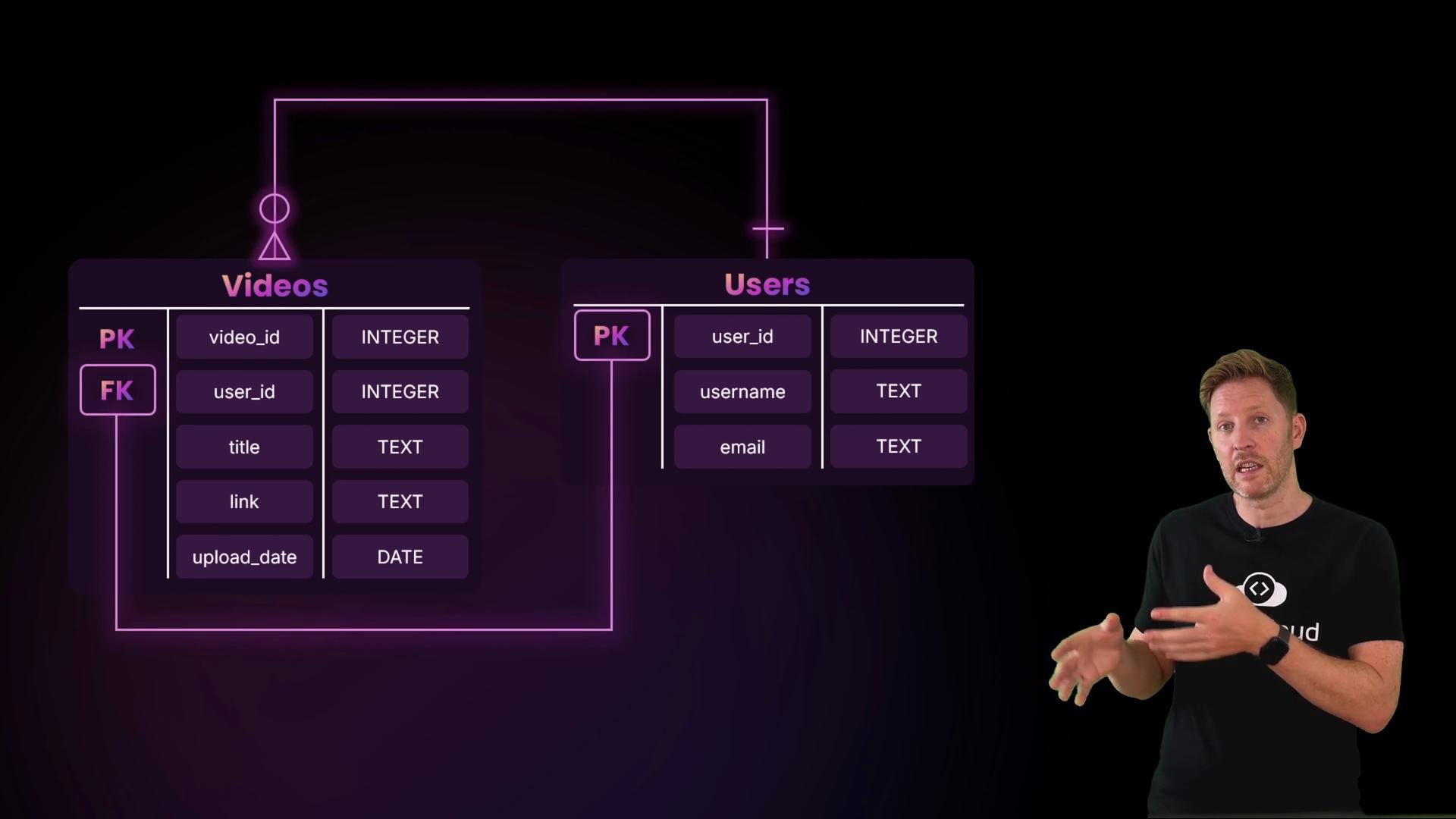 Table design decisions (from the ERD)
* Use `INT AUTO_INCREMENT PRIMARY KEY` for `user_id` and `video_id` so the database assigns unique IDs automatically.
* `VARCHAR(100)` for `username` and `title`.
* `VARCHAR(500)` for `link` to safely store longer URLs.
* `VARCHAR(255)` for `email` (common, index-friendly choice).
* `DATE` for `upload_date` (format YYYY-MM-DD).
* Use `InnoDB` engine for foreign key support.
* `ON DELETE CASCADE` on the foreign key ensures referential integrity by removing related videos if a user is deleted (only use this if that is the desired behavior).
Create the database and both tables
```sql theme={null}
CREATE DATABASE miaowtube;
USE miaowtube;
CREATE TABLE users (
user_id INT AUTO_INCREMENT PRIMARY KEY,
username VARCHAR(100) NOT NULL,
email VARCHAR(255) NOT NULL
) ENGINE=InnoDB;
CREATE TABLE videos (
video_id INT AUTO_INCREMENT PRIMARY KEY,
user_id INT,
title VARCHAR(100) NOT NULL,
link VARCHAR(500) NOT NULL,
upload_date DATE,
FOREIGN KEY (user_id) REFERENCES users(user_id) ON DELETE CASCADE
) ENGINE=InnoDB;
```
Key SQL elements explained
* `INT AUTO_INCREMENT PRIMARY KEY` — auto-incrementing integer primary key.
* `VARCHAR(n)` — variable-length string up to n characters.
* `NOT NULL` — value is required in that column.
* `DATE` — stores `YYYY-MM-DD`.
* `FOREIGN KEY (user_id) REFERENCES users(user_id)` — enforces that every `user_id` in `videos` exists in `users`.
* `ON DELETE CASCADE` — deletes dependent `videos` rows when the referenced `users` row is removed.
* `ENGINE=InnoDB` — required for foreign key enforcement in MySQL.
CRUD quick-reference table
| CRUD operation | SQL statement(s) | Example |
| -------------- | ---------------- | -------------------------------------------------------------------------- |
| Create | `INSERT` | `INSERT INTO users (username, email) VALUES ('cody', 'cody@example.com');` |
| Read | `SELECT` | `SELECT * FROM videos WHERE user_id = 1;` |
| Update | `UPDATE` | `UPDATE users SET email = 'new@addr.com' WHERE user_id = 1;` |
| Delete | `DELETE` | `DELETE FROM videos WHERE video_id = 10;` |
Column types and rationale
| Column | Type | Reason |
| --------------------- | -------------------- | ------------------------------------------------ |
| `user_id`, `video_id` | `INT AUTO_INCREMENT` | Simple numeric PKs, efficient joins and indexing |
| `username`, `title` | `VARCHAR(100)` | Fixed upper bound for user-friendly text |
| `email` | `VARCHAR(255)` | Common practice for email length & indexes |
| `link` | `VARCHAR(500)` | Accommodate long URLs |
| `upload_date` | `DATE` | Stores date without time portion |
Tips for using the MySQL client
* If you make a typo while entering a long statement, press Ctrl-C to cancel the current input.
* Alternatively, finish the statement with a semicolon, then use your shell history (up-arrow) to retrieve and edit previous commands.
* Use `DESCRIBE table_name;` or `SHOW CREATE TABLE table_name;` to inspect table definitions.
If you need to add a foreign key after creating both tables, use ALTER TABLE to add the constraint. However, creating the referenced table first avoids extra ALTER steps.
Links and references
* MySQL Documentation: [https://dev.mysql.com/doc/](https://dev.mysql.com/doc/)
* [Kubernetes Documentation](https://kubernetes.io/docs/) (for related deployment topics)
* KodeKloud Playground (use the playground for interactive MySQL practice)
Table design decisions (from the ERD)
* Use `INT AUTO_INCREMENT PRIMARY KEY` for `user_id` and `video_id` so the database assigns unique IDs automatically.
* `VARCHAR(100)` for `username` and `title`.
* `VARCHAR(500)` for `link` to safely store longer URLs.
* `VARCHAR(255)` for `email` (common, index-friendly choice).
* `DATE` for `upload_date` (format YYYY-MM-DD).
* Use `InnoDB` engine for foreign key support.
* `ON DELETE CASCADE` on the foreign key ensures referential integrity by removing related videos if a user is deleted (only use this if that is the desired behavior).
Create the database and both tables
```sql theme={null}
CREATE DATABASE miaowtube;
USE miaowtube;
CREATE TABLE users (
user_id INT AUTO_INCREMENT PRIMARY KEY,
username VARCHAR(100) NOT NULL,
email VARCHAR(255) NOT NULL
) ENGINE=InnoDB;
CREATE TABLE videos (
video_id INT AUTO_INCREMENT PRIMARY KEY,
user_id INT,
title VARCHAR(100) NOT NULL,
link VARCHAR(500) NOT NULL,
upload_date DATE,
FOREIGN KEY (user_id) REFERENCES users(user_id) ON DELETE CASCADE
) ENGINE=InnoDB;
```
Key SQL elements explained
* `INT AUTO_INCREMENT PRIMARY KEY` — auto-incrementing integer primary key.
* `VARCHAR(n)` — variable-length string up to n characters.
* `NOT NULL` — value is required in that column.
* `DATE` — stores `YYYY-MM-DD`.
* `FOREIGN KEY (user_id) REFERENCES users(user_id)` — enforces that every `user_id` in `videos` exists in `users`.
* `ON DELETE CASCADE` — deletes dependent `videos` rows when the referenced `users` row is removed.
* `ENGINE=InnoDB` — required for foreign key enforcement in MySQL.
CRUD quick-reference table
| CRUD operation | SQL statement(s) | Example |
| -------------- | ---------------- | -------------------------------------------------------------------------- |
| Create | `INSERT` | `INSERT INTO users (username, email) VALUES ('cody', 'cody@example.com');` |
| Read | `SELECT` | `SELECT * FROM videos WHERE user_id = 1;` |
| Update | `UPDATE` | `UPDATE users SET email = 'new@addr.com' WHERE user_id = 1;` |
| Delete | `DELETE` | `DELETE FROM videos WHERE video_id = 10;` |
Column types and rationale
| Column | Type | Reason |
| --------------------- | -------------------- | ------------------------------------------------ |
| `user_id`, `video_id` | `INT AUTO_INCREMENT` | Simple numeric PKs, efficient joins and indexing |
| `username`, `title` | `VARCHAR(100)` | Fixed upper bound for user-friendly text |
| `email` | `VARCHAR(255)` | Common practice for email length & indexes |
| `link` | `VARCHAR(500)` | Accommodate long URLs |
| `upload_date` | `DATE` | Stores date without time portion |
Tips for using the MySQL client
* If you make a typo while entering a long statement, press Ctrl-C to cancel the current input.
* Alternatively, finish the statement with a semicolon, then use your shell history (up-arrow) to retrieve and edit previous commands.
* Use `DESCRIBE table_name;` or `SHOW CREATE TABLE table_name;` to inspect table definitions.
If you need to add a foreign key after creating both tables, use ALTER TABLE to add the constraint. However, creating the referenced table first avoids extra ALTER steps.
Links and references
* MySQL Documentation: [https://dev.mysql.com/doc/](https://dev.mysql.com/doc/)
* [Kubernetes Documentation](https://kubernetes.io/docs/) (for related deployment topics)
* KodeKloud Playground (use the playground for interactive MySQL practice)