> ## Documentation Index
> Fetch the complete documentation index at: https://notes.kodekloud.com/llms.txt
> Use this file to discover all available pages before exploring further.
# Adding Column to Database with Zero Downtime
> Safe zero-downtime method to add a new nullable column to a large production table by metadata-only changes, updating app writes, and backfilling rows in small batches.
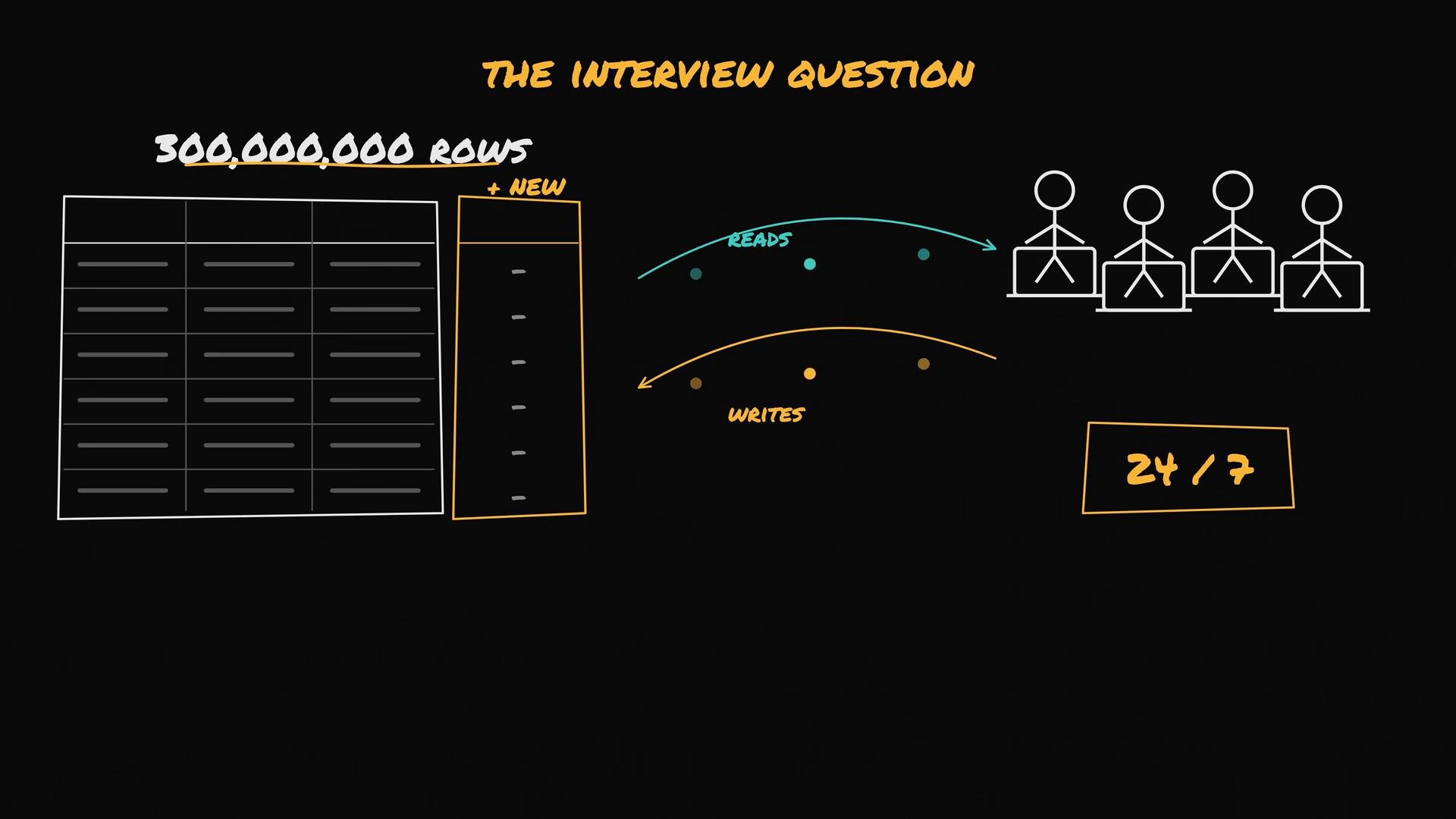
Problem: you must add a new column to a table containing \~300,000,000 rows while the system is being read and written 24/7. You cannot take the database offline or incur downtime.
The key idea is to avoid touching every row in a single long-running transaction. Instead, perform a metadata-only change first, make application writes populate the new column, then backfill existing rows in small batches while monitoring load.
 ## Common—but dangerous—naive approach
A naive migration that adds the column and immediately updates every row will try to modify 300M rows in one transaction. That will either lock large portions of the table or consume so many resources the database becomes unresponsive:
```sql theme={null}
-- Running interactively against production (naive and dangerous)
ALTER TABLE users ADD COLUMN plan text;
UPDATE users SET plan = 'free';
-- updating 300,000,000 rows…
```
Do not run a single UPDATE that touches every row in a hot production table. That will create long locks and resource spikes that can cause downtime.
## Safe, staged migration
Follow these incremental stages to add a column without downtime:
## Stage 1 — Add the column as nullable with no default
Add the new column as nullable and without a default. In many databases (for example, PostgreSQL), a nullable column without a default is a metadata-only change and completes quickly without rewriting the table.
```sql theme={null}
ALTER TABLE users
ADD COLUMN plan text NULL;
```
This completes in milliseconds. The column exists but all existing rows have `NULL` for that column.
## Common—but dangerous—naive approach
A naive migration that adds the column and immediately updates every row will try to modify 300M rows in one transaction. That will either lock large portions of the table or consume so many resources the database becomes unresponsive:
```sql theme={null}
-- Running interactively against production (naive and dangerous)
ALTER TABLE users ADD COLUMN plan text;
UPDATE users SET plan = 'free';
-- updating 300,000,000 rows…
```
Do not run a single UPDATE that touches every row in a hot production table. That will create long locks and resource spikes that can cause downtime.
## Safe, staged migration
Follow these incremental stages to add a column without downtime:
## Stage 1 — Add the column as nullable with no default
Add the new column as nullable and without a default. In many databases (for example, PostgreSQL), a nullable column without a default is a metadata-only change and completes quickly without rewriting the table.
```sql theme={null}
ALTER TABLE users
ADD COLUMN plan text NULL;
```
This completes in milliseconds. The column exists but all existing rows have `NULL` for that column.
 ## Stage 2 — Update application code so all new writes populate the column
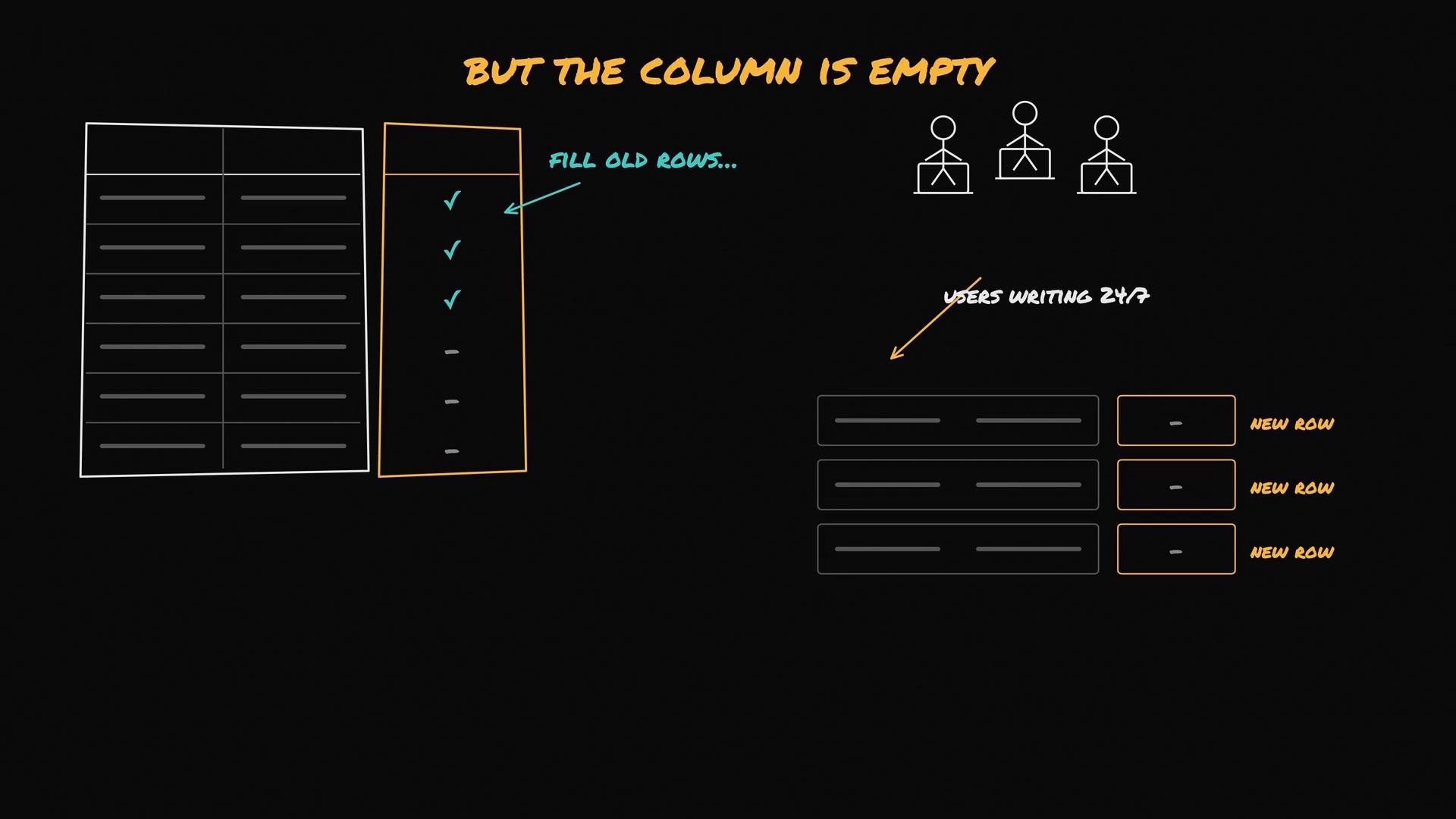
Before backfilling old rows, ensure every new write includes the new column; otherwise you'll be chasing a moving target.
* Modify the application/service layer to collect and send the `plan` value on INSERT (and on any UPDATEs that should set it).
* Deploy the updated application so that from this point forward new rows have `plan` populated.
## Stage 3 — Backfill existing rows in small batches
Backfill existing rows using a background job that updates a small, bounded number of rows per transaction (for example, 5k rows). Pause between batches and monitor database metrics (CPU, I/O, lock waits). If load rises, increase the pause or reduce the batch size.
PostgreSQL-safe batching pattern (CTE with LIMIT):
```sql theme={null}
-- Example PostgreSQL batch update using a CTE (5000 rows per batch)
WITH batch AS (
SELECT id
FROM users
WHERE plan IS NULL
LIMIT 5000
)
UPDATE users u
SET plan = 'free'
FROM batch
WHERE u.id = batch.id;
```
Alternative: use `ctid` for very short-running batches (remember `ctid` is a physical row locator and not a stable identifier):
```sql theme={null}
-- Example using ctid (PostgreSQL)
UPDATE users
SET plan = 'free'
WHERE ctid IN (
SELECT ctid FROM users WHERE plan IS NULL LIMIT 5000
);
```
Automate the loop with a small controller (bash, Python, or a job runner). Example pseudocode:
```python theme={null}
# Pseudocode (use an appropriate DB client and add error handling)
while True:
rows_updated = run_sql("""
WITH batch AS (
SELECT id
FROM users
WHERE plan IS NULL
LIMIT 5000
)
UPDATE users u
SET plan = 'free'
FROM batch
WHERE u.id = batch.id
RETURNING 1;
""")
if rows_updated == 0:
break
sleep(0.5) # tune pause based on observed load
```
Monitor:
* CPU, IO, and disk latency
* Active queries and lock contention (`pg_stat_activity`, `pg_locks`)
* Replication lag if you have replicas
If the database shows stress, pause the backfill, lower batch sizes, or schedule backfilling during lower traffic windows.
## Notes about defaults and NOT NULL
* Avoid adding the column with a non-null default in the first step: on some DB versions this triggers a full-table rewrite (long-running).
* PostgreSQL historically rewrote the table when adding a column with a default; recent versions may optimize this. Always verify the behavior for your database version.
* After the backfill:
1. Add a server-side default for future inserts: `ALTER TABLE ... ALTER COLUMN SET DEFAULT ...` (often metadata-only).
2. Add the NOT NULL constraint: `ALTER TABLE ... ALTER COLUMN SET NOT NULL` (this requires a scan to verify no NULLs exist but typically doesn't rewrite the table).
Always test the exact ALTER TABLE behavior on a staging snapshot of your production data.
Adding a nullable column and backfilling in batches is the safe, incremental approach. But database-specific behaviors vary — always verify how your DB version handles ALTER TABLE with defaults and NOT NULL changes before performing production migrations.
## Quick reference: recommended sequence
| Step | Action | Reason |
| - | - | - |
| 1 | `ALTER TABLE ... ADD COLUMN ... NULL` (no default) | Metadata-only on many DBs; instant and safe |
| 2 | Deploy app changes so new writes populate the column | Prevents new rows from remaining NULL |
| 3 | Backfill existing rows in small batches (e.g., 5k) | Minimizes locks and resource usage; can pause/resume |
| 4 | Set default and `NOT NULL` after verification | Enforces invariant for future inserts |
Tools and further reading
* For MySQL: pt-online-schema-change, gh-ost (online schema change tools)
* PostgreSQL ALTER docs: [https://www.postgresql.org/docs/current/sql-altertable.html](https://www.postgresql.org/docs/current/sql-altertable.html)
* PostgreSQL system columns (`ctid`): [https://www.postgresql.org/docs/current/ddl-system-columns.html](https://www.postgresql.org/docs/current/ddl-system-columns.html)
## Recap
Performing an online column addition safely requires converting one risky change into a sequence of small, monitored steps: add metadata-only column, update app writes, backfill in controlled batches, then add defaults/constraints. This approach minimizes locking, CPU and I/O spikes, and avoids production downtime.
This documentation is built and hosted on [Mintlify](https://mintlify.com), a developer documentation platform.
## Stage 2 — Update application code so all new writes populate the column
Before backfilling old rows, ensure every new write includes the new column; otherwise you'll be chasing a moving target.
* Modify the application/service layer to collect and send the `plan` value on INSERT (and on any UPDATEs that should set it).
* Deploy the updated application so that from this point forward new rows have `plan` populated.
## Stage 3 — Backfill existing rows in small batches
Backfill existing rows using a background job that updates a small, bounded number of rows per transaction (for example, 5k rows). Pause between batches and monitor database metrics (CPU, I/O, lock waits). If load rises, increase the pause or reduce the batch size.
PostgreSQL-safe batching pattern (CTE with LIMIT):
```sql theme={null}
-- Example PostgreSQL batch update using a CTE (5000 rows per batch)
WITH batch AS (
SELECT id
FROM users
WHERE plan IS NULL
LIMIT 5000
)
UPDATE users u
SET plan = 'free'
FROM batch
WHERE u.id = batch.id;
```
Alternative: use `ctid` for very short-running batches (remember `ctid` is a physical row locator and not a stable identifier):
```sql theme={null}
-- Example using ctid (PostgreSQL)
UPDATE users
SET plan = 'free'
WHERE ctid IN (
SELECT ctid FROM users WHERE plan IS NULL LIMIT 5000
);
```
Automate the loop with a small controller (bash, Python, or a job runner). Example pseudocode:
```python theme={null}
# Pseudocode (use an appropriate DB client and add error handling)
while True:
rows_updated = run_sql("""
WITH batch AS (
SELECT id
FROM users
WHERE plan IS NULL
LIMIT 5000
)
UPDATE users u
SET plan = 'free'
FROM batch
WHERE u.id = batch.id
RETURNING 1;
""")
if rows_updated == 0:
break
sleep(0.5) # tune pause based on observed load
```
Monitor:
* CPU, IO, and disk latency
* Active queries and lock contention (`pg_stat_activity`, `pg_locks`)
* Replication lag if you have replicas
If the database shows stress, pause the backfill, lower batch sizes, or schedule backfilling during lower traffic windows.
## Notes about defaults and NOT NULL
* Avoid adding the column with a non-null default in the first step: on some DB versions this triggers a full-table rewrite (long-running).
* PostgreSQL historically rewrote the table when adding a column with a default; recent versions may optimize this. Always verify the behavior for your database version.
* After the backfill:
1. Add a server-side default for future inserts: `ALTER TABLE ... ALTER COLUMN SET DEFAULT ...` (often metadata-only).
2. Add the NOT NULL constraint: `ALTER TABLE ... ALTER COLUMN SET NOT NULL` (this requires a scan to verify no NULLs exist but typically doesn't rewrite the table).
Always test the exact ALTER TABLE behavior on a staging snapshot of your production data.
Adding a nullable column and backfilling in batches is the safe, incremental approach. But database-specific behaviors vary — always verify how your DB version handles ALTER TABLE with defaults and NOT NULL changes before performing production migrations.
## Quick reference: recommended sequence
| Step | Action | Reason |
| - | - | - |
| 1 | `ALTER TABLE ... ADD COLUMN ... NULL` (no default) | Metadata-only on many DBs; instant and safe |
| 2 | Deploy app changes so new writes populate the column | Prevents new rows from remaining NULL |
| 3 | Backfill existing rows in small batches (e.g., 5k) | Minimizes locks and resource usage; can pause/resume |
| 4 | Set default and `NOT NULL` after verification | Enforces invariant for future inserts |
Tools and further reading
* For MySQL: pt-online-schema-change, gh-ost (online schema change tools)
* PostgreSQL ALTER docs: [https://www.postgresql.org/docs/current/sql-altertable.html](https://www.postgresql.org/docs/current/sql-altertable.html)
* PostgreSQL system columns (`ctid`): [https://www.postgresql.org/docs/current/ddl-system-columns.html](https://www.postgresql.org/docs/current/ddl-system-columns.html)
## Recap
Performing an online column addition safely requires converting one risky change into a sequence of small, monitored steps: add metadata-only column, update app writes, backfill in controlled batches, then add defaults/constraints. This approach minimizes locking, CPU and I/O spikes, and avoids production downtime.
This documentation is built and hosted on [Mintlify](https://mintlify.com), a developer documentation platform.