> ## Documentation Index
> Fetch the complete documentation index at: https://notes.kodekloud.com/llms.txt
> Use this file to discover all available pages before exploring further.
# Too Many Connections
> Diagnosing and fixing Postgres connection exhaustion by inspecting pg_stat_activity, terminating idle transactions, setting timeouts, refactoring app to avoid holding connections, and adding PgBouncer
In this lesson we diagnose and fix a common Postgres problem: your application exhausts available database connections. This typically appears during traffic spikes and can bring critical flows (like checkout) to a halt. Learn how to investigate live connections, apply immediate mitigations, fix the application pattern, and adopt architectural improvements to prevent recurrence.
Scenario
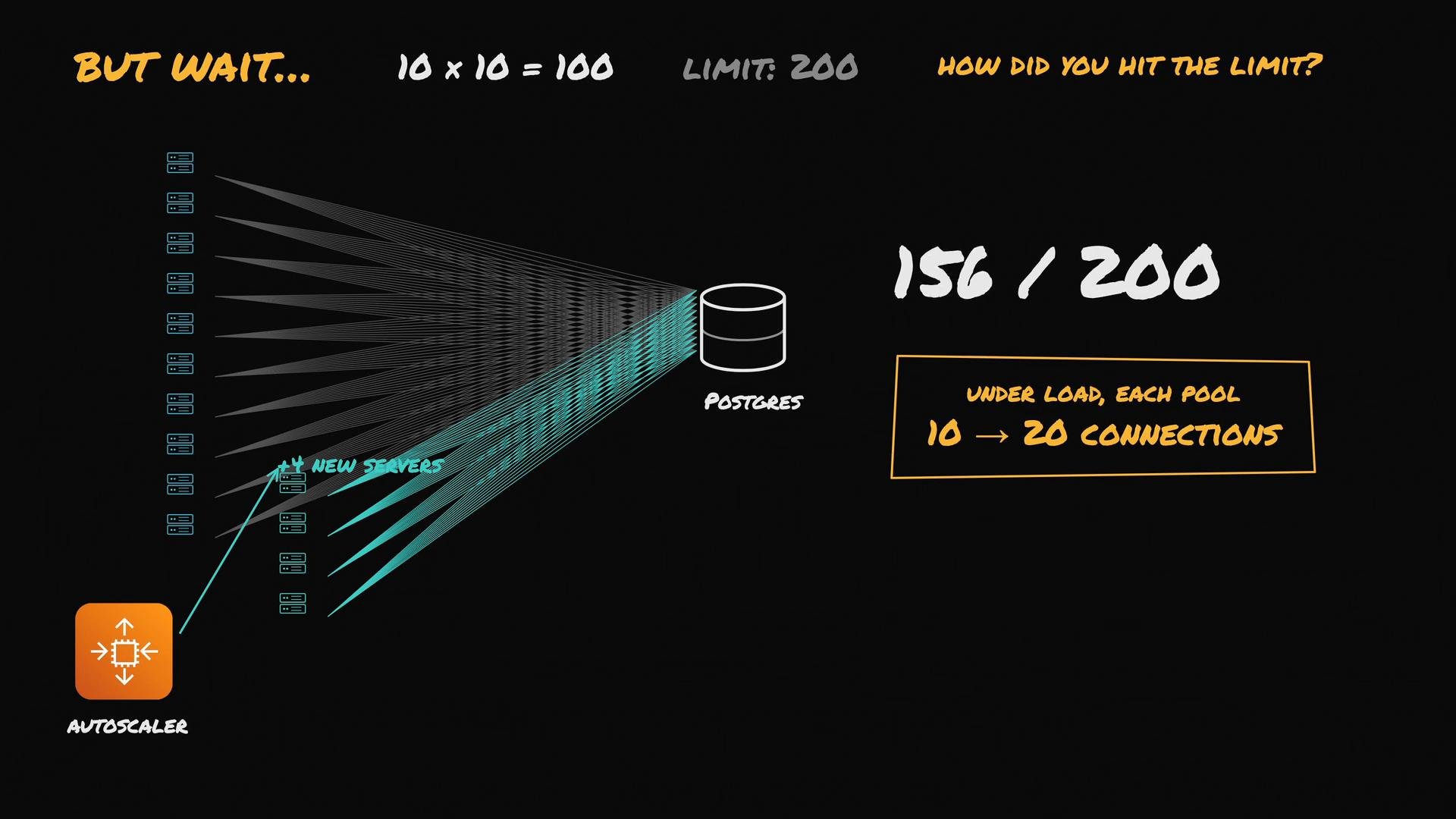
* Ten application servers.
* One Postgres database.
* Each server keeps a connection pool of 10 connections under normal load and can grow to 20 under heavy load.
* Postgres is configured with `max_connections = 200`.
During a flash sale, traffic triples and Postgres logs this error:
```text theme={null}
postgres logs
FATAL: sorry, too many clients already
# "clients" here means database connections from the app servers, not users
```
Your checkout is down. What’s the correct response?
A common but hasty reaction is to raise the Postgres connection limit (for example, `max_connections = 500`) so the app servers can open more connections. That can buy time but has serious drawbacks: each Postgres connection maps to an OS process and consumes memory even when idle. Raising `max_connections` can cause the database to spend more time and memory managing processes than executing queries.
```conf theme={null}
# postgresql.conf
max_connections = 500
```
Before changing `max_connections`, inspect what connections actually exist — often the real cause is different.
In this scenario, the autoscaler added more servers during the spike. Four extra servers were provisioned, explaining the additional connections: 4 servers × 10 normal connections = 40 extra connections, bringing the usual total to \~140. Under peak load each server's pool can grow to 20 connections, which may exhaust the 200-connection limit.
 Investigate live connections with pg\_stat\_activity
Postgres exposes `pg_stat_activity` which lists every live connection and what it’s doing. Run this as a superuser or a role with sufficient access:
```sql theme={null}
-- inspect connections (run as a superuser or a role with access)
SELECT pid, usename, client_addr, state, query_start, state_change, query
FROM pg_stat_activity
WHERE datname = current_database()
ORDER BY query_start DESC;
```
If many sessions show `idle in transaction`, that is a red flag: the application opened a transaction, then waited (for an external call, user input, etc.) while still holding the DB connection. Example problematic output:
```text theme={null}
4022 idle in transaction
4023 idle in transaction
4024 idle in transaction
...
```
Root cause in this scenario
* The checkout code begins a DB transaction, performs writes, then calls an external payment provider before committing.
* The external call can be slow (tens of seconds), so the transaction holds the connection while doing no DB work.
* Many concurrent checkouts holding transactions lead to connection exhaustion.
Fix this in stages
Stage 1 — Immediate mitigation (bring the service back up)
* Terminate stuck sessions so new checkouts can proceed. Postgres will roll back open transactions safely.
```sql theme={null}
-- terminate a session by pid (from pg_stat_activity)
SELECT pg_terminate_backend(4022);
```
* Configure an automatic timeout to prevent transactions remaining idle inside a transaction for too long. Use `idle_in_transaction_session_timeout` to kill sessions that stay idle in a transaction beyond a sensible threshold:
```sql theme={null}
-- set a sensible timeout (example: 5 seconds)
ALTER SYSTEM SET idle_in_transaction_session_timeout = '5s';
-- then reload configuration
SELECT pg_reload_conf();
```
Setting `idle_in_transaction_session_timeout` prevents long-running `idle in transaction` sessions from accumulating. Choose a value that accommodates legitimate long transactions for your workload, but protects the server from resource exhaustion.
Stage 2 — Fix the application
* Never hold a DB connection while waiting on a slow external operation. Commit and release the connection before making external network calls (e.g., payment provider). If you need to persist the external result, obtain a short-lived connection after the external call to write the result.
Example (Python / psycopg2-like pseudocode):
```python theme={null}
# BAD: holding a DB connection while waiting on an external service
with db_conn.cursor() as cur:
cur.execute("BEGIN")
cur.execute("UPDATE orders SET status = 'processing' WHERE id = %s", (order_id,))
# still inside transaction -> hold connection while calling payment provider
payment_response = call_payment_provider(...)
cur.execute("UPDATE orders SET payment_result = %s WHERE id = %s", (payment_response, order_id))
# commit on the connection (execute COMMIT is also possible, but call the connection's commit)
db_conn.commit()
# GOOD: commit before calling external service
with db_conn.cursor() as cur:
cur.execute("BEGIN")
cur.execute("UPDATE orders SET status = 'processing' WHERE id = %s", (order_id,))
# commit to release connection back to the pool
db_conn.commit()
# connection returned to pool here; call external service
payment_response = call_payment_provider(...)
# use a new short-lived DB connection to save the result
with db_pool.connect() as conn:
with conn.cursor() as cur:
cur.execute("UPDATE orders SET payment_result = %s, status = %s WHERE id = %s",
(payment_response, 'complete', order_id))
conn.commit()
```
Stage 3 — Architectural improvement: put a PgBouncer in front of Postgres
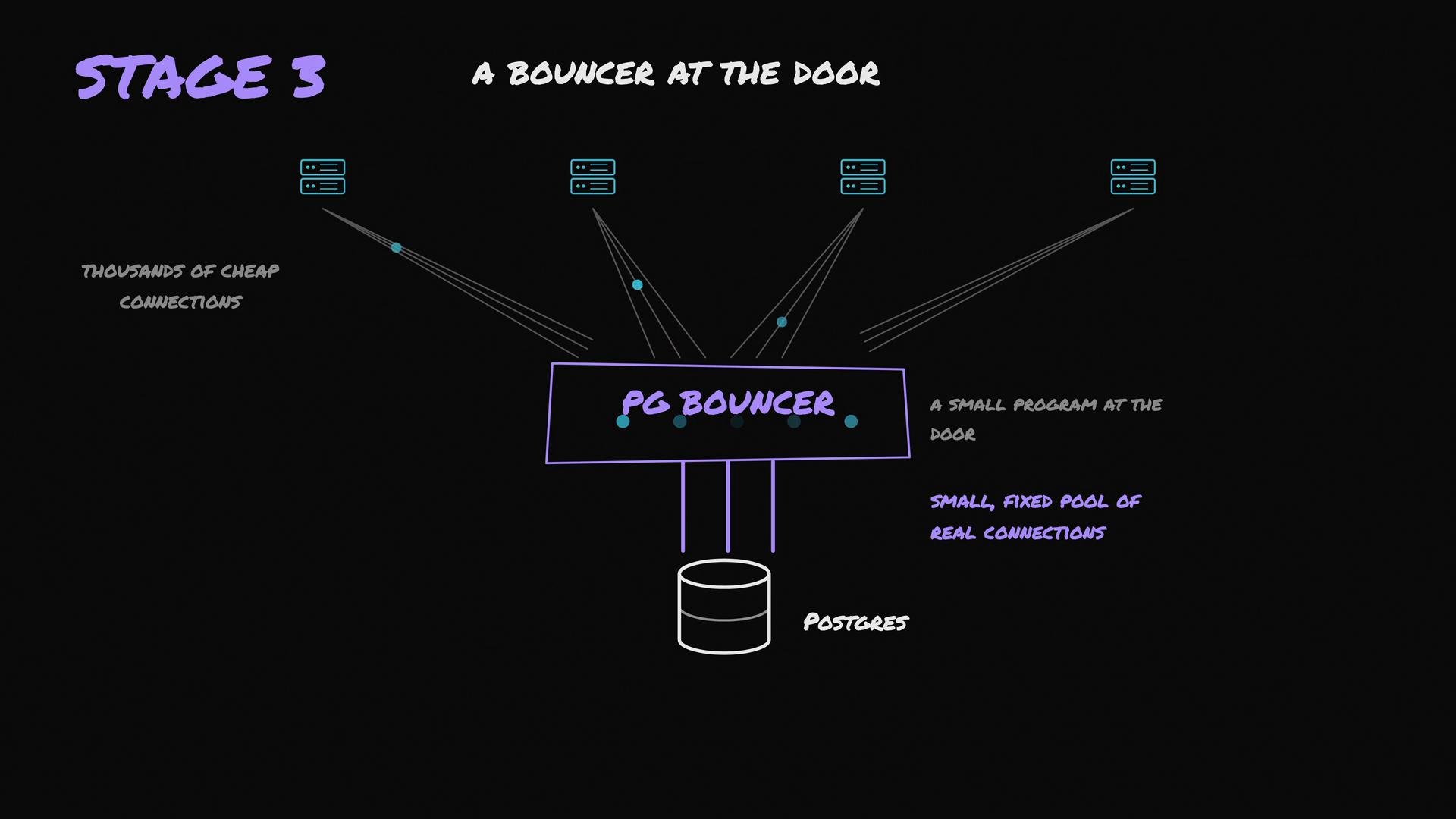
* PgBouncer is a lightweight connection pooler/proxy that sits between your application and Postgres.
* Applications can open many cheap client connections to PgBouncer while PgBouncer keeps a small, fixed pool of real Postgres connections.
* In transaction pooling mode, PgBouncer assigns a real Postgres connection only for the duration of a transaction; once the transaction completes the connection returns to the pool. This dramatically reduces the number of concurrent Postgres processes.
Investigate live connections with pg\_stat\_activity
Postgres exposes `pg_stat_activity` which lists every live connection and what it’s doing. Run this as a superuser or a role with sufficient access:
```sql theme={null}
-- inspect connections (run as a superuser or a role with access)
SELECT pid, usename, client_addr, state, query_start, state_change, query
FROM pg_stat_activity
WHERE datname = current_database()
ORDER BY query_start DESC;
```
If many sessions show `idle in transaction`, that is a red flag: the application opened a transaction, then waited (for an external call, user input, etc.) while still holding the DB connection. Example problematic output:
```text theme={null}
4022 idle in transaction
4023 idle in transaction
4024 idle in transaction
...
```
Root cause in this scenario
* The checkout code begins a DB transaction, performs writes, then calls an external payment provider before committing.
* The external call can be slow (tens of seconds), so the transaction holds the connection while doing no DB work.
* Many concurrent checkouts holding transactions lead to connection exhaustion.
Fix this in stages
Stage 1 — Immediate mitigation (bring the service back up)
* Terminate stuck sessions so new checkouts can proceed. Postgres will roll back open transactions safely.
```sql theme={null}
-- terminate a session by pid (from pg_stat_activity)
SELECT pg_terminate_backend(4022);
```
* Configure an automatic timeout to prevent transactions remaining idle inside a transaction for too long. Use `idle_in_transaction_session_timeout` to kill sessions that stay idle in a transaction beyond a sensible threshold:
```sql theme={null}
-- set a sensible timeout (example: 5 seconds)
ALTER SYSTEM SET idle_in_transaction_session_timeout = '5s';
-- then reload configuration
SELECT pg_reload_conf();
```
Setting `idle_in_transaction_session_timeout` prevents long-running `idle in transaction` sessions from accumulating. Choose a value that accommodates legitimate long transactions for your workload, but protects the server from resource exhaustion.
Stage 2 — Fix the application
* Never hold a DB connection while waiting on a slow external operation. Commit and release the connection before making external network calls (e.g., payment provider). If you need to persist the external result, obtain a short-lived connection after the external call to write the result.
Example (Python / psycopg2-like pseudocode):
```python theme={null}
# BAD: holding a DB connection while waiting on an external service
with db_conn.cursor() as cur:
cur.execute("BEGIN")
cur.execute("UPDATE orders SET status = 'processing' WHERE id = %s", (order_id,))
# still inside transaction -> hold connection while calling payment provider
payment_response = call_payment_provider(...)
cur.execute("UPDATE orders SET payment_result = %s WHERE id = %s", (payment_response, order_id))
# commit on the connection (execute COMMIT is also possible, but call the connection's commit)
db_conn.commit()
# GOOD: commit before calling external service
with db_conn.cursor() as cur:
cur.execute("BEGIN")
cur.execute("UPDATE orders SET status = 'processing' WHERE id = %s", (order_id,))
# commit to release connection back to the pool
db_conn.commit()
# connection returned to pool here; call external service
payment_response = call_payment_provider(...)
# use a new short-lived DB connection to save the result
with db_pool.connect() as conn:
with conn.cursor() as cur:
cur.execute("UPDATE orders SET payment_result = %s, status = %s WHERE id = %s",
(payment_response, 'complete', order_id))
conn.commit()
```
Stage 3 — Architectural improvement: put a PgBouncer in front of Postgres
* PgBouncer is a lightweight connection pooler/proxy that sits between your application and Postgres.
* Applications can open many cheap client connections to PgBouncer while PgBouncer keeps a small, fixed pool of real Postgres connections.
* In transaction pooling mode, PgBouncer assigns a real Postgres connection only for the duration of a transaction; once the transaction completes the connection returns to the pool. This dramatically reduces the number of concurrent Postgres processes.
 Be careful when using PgBouncer in transaction pooling mode: session-level features (temporary tables, session-local GUC settings, prepared statements) do not persist across pooled transactions. Some ORMs or application patterns require session pooling instead. Choose the pooling mode and application changes that match your workload.
Summary checklist
| Step | Action | Example / Notes |
| - | - | - |
| Inspect connections | Query `pg_stat_activity` to see what sessions are doing | `SELECT * FROM pg_stat_activity WHERE datname = current_database();` |
| Kill stuck sessions | Terminate long `idle in transaction` sessions to free connections | `SELECT pg_terminate_backend();` |
| Set timeouts | Prevent recurrence with `idle_in_transaction_session_timeout` | `ALTER SYSTEM SET idle_in_transaction_session_timeout = '5s';` + `SELECT pg_reload_conf();` |
| Fix application | Commit before external calls; use short-lived connections for follow-up writes | Refactor to avoid holding transactions across network I/O |
| Add pooler | Deploy PgBouncer in the appropriate pooling mode | Use transaction pooling to reduce real Postgres processes (if compatible) |
| Increase `max_connections`? | Only after measuring memory/CPU impact and applying mitigations | Raising limits can increase OS processes and memory usage per connection |
Links and references
* [Postgres pg\_stat\_activity documentation](https://www.postgresql.org/docs/current/monitoring-stats.html#PG-STAT-ACTIVITY)
* [Postgres connection settings (`max_connections`, `idle_in_transaction_session_timeout`)](https://www.postgresql.org/docs/current/runtime-config-connection.html)
* [PgBouncer documentation and pooling modes](https://www.pgbouncer.org/)
Follow this flow: observe before changing limits, mitigate quickly to restore service, fix the application pattern that holds connections, and adopt a pooler when appropriate. Only after you understand the memory and CPU implications should you consider increasing `max_connections`.
This documentation is built and hosted on [Mintlify](https://mintlify.com), a developer documentation platform.
Be careful when using PgBouncer in transaction pooling mode: session-level features (temporary tables, session-local GUC settings, prepared statements) do not persist across pooled transactions. Some ORMs or application patterns require session pooling instead. Choose the pooling mode and application changes that match your workload.
Summary checklist
| Step | Action | Example / Notes |
| - | - | - |
| Inspect connections | Query `pg_stat_activity` to see what sessions are doing | `SELECT * FROM pg_stat_activity WHERE datname = current_database();` |
| Kill stuck sessions | Terminate long `idle in transaction` sessions to free connections | `SELECT pg_terminate_backend();` |
| Set timeouts | Prevent recurrence with `idle_in_transaction_session_timeout` | `ALTER SYSTEM SET idle_in_transaction_session_timeout = '5s';` + `SELECT pg_reload_conf();` |
| Fix application | Commit before external calls; use short-lived connections for follow-up writes | Refactor to avoid holding transactions across network I/O |
| Add pooler | Deploy PgBouncer in the appropriate pooling mode | Use transaction pooling to reduce real Postgres processes (if compatible) |
| Increase `max_connections`? | Only after measuring memory/CPU impact and applying mitigations | Raising limits can increase OS processes and memory usage per connection |
Links and references
* [Postgres pg\_stat\_activity documentation](https://www.postgresql.org/docs/current/monitoring-stats.html#PG-STAT-ACTIVITY)
* [Postgres connection settings (`max_connections`, `idle_in_transaction_session_timeout`)](https://www.postgresql.org/docs/current/runtime-config-connection.html)
* [PgBouncer documentation and pooling modes](https://www.pgbouncer.org/)
Follow this flow: observe before changing limits, mitigate quickly to restore service, fix the application pattern that holds connections, and adopt a pooler when appropriate. Only after you understand the memory and CPU implications should you consider increasing `max_connections`.
This documentation is built and hosted on [Mintlify](https://mintlify.com), a developer documentation platform.