> ## Documentation Index
> Fetch the complete documentation index at: https://notes.kodekloud.com/llms.txt
> Use this file to discover all available pages before exploring further.
# How Does Kafka Work
> Explains how Kafka works, covering producers, topics, partitions, consumer groups, replication, and delivery semantics using an e-commerce checkout example
In this lesson we'll cover the problem Kafka solves, how it organizes event data, and the guarantees it provides. We'll use a simple e-commerce checkout example to explain producers, topics, partitions, consumer groups, replication, and delivery semantics.
Imagine a shopping site where a customer places an order. The checkout service handles the order, but multiple other services must react to that same event: send a confirmation email, update inventory, and push analytics.
A straightforward but fragile design is for the checkout service to call each of those downstream services synchronously. That design introduces two issues:
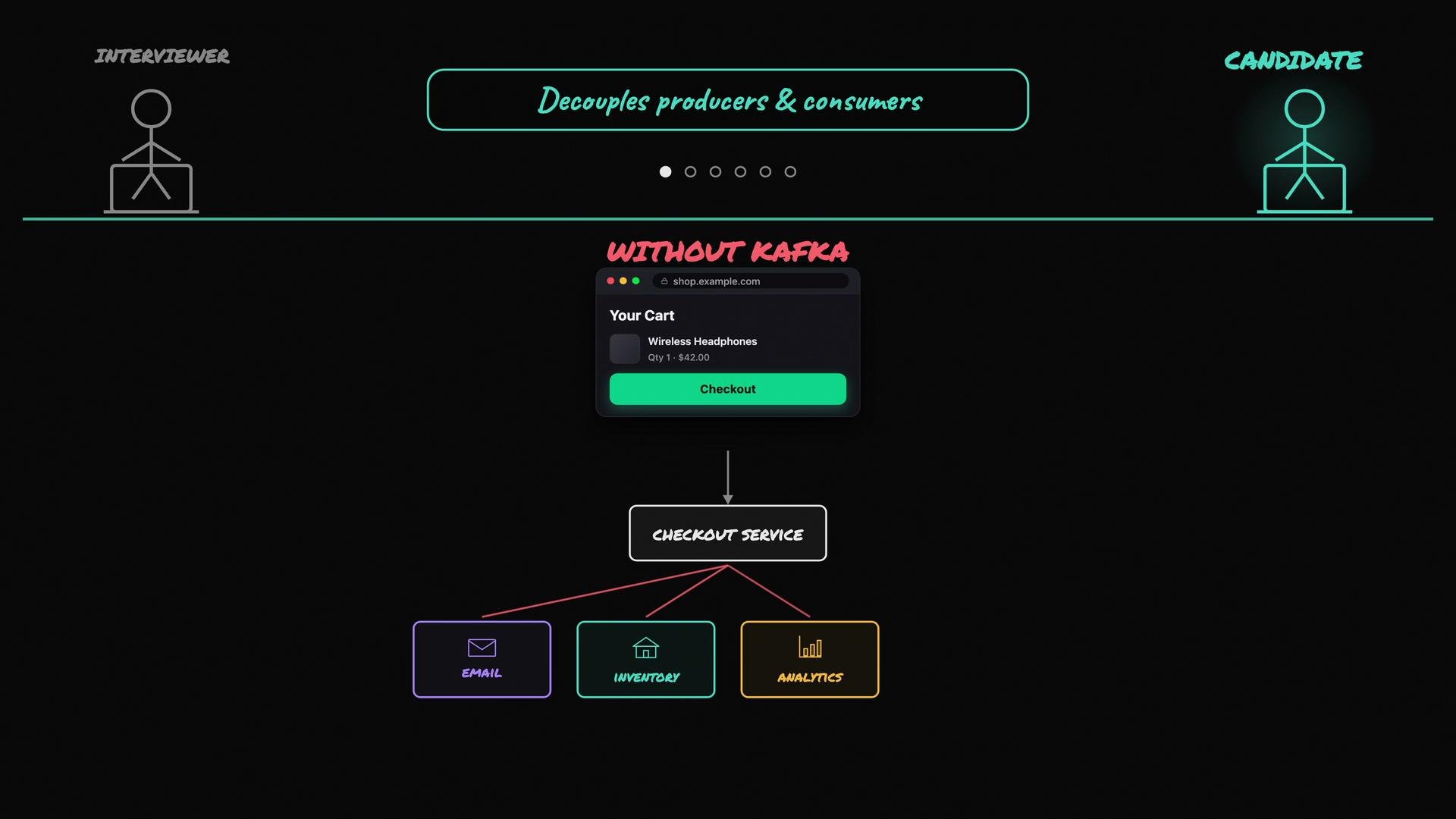 * Tight coupling: the checkout service must know about every downstream service. Adding a loyalty program or another integration requires changes to checkout.
* Blocking and reliability: the checkout flow waits on each downstream call. If one service is slow or unavailable, checkout is impacted.
Kafka resolves both problems by decoupling producers (writers) from consumers (readers). Instead of calling each service, the checkout service writes an order event into Kafka. Other services read those events independently, at their own pace, and can even replay history.
## Producers, topics, partitions, and offsets
* Producers write events into Kafka topics.
* Consumers read events from topics.
* The producer does not need to know who will read the events.
* Kafka retains events for a configurable period (or indefinitely), so new consumers can read past events from the beginning.
What does Kafka store internally?
* Topic: a named stream of events, e.g. `checkout-orders`.
* Event (message): one produced message is stored as one event — Kafka doesn't split a single produced message across multiple events.
* Partition: each topic is split into partitions. A partition is an ordered, immutable sequence of events.
* Offset: within a partition, each event gets a sequential offset (0, 1, 2, ...).
If `checkout-orders` has three partitions, Kafka will place each order into one partition (based on a partition key or a partitioner). For example, order 101 → partition 0 offset 0, order 102 → partition 1 offset 0, etc.
Why partition a topic? Two reasons: scale and parallelism.
* Tight coupling: the checkout service must know about every downstream service. Adding a loyalty program or another integration requires changes to checkout.
* Blocking and reliability: the checkout flow waits on each downstream call. If one service is slow or unavailable, checkout is impacted.
Kafka resolves both problems by decoupling producers (writers) from consumers (readers). Instead of calling each service, the checkout service writes an order event into Kafka. Other services read those events independently, at their own pace, and can even replay history.
## Producers, topics, partitions, and offsets
* Producers write events into Kafka topics.
* Consumers read events from topics.
* The producer does not need to know who will read the events.
* Kafka retains events for a configurable period (or indefinitely), so new consumers can read past events from the beginning.
What does Kafka store internally?
* Topic: a named stream of events, e.g. `checkout-orders`.
* Event (message): one produced message is stored as one event — Kafka doesn't split a single produced message across multiple events.
* Partition: each topic is split into partitions. A partition is an ordered, immutable sequence of events.
* Offset: within a partition, each event gets a sequential offset (0, 1, 2, ...).
If `checkout-orders` has three partitions, Kafka will place each order into one partition (based on a partition key or a partitioner). For example, order 101 → partition 0 offset 0, order 102 → partition 1 offset 0, etc.
Why partition a topic? Two reasons: scale and parallelism.
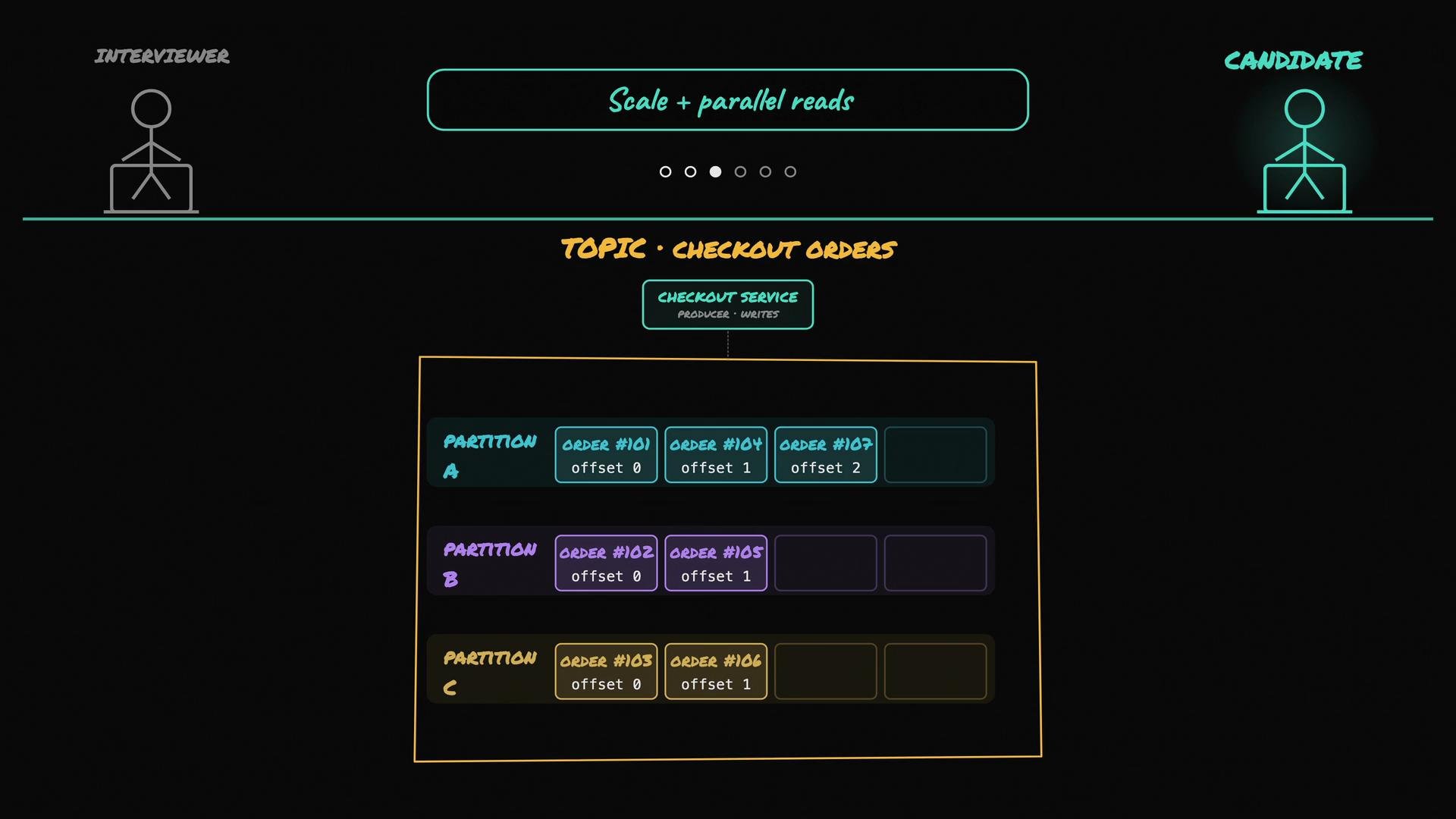 * With one partition, only a single broker and a single reader handle the topic's load.
* With multiple partitions, Kafka can spread partitions across brokers to increase throughput, and multiple consumers can read in parallel.
Important: ordering is only guaranteed within a single partition—not across partitions. If ordering for a logical entity matters (for example, all events for one customer), assign a key (commonly the customer ID). Kafka’s default partitioner hashes that key so all events with the same key map to the same partition and retain their relative order.
Note: changing the number of partitions can change how keys map to partitions for future messages, which may affect ordering guarantees for subsequent events.
Example commands and message format
* Create a topic with 3 partitions and replication factor 2:
```bash theme={null}
kafka-topics.sh --create \
--topic checkout-orders \
--partitions 3 \
--replication-factor 2 \
--bootstrap-server kafka:9092
```
* Produce a message with a key (so it hashes to a partition consistently):
```bash theme={null}
# using console producer with key parsing
kafka-console-producer.sh --topic checkout-orders --bootstrap-server kafka:9092 \
--property "parse.key=true" --property "key.separator=:"
# Example message line you would type/publish:
cust-123:{"orderId":101,"items":[{"sku":"X","qty":1}],"total":79.99}
```
* Inspect consumer group offsets:
```bash theme={null}
kafka-consumer-groups.sh --bootstrap-server kafka:9092 --group email-service --describe
```
## Consumer groups and parallel consumption
Consumer groups let multiple consumer instances cooperate to consume a topic without duplicating work. Kafka assigns each partition to exactly one consumer within a consumer group. Examples:
* Topic `checkout-orders` has 3 partitions.
* Analytics service runs 3 instances in the same consumer group → each instance gets one partition and processes in parallel.
* Email service runs 1 instance in its own group → that instance consumes all partitions (and keeps a separate offset).
Each consumer group tracks offsets per partition. If a consumer restarts, it resumes from the last committed offset. If a consumer fails, Kafka reassigns its partitions to remaining consumers (a rebalance).
Different services should use different consumer groups when they need to process the same events independently.
## Replication and broker failure handling
Kafka runs as a cluster of brokers. Partitions are typically replicated across brokers for fault tolerance. Each partition has multiple replicas:
* One replica is the leader for reads/writes.
* Other replicas are followers that replicate the leader’s data.
If the broker hosting the leader fails, Kafka elects an in-sync replica as the new leader, allowing producers and consumers to continue with minimal disruption (assuming replicas are up to date and producer acks are configured appropriately).
* With one partition, only a single broker and a single reader handle the topic's load.
* With multiple partitions, Kafka can spread partitions across brokers to increase throughput, and multiple consumers can read in parallel.
Important: ordering is only guaranteed within a single partition—not across partitions. If ordering for a logical entity matters (for example, all events for one customer), assign a key (commonly the customer ID). Kafka’s default partitioner hashes that key so all events with the same key map to the same partition and retain their relative order.
Note: changing the number of partitions can change how keys map to partitions for future messages, which may affect ordering guarantees for subsequent events.
Example commands and message format
* Create a topic with 3 partitions and replication factor 2:
```bash theme={null}
kafka-topics.sh --create \
--topic checkout-orders \
--partitions 3 \
--replication-factor 2 \
--bootstrap-server kafka:9092
```
* Produce a message with a key (so it hashes to a partition consistently):
```bash theme={null}
# using console producer with key parsing
kafka-console-producer.sh --topic checkout-orders --bootstrap-server kafka:9092 \
--property "parse.key=true" --property "key.separator=:"
# Example message line you would type/publish:
cust-123:{"orderId":101,"items":[{"sku":"X","qty":1}],"total":79.99}
```
* Inspect consumer group offsets:
```bash theme={null}
kafka-consumer-groups.sh --bootstrap-server kafka:9092 --group email-service --describe
```
## Consumer groups and parallel consumption
Consumer groups let multiple consumer instances cooperate to consume a topic without duplicating work. Kafka assigns each partition to exactly one consumer within a consumer group. Examples:
* Topic `checkout-orders` has 3 partitions.
* Analytics service runs 3 instances in the same consumer group → each instance gets one partition and processes in parallel.
* Email service runs 1 instance in its own group → that instance consumes all partitions (and keeps a separate offset).
Each consumer group tracks offsets per partition. If a consumer restarts, it resumes from the last committed offset. If a consumer fails, Kafka reassigns its partitions to remaining consumers (a rebalance).
Different services should use different consumer groups when they need to process the same events independently.
## Replication and broker failure handling
Kafka runs as a cluster of brokers. Partitions are typically replicated across brokers for fault tolerance. Each partition has multiple replicas:
* One replica is the leader for reads/writes.
* Other replicas are followers that replicate the leader’s data.
If the broker hosting the leader fails, Kafka elects an in-sync replica as the new leader, allowing producers and consumers to continue with minimal disruption (assuming replicas are up to date and producer acks are configured appropriately).
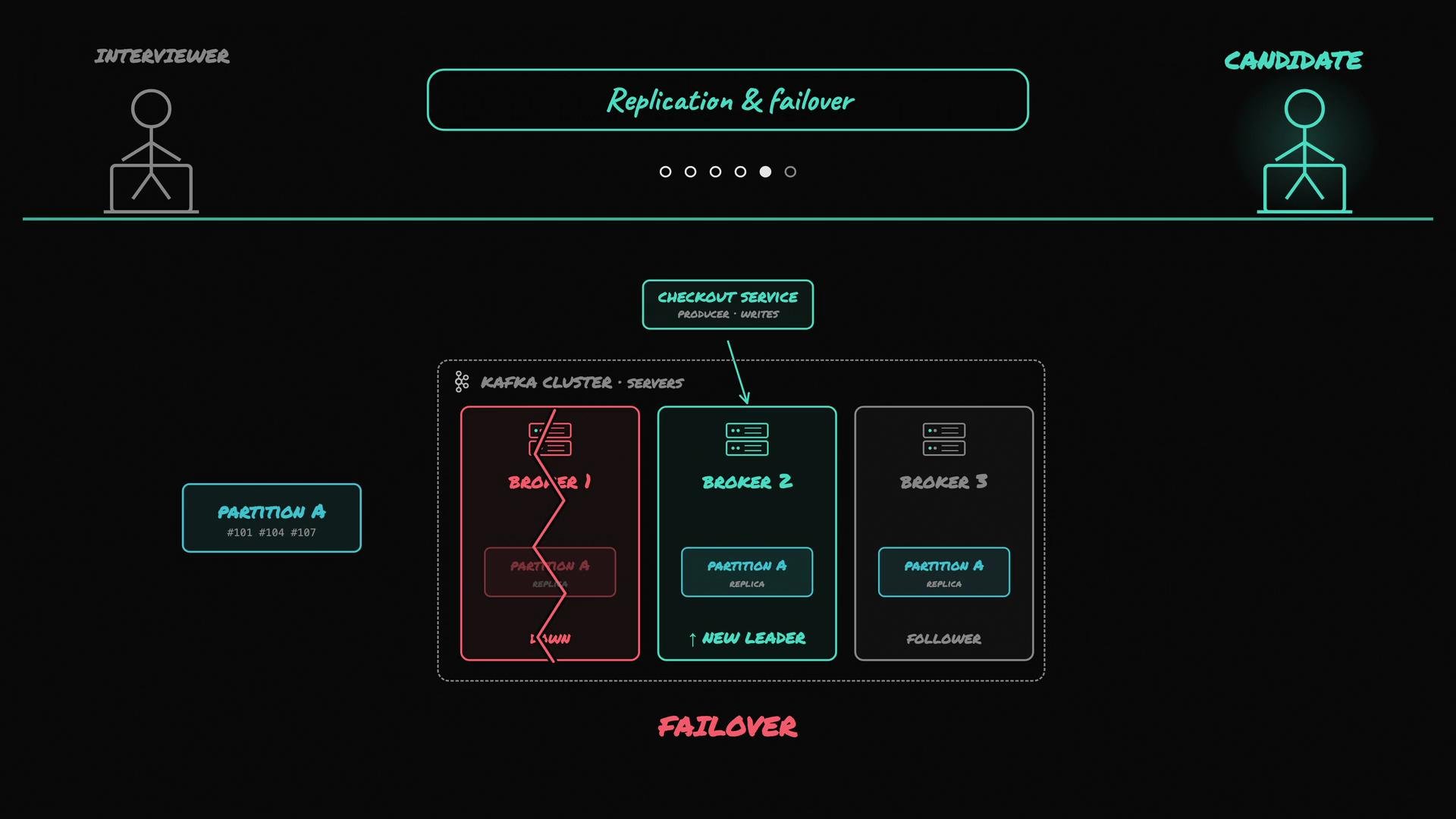 Replication is controlled by the replication factor (how many copies of each partition exist) and by which replicas are considered in-sync. Kafka promotes a new leader only from replicas that are up to date to avoid data loss.
## Delivery semantics and idempotency
By default, Kafka provides at-least-once delivery semantics: events are not lost, but in some failure scenarios they may be processed more than once.
Example of duplicate processing:
* Consumer reads order 101 and performs side effects (charge customer, send email).
* Before committing the offset, the consumer crashes.
* On restart, since the offset was not committed, the consumer reads order 101 again and executes the side effects again.
Because of this, consumers and downstream systems must be idempotent: processing the same event multiple times should not produce incorrect results (e.g., double charging). Idempotency strategies include:
* Use unique transaction or event IDs and deduplicate based on that ID.
* Implement idempotent APIs or business logic (e.g., mark an order as processed).
* Use Kafka’s idempotent producers and transactions to achieve stronger semantics (but these require additional configuration and careful design).
Replication is controlled by the replication factor (how many copies of each partition exist) and by which replicas are considered in-sync. Kafka promotes a new leader only from replicas that are up to date to avoid data loss.
## Delivery semantics and idempotency
By default, Kafka provides at-least-once delivery semantics: events are not lost, but in some failure scenarios they may be processed more than once.
Example of duplicate processing:
* Consumer reads order 101 and performs side effects (charge customer, send email).
* Before committing the offset, the consumer crashes.
* On restart, since the offset was not committed, the consumer reads order 101 again and executes the side effects again.
Because of this, consumers and downstream systems must be idempotent: processing the same event multiple times should not produce incorrect results (e.g., double charging). Idempotency strategies include:
* Use unique transaction or event IDs and deduplicate based on that ID.
* Implement idempotent APIs or business logic (e.g., mark an order as processed).
* Use Kafka’s idempotent producers and transactions to achieve stronger semantics (but these require additional configuration and careful design).
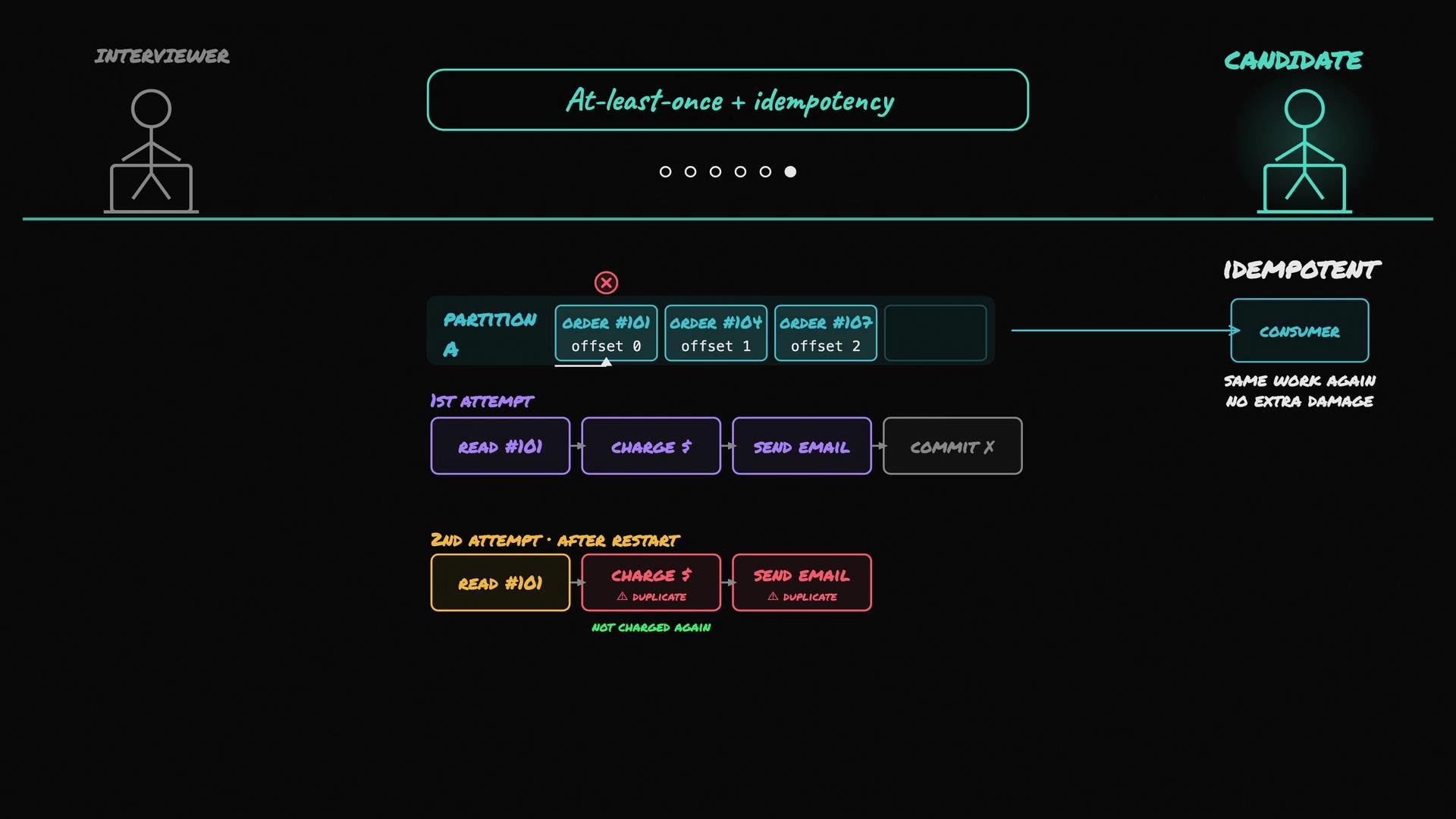 If your business cannot tolerate duplicates, design idempotent consumers or use Kafka’s stronger features (idempotent producers and transactions) to approach exactly-once semantics end-to-end. These features require additional configuration and careful design.
## Quick reference table
| Concept | Purpose | Example / Command |
| -----------------: | -------------------------------------------------------------- | ----------------------------------------------------------------- |
| Topic | Named stream of events | `checkout-orders` |
| Partition | Ordered subset of a topic for scale & parallelism | `--partitions 3` |
| Offset | Sequential position in a partition | Visible via `kafka-consumer-groups.sh --describe` |
| Consumer group | Coordinates consumers so each partition is read once per group | `--group email-service` |
| Replication | Redundancy for availability & failover | `--replication-factor 2` |
| Delivery semantics | Guarantees for message delivery | at-least-once (default); use transactions for stronger guarantees |
## Summary
* Kafka decouples producers from consumers and retains events for replay.
* Topics are split into partitions for scale and parallelism; ordering is guaranteed only within a partition.
* Consumer groups distribute partition consumption so each partition is read by one consumer instance in the group.
* Replication and leader election provide fault tolerance.
* Kafka defaults to at-least-once delivery; handle duplicates using idempotent consumers or adopt Kafka’s transactional features for stronger semantics.
## Links and references
* Apache Kafka documentation: [https://kafka.apache.org/documentation/](https://kafka.apache.org/documentation/)
* Kafka consumer groups and offsets: [https://kafka.apache.org/documentation/#consumerconfigs](https://kafka.apache.org/documentation/#consumerconfigs)
* Confluent blog—Kafka design and guarantees: [https://www.confluent.io/blog/](https://www.confluent.io/blog/)
If your business cannot tolerate duplicates, design idempotent consumers or use Kafka’s stronger features (idempotent producers and transactions) to approach exactly-once semantics end-to-end. These features require additional configuration and careful design.
## Quick reference table
| Concept | Purpose | Example / Command |
| -----------------: | -------------------------------------------------------------- | ----------------------------------------------------------------- |
| Topic | Named stream of events | `checkout-orders` |
| Partition | Ordered subset of a topic for scale & parallelism | `--partitions 3` |
| Offset | Sequential position in a partition | Visible via `kafka-consumer-groups.sh --describe` |
| Consumer group | Coordinates consumers so each partition is read once per group | `--group email-service` |
| Replication | Redundancy for availability & failover | `--replication-factor 2` |
| Delivery semantics | Guarantees for message delivery | at-least-once (default); use transactions for stronger guarantees |
## Summary
* Kafka decouples producers from consumers and retains events for replay.
* Topics are split into partitions for scale and parallelism; ordering is guaranteed only within a partition.
* Consumer groups distribute partition consumption so each partition is read by one consumer instance in the group.
* Replication and leader election provide fault tolerance.
* Kafka defaults to at-least-once delivery; handle duplicates using idempotent consumers or adopt Kafka’s transactional features for stronger semantics.
## Links and references
* Apache Kafka documentation: [https://kafka.apache.org/documentation/](https://kafka.apache.org/documentation/)
* Kafka consumer groups and offsets: [https://kafka.apache.org/documentation/#consumerconfigs](https://kafka.apache.org/documentation/#consumerconfigs)
* Confluent blog—Kafka design and guarantees: [https://www.confluent.io/blog/](https://www.confluent.io/blog/)