> ## Documentation Index
> Fetch the complete documentation index at: https://notes.kodekloud.com/llms.txt
> Use this file to discover all available pages before exploring further.
# What is Kubernetes
> Overview of Kubernetes fundamentals for DevOps interview covering desired state model, control plane components, scheduling, kubelet responsibilities, and running containerized workloads at scale.
In this lesson/article for a DevOps engineer interview, we’ll start with the fundamentals of Kubernetes and how it makes running containers at scale reliable and declarative.
What is Kubernetes?
Kubernetes is a control plane that runs containerized workloads across a fleet of machines and continuously reconciles the cluster to match the desired state you declare. Instead of specifying which machine should run a workload, you declare the desired outcome (for example, how many replicas of a service you want) and Kubernetes makes that happen — and keeps it that way.
Example: declare three replicas
```yaml theme={null}
# deployment.yaml
apiVersion: apps/v1
kind: Deployment
metadata:
name: my-app
spec:
replicas: 3
selector:
matchLabels:
app: my-app
template:
metadata:
labels:
app: my-app
spec:
containers:
- name: my-app
image: my-app:latest
resources:
requests:
memory: "2Gi"
cpu: "500m"
```
Apply the manifest to the cluster:
```bash theme={null}
kubectl apply -f deployment.yaml
```
After applying, Kubernetes will ensure three running pods that match your Deployment. If a node fails and a pod is lost, controllers detect the discrepancy and create another pod to restore the declared state. You declare the desired state; Kubernetes continuously works to reach and maintain it.
The control plane — the brain of Kubernetes
Several components together form the control plane. They coordinate to accept your desired state, store it, and reconcile the actual cluster state with that desired state.
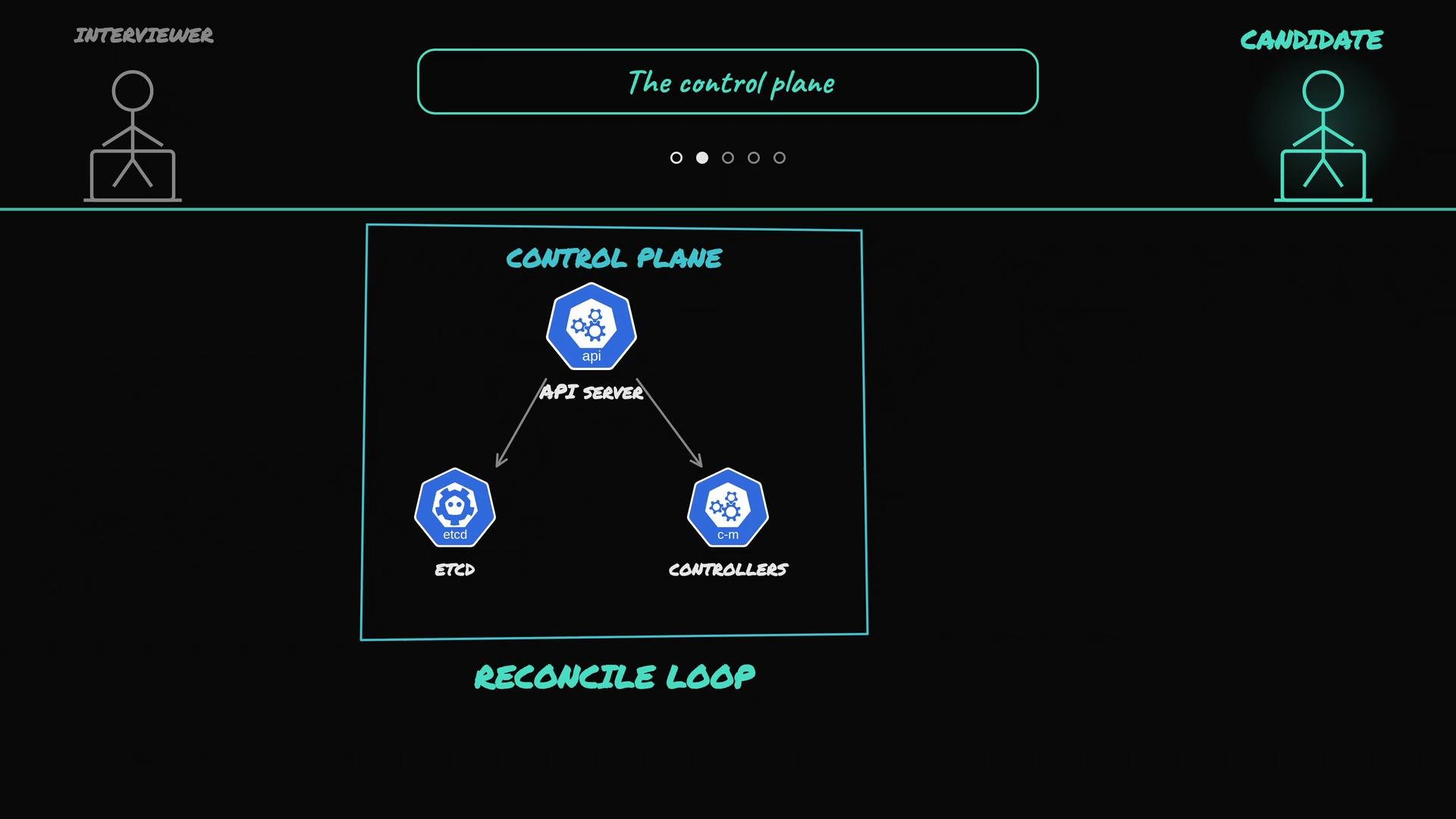 * API server: the front door for all requests and the primary interface for components and users. Every command and component talks to the API server.
* etcd: the distributed key-value store where Kubernetes persists cluster state (both desired and observed).
* Controllers: control loops that continuously compare desired state vs. actual state and take actions to reconcile them.
* Scheduler: assigns pods to appropriate nodes based on resource needs, affinity/anti-affinity, taints/tolerations, and other constraints.
* Kubelet: the node agent that ensures containers for assigned pods are running on a specific node.
Quick reference table
| Component | Primary role | Responsibilities |
| ----------- | ------------------------ | ----------------------------------------------------------------------------- |
| API server | Cluster frontend | Accepts RESTful requests, validates & persists objects |
| `etcd` | Cluster storage | Stores desired and observed cluster state |
| Controllers | Reconciliation loops | Watch API state and create/update/delete resources to match the desired state |
| Scheduler | Placement decision maker | Chooses the best node for unscheduled pods |
| Kubelet | Node agent | Starts containers, configures networking, and reports status |
etcd stores both:
* the desired state you submit (for example, the `Deployment` with `replicas: 3`), and
* the current observed state of the cluster.
Controllers are declarative reconcilers: they continuously observe API state and make changes until the cluster matches the desired specification.
Scheduling: how Kubernetes picks a node
* API server: the front door for all requests and the primary interface for components and users. Every command and component talks to the API server.
* etcd: the distributed key-value store where Kubernetes persists cluster state (both desired and observed).
* Controllers: control loops that continuously compare desired state vs. actual state and take actions to reconcile them.
* Scheduler: assigns pods to appropriate nodes based on resource needs, affinity/anti-affinity, taints/tolerations, and other constraints.
* Kubelet: the node agent that ensures containers for assigned pods are running on a specific node.
Quick reference table
| Component | Primary role | Responsibilities |
| ----------- | ------------------------ | ----------------------------------------------------------------------------- |
| API server | Cluster frontend | Accepts RESTful requests, validates & persists objects |
| `etcd` | Cluster storage | Stores desired and observed cluster state |
| Controllers | Reconciliation loops | Watch API state and create/update/delete resources to match the desired state |
| Scheduler | Placement decision maker | Chooses the best node for unscheduled pods |
| Kubelet | Node agent | Starts containers, configures networking, and reports status |
etcd stores both:
* the desired state you submit (for example, the `Deployment` with `replicas: 3`), and
* the current observed state of the cluster.
Controllers are declarative reconcilers: they continuously observe API state and make changes until the cluster matches the desired specification.
Scheduling: how Kubernetes picks a node
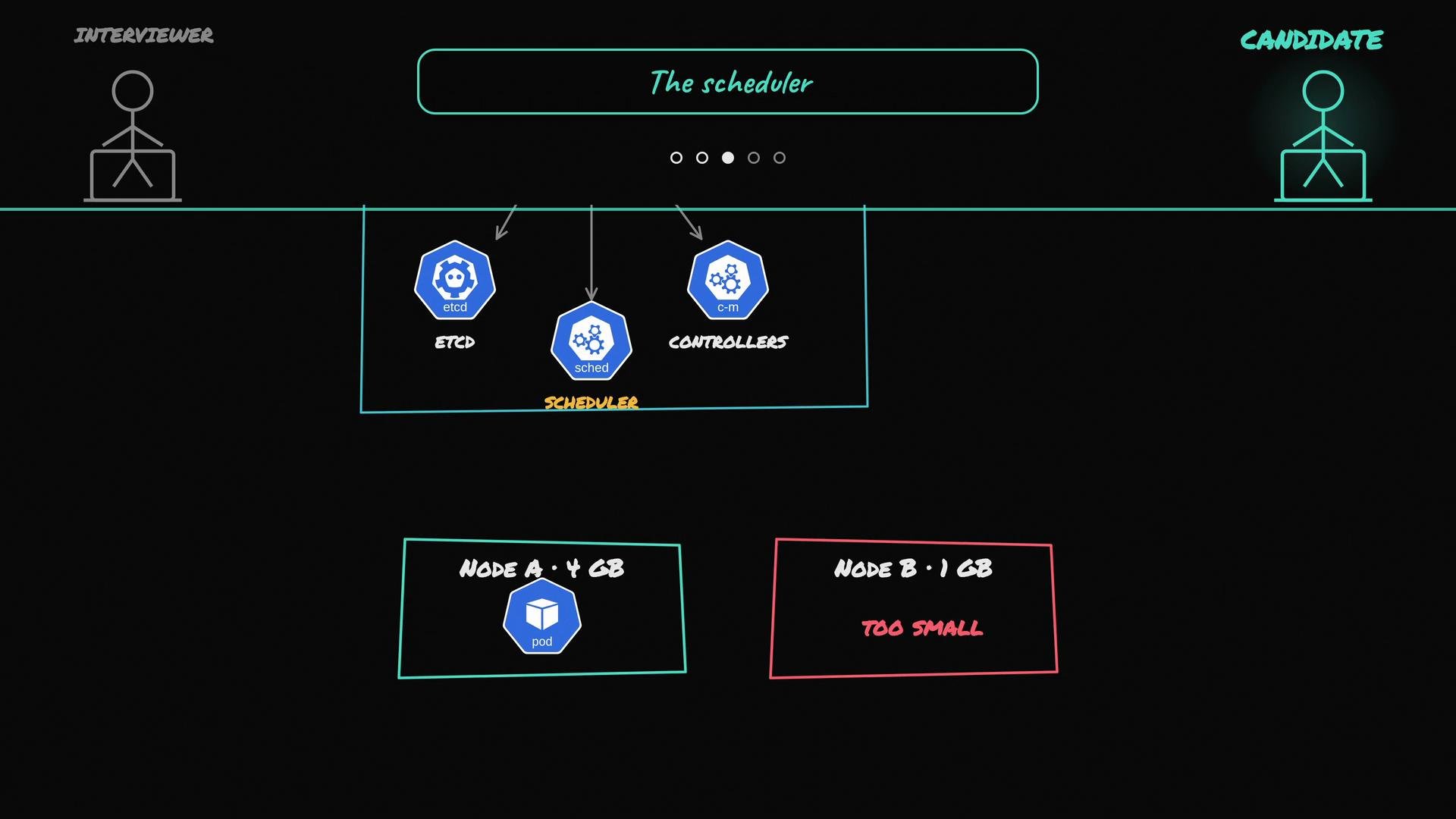 When a pod is created, it initially exists in the API server in an unscheduled state (no `nodeName` set). The scheduler watches for unscheduled pods and processes each in two main phases:
1. Filter (pre-score): Exclude nodes that cannot run the pod. Filters include:
* Insufficient CPU/memory or other resource constraints
* Taints on nodes that the pod does not tolerate
* Node selectors, node affinity, or other constraints
2. Score (prioritize): Rank the remaining nodes using scoring rules — for example, packing vs. balanced placement, affinity/anti-affinity, or custom scoring plugins — and pick the best fit.
Once a node is chosen, the scheduler writes the chosen node’s name into the PodSpec via the API server. The scheduler decides placement only; it does not start containers.
Kubelet: making scheduling decisions real on a node
When a pod is created, it initially exists in the API server in an unscheduled state (no `nodeName` set). The scheduler watches for unscheduled pods and processes each in two main phases:
1. Filter (pre-score): Exclude nodes that cannot run the pod. Filters include:
* Insufficient CPU/memory or other resource constraints
* Taints on nodes that the pod does not tolerate
* Node selectors, node affinity, or other constraints
2. Score (prioritize): Rank the remaining nodes using scoring rules — for example, packing vs. balanced placement, affinity/anti-affinity, or custom scoring plugins — and pick the best fit.
Once a node is chosen, the scheduler writes the chosen node’s name into the PodSpec via the API server. The scheduler decides placement only; it does not start containers.
Kubelet: making scheduling decisions real on a node
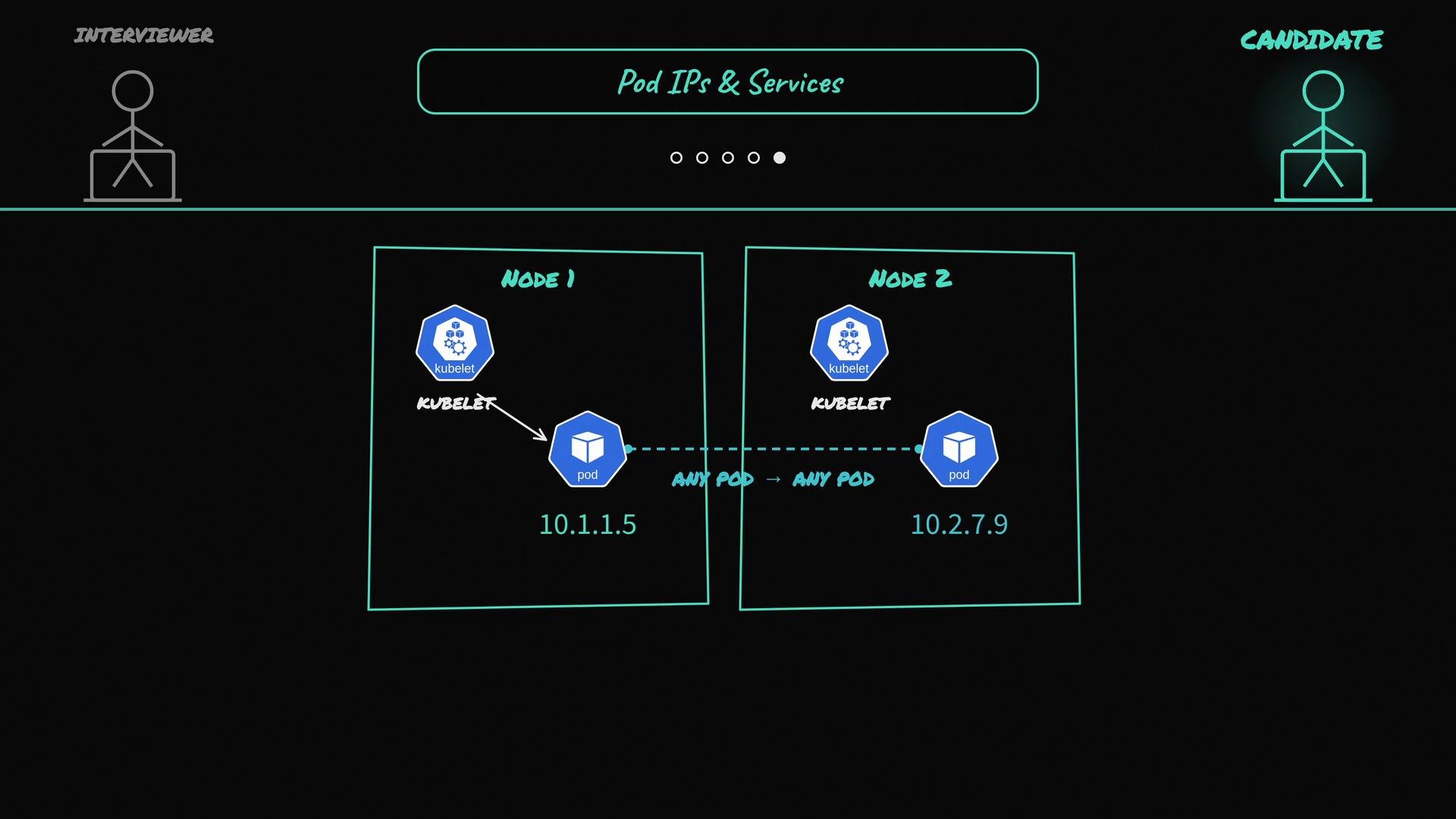 When a pod becomes assigned to a node, the kubelet on that node notices the new PodSpec via the API server. The kubelet:
* Pulls container images using the container runtime (for example, `containerd`).
* Starts and supervises containers for the pod.
* Configures pod networking and mounts volumes.
* Periodically reports pod and node status back to the API server.
Together: the control loop
The core control loop of Kubernetes can be summarized as:
1. You declare the desired state (create a Deployment, Service, etc.).
2. The API server stores the spec in `etcd`.
3. Controllers and the scheduler watch the API, compare desired vs actual state, and take actions (create pods, assign nodes).
4. Kubelets on nodes execute the runtime actions to realize the desired state and report status.
5. Controllers continue reconciling until the actual state matches the desired state.
Further reading and references
* [Kubernetes Basics](https://kubernetes.io/docs/concepts/overview/what-is-kubernetes/)
* [kube-scheduler concept](https://kubernetes.io/docs/concepts/scheduling-eviction/kube-scheduler/)
* [kubelet documentation](https://kubernetes.io/docs/reference/command-line-tools-reference/kubelet/)
* [etcd documentation](https://etcd.io/docs/)
This overview is a compact refresher ideal for interview prep: explain the desired-state model, name the core control plane components, and describe the scheduler + kubelet flow end-to-end.
When a pod becomes assigned to a node, the kubelet on that node notices the new PodSpec via the API server. The kubelet:
* Pulls container images using the container runtime (for example, `containerd`).
* Starts and supervises containers for the pod.
* Configures pod networking and mounts volumes.
* Periodically reports pod and node status back to the API server.
Together: the control loop
The core control loop of Kubernetes can be summarized as:
1. You declare the desired state (create a Deployment, Service, etc.).
2. The API server stores the spec in `etcd`.
3. Controllers and the scheduler watch the API, compare desired vs actual state, and take actions (create pods, assign nodes).
4. Kubelets on nodes execute the runtime actions to realize the desired state and report status.
5. Controllers continue reconciling until the actual state matches the desired state.
Further reading and references
* [Kubernetes Basics](https://kubernetes.io/docs/concepts/overview/what-is-kubernetes/)
* [kube-scheduler concept](https://kubernetes.io/docs/concepts/scheduling-eviction/kube-scheduler/)
* [kubelet documentation](https://kubernetes.io/docs/reference/command-line-tools-reference/kubelet/)
* [etcd documentation](https://etcd.io/docs/)
This overview is a compact refresher ideal for interview prep: explain the desired-state model, name the core control plane components, and describe the scheduler + kubelet flow end-to-end.