> ## Documentation Index
> Fetch the complete documentation index at: https://notes.kodekloud.com/llms.txt
> Use this file to discover all available pages before exploring further.
# DNS Failing in Pods
> Guide to diagnosing and troubleshooting DNS resolution failures in Kubernetes pods with lookup flows, debugging steps, example outputs, and a concise troubleshooting checklist.
A common Kubernetes interview and on-call scenario: a pod cannot resolve DNS names. This guide walks through why DNS is critical in Kubernetes, how DNS lookups flow, quick debugging steps, example outputs, and a concise troubleshooting checklist to help you find the root cause quickly.
Why DNS matters in Kubernetes
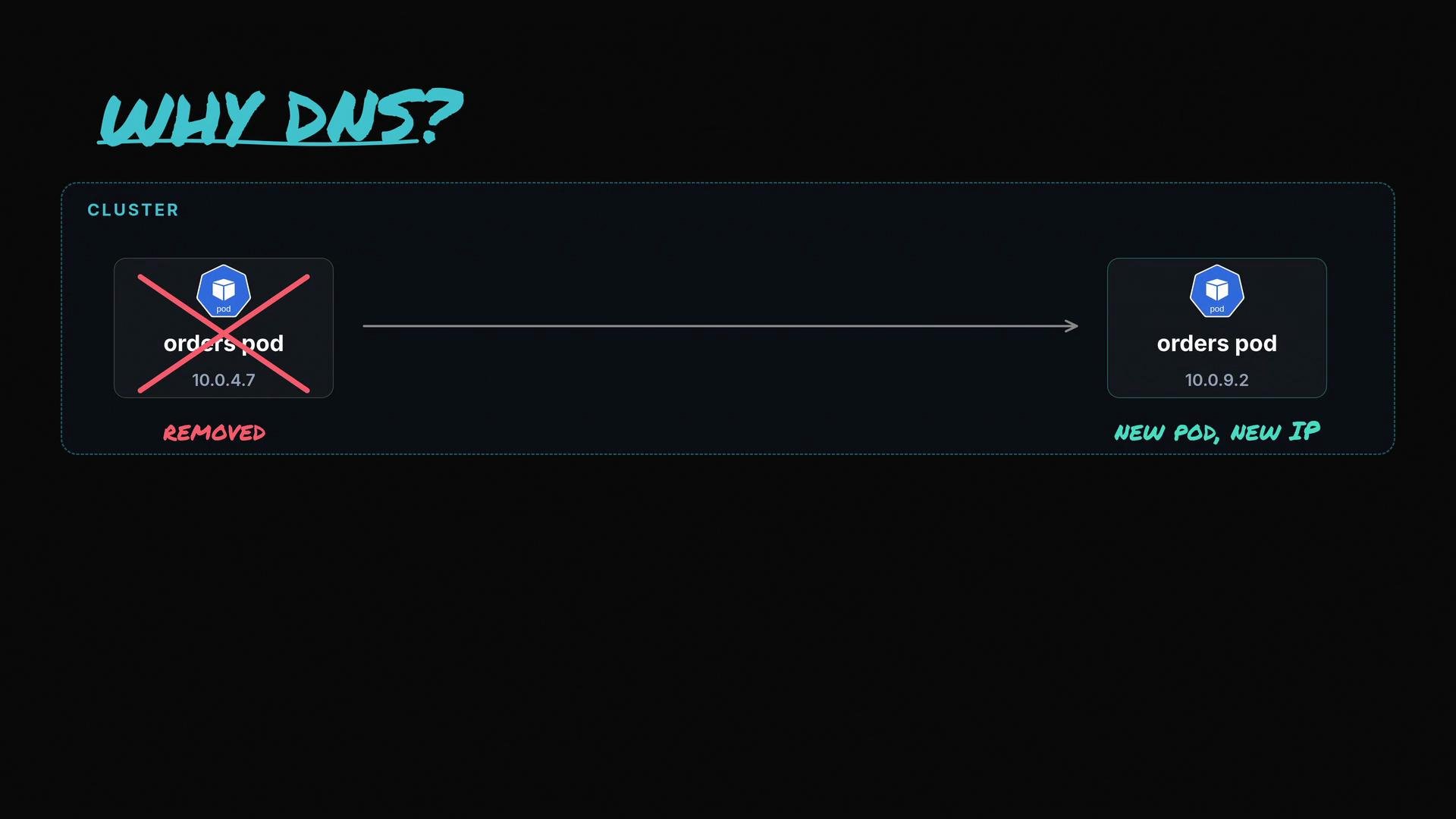
* Pods and Services in Kubernetes rarely rely on fixed IPs; they use DNS names because the cluster is dynamic—pods are recreated and IPs change.
* When a pod needs to contact another service or external host, it asks the cluster DNS (CoreDNS) to translate a human-readable name into an IP address. If DNS fails, service discovery and inter-pod communication break.
 How a DNS lookup flows in Kubernetes
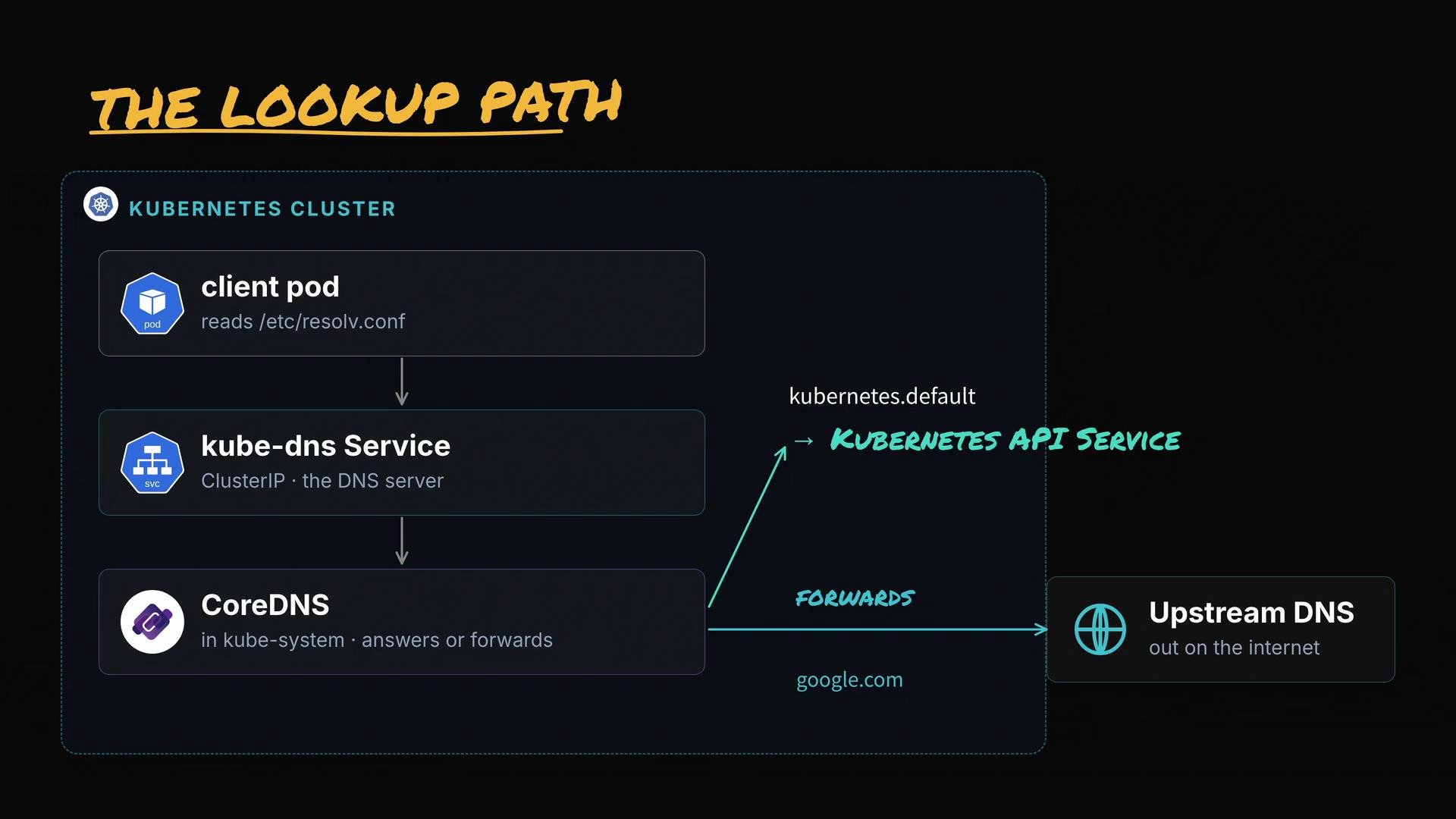
* A pod reads `/etc/resolv.conf` to determine which nameserver to query.
* Typically the configured nameserver is the `kube-dns` Service ClusterIP (for example, `10.96.0.10`), which forwards the query to a CoreDNS pod.
* CoreDNS resolves Kubernetes-internal names (for example, `kubernetes.default.svc.cluster.local`) and forwards external queries to upstream resolvers for internet names.
How a DNS lookup flows in Kubernetes
* A pod reads `/etc/resolv.conf` to determine which nameserver to query.
* Typically the configured nameserver is the `kube-dns` Service ClusterIP (for example, `10.96.0.10`), which forwards the query to a CoreDNS pod.
* CoreDNS resolves Kubernetes-internal names (for example, `kubernetes.default.svc.cluster.local`) and forwards external queries to upstream resolvers for internet names.
 Quick debugging tip — two lookups to isolate the problem
From inside the failing pod, run two DNS lookups:
1. `kubernetes.default` — verifies cluster-internal DNS (the Kubernetes API Service always exists and should resolve through cluster DNS).
2. `google.com` — verifies external resolution / DNS forwarding to upstream servers.
Run these lookups from inside the failing pod. For example, open a shell into the pod and run nslookup:
* `kubectl exec -it -- sh` (then run nslookup inside the shell), or
* `kubectl exec -it -- nslookup ` (if nslookup is available in the image).
If the pod image lacks DNS utilities, run a temporary debug pod that includes them:
* `kubectl run -i --tty --rm debug --image=nicolaka/netshoot -- /bin/bash`
or use a lightweight image such as busybox that includes basic DNS tools.
Example lookups
```bash theme={null}
$ nslookup kubernetes.default
Server: 10.96.0.10
Name: kubernetes.default.svc.cluster.local
Address: 10.96.0.1
$ nslookup google.com
Server: 10.96.0.10
Name: google.com
Address: 142.250.4.100
```
Interpreting results — mapping symptoms to next checks
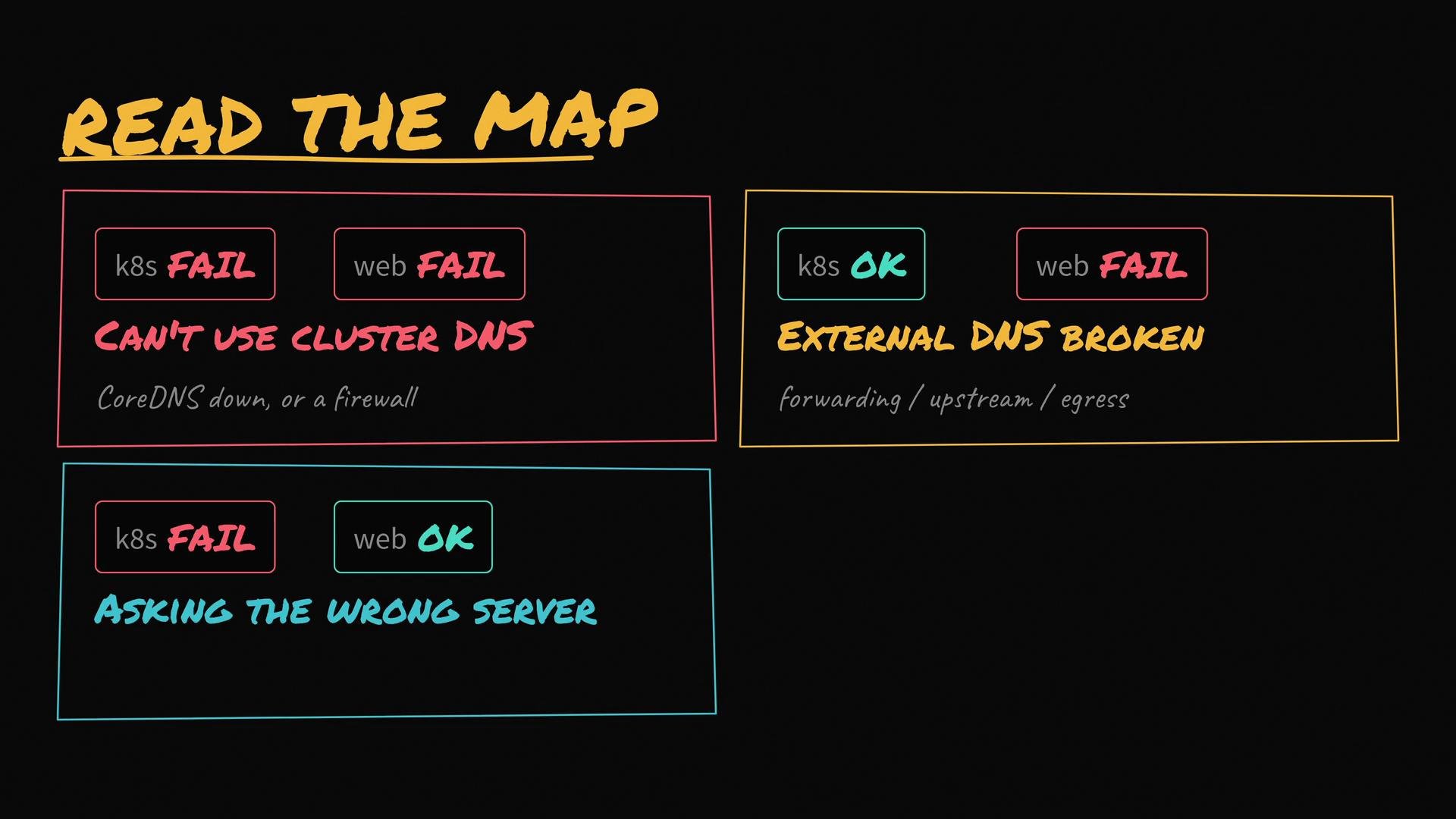
* Both lookups fail
* Symptom: Pod cannot reach cluster DNS at all.
* Likely causes: CoreDNS pods down, `kube-dns` Service missing, network policy/firewall blocking DNS, or incorrect `/etc/resolv.conf`.
* Next checks: CoreDNS pod health/logs, `kube-dns` Service & endpoints, pod `resolv.conf`, cluster network rules.
* `kubernetes.default` succeeds, `google.com` fails
* Symptom: Cluster DNS resolves internal names but cannot forward external queries.
* Likely causes: CoreDNS forwarding misconfigured, upstream resolvers unreachable, firewall blocking outbound DNS.
* Next checks: CoreDNS `Corefile`, upstream resolvers, node egress access.
* `kubernetes.default` fails, `google.com` succeeds
* Symptom: The pod reaches some DNS server but not the cluster DNS.
* Likely causes: Pod uses node or external resolver instead of `kube-dns`, `dnsPolicy` overridden in pod spec, or `resolv.conf` has wrong nameserver.
* Next checks: Inspect `/etc/resolv.conf` inside pod, check pod spec `dnsPolicy` and `dnsConfig`, validate node-level DNS settings.
* Both succeed but DNS is slow
* Symptom: Resolution works but with high latency.
* Likely causes: CoreDNS overloaded, too many queries, or slow upstream resolvers.
* Next checks: CoreDNS metrics/CPU/memory, rate-limiting, caching, or upstream performance.
Troubleshooting checklist and commands
* Check pod resolv.conf:
* `kubectl exec -it -- cat /etc/resolv.conf`
* Check CoreDNS pods and logs:
* `kubectl -n kube-system get pods -l k8s-app=kube-dns`
* (Some clusters use `k8s-app=coredns`) `kubectl -n kube-system logs `
* Verify `kube-dns` Service and endpoints:
* `kubectl -n kube-system get svc kube-dns -o yaml`
* `kubectl -n kube-system get endpoints kube-dns -o yaml`
* Run DNS lookups from a debug pod:
* `kubectl run -i --tty --rm debug --image=nicolaka/netshoot -- /bin/bash`
* From inside: `nslookup kubernetes.default` and `nslookup google.com`
* Inspect network policies / iptables / kube-proxy if DNS requests are being dropped or redirected:
* `iptables -t nat -L -n -v` (run on affected node) — trace kube-proxy rules if necessary.
Table: Common DNS failure modes and checks
| Symptom | Probable cause | Quick checks & commands |
| --------------------------------------- | ------------------------------------------------------ | ----------------------------------------------------------------------------------------------------------- |
| No DNS at all (timeouts) | CoreDNS crashed, Service missing, network blocking DNS | `kubectl -n kube-system get pods -l k8s-app=kube-dns`
Quick debugging tip — two lookups to isolate the problem
From inside the failing pod, run two DNS lookups:
1. `kubernetes.default` — verifies cluster-internal DNS (the Kubernetes API Service always exists and should resolve through cluster DNS).
2. `google.com` — verifies external resolution / DNS forwarding to upstream servers.
Run these lookups from inside the failing pod. For example, open a shell into the pod and run nslookup:
* `kubectl exec -it -- sh` (then run nslookup inside the shell), or
* `kubectl exec -it -- nslookup ` (if nslookup is available in the image).
If the pod image lacks DNS utilities, run a temporary debug pod that includes them:
* `kubectl run -i --tty --rm debug --image=nicolaka/netshoot -- /bin/bash`
or use a lightweight image such as busybox that includes basic DNS tools.
Example lookups
```bash theme={null}
$ nslookup kubernetes.default
Server: 10.96.0.10
Name: kubernetes.default.svc.cluster.local
Address: 10.96.0.1
$ nslookup google.com
Server: 10.96.0.10
Name: google.com
Address: 142.250.4.100
```
Interpreting results — mapping symptoms to next checks
* Both lookups fail
* Symptom: Pod cannot reach cluster DNS at all.
* Likely causes: CoreDNS pods down, `kube-dns` Service missing, network policy/firewall blocking DNS, or incorrect `/etc/resolv.conf`.
* Next checks: CoreDNS pod health/logs, `kube-dns` Service & endpoints, pod `resolv.conf`, cluster network rules.
* `kubernetes.default` succeeds, `google.com` fails
* Symptom: Cluster DNS resolves internal names but cannot forward external queries.
* Likely causes: CoreDNS forwarding misconfigured, upstream resolvers unreachable, firewall blocking outbound DNS.
* Next checks: CoreDNS `Corefile`, upstream resolvers, node egress access.
* `kubernetes.default` fails, `google.com` succeeds
* Symptom: The pod reaches some DNS server but not the cluster DNS.
* Likely causes: Pod uses node or external resolver instead of `kube-dns`, `dnsPolicy` overridden in pod spec, or `resolv.conf` has wrong nameserver.
* Next checks: Inspect `/etc/resolv.conf` inside pod, check pod spec `dnsPolicy` and `dnsConfig`, validate node-level DNS settings.
* Both succeed but DNS is slow
* Symptom: Resolution works but with high latency.
* Likely causes: CoreDNS overloaded, too many queries, or slow upstream resolvers.
* Next checks: CoreDNS metrics/CPU/memory, rate-limiting, caching, or upstream performance.
Troubleshooting checklist and commands
* Check pod resolv.conf:
* `kubectl exec -it -- cat /etc/resolv.conf`
* Check CoreDNS pods and logs:
* `kubectl -n kube-system get pods -l k8s-app=kube-dns`
* (Some clusters use `k8s-app=coredns`) `kubectl -n kube-system logs `
* Verify `kube-dns` Service and endpoints:
* `kubectl -n kube-system get svc kube-dns -o yaml`
* `kubectl -n kube-system get endpoints kube-dns -o yaml`
* Run DNS lookups from a debug pod:
* `kubectl run -i --tty --rm debug --image=nicolaka/netshoot -- /bin/bash`
* From inside: `nslookup kubernetes.default` and `nslookup google.com`
* Inspect network policies / iptables / kube-proxy if DNS requests are being dropped or redirected:
* `iptables -t nat -L -n -v` (run on affected node) — trace kube-proxy rules if necessary.
Table: Common DNS failure modes and checks
| Symptom | Probable cause | Quick checks & commands |
| --------------------------------------- | ------------------------------------------------------ | ----------------------------------------------------------------------------------------------------------- |
| No DNS at all (timeouts) | CoreDNS crashed, Service missing, network blocking DNS | `kubectl -n kube-system get pods -l k8s-app=kube-dns`
`kubectl -n kube-system describe svc kube-dns` |
| Internal names resolve, external do not | CoreDNS forwarding to upstream broken | Check CoreDNS `Corefile` and upstream servers: `kubectl -n kube-system describe configmap coredns` |
| External resolves, internal does not | Pod not using cluster DNS | `kubectl exec -it -- cat /etc/resolv.conf`
Check pod `dnsPolicy` in spec |
| Intermittent or slow resolution | Resource exhaustion or upstream slowness | `kubectl -n kube-system top pod` (CoreDNS)
Check CoreDNS logs and metrics |
Watch for specific error responses
* "no such host" — CoreDNS returned NXDOMAIN; the name truly doesn't exist in the queried domain.
* Timeout — the pod never reached the DNS server (network or nameserver misconfiguration).
 Further diagnostic steps and tracing
* Trace requests through iptables/kube-proxy if DNS packets are being redirected or dropped.
* Use CoreDNS logs to inspect failed queries and forwarding errors:
* `kubectl -n kube-system logs `
* If DNS appears to work but service discovery fails, trace connection paths from the client pod to the target service IP and check kube-proxy rules, service endpoints, and target pod readiness.
Be cautious when editing cluster DNS settings. Incorrect changes to CoreDNS `ConfigMap` or Service cluster IPs can disrupt all name resolution in the cluster. Always test changes in a staging environment and keep backups of configuration before editing.
Useful links and references
* [Kubernetes DNS concepts](https://kubernetes.io/docs/concepts/services-networking/dns-pod-service/)
* [CoreDNS documentation](https://coredns.io/)
* [Troubleshooting DNS in Kubernetes (guide)](https://kubernetes.io/docs/tasks/administer-cluster/dns-debugging-resolution/)
Summary
Two quick lookups—one for a known internal name (`kubernetes.default`) and one for an internet name (`google.com`)—rapidly pinpoint whether the problem is cluster DNS, forwarding, or pod-level configuration. From there, inspect `/etc/resolv.conf`, CoreDNS pods and ConfigMap, `kube-dns` Service and endpoints, and any network rules that could interfere with DNS traffic.
Further diagnostic steps and tracing
* Trace requests through iptables/kube-proxy if DNS packets are being redirected or dropped.
* Use CoreDNS logs to inspect failed queries and forwarding errors:
* `kubectl -n kube-system logs `
* If DNS appears to work but service discovery fails, trace connection paths from the client pod to the target service IP and check kube-proxy rules, service endpoints, and target pod readiness.
Be cautious when editing cluster DNS settings. Incorrect changes to CoreDNS `ConfigMap` or Service cluster IPs can disrupt all name resolution in the cluster. Always test changes in a staging environment and keep backups of configuration before editing.
Useful links and references
* [Kubernetes DNS concepts](https://kubernetes.io/docs/concepts/services-networking/dns-pod-service/)
* [CoreDNS documentation](https://coredns.io/)
* [Troubleshooting DNS in Kubernetes (guide)](https://kubernetes.io/docs/tasks/administer-cluster/dns-debugging-resolution/)
Summary
Two quick lookups—one for a known internal name (`kubernetes.default`) and one for an internet name (`google.com`)—rapidly pinpoint whether the problem is cluster DNS, forwarding, or pod-level configuration. From there, inspect `/etc/resolv.conf`, CoreDNS pods and ConfigMap, `kube-dns` Service and endpoints, and any network rules that could interfere with DNS traffic.