> ## Documentation Index
> Fetch the complete documentation index at: https://notes.kodekloud.com/llms.txt
> Use this file to discover all available pages before exploring further.
# Managed vs Self Managed Kubernetes
> Comparison of managed, self-managed, and lightweight Kubernetes hosting options highlighting trade-offs in control, cost, operational burden, and compliance to guide deployment decisions
The hardest Kubernetes question isn't how to use it — it's how to host it.
A common early decision for teams adopting Kubernetes is whether to use a managed control plane (for example, AWS EKS, Google GKE, or Azure AKS) or to run and operate Kubernetes themselves. Each approach makes different trade-offs across cost, control, operational burden, and compliance.
Below is a clear breakdown to help you decide which option fits your team and workload.
## What “Managed Kubernetes” means
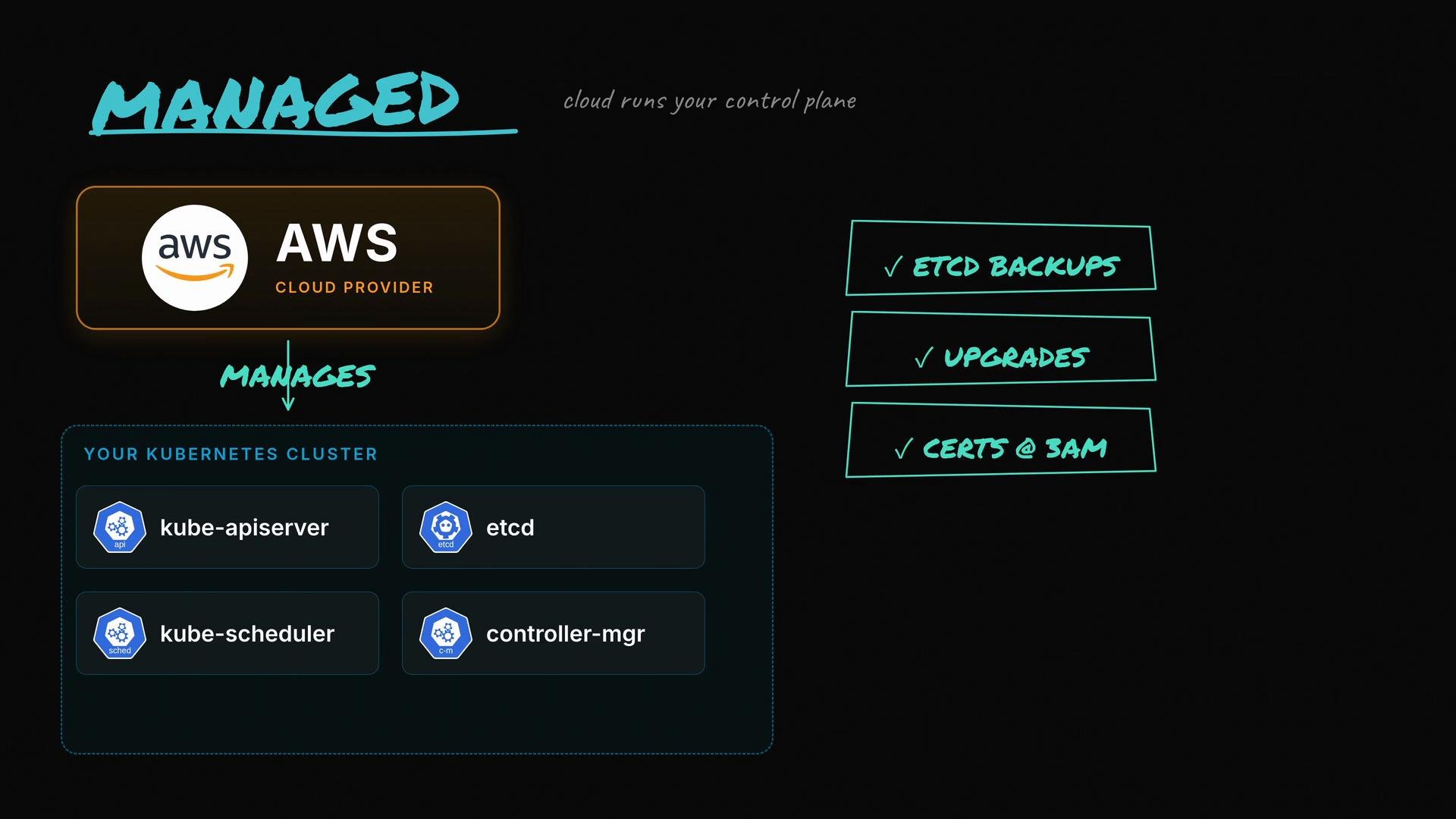
With a managed Kubernetes service, the cloud provider operates the control plane on your behalf. That typically includes running and maintaining the API servers, etcd, the scheduler, controller-manager, and many of the surrounding operational tasks such as backups, upgrades, and certificate rotation. Managed services reduce on-call load because many paging incidents tied to control-plane components are handled by the provider.
 Key managed offerings:
* AWS EKS — managed control plane with worker node options (managed node groups, Fargate).
* Google GKE — integrated control plane plus autopilot options.
* Azure AKS — managed control plane with Windows node support.
Useful links:
* [Kubernetes official concepts](https://kubernetes.io/docs/concepts/overview/what-is-kubernetes/)
* [AWS EKS](https://learn.kodekloud.com/user/courses/aws-eks)
* [Google GKE](https://learn.kodekloud.com/user/courses/gke-google-kubernetes-engine)
* [Azure AKS](https://learn.kodekloud.com/user/courses/azure-kubernetes-service)
## What “Self-Managed Kubernetes” means
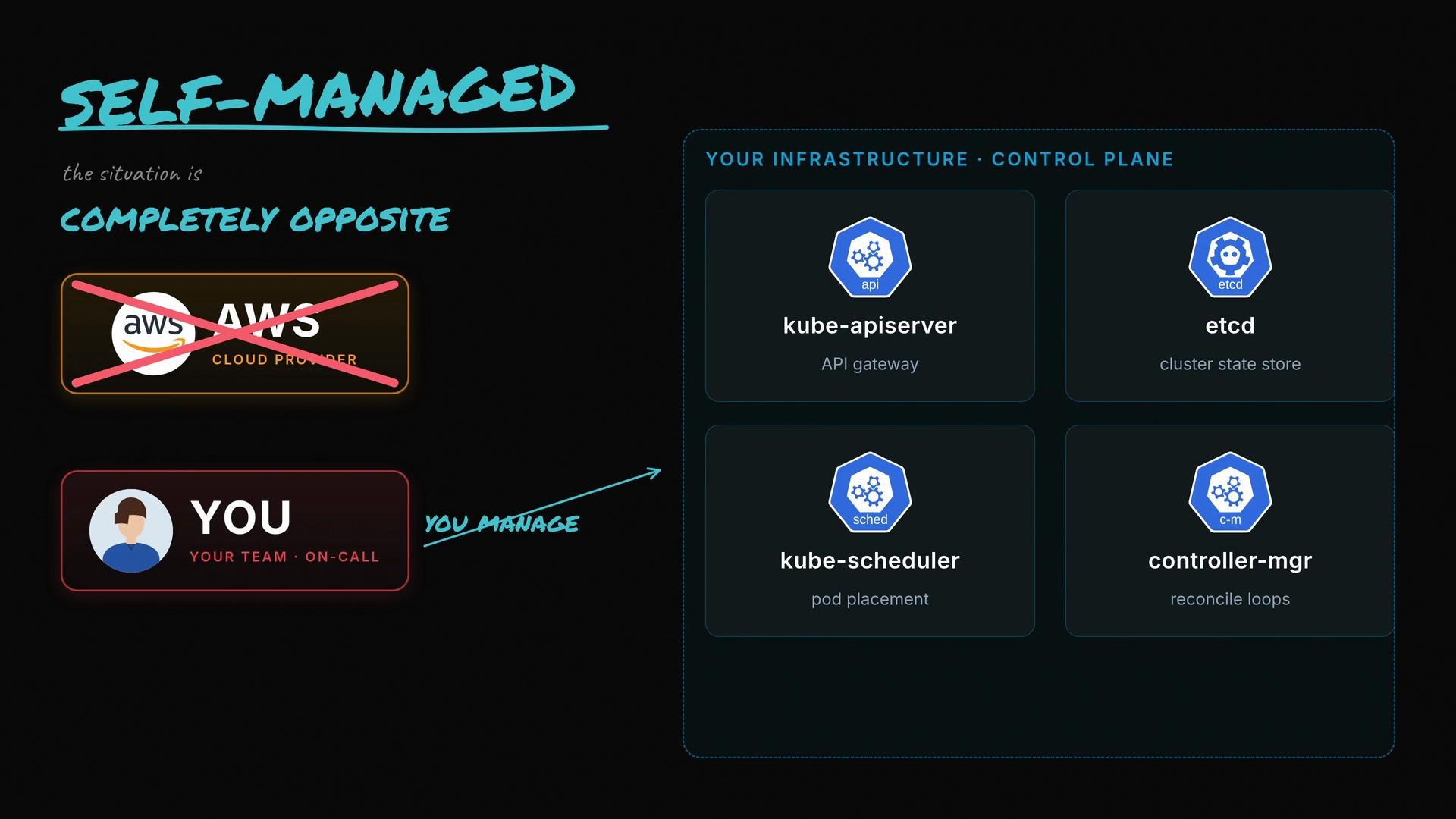
In a self-managed deployment you run your own control plane components: API servers, etcd, scheduler, controller-manager, backups, upgrades, monitoring, and on-call support. This gives you full control and customization but also increases operational complexity and responsibility. Teams that need bespoke control-plane configuration or want to avoid provider-specific limitations often choose this route.
Key managed offerings:
* AWS EKS — managed control plane with worker node options (managed node groups, Fargate).
* Google GKE — integrated control plane plus autopilot options.
* Azure AKS — managed control plane with Windows node support.
Useful links:
* [Kubernetes official concepts](https://kubernetes.io/docs/concepts/overview/what-is-kubernetes/)
* [AWS EKS](https://learn.kodekloud.com/user/courses/aws-eks)
* [Google GKE](https://learn.kodekloud.com/user/courses/gke-google-kubernetes-engine)
* [Azure AKS](https://learn.kodekloud.com/user/courses/azure-kubernetes-service)
## What “Self-Managed Kubernetes” means
In a self-managed deployment you run your own control plane components: API servers, etcd, scheduler, controller-manager, backups, upgrades, monitoring, and on-call support. This gives you full control and customization but also increases operational complexity and responsibility. Teams that need bespoke control-plane configuration or want to avoid provider-specific limitations often choose this route.
 Self-managed is commonly chosen when:
* You require specific control-plane configurations or experimental Kubernetes features.
* You need to run Kubernetes on-premises or in a hybrid environment.
* Compliance or data residency rules restrict provider-managed control planes.
## A middle ground: Lightweight & opinionated distributions
There’s also a middle ground between fully managed and raw upstream installations. Lightweight or opinionated distributions like K3s, RKE2, and Talos reduce the operational surface and resource footprint while still giving teams more control than a managed service. They are often chosen for edge deployments, single-board computers, or teams wanting simpler ops without fully outsourcing the control plane.
Examples:
* K3s — lightweight, single binary distribution for constrained environments. ([https://k3s.io](https://k3s.io))
* RKE2 — Rancher’s hardened Kubernetes distribution. ([https://rke2.io](https://rke2.io))
* Talos — immutable OS for Kubernetes with strong security defaults. ([https://www.talos.dev](https://www.talos.dev))
When choosing between managed, self-managed, or a lightweight distribution, weigh team expertise, operational bandwidth, compliance requirements, cost sensitivity, and how much control or customization you need.
## Quick comparison of common trade-offs
| Option | Pros | Cons | Best for |
| -------------------------------------------- | ----------------------------------------------------------------------------------------------------------- | ---------------------------------------------------------------------------------------------- | ---------------------------------------------------------------------------------------------- |
| Managed (EKS / GKE / AKS) | Provider-operated control plane; automatic control-plane upgrades; provider-backed SLAs; reduced ops burden | Higher cost; less low-level control; possible provider-specific features/lock-in | Teams wanting to minimize operational overhead and focus on application delivery |
| Self-Managed (Upstream Kubernetes) | Full control over configuration, versions, and extensions; no managed-service constraints | Responsible for HA, etcd backups, upgrades, security, monitoring, on-call; higher ops overhead | Teams needing full control, custom configurations, or on-premises deployments |
| Lightweight / Opinionated (K3s, RKE2, Talos) | Simpler operations than raw upstream; lower resource footprint; faster bootstrap | Differences from upstream behavior; potential compatibility issues with some tooling | Edge, constrained environments, or teams seeking a simpler control plane with control retained |
## Operational considerations checklist
* Team and on-call capacity: Do you have SRE/ops capacity to run control plane and etcd 24/7?
* Compliance and data residency: Are there regulations requiring you to run control plane components in-house?
* Cost model: Compare managed-service pricing versus the cost of hiring ops personnel and running servers.
* Upgrade/backup strategy: Who will handle etcd backups, cluster upgrades, and recovery testing?
* Integrations and tooling: Do you rely on ecosystem tools that expect upstream behavior, or are you flexible?
## Final thoughts
There is no one-size-fits-all answer. Some teams accept the cloud premium to avoid operational load; others take on the control plane to gain flexibility and avoid lock-in. Lightweight distributions provide a useful compromise in many scenarios.
Which side are you on, and what drove your decision? If you've ever migrated between approaches, what lessons did you take away from that migration?
Self-managed is commonly chosen when:
* You require specific control-plane configurations or experimental Kubernetes features.
* You need to run Kubernetes on-premises or in a hybrid environment.
* Compliance or data residency rules restrict provider-managed control planes.
## A middle ground: Lightweight & opinionated distributions
There’s also a middle ground between fully managed and raw upstream installations. Lightweight or opinionated distributions like K3s, RKE2, and Talos reduce the operational surface and resource footprint while still giving teams more control than a managed service. They are often chosen for edge deployments, single-board computers, or teams wanting simpler ops without fully outsourcing the control plane.
Examples:
* K3s — lightweight, single binary distribution for constrained environments. ([https://k3s.io](https://k3s.io))
* RKE2 — Rancher’s hardened Kubernetes distribution. ([https://rke2.io](https://rke2.io))
* Talos — immutable OS for Kubernetes with strong security defaults. ([https://www.talos.dev](https://www.talos.dev))
When choosing between managed, self-managed, or a lightweight distribution, weigh team expertise, operational bandwidth, compliance requirements, cost sensitivity, and how much control or customization you need.
## Quick comparison of common trade-offs
| Option | Pros | Cons | Best for |
| -------------------------------------------- | ----------------------------------------------------------------------------------------------------------- | ---------------------------------------------------------------------------------------------- | ---------------------------------------------------------------------------------------------- |
| Managed (EKS / GKE / AKS) | Provider-operated control plane; automatic control-plane upgrades; provider-backed SLAs; reduced ops burden | Higher cost; less low-level control; possible provider-specific features/lock-in | Teams wanting to minimize operational overhead and focus on application delivery |
| Self-Managed (Upstream Kubernetes) | Full control over configuration, versions, and extensions; no managed-service constraints | Responsible for HA, etcd backups, upgrades, security, monitoring, on-call; higher ops overhead | Teams needing full control, custom configurations, or on-premises deployments |
| Lightweight / Opinionated (K3s, RKE2, Talos) | Simpler operations than raw upstream; lower resource footprint; faster bootstrap | Differences from upstream behavior; potential compatibility issues with some tooling | Edge, constrained environments, or teams seeking a simpler control plane with control retained |
## Operational considerations checklist
* Team and on-call capacity: Do you have SRE/ops capacity to run control plane and etcd 24/7?
* Compliance and data residency: Are there regulations requiring you to run control plane components in-house?
* Cost model: Compare managed-service pricing versus the cost of hiring ops personnel and running servers.
* Upgrade/backup strategy: Who will handle etcd backups, cluster upgrades, and recovery testing?
* Integrations and tooling: Do you rely on ecosystem tools that expect upstream behavior, or are you flexible?
## Final thoughts
There is no one-size-fits-all answer. Some teams accept the cloud premium to avoid operational load; others take on the control plane to gain flexibility and avoid lock-in. Lightweight distributions provide a useful compromise in many scenarios.
Which side are you on, and what drove your decision? If you've ever migrated between approaches, what lessons did you take away from that migration?