> ## Documentation Index
> Fetch the complete documentation index at: https://notes.kodekloud.com/llms.txt
> Use this file to discover all available pages before exploring further.
# Leaked S3 Bucket
> Practical incident response guide for a leaked S3 bucket covering immediate containment, log collection and forensics, remediation, legal notification, and preventive AWS configuration guardrails.
You're three days into a new role and a security audit lands on your desk: an S3 bucket containing customer data (names, emails, support tickets) has been public for six months. Your manager asks for two deliverables: a fast containment action and a credible incident response plan.
Flipping the bucket to private is a correct immediate step — it stops further exposure — but it is only the start. The critical questions remain: who accessed the data, what was taken, and which customers need to be notified? Below is a practical, interview-friendly walkthrough covering containment, evidence collection, remediation, and follow-up.
## 1) Immediate containment — stop the bleeding
Run this immediately to prevent additional downloads.
```bash theme={null}
# Make the bucket private via ACL (fast immediate action; not sufficient by itself)
aws s3api put-bucket-acl --bucket myapp --acl private
```
Use this only as the first step. After this, implement enforced protections so the bucket cannot be accidentally reopened.
## 2) Properly lock down the bucket and enable encryption
Enable S3 Block Public Access at the bucket level and at the account level. Do not rely solely on bucket policies or ACLs.
```bash theme={null}
# Block public access at the bucket level
aws s3api put-public-access-block \
--bucket myapp \
--public-access-block-configuration \
BlockPublicAcls=true,IgnorePublicAcls=true,BlockPublicPolicy=true,RestrictPublicBuckets=true
```
```bash theme={null}
# Block public access at the account level
aws s3control put-public-access-block \
--account-id 123456789012 \
--public-access-block-configuration '{"BlockPublicAcls":true,"IgnorePublicAcls":true,"BlockPublicPolicy":true,"RestrictPublicBuckets":true}'
```
Enable default server-side encryption for new objects:
```bash theme={null}
# Enable default encryption (AES256 or aws:kms)
aws s3api put-bucket-encryption \
--bucket myapp \
--server-side-encryption-configuration '{"Rules":[{"ApplyServerSideEncryptionByDefault":{"SSEAlgorithm":"AES256"}}]}'
```
Note: S3 default encryption affects objects uploaded after it is enabled. Existing objects need to be rewritten or copied (for example, via S3 Batch Operations) to be encrypted.
## Quick comparison — Immediate vs Recommended actions
| Goal | Immediate command | Recommended / enforced fix |
| ------------------------------------------------- | ------------------------------------------------------- | --------------------------------------------------------------------------- |
| Prevent further public reads | `aws s3api put-bucket-acl --bucket myapp --acl private` | Enable bucket and account-level S3 Block Public Access (see commands above) |
| Prevent future unencrypted uploads | N/A | `aws s3api put-bucket-encryption ...` to set default encryption |
| Prevent accidental public buckets across accounts | N/A | Use AWS Organizations & Service Control Policies |
| Detect object-level activity | N/A | Enable CloudTrail data events and S3 server access logs |
## 3) Audit activity — collect evidence and assess scope
Collect and analyze logs before altering them. Focus on CloudTrail (S3 data events) and S3 server access logs. You’re looking for:
* IP addresses that are external or unknown to your org
* Repeated or large downloads from the same IP/credential
* Requests that list the bucket or enumerate many objects in a short timeframe
If object-level CloudTrail data events were not enabled for the exposure window, assume the worst and treat it as a confirmed breach while you continue investigating.
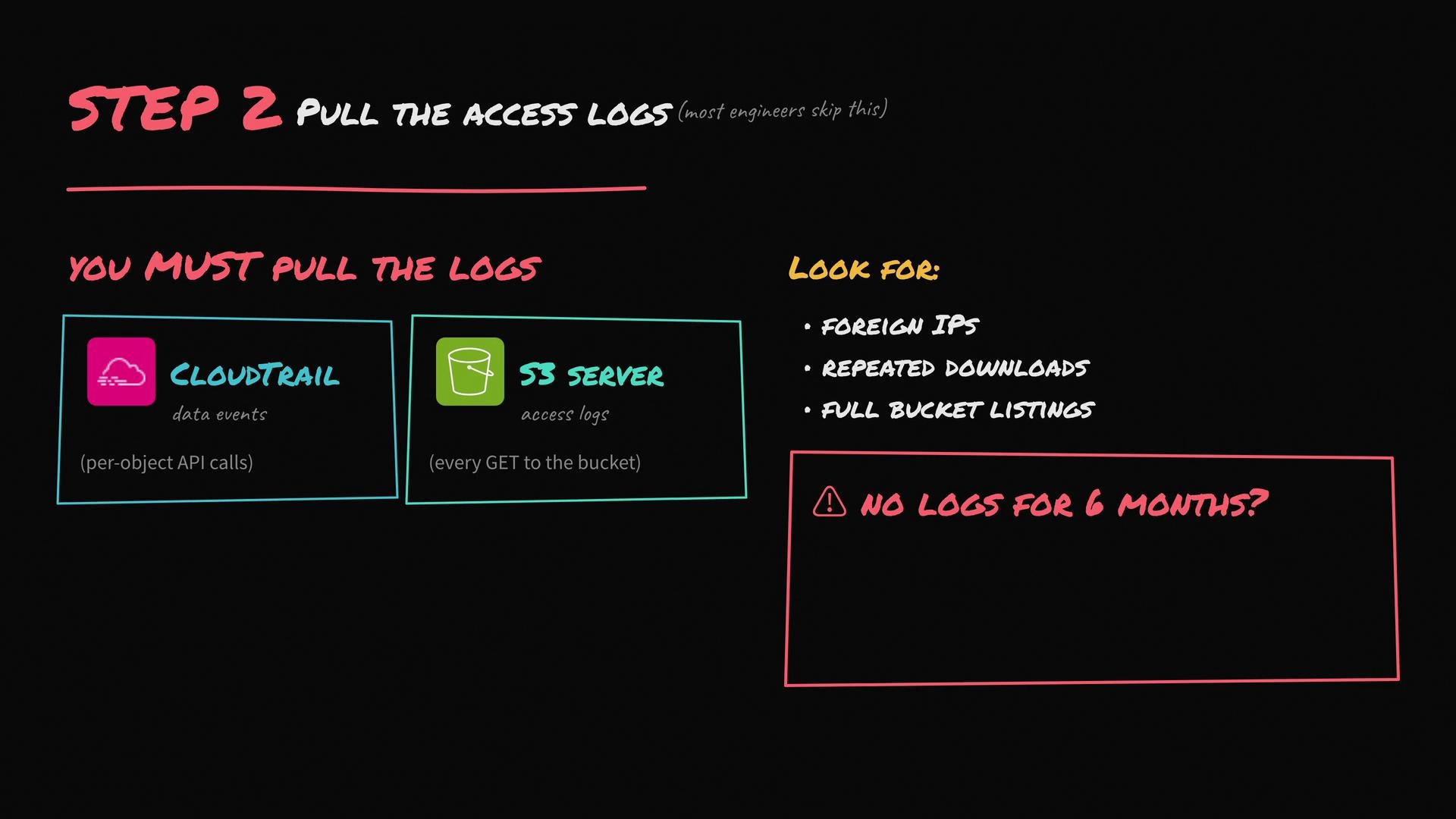 If logs for the exposure window are incomplete or missing, accelerate your incident response and treat the situation as a confirmed data breach while you continue to gather any available evidence.
Suggested log sources to collect
* CloudTrail (must have S3 data events enabled to capture GetObject/PutObject)
* S3 server access logs (bucket-level access)
* VPC Flow Logs if requests originated from within your VPC
* Any WAF logs, CDN logs, or application logs that could show downloads or enumerations
Search the logs for anomalies, then export and preserve relevant entries for forensic analysis.
## 4) Engage stakeholders and remediate root causes
Immediately loop in legal/compliance, your security/incident response team, and leadership. Regulatory timelines (for example, GDPR’s 72-hour rule) may apply and should be coordinated with legal.
Remediation and longer-term guardrails:
* Apply S3 Block Public Access at organization/account level and use Service Control Policies to prevent new public buckets.
* Enforce automated guardrails (AWS Config rules, Security Hub) to flag or auto-remediate public or unencrypted buckets.
* Adopt least-privilege IAM roles for services and users that access S3.
* Enable and centralize S3 server access logs and CloudTrail data events going forward.
* Consider using S3 Access Points with restricted network controls or VPC-only access for sensitive buckets.
If logs for the exposure window are incomplete or missing, accelerate your incident response and treat the situation as a confirmed data breach while you continue to gather any available evidence.
Suggested log sources to collect
* CloudTrail (must have S3 data events enabled to capture GetObject/PutObject)
* S3 server access logs (bucket-level access)
* VPC Flow Logs if requests originated from within your VPC
* Any WAF logs, CDN logs, or application logs that could show downloads or enumerations
Search the logs for anomalies, then export and preserve relevant entries for forensic analysis.
## 4) Engage stakeholders and remediate root causes
Immediately loop in legal/compliance, your security/incident response team, and leadership. Regulatory timelines (for example, GDPR’s 72-hour rule) may apply and should be coordinated with legal.
Remediation and longer-term guardrails:
* Apply S3 Block Public Access at organization/account level and use Service Control Policies to prevent new public buckets.
* Enforce automated guardrails (AWS Config rules, Security Hub) to flag or auto-remediate public or unencrypted buckets.
* Adopt least-privilege IAM roles for services and users that access S3.
* Enable and centralize S3 server access logs and CloudTrail data events going forward.
* Consider using S3 Access Points with restricted network controls or VPC-only access for sensitive buckets.
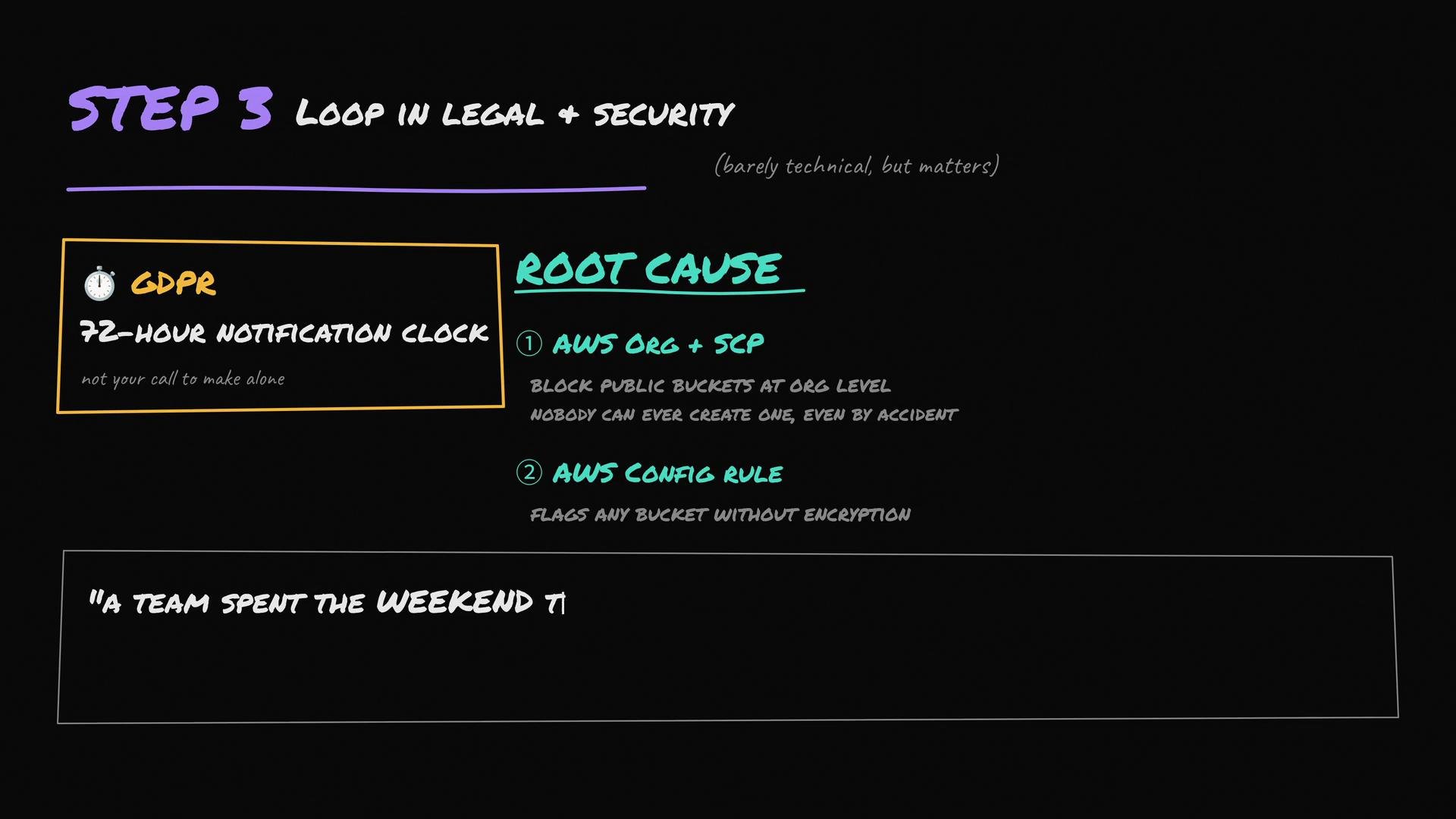 Regulatory timelines (for example GDPR) can require very fast notification once a breach is confirmed. Engage legal and security early to coordinate customer notifications, record retention, and compliance obligations.
## 5) Build an incident response plan (what interviewers want to hear)
A complete incident plan covers containment, evidence collection, communication, remediation, and lessons learned. At minimum, describe the following steps:
* Containment: Lock down buckets, rotate exposed credentials, revoke temporary tokens.
* Preservation: Collect and preserve logs and relevant metadata for forensics.
* Triage & scope: Identify affected objects, customers, and systems.
* Notification: Coordinate with legal to determine regulatory and customer notification paths and timelines.
* Remediation: Apply long-term guardrails, policy changes, and automation to prevent recurrence.
* Post-incident review: Run a blameless postmortem and update runbooks, IAM policies, and monitoring.
## Example checklist to present in an interview or incident report
* [ ] Bucket made private (`put-bucket-acl`) — immediate
* [ ] Bucket & account-level Block Public Access enabled — enforced fix
* [ ] Default encryption enabled and existing objects planned for re-encryption
* [ ] CloudTrail data events and S3 server logs collected and archived
* [ ] Legal & security engaged; notification timelines confirmed
* [ ] Guardrails (AWS Config rules / SCPs) implemented
* [ ] Post-incident review scheduled and action items tracked
## References and links
* AWS S3 Block Public Access: [https://docs.aws.amazon.com/AmazonS3/latest/userguide/access-control-block-public-access.html](https://docs.aws.amazon.com/AmazonS3/latest/userguide/access-control-block-public-access.html)
* AWS CloudTrail data events: [https://docs.aws.amazon.com/awscloudtrail/latest/userguide/logging-data-events-with-cloudtrail.html](https://docs.aws.amazon.com/awscloudtrail/latest/userguide/logging-data-events-with-cloudtrail.html)
* GDPR overview: [https://gdpr.eu/](https://gdpr.eu/)
Keep answers factual and process-driven in interviews: demonstrate that you can both stop further exposure immediately and run a thorough investigation and remediation that addresses legal, technical, and operational concerns.
Regulatory timelines (for example GDPR) can require very fast notification once a breach is confirmed. Engage legal and security early to coordinate customer notifications, record retention, and compliance obligations.
## 5) Build an incident response plan (what interviewers want to hear)
A complete incident plan covers containment, evidence collection, communication, remediation, and lessons learned. At minimum, describe the following steps:
* Containment: Lock down buckets, rotate exposed credentials, revoke temporary tokens.
* Preservation: Collect and preserve logs and relevant metadata for forensics.
* Triage & scope: Identify affected objects, customers, and systems.
* Notification: Coordinate with legal to determine regulatory and customer notification paths and timelines.
* Remediation: Apply long-term guardrails, policy changes, and automation to prevent recurrence.
* Post-incident review: Run a blameless postmortem and update runbooks, IAM policies, and monitoring.
## Example checklist to present in an interview or incident report
* [ ] Bucket made private (`put-bucket-acl`) — immediate
* [ ] Bucket & account-level Block Public Access enabled — enforced fix
* [ ] Default encryption enabled and existing objects planned for re-encryption
* [ ] CloudTrail data events and S3 server logs collected and archived
* [ ] Legal & security engaged; notification timelines confirmed
* [ ] Guardrails (AWS Config rules / SCPs) implemented
* [ ] Post-incident review scheduled and action items tracked
## References and links
* AWS S3 Block Public Access: [https://docs.aws.amazon.com/AmazonS3/latest/userguide/access-control-block-public-access.html](https://docs.aws.amazon.com/AmazonS3/latest/userguide/access-control-block-public-access.html)
* AWS CloudTrail data events: [https://docs.aws.amazon.com/awscloudtrail/latest/userguide/logging-data-events-with-cloudtrail.html](https://docs.aws.amazon.com/awscloudtrail/latest/userguide/logging-data-events-with-cloudtrail.html)
* GDPR overview: [https://gdpr.eu/](https://gdpr.eu/)
Keep answers factual and process-driven in interviews: demonstrate that you can both stop further exposure immediately and run a thorough investigation and remediation that addresses legal, technical, and operational concerns.