> ## Documentation Index
> Fetch the complete documentation index at: https://notes.kodekloud.com/llms.txt
> Use this file to discover all available pages before exploring further.
# Design Trace Pipeline
> Designing a Kubernetes trace collection pipeline using OpenTelemetry collectors, Grafana Tempo storage, and Grafana visualization to trace requests and diagnose service latency
Let's design a trace collection pipeline for every service running inside a Kubernetes cluster. This pattern helps you answer questions like: a customer clicks "buy" and the checkout flow passes through ten services — which one caused the extra latency?
## Scenario: a slow checkout flow
Imagine:
* A user clicks "buy".
* The request flows through \~10 microservices (gateway → auth → cart → inventory → payment → order → …).
* Checkout used to finish in \~2s but now takes \~3s.
To find the cause you must measure how long each service takes. Each timed operation emitted by a service is called a span.
## What is a span and a trace?
* A span is a single timing record: operation name, start time, duration (or end time), and metadata (attributes, status, events).
* A trace is a collection of spans that share the same trace ID. All spans produced while handling one request carry the same trace ID so you can reconstruct the full journey.
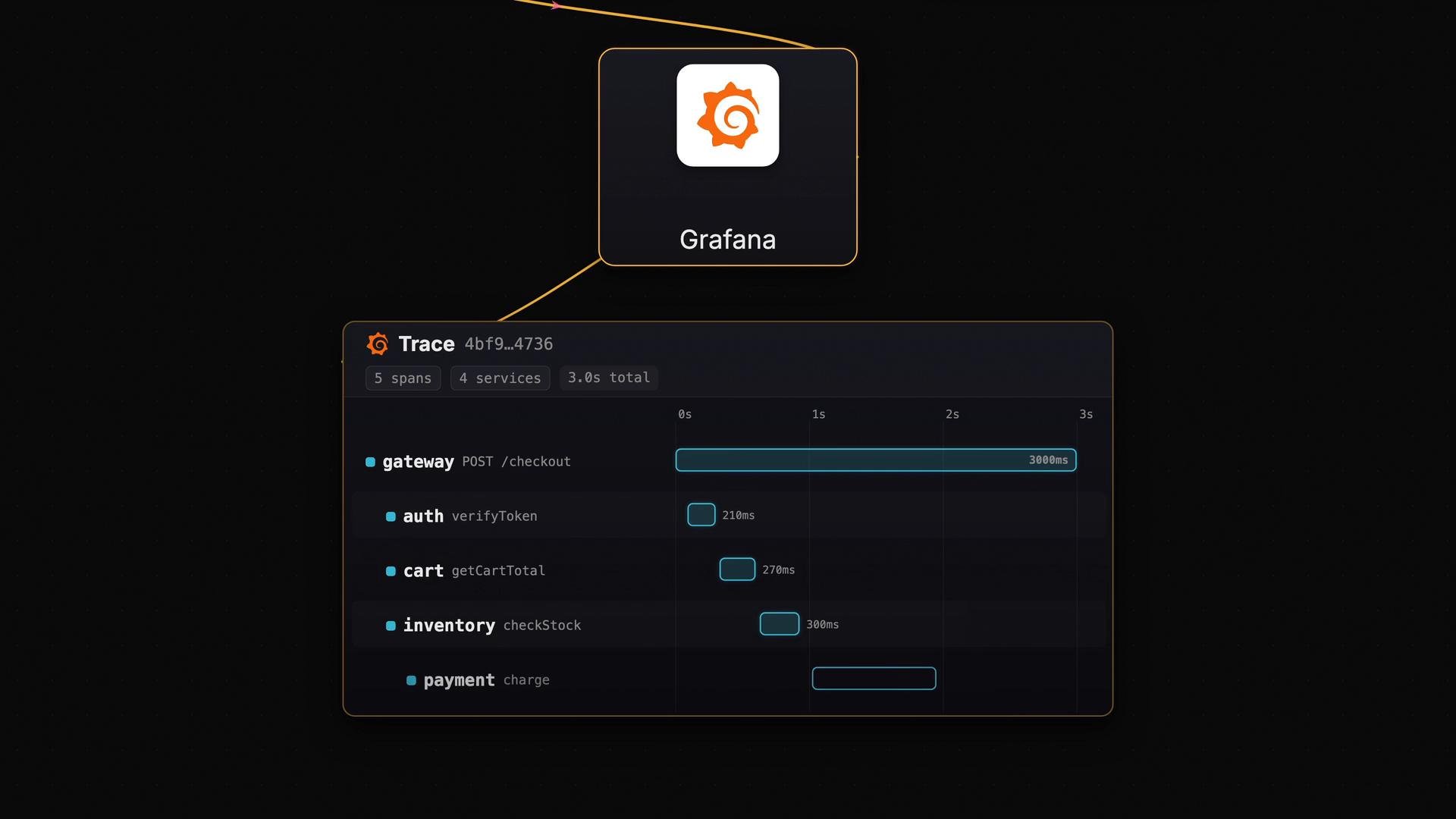
Example: simplified spans for one trace
```text theme={null}
trace_id = 4bf92f3577b34da6a3ce929d0e0e4736
gateway: POST /checkout
auth: verifyToken
cart: getCartTotal
catalog: getItems
inventory: checkStock
payment: chargeCard
order: createOrder
```
## Instrument services with OpenTelemetry
Add OpenTelemetry instrumentation to each service. OpenTelemetry (OTel) is the de-facto standard for generating traces and spans across languages and frameworks. Instrumentation can:
* Automatically create spans for incoming and outgoing requests.
* Propagate the trace context (trace ID and span context) across service boundaries so downstream services continue the same trace.
* Enrich spans with attributes (service name, route, HTTP status, etc.).
References:
* OpenTelemetry: [https://opentelemetry.io/](https://opentelemetry.io/)
* OpenTelemetry SDK docs: [https://opentelemetry.io/docs/](https://opentelemetry.io/docs/)
Make sure your services propagate the [OpenTelemetry context](https://opentelemetry.io/docs/concepts/context/) (for HTTP, [gRPC](https://grpc.io/), etc.) and that sampling is configured consistently. If context propagation or sampling is misconfigured, spans from the same request may not get the same trace ID or may be dropped.
## Collector deployment: one per node (DaemonSet)
Run the OpenTelemetry Collector as a Kubernetes DaemonSet so there is one collector instance on every node. Services on the same node forward spans to the local collector (commonly via OTLP over gRPC or HTTP). Benefits:
* Local aggregation reduces cross-node traffic.
* Collector performs batching, processing, sampling, and enrichment (adds pod, node, or service resource attributes).
* Collector exports telemetry to one or more backends.
Key protocols and components:
* OTLP (OpenTelemetry Protocol): [https://opentelemetry.io/docs/reference/specification/protocol/](https://opentelemetry.io/docs/reference/specification/protocol/)
* Collector: [https://opentelemetry.io/docs/collector/](https://opentelemetry.io/docs/collector/)
## Long-term storage: Grafana Tempo
For long-term trace storage, use Grafana Tempo. Tempo is a scalable, open-source trace store designed to minimize indexing and to rely on object storage (e.g., Amazon S3). Workflow:
* Tempo receives traces (from the collector or other agents).
* Traces are packed into compressed blocks and written to object storage.
* When you request a trace by trace ID, Tempo fetches the relevant blocks from object storage, reconstructs the spans, and returns them.
Why Tempo?
* Low-cost storage by leveraging object stores like S3.
* Scales for large volumes of traces without heavy indexing.
More:
* Grafana Tempo: [https://grafana.com/oss/tempo/](https://grafana.com/oss/tempo/)
* Amazon S3: [https://aws.amazon.com/s3/](https://aws.amazon.com/s3/)
## Visualize and explore traces in Grafana
Grafana provides the UI to search, fetch, and display traces from Tempo. With a trace ID (or search criteria), Grafana reconstructs the request timeline and displays spans across services so you can quickly spot which service(s) added latency.
 ## Components at a glance
| Component | Role | Example / Notes |
| - | - | - |
| Instrumentation | Produce spans in each service | Use OpenTelemetry SDKs for your language |
| Collector | Receive, enrich, batch, and export telemetry | Deploy as Kubernetes `DaemonSet`, accepts `OTLP` over gRPC/HTTP |
| Storage | Long-term trace storage | Grafana Tempo backed by `S3` or compatible object store |
| Visualization | UI for searching and viewing traces | Grafana connects to Tempo and other backends |
## How this helps debug latency
* Metrics (e.g., increased request duration) alert you that something changed.
* Logs give context about errors or exceptions.
* Traces show the full request path and which services contributed most to latency.
This pipeline scales:
* Instrument all services with OpenTelemetry.
* Deploy a DaemonSet of OpenTelemetry Collectors to receive node-local telemetry.
* Export to Tempo with object storage for cost-effective long-term retention.
* Use Grafana for trace exploration and root-cause analysis.
## Links and references
* OpenTelemetry: [https://opentelemetry.io/](https://opentelemetry.io/)
* OpenTelemetry Collector: [https://opentelemetry.io/docs/collector/](https://opentelemetry.io/docs/collector/)
* OTLP protocol: [https://opentelemetry.io/docs/reference/specification/protocol/](https://opentelemetry.io/docs/reference/specification/protocol/)
* Kubernetes DaemonSet: [https://kubernetes.io/docs/concepts/workloads/controllers/daemonset/](https://kubernetes.io/docs/concepts/workloads/controllers/daemonset/)
* Grafana Tempo: [https://grafana.com/oss/tempo/](https://grafana.com/oss/tempo/)
* Grafana: [https://grafana.com/](https://grafana.com/)
* Amazon S3: [https://aws.amazon.com/s3/](https://aws.amazon.com/s3/)
This documentation is built and hosted on [Mintlify](https://mintlify.com), a developer documentation platform.
## Components at a glance
| Component | Role | Example / Notes |
| - | - | - |
| Instrumentation | Produce spans in each service | Use OpenTelemetry SDKs for your language |
| Collector | Receive, enrich, batch, and export telemetry | Deploy as Kubernetes `DaemonSet`, accepts `OTLP` over gRPC/HTTP |
| Storage | Long-term trace storage | Grafana Tempo backed by `S3` or compatible object store |
| Visualization | UI for searching and viewing traces | Grafana connects to Tempo and other backends |
## How this helps debug latency
* Metrics (e.g., increased request duration) alert you that something changed.
* Logs give context about errors or exceptions.
* Traces show the full request path and which services contributed most to latency.
This pipeline scales:
* Instrument all services with OpenTelemetry.
* Deploy a DaemonSet of OpenTelemetry Collectors to receive node-local telemetry.
* Export to Tempo with object storage for cost-effective long-term retention.
* Use Grafana for trace exploration and root-cause analysis.
## Links and references
* OpenTelemetry: [https://opentelemetry.io/](https://opentelemetry.io/)
* OpenTelemetry Collector: [https://opentelemetry.io/docs/collector/](https://opentelemetry.io/docs/collector/)
* OTLP protocol: [https://opentelemetry.io/docs/reference/specification/protocol/](https://opentelemetry.io/docs/reference/specification/protocol/)
* Kubernetes DaemonSet: [https://kubernetes.io/docs/concepts/workloads/controllers/daemonset/](https://kubernetes.io/docs/concepts/workloads/controllers/daemonset/)
* Grafana Tempo: [https://grafana.com/oss/tempo/](https://grafana.com/oss/tempo/)
* Grafana: [https://grafana.com/](https://grafana.com/)
* Amazon S3: [https://aws.amazon.com/s3/](https://aws.amazon.com/s3/)
This documentation is built and hosted on [Mintlify](https://mintlify.com), a developer documentation platform.