> ## Documentation Index
> Fetch the complete documentation index at: https://notes.kodekloud.com/llms.txt
> Use this file to discover all available pages before exploring further.
# Design an Image Upload Pipeline
> Guide to designing a scalable production image upload pipeline covering object storage, asynchronous processing, CDNs, and security for optimized, reliable, and moderated image delivery.
This guide walks through designing a scalable, production-ready image upload pipeline (think Instagram). We start with a simple prototype and iterate through common failure modes to arrive at a robust architecture that handles scale, performance, and safety.
## Version 1 — The naive approach
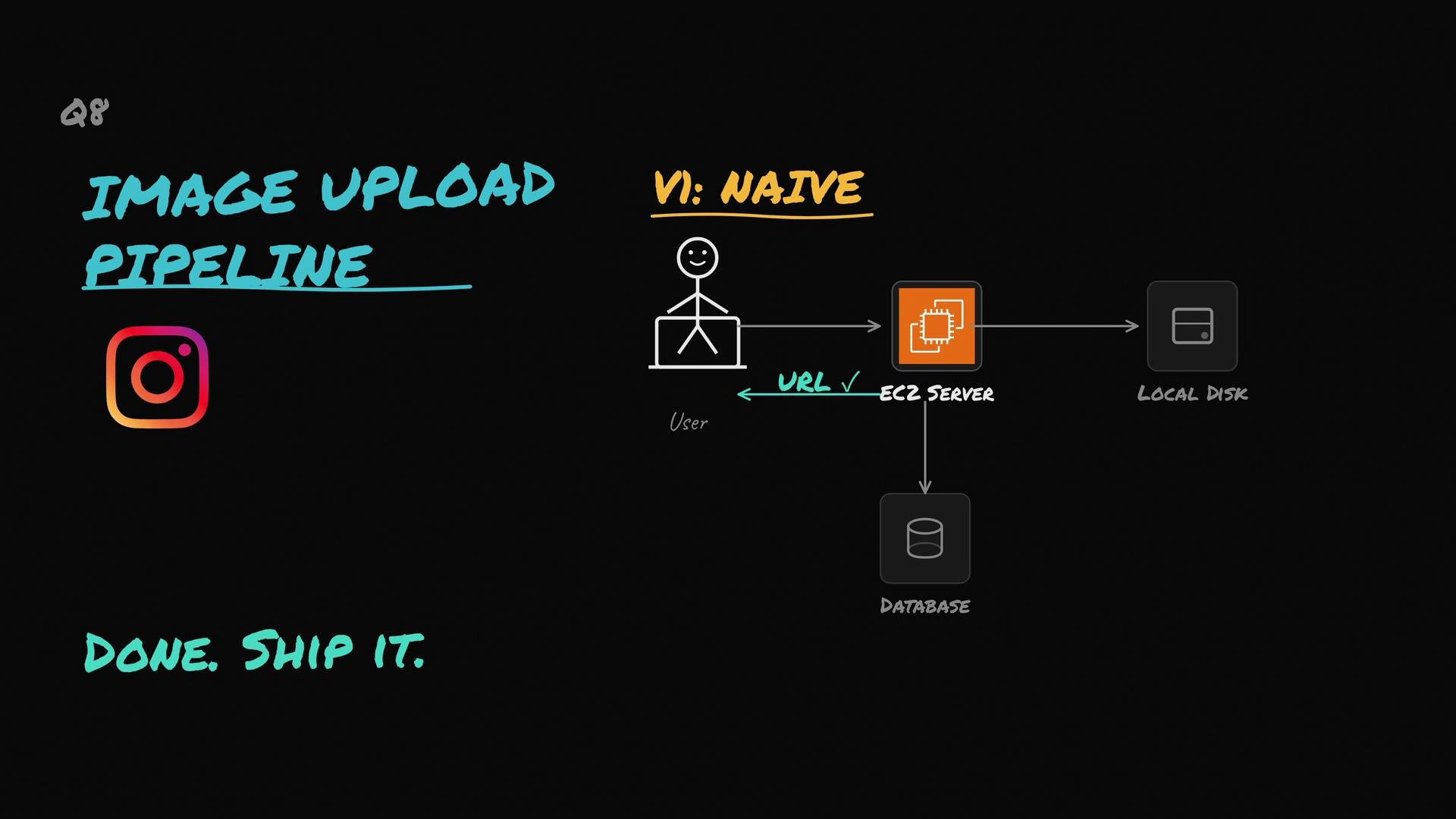
Users upload an image → your server receives it → you save it to the server's local disk → record the file path in the DB → return a URL.
This works for prototypes and hackathons, but quickly breaks at scale.
 Why this fails
* Disk limits: a server with limited disk (e.g., 50 GB) will fill quickly if users upload tens of GBs per day.
* Single point of failure: if the server dies, images may be lost unless you implement replication/backups.
* Operational overhead: scaling, backups, and restorations become painful.
## Version 2 — Move to object storage
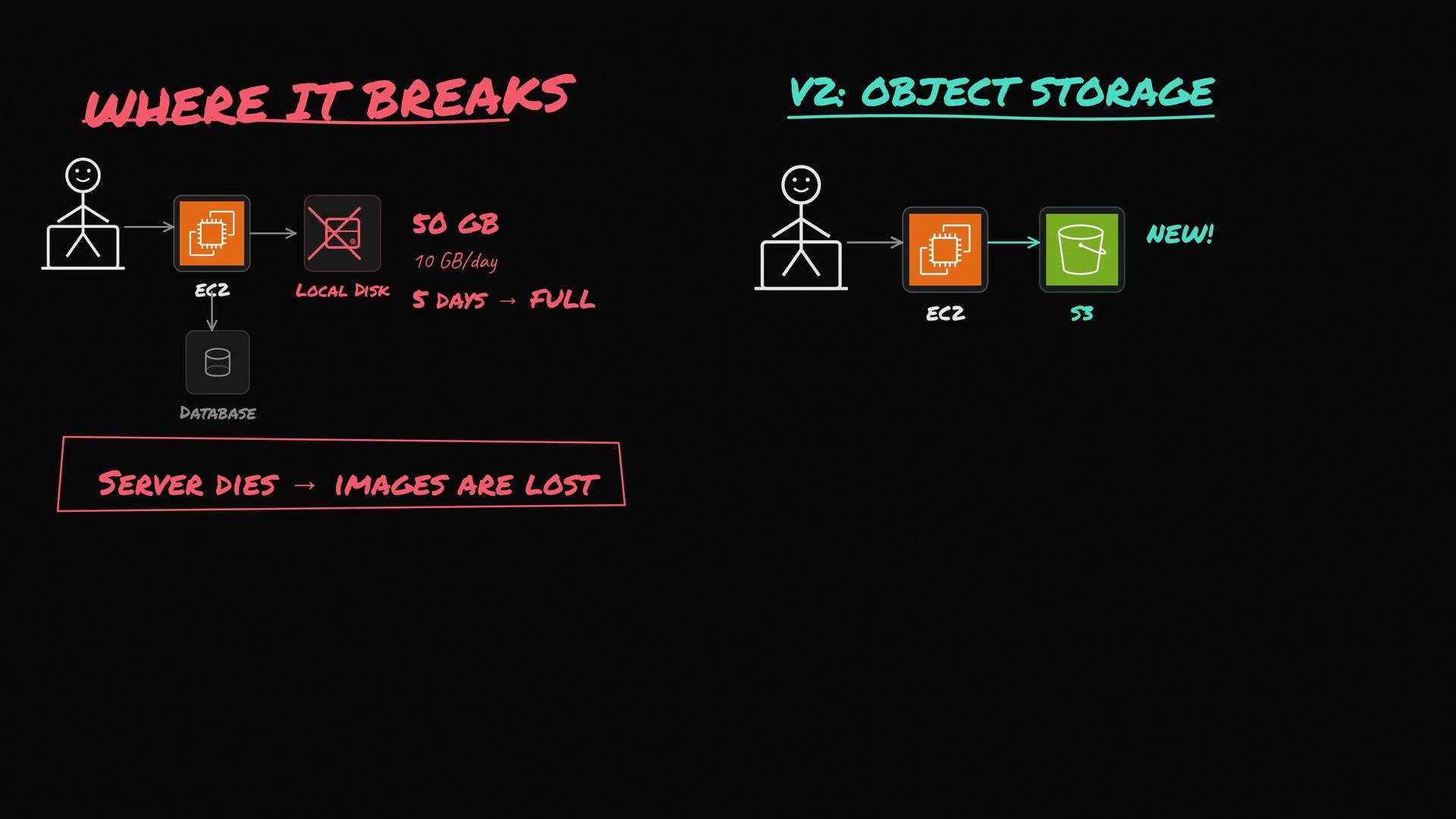
Replace server disk with object storage (S3, Google Cloud Storage, Azure Blob Storage). The app server stores objects into S3 and stores object keys/URLs in the DB. This provides practically unlimited storage, built-in redundancy, and resilience.
Why this fails
* Disk limits: a server with limited disk (e.g., 50 GB) will fill quickly if users upload tens of GBs per day.
* Single point of failure: if the server dies, images may be lost unless you implement replication/backups.
* Operational overhead: scaling, backups, and restorations become painful.
## Version 2 — Move to object storage
Replace server disk with object storage (S3, Google Cloud Storage, Azure Blob Storage). The app server stores objects into S3 and stores object keys/URLs in the DB. This provides practically unlimited storage, built-in redundancy, and resilience.
 Best practices for object storage
* Use presigned upload URLs to allow clients to upload directly to object storage, reducing server bandwidth and cost.
* For very large files, use multipart uploads (S3 Multipart Upload, GCS resumable uploads).
* Record metadata in your DB: object key, content-type, owner ID, upload timestamp, checksum.
Use presigned (signed) upload URLs so clients upload directly to object storage. This reduces server bandwidth and simplifies horizontal scaling.
Table — Object storage checklist
| Feature | Why it matters | Implementation tip |
| --------------------------- | ----------------------------------------------- | -------------------------------------------------------- |
| Presigned uploads | Offloads bandwidth from API servers | Generate short-lived signed URL from your backend |
| Multipart/resumable uploads | Handles unreliable networks & large files | Use provider SDKs (S3 Multipart, GCS resumable) |
| Metadata in DB | Enables lookup, ownership, and processing state | Store object key, `content-type`, `checksum`, `owner_id` |
## New problem: raw camera files are large
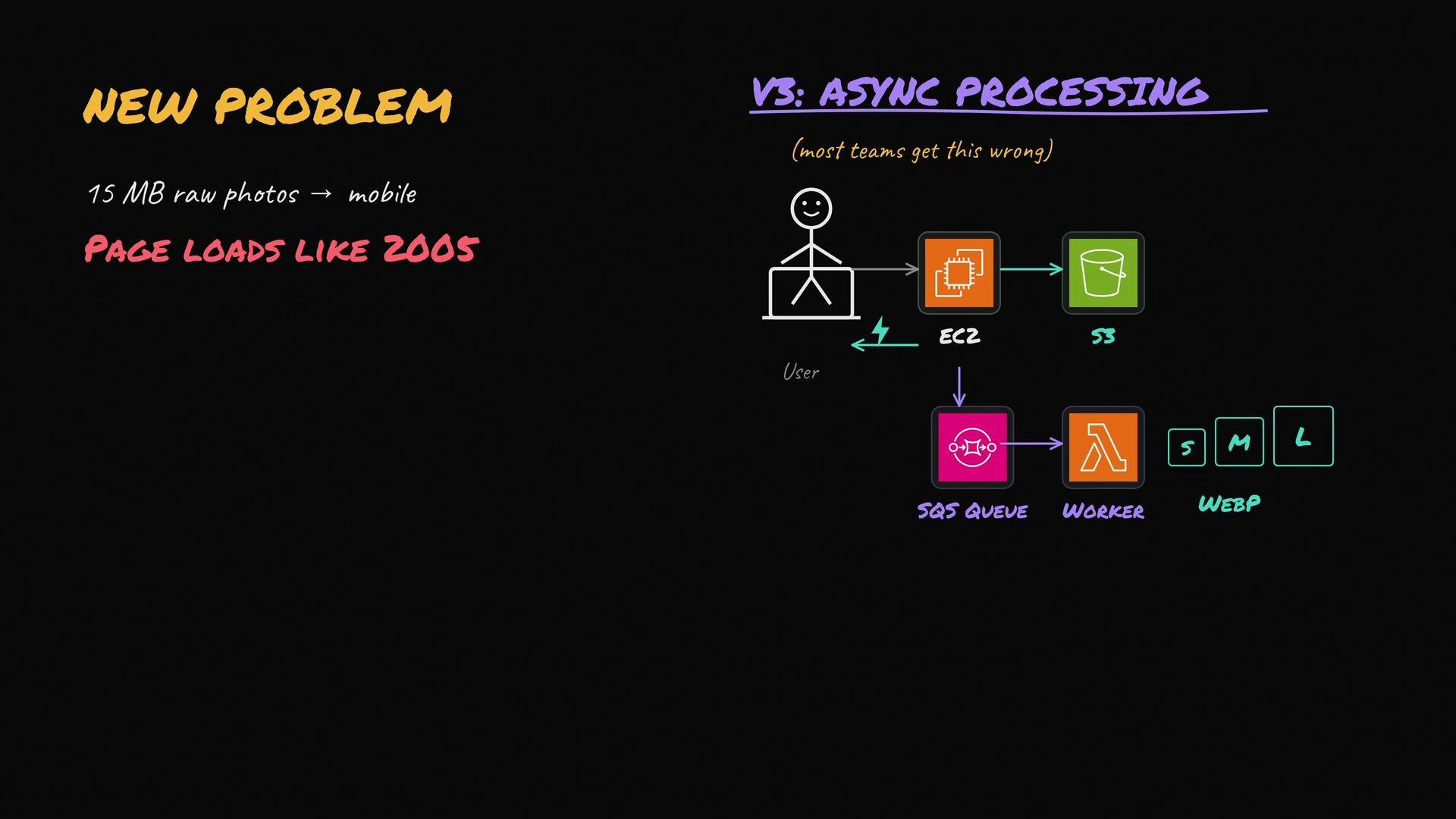
Mobile camera images can be 10–20+ MB. Serving raw camera files to mobile clients causes slow page loads and poor UX. You need to optimize images for different devices and network conditions.
## Version 3 — Asynchronous processing pipeline
Do not block the upload HTTP request on heavy processing. Instead, make optimization asynchronous:
1. Client uploads the raw image to object storage (ideally via a presigned URL).
2. Your API server performs lightweight validation, records metadata in the DB, and enqueues a “process this object key” message to a durable queue (SQS, Pub/Sub, RabbitMQ, Kafka).
3. Workers/consumers pick up jobs, then:
* Generate multiple sizes (thumbnail, small, medium, large).
* Convert/optimize formats (WebP, AVIF) for bandwidth savings.
* Strip sensitive EXIF metadata.
* Calculate and persist checksums and content hashes.
* Write processed derivatives back to object storage and update the DB.
4. Mark processing status in the DB (e.g., `processing`, `ready`, `failed`) so clients can show conditional UI immediately after upload.
This gives users an immediate upload response while background workers handle heavy tasks.
Best practices for object storage
* Use presigned upload URLs to allow clients to upload directly to object storage, reducing server bandwidth and cost.
* For very large files, use multipart uploads (S3 Multipart Upload, GCS resumable uploads).
* Record metadata in your DB: object key, content-type, owner ID, upload timestamp, checksum.
Use presigned (signed) upload URLs so clients upload directly to object storage. This reduces server bandwidth and simplifies horizontal scaling.
Table — Object storage checklist
| Feature | Why it matters | Implementation tip |
| --------------------------- | ----------------------------------------------- | -------------------------------------------------------- |
| Presigned uploads | Offloads bandwidth from API servers | Generate short-lived signed URL from your backend |
| Multipart/resumable uploads | Handles unreliable networks & large files | Use provider SDKs (S3 Multipart, GCS resumable) |
| Metadata in DB | Enables lookup, ownership, and processing state | Store object key, `content-type`, `checksum`, `owner_id` |
## New problem: raw camera files are large
Mobile camera images can be 10–20+ MB. Serving raw camera files to mobile clients causes slow page loads and poor UX. You need to optimize images for different devices and network conditions.
## Version 3 — Asynchronous processing pipeline
Do not block the upload HTTP request on heavy processing. Instead, make optimization asynchronous:
1. Client uploads the raw image to object storage (ideally via a presigned URL).
2. Your API server performs lightweight validation, records metadata in the DB, and enqueues a “process this object key” message to a durable queue (SQS, Pub/Sub, RabbitMQ, Kafka).
3. Workers/consumers pick up jobs, then:
* Generate multiple sizes (thumbnail, small, medium, large).
* Convert/optimize formats (WebP, AVIF) for bandwidth savings.
* Strip sensitive EXIF metadata.
* Calculate and persist checksums and content hashes.
* Write processed derivatives back to object storage and update the DB.
4. Mark processing status in the DB (e.g., `processing`, `ready`, `failed`) so clients can show conditional UI immediately after upload.
This gives users an immediate upload response while background workers handle heavy tasks.
 Operational guidance for async processing
* Idempotency: design workers so retries do not create duplicate derivatives or corrupt state. Use deterministic object keys or a deduplication step.
* Durable queues + retries: use exponential backoff and dead-letter queues for poison messages.
* Status tracking: persist job states and errors so the API can report progress to clients.
* Deduplication: compare checksums/hashes to avoid reprocessing identical uploads.
Make processing idempotent and persist job status. That simplifies retries, debugging, and recovery from partial failures.
## Version 4 — Add a CDN for global performance
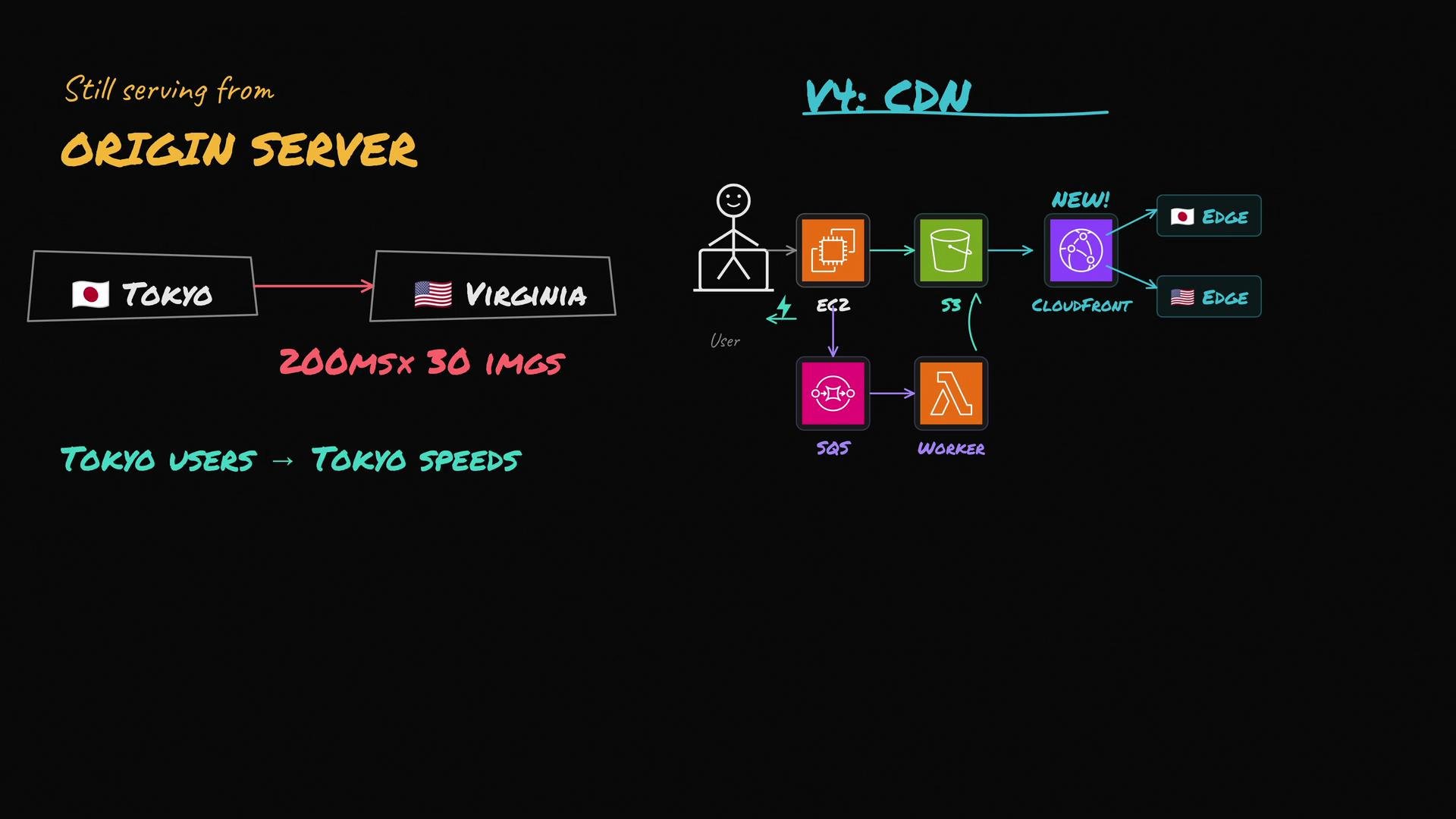
Even optimized images benefit from being cached geographically close to users. Put a CDN (CloudFront, Fastly, Cloudflare, etc.) in front of your object storage.
* First request (cache miss): edge fetches the object from origin (S3).
* Subsequent requests: served from the nearest edge node with low latency.
* CDNs handle the majority of read traffic, enabling virtually unlimited, low-latency reads.
Cache control, invalidation, and URL strategies
* Use `Cache-Control` headers to set TTLs and leverage CDN caching effectively.
* Use versioned/fingerprinted URLs (e.g., `image-.webp`) so updates don’t require manual invalidation — clients request a new URL when content changes.
* For private assets, use signed URLs or signed cookies at the CDN layer to enforce access controls.
Operational guidance for async processing
* Idempotency: design workers so retries do not create duplicate derivatives or corrupt state. Use deterministic object keys or a deduplication step.
* Durable queues + retries: use exponential backoff and dead-letter queues for poison messages.
* Status tracking: persist job states and errors so the API can report progress to clients.
* Deduplication: compare checksums/hashes to avoid reprocessing identical uploads.
Make processing idempotent and persist job status. That simplifies retries, debugging, and recovery from partial failures.
## Version 4 — Add a CDN for global performance
Even optimized images benefit from being cached geographically close to users. Put a CDN (CloudFront, Fastly, Cloudflare, etc.) in front of your object storage.
* First request (cache miss): edge fetches the object from origin (S3).
* Subsequent requests: served from the nearest edge node with low latency.
* CDNs handle the majority of read traffic, enabling virtually unlimited, low-latency reads.
Cache control, invalidation, and URL strategies
* Use `Cache-Control` headers to set TTLs and leverage CDN caching effectively.
* Use versioned/fingerprinted URLs (e.g., `image-.webp`) so updates don’t require manual invalidation — clients request a new URL when content changes.
* For private assets, use signed URLs or signed cookies at the CDN layer to enforce access controls.
 Quick CDN tips
* Use immutable URLs with content hashes: `image-.webp`.
* Keep short cache TTLs for frequently changing content, or use versioning to avoid TTL complications.
* For signed/private images, prefer CDN-level signed URLs over exposing direct S3 presigned URLs to end users.
## Version 5 — Validation, safety, and moderation
Before images enter processing or become public, validate and protect:
* Verify file headers (magic bytes) and MIME types — don’t rely on file extensions alone.
* Enforce maximum file size (e.g., reject files > 20 MB).
* Scan for malware and viruses on the raw upload.
* Run automated content moderation (nudity, violence) and implement a human review workflow for flagged content.
* Quarantine suspicious files until cleared and ensure no public access before approval.
Common attack vectors to defend against
* A file named `image.jpg` that is actually a malicious archive or a zip bomb.
* EXIF or metadata with payloads that could exploit downstream parsers.
All security and moderation gates should occur before the image becomes publicly accessible.
## Final architecture — end-to-end summary
* Client uploads raw image (prefer presigned URL to object storage).
* API server performs lightweight validation, stores metadata in DB, and enqueues a processing job.
* Background workers optimize images (resize, reformat, strip metadata), persist derivatives to object storage, and update DB state.
* CDN sits in front of object storage for global caching and low-latency delivery.
* Security pipeline (malware scans, moderation, size/type validation) ensures safety prior to publishing.
Table — Component responsibilities
| Component | Responsibility | Example technologies / tips |
| --------------------- | ------------------------------------------------------------- | ---------------------------------------------------- |
| Client | Direct upload via presigned URL; request processed image URLs | Use SDKs for presigned uploads |
| API server | Auth, lightweight validation, DB metadata, enqueue jobs | Node/Go/Python; return processing status |
| Object storage | Durable origin for raw and processed assets | S3, GCS, Azure Blob |
| Message queue | Reliable job delivery & retries | SQS, Pub/Sub, RabbitMQ, Kafka |
| Workers | Image processing, format conversion, metadata stripping | Lambda/containers, image libs (libvips, ImageMagick) |
| CDN | Global caching & delivery | CloudFront, Fastly, Cloudflare |
| Security & moderation | Malware scanning, automated/human content review | ClamAV, vendor moderation APIs |
## References and further reading
* AWS S3: [https://aws.amazon.com/s3/](https://aws.amazon.com/s3/)
* AWS CloudFront: [https://aws.amazon.com/cloudfront/](https://aws.amazon.com/cloudfront/)
* Multipart uploads & presigned URLs: consult your cloud provider SDK docs (S3 multipart, GCS resumable)
* Image processing libraries: libvips, ImageMagick, Sharp (Node)
* Content moderation services: Perspective API, AWS Rekognition, Google Cloud Vision
By following this progression — local disk → object storage → async processing → CDN → validation — you build a scalable, performant, and secure image pipeline that is ready for production.
Quick CDN tips
* Use immutable URLs with content hashes: `image-.webp`.
* Keep short cache TTLs for frequently changing content, or use versioning to avoid TTL complications.
* For signed/private images, prefer CDN-level signed URLs over exposing direct S3 presigned URLs to end users.
## Version 5 — Validation, safety, and moderation
Before images enter processing or become public, validate and protect:
* Verify file headers (magic bytes) and MIME types — don’t rely on file extensions alone.
* Enforce maximum file size (e.g., reject files > 20 MB).
* Scan for malware and viruses on the raw upload.
* Run automated content moderation (nudity, violence) and implement a human review workflow for flagged content.
* Quarantine suspicious files until cleared and ensure no public access before approval.
Common attack vectors to defend against
* A file named `image.jpg` that is actually a malicious archive or a zip bomb.
* EXIF or metadata with payloads that could exploit downstream parsers.
All security and moderation gates should occur before the image becomes publicly accessible.
## Final architecture — end-to-end summary
* Client uploads raw image (prefer presigned URL to object storage).
* API server performs lightweight validation, stores metadata in DB, and enqueues a processing job.
* Background workers optimize images (resize, reformat, strip metadata), persist derivatives to object storage, and update DB state.
* CDN sits in front of object storage for global caching and low-latency delivery.
* Security pipeline (malware scans, moderation, size/type validation) ensures safety prior to publishing.
Table — Component responsibilities
| Component | Responsibility | Example technologies / tips |
| --------------------- | ------------------------------------------------------------- | ---------------------------------------------------- |
| Client | Direct upload via presigned URL; request processed image URLs | Use SDKs for presigned uploads |
| API server | Auth, lightweight validation, DB metadata, enqueue jobs | Node/Go/Python; return processing status |
| Object storage | Durable origin for raw and processed assets | S3, GCS, Azure Blob |
| Message queue | Reliable job delivery & retries | SQS, Pub/Sub, RabbitMQ, Kafka |
| Workers | Image processing, format conversion, metadata stripping | Lambda/containers, image libs (libvips, ImageMagick) |
| CDN | Global caching & delivery | CloudFront, Fastly, Cloudflare |
| Security & moderation | Malware scanning, automated/human content review | ClamAV, vendor moderation APIs |
## References and further reading
* AWS S3: [https://aws.amazon.com/s3/](https://aws.amazon.com/s3/)
* AWS CloudFront: [https://aws.amazon.com/cloudfront/](https://aws.amazon.com/cloudfront/)
* Multipart uploads & presigned URLs: consult your cloud provider SDK docs (S3 multipart, GCS resumable)
* Image processing libraries: libvips, ImageMagick, Sharp (Node)
* Content moderation services: Perspective API, AWS Rekognition, Google Cloud Vision
By following this progression — local disk → object storage → async processing → CDN → validation — you build a scalable, performant, and secure image pipeline that is ready for production.