> ## Documentation Index
> Fetch the complete documentation index at: https://notes.kodekloud.com/llms.txt
> Use this file to discover all available pages before exploring further.
# DevOps Tools
> Overview of common DevOps tools and how they integrate across the development lifecycle from code and CI to containers, orchestration, infrastructure as code, configuration, and monitoring
When people talk about DevOps you'll frequently hear many tool names — [Docker](https://learn.kodekloud.com/user/courses/docker-training-course-for-the-absolute-beginner), [Kubernetes](https://learn.kodekloud.com/user/courses/kubernetes-for-the-absolute-beginners-hands-on-tutorial), [Ansible](https://learn.kodekloud.com/user/courses/learn-ansible-basics-beginners-course), [Terraform](https://learn.kodekloud.com/user/courses/terraform-basics-training-course), [Git](https://learn.kodekloud.com/user/courses/git-for-beginners), [GitHub](https://learn.kodekloud.com/user/courses/github-foundation-certification), [Jenkins](https://learn.kodekloud.com/user/courses/jenkins-for-beginners), [Prometheus](https://learn.kodekloud.com/user/courses/prep-course-prometheus-certified-associate-pca-certification), and [Grafana](https://learn.kodekloud.com/user/courses/grafana-assistant). The ecosystem can look overwhelming at first.
This article demystifies these tools by following a practical story: you start with a small app on your laptop and, as it grows, new tools appear to solve new challenges. The goal is a high-level map of how each tool fits into the development and operations lifecycle.
## From idea to running service
Everything begins with an idea. You build a small application on your laptop and run it locally. For example, a minimal Python app:
```python theme={null}
def book_my_ticket_to_mars():
# world-changing code here
print("Booking ticket to Mars...")
if __name__ == "__main__":
book_my_ticket_to_mars()
```
Locally this runs only on your machine (e.g., reachable at `http://localhost:8080` for a web server). If your laptop is off, the service is inaccessible. To keep it available you must host it on an always-on machine: a server in a data center or a cloud VM.
Key challenges when moving from laptop to server:
* The target server must provide the correct runtime (Python, Java, etc.) and the same library versions.
* You need a predictable deployment process so the app behaves the same in production as in development.
Terminology:
* Build — convert your source into an executable form (packaging, compiling, or bundling dependencies).
* Deploy — move and run the build/artifact on the production server.
Example local build + run (illustrative):
```bash theme={null}
$ ./build.sh
$ ./app
```
## Collaboration: version control and hosted repos
As the team grows, developers work on the same codebase from different machines. Version control is essential to coordinate work and avoid conflicts.
Git provides distributed version control; platforms like GitHub, GitLab, and Bitbucket provide central hosting, access control, pull requests, CI integrations, and issue tracking.
Common Git commands:
```bash theme={null}
$ git pull
$ git add .
$ git commit -m "Add feature"
$ git push
```
Workflow summary:
* Developers work locally and push code to a central repo.
* The central repo triggers other processes (builds, reviews, CI pipelines).
## Continuous Integration / Continuous Delivery (CI/CD)
Manual builds and deployments become a bottleneck as features accumulate. CI/CD tools automate build, test, and deployment stages so you can release faster and with fewer errors.
Popular CI/CD tools: Jenkins, GitHub Actions, GitLab CI/CD.
A typical automated pipeline:
* Pull code from the repository.
* Build artifacts (and optionally Docker images).
* Run automated tests.
* If tests pass, deploy to staging and/or production.
CI/CD enables frequent, reliable releases and faster feedback loops.
## Dependency and runtime consistency: Containers with Docker
Different servers can have different runtimes and library versions. Containers package the app and its dependencies into a single image that runs consistently across environments.
Docker workflow (typical):
```bash theme={null}
$ vi Dockerfile
$ docker build -t myapp:latest .
$ docker run -p 8080:8080 myapp:latest
```
Benefits:
* Environment consistency across dev, test, and prod.
* Process isolation so multiple app instances can run on the same host.
## Orchestration at scale: Kubernetes
When you run many containers across multiple machines you need orchestration to:
* Maintain desired counts of running containers,
* Restart failed containers,
* Scale up/down with demand,
* Allocate resources across the cluster.
Kubernetes is the most widely used orchestration platform for containerized workloads. It declares how containers should be deployed, handles scheduling across nodes, and integrates with autoscalers to expand the underlying infrastructure when needed.
Modern pipeline example:
* Developers push code to GitHub.
* CI builds Docker images and stores them in a registry.
* Staging runs automated tests against those images.
* Kubernetes deploys approved images to production.
## Infrastructure as Code (IaC): Terraform
Servers and cloud resources should be provisioned consistently. Manually creating resources via a cloud console is slow and error-prone — Terraform codifies infrastructure so it can be versioned, reviewed, and reapplied.
Example (illustrative):
```hcl theme={null}
# main.tf (illustrative)
resource "aws_instance" "node01" {
ami = data.aws_ami.ubuntu.id
instance_type = "t3.micro"
tags = {
Name = "controlplane"
}
}
resource "aws_instance" "node02" {
ami = data.aws_ami.ubuntu.id
instance_type = "t3.micro"
tags = {
Name = "worker01"
}
}
resource "aws_instance" "node03" {
ami = data.aws_ami.ubuntu.id
instance_type = "t3.micro"
tags = {
Name = "worker02"
}
}
```
Use Terraform to:
* Provision VMs, networks, load balancers, and storage.
* Keep infrastructure state in source control.
* Detect and correct configuration drift.
## Configuration management: Ansible
After provisioning, servers often need in-guest configuration (install packages, template config files, ensure services are running). Ansible is commonly used for these tasks.
Common pattern:
* Terraform provisions VMs, networks, and cloud resources.
* Ansible runs playbooks to configure the machines themselves.
Ansible playbooks are YAML files that can live in the same repository as application code or a separate ops repo.
## Observability: Prometheus and Grafana
Provisioning, CI/CD, and orchestration are only part of the story. You must monitor application health and infrastructure to detect issues early and act on them.
* Prometheus scrapes metrics from applications and infrastructure and stores time-series data.
* Grafana builds dashboards and visualizations from Prometheus and other metric sources.
Monitoring provides the feedback loop that informs development priorities and operational actions.
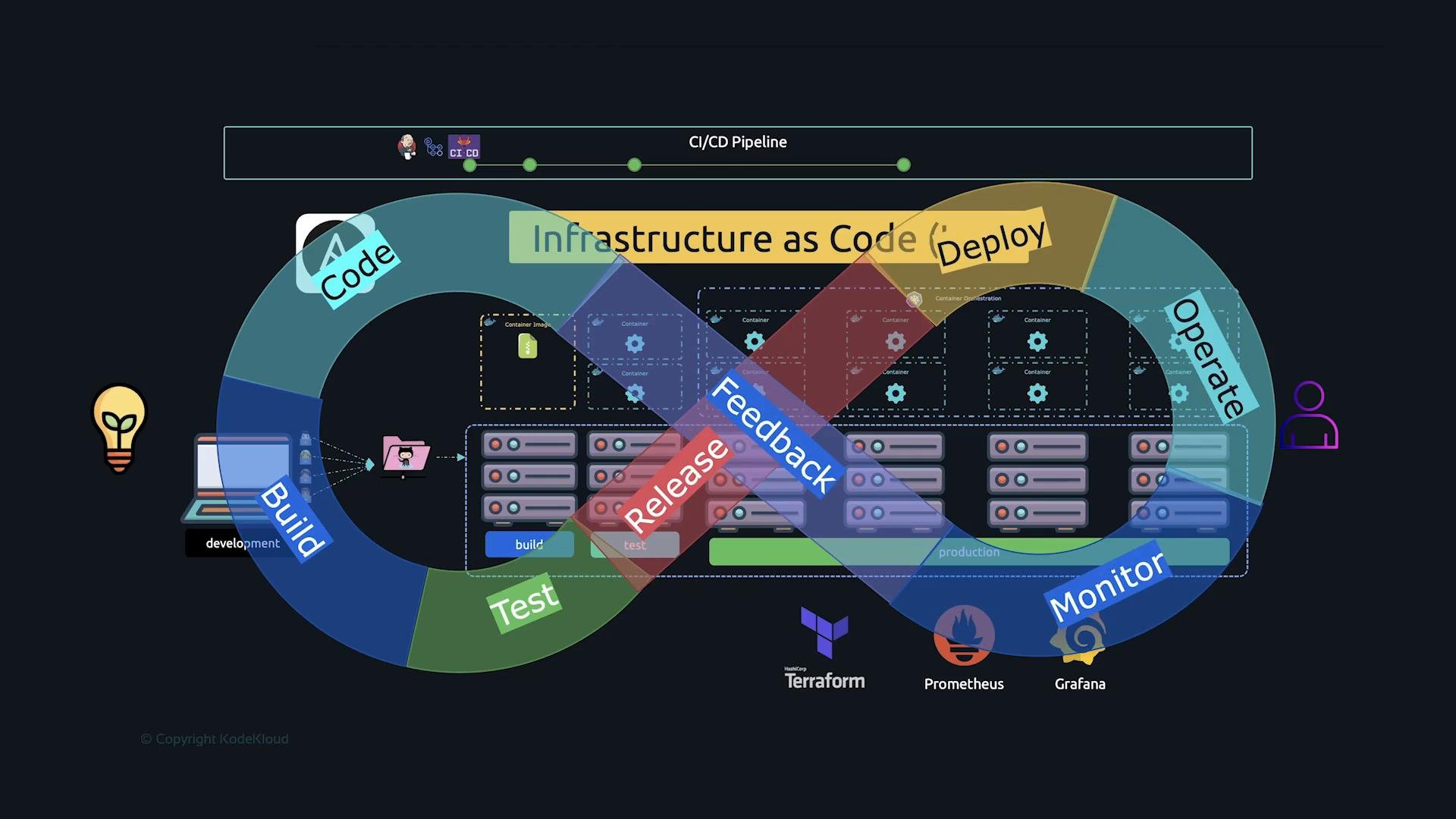 ## Putting it all together: the DevOps infinity loop
With CI/CD pipelines and container images deployed by Kubernetes, code changes flow through automated stages and reach production faster. Monitoring feeds performance and health data back into planning and development — completing the DevOps cycle.
DevOps = people + processes + tools focused on continuous delivery of value: build, test, deploy, operate, monitor, and iterate.
| Tool Category | Common Tools | Role / Example |
| - | - | - |
| Version Control & Hosting | [Git](https://learn.kodekloud.com/user/courses/git-for-beginners), [GitHub](), GitLab | Source control, PRs, code review, trigger CI |
| CI/CD | Jenkins, GitHub Actions, GitLab CI/CD | Automate build, test, and deploy pipelines |
| Containerization | [Docker](https://learn.kodekloud.com/user/courses/docker-training-course-for-the-absolute-beginner) | Package app + dependencies into portable images |
| Orchestration | [Kubernetes](https://learn.kodekloud.com/user/courses/kubernetes-for-the-absolute-beginners-hands-on-tutorial) | Deploy and manage containers at scale |
| IaC / Provisioning | [Terraform](https://learn.kodekloud.com/user/courses/terraform-basics-training-course) | Declare and provision cloud resources |
| Configuration Mgmt | [Ansible](https://learn.kodekloud.com/user/courses/learn-ansible-basics-beginners-course) | In-guest configuration and automation |
| Monitoring & Observability | [Prometheus](https://learn.kodekloud.com/user/courses/prep-course-prometheus-certified-associate-pca-certification), [Grafana](https://learn.kodekloud.com/user/courses/grafana-assistant) | Metrics collection, alerting, dashboards |
## Quick tips for getting started
* Start small: use Git + a basic CI pipeline to automate builds and tests.
* Containerize when you need environment consistency across machines.
* Add orchestration (Kubernetes) when you need to manage many containers or require advanced scheduling and scaling.
* Introduce IaC (Terraform) to make provisioning reproducible and reviewable.
* Use Ansible or similar for configuration tasks that run inside VMs or when you need configuration templating.
* Instrument apps early so Prometheus/Grafana can provide meaningful feedback.
DevOps emphasizes automation, collaboration, and continuous feedback. Start small (source control + CI), then gradually add containers, orchestration, infrastructure-as-code, configuration management, and monitoring as your needs grow.
## Links and references
* [Kubernetes Basics](https://kubernetes.io/docs/concepts/overview/what-is-kubernetes/)
* [Terraform Documentation](https://www.terraform.io/docs)
* [Docker Documentation](https://docs.docker.com/)
* [Prometheus](https://prometheus.io/) | [Grafana](https://grafana.com/)
* Learn more courses referenced above on the linked KodeKloud pages.
This documentation is built and hosted on [Mintlify](https://mintlify.com), a developer documentation platform.
## Putting it all together: the DevOps infinity loop
With CI/CD pipelines and container images deployed by Kubernetes, code changes flow through automated stages and reach production faster. Monitoring feeds performance and health data back into planning and development — completing the DevOps cycle.
DevOps = people + processes + tools focused on continuous delivery of value: build, test, deploy, operate, monitor, and iterate.
| Tool Category | Common Tools | Role / Example |
| - | - | - |
| Version Control & Hosting | [Git](https://learn.kodekloud.com/user/courses/git-for-beginners), [GitHub](), GitLab | Source control, PRs, code review, trigger CI |
| CI/CD | Jenkins, GitHub Actions, GitLab CI/CD | Automate build, test, and deploy pipelines |
| Containerization | [Docker](https://learn.kodekloud.com/user/courses/docker-training-course-for-the-absolute-beginner) | Package app + dependencies into portable images |
| Orchestration | [Kubernetes](https://learn.kodekloud.com/user/courses/kubernetes-for-the-absolute-beginners-hands-on-tutorial) | Deploy and manage containers at scale |
| IaC / Provisioning | [Terraform](https://learn.kodekloud.com/user/courses/terraform-basics-training-course) | Declare and provision cloud resources |
| Configuration Mgmt | [Ansible](https://learn.kodekloud.com/user/courses/learn-ansible-basics-beginners-course) | In-guest configuration and automation |
| Monitoring & Observability | [Prometheus](https://learn.kodekloud.com/user/courses/prep-course-prometheus-certified-associate-pca-certification), [Grafana](https://learn.kodekloud.com/user/courses/grafana-assistant) | Metrics collection, alerting, dashboards |
## Quick tips for getting started
* Start small: use Git + a basic CI pipeline to automate builds and tests.
* Containerize when you need environment consistency across machines.
* Add orchestration (Kubernetes) when you need to manage many containers or require advanced scheduling and scaling.
* Introduce IaC (Terraform) to make provisioning reproducible and reviewable.
* Use Ansible or similar for configuration tasks that run inside VMs or when you need configuration templating.
* Instrument apps early so Prometheus/Grafana can provide meaningful feedback.
DevOps emphasizes automation, collaboration, and continuous feedback. Start small (source control + CI), then gradually add containers, orchestration, infrastructure-as-code, configuration management, and monitoring as your needs grow.
## Links and references
* [Kubernetes Basics](https://kubernetes.io/docs/concepts/overview/what-is-kubernetes/)
* [Terraform Documentation](https://www.terraform.io/docs)
* [Docker Documentation](https://docs.docker.com/)
* [Prometheus](https://prometheus.io/) | [Grafana](https://grafana.com/)
* Learn more courses referenced above on the linked KodeKloud pages.
This documentation is built and hosted on [Mintlify](https://mintlify.com), a developer documentation platform.