> ## Documentation Index
> Fetch the complete documentation index at: https://notes.kodekloud.com/llms.txt
> Use this file to discover all available pages before exploring further.
# Kubernetes Architecture
> This guide examines Kubernetes usage, core components, and its cluster and control-plane architecture.
In this guide, we’ll examine when and where to use Kubernetes, explore its core components, and take a deep dive into its cluster and control-plane architecture.
## Evolution of Application Architectures
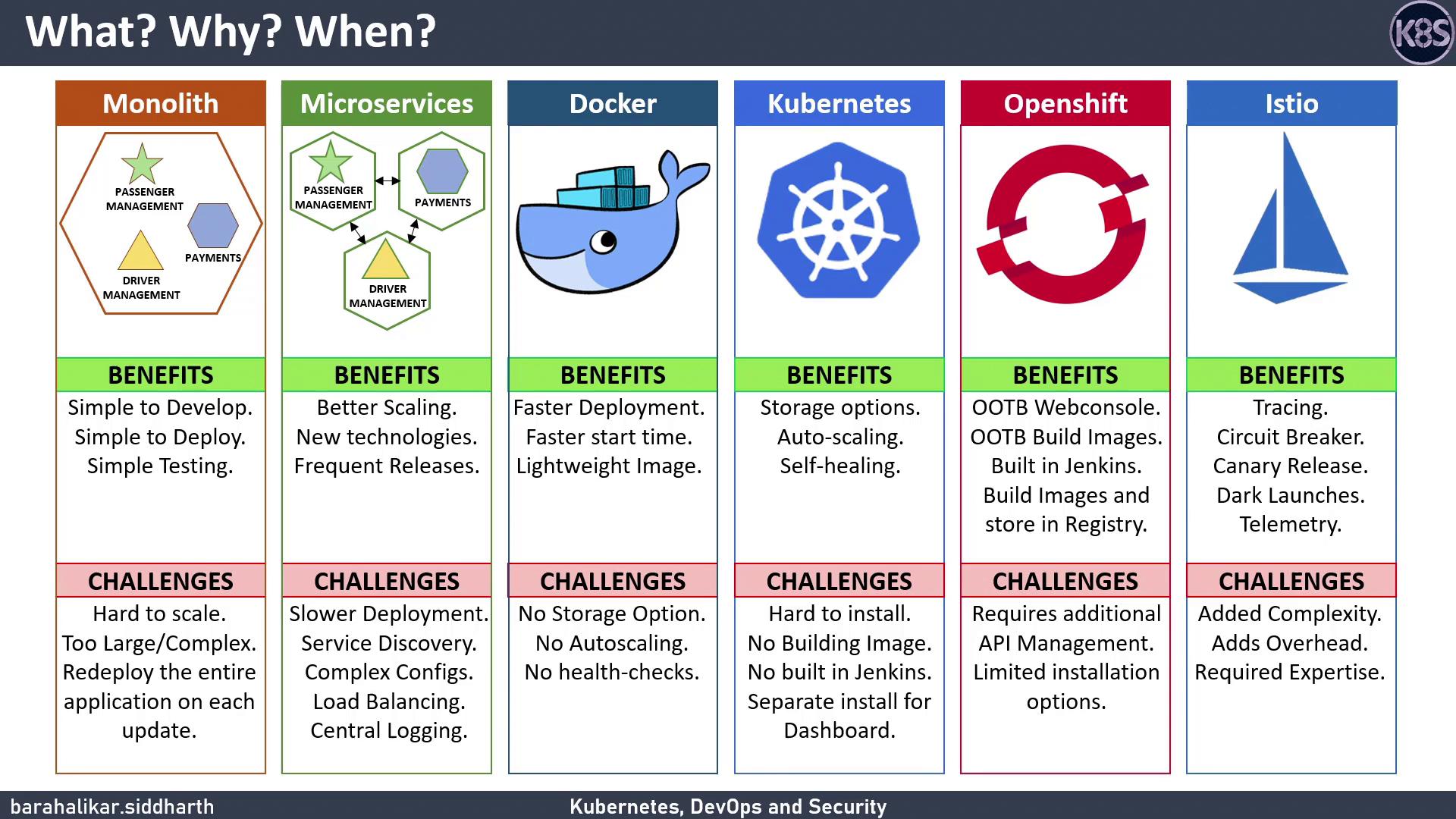
### Monolithic Applications
Early applications bundled all functionality into a single deployable unit. For example, an Uber-like app might combine passenger management, payment processing, and driver routing in one binary.
**Benefits:**
* Simple development and testing with one codebase
* Single configuration file and PaaS deployment
**Challenges:**
* Inefficient scaling: you must replicate the whole app
* Large codebase hinders team onboarding
* Every change triggers a full redeploy
### Microservices
Breaking a monolith into independent services allows each to be developed, deployed, and scaled separately.
**Benefits:**
* Fine-grained scaling for busy services
* Faster release cycles per team
**Challenges:**
* Service discovery requires a central registry
* Configuration sprawl calls for a unified config store
* Distributed tracing, logging, and load balancing add complexity
### Docker and Containers
Docker packages applications with their dependencies into lightweight containers.
**Benefits:**
* Rapid startup vs. VMs
* Smaller images including only necessary libraries
**Challenges:**
* No built-in auto-scaling or self-healing without orchestration
### Kubernetes: Container Orchestration
Kubernetes automates deployment, scaling, and management of containerized workloads.
**Benefits:**
* Auto-scaling, self-healing, rolling updates out of the box
* Portable storage abstractions and rich ecosystem
**Challenges:**
* Initial setup can be complex (binaries, certificates)
* Requires external build pipelines; it doesn’t build container images
* Dashboard is an add-on, not built in
### Platform-as-a-Service (PaaS)
Platforms like OpenShift, Rancher, and Cloud Foundry bundle runtimes, orchestration, and CI/CD.
**Example: OpenShift**
* Web console, integrated Jenkins pipelines, built-in registry
* Supports Docker and Podman for image builds
**Considerations:**
* Extra API layers add overhead
* Customization and installation can be limiting
### Service Mesh
A service mesh (e.g., Istio) overlays Kubernetes to secure and observe microservices.
**Benefits:**
* mTLS, circuit breakers, canary deployments, tracing
* Integrations with Prometheus, Grafana, Kiali, Jaeger
Adding a service mesh increases resource usage and cluster complexity. Ensure you monitor performance and avoid misconfiguration.
***
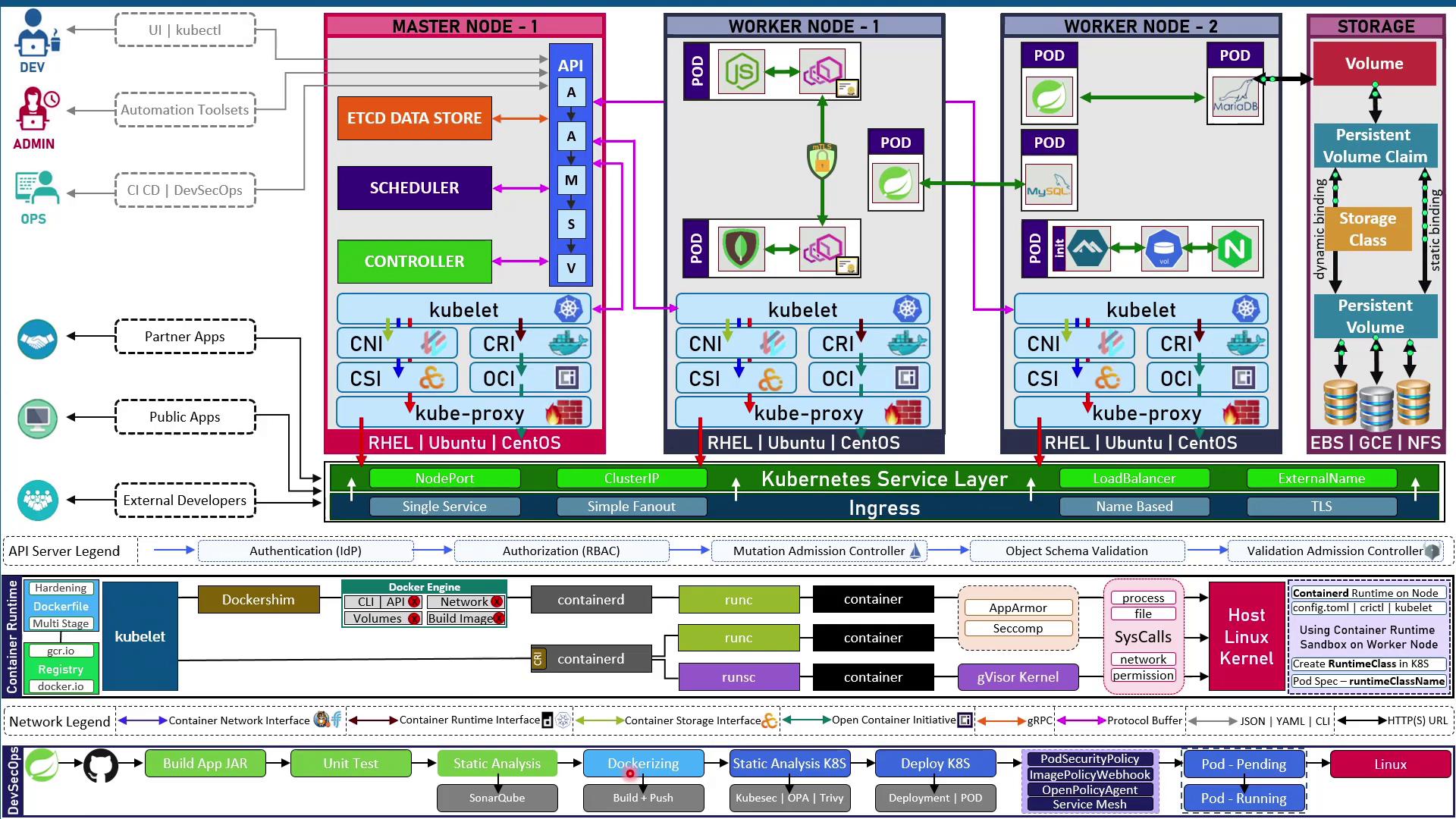
## Kubernetes Cluster Architecture
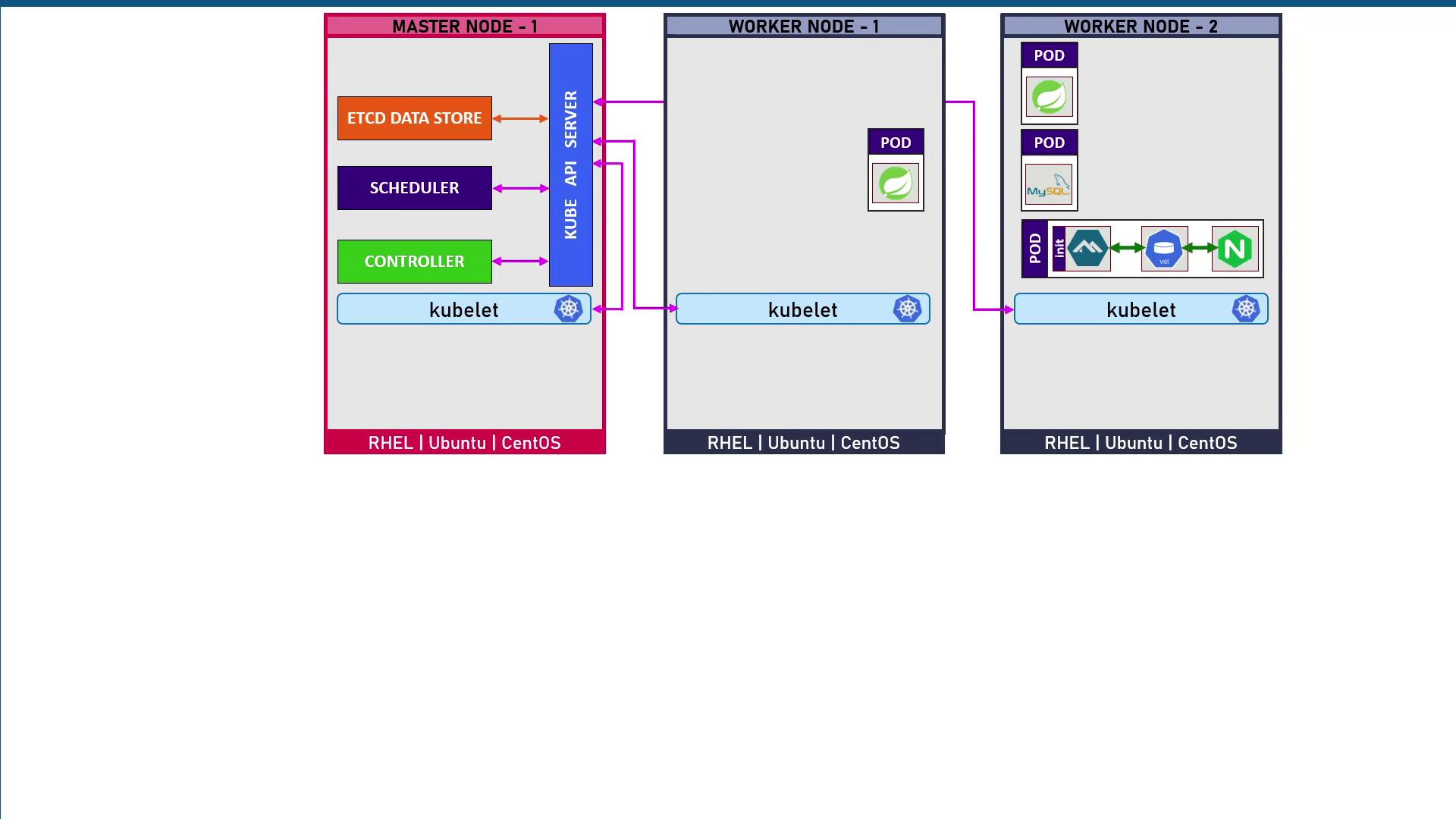
At the heart of Kubernetes are **pods**, the smallest deployable units that run one or more containers. Pods run on **worker nodes** (VMs or physical servers). For high availability, you deploy multiple workers so workloads shift if a node fails.
A separate **control plane** (master nodes) manages scheduling, state, and the API. Running multiple control-plane nodes ensures redundancy.
### Control Plane Components
* **etcd**\
A highly-available key-value store that persists all cluster state.
* **kube-apiserver**\
The central API gateway; the only component that communicates directly with etcd.
* **kube-scheduler**\
Assigns pods to nodes based on resource requirements and constraints.
* **kube-controller-manager**\
Runs controllers (e.g., ReplicaSet, Endpoint) to enforce the desired state.
### kubelet and the Container Runtime
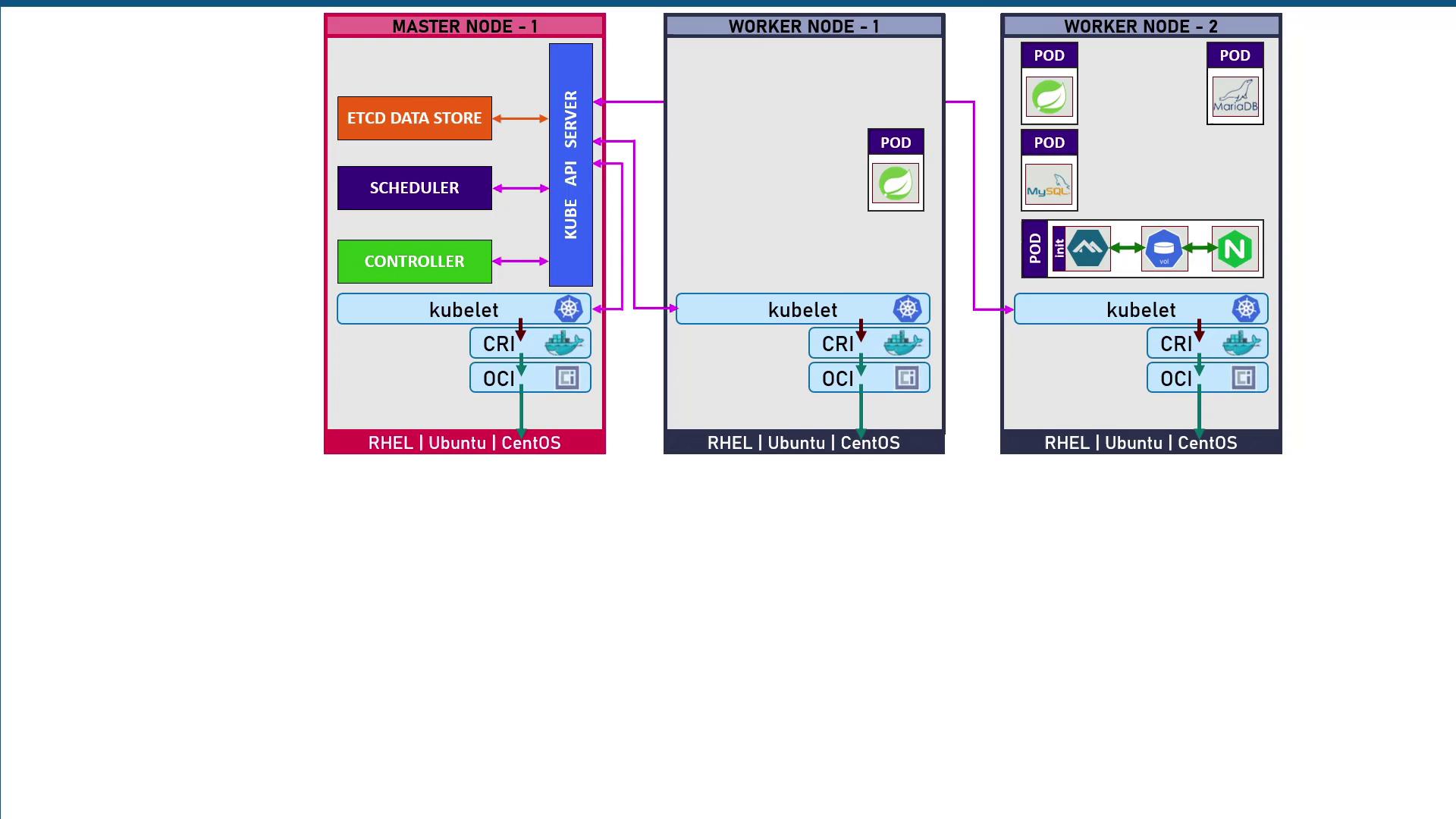
Each node (control plane and worker) runs a **kubelet** agent that:
1. Watches the API server for PodSpecs.
2. Uses the Container Runtime Interface (CRI) to pull and launch containers.
Supported runtimes include Docker, containerd, and CRI-O, all conforming to the OCI (Open Container Initiative) specs:
* **Image spec**: Defines how container images are built.
* **Runtime spec**: Defines how containers are unpacked and executed.
### Networking with CNI and kube-proxy
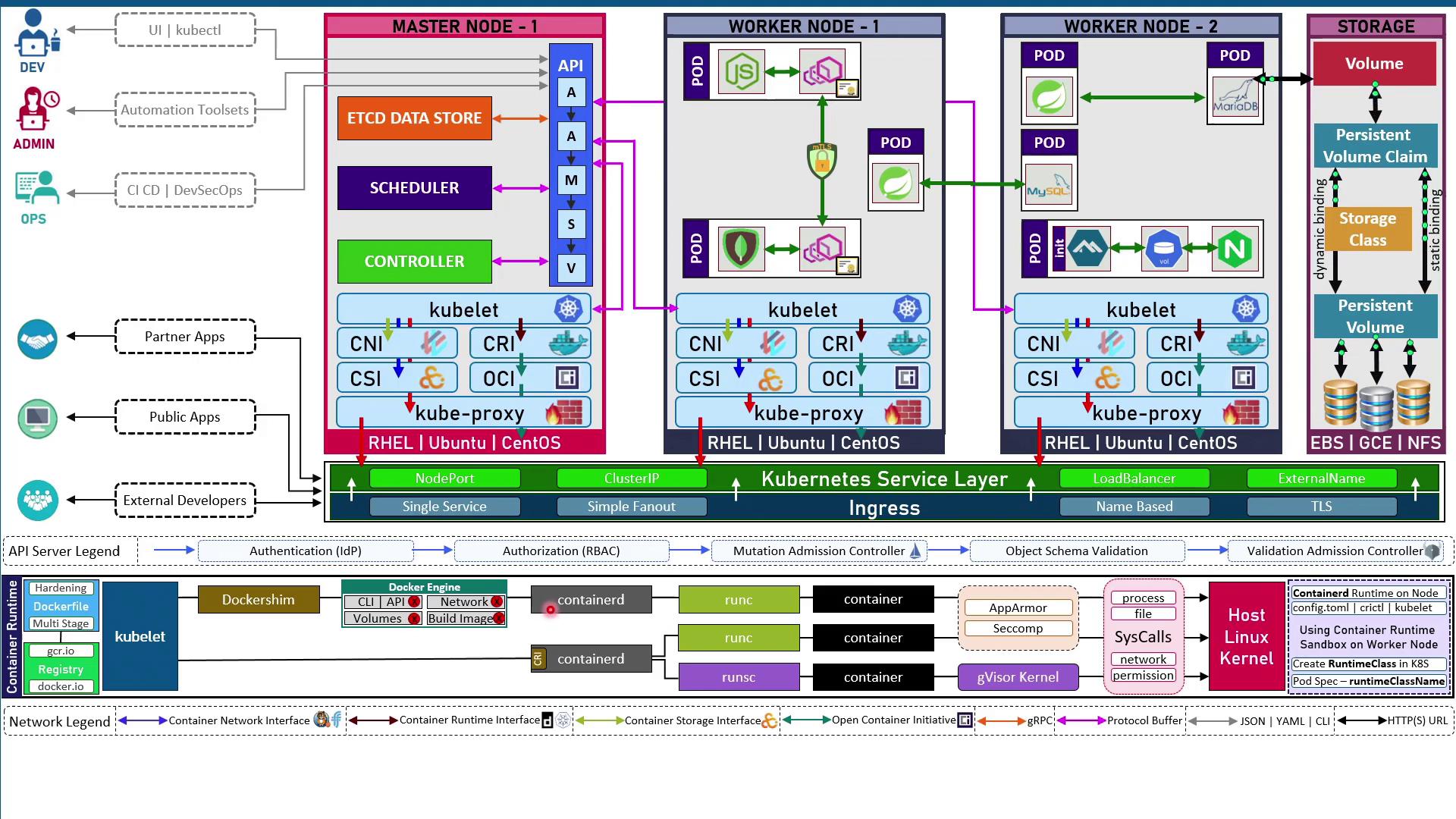
* **CNI (Container Network Interface)**\
Plugins like Calico, Flannel, and Weave Net assign each pod a unique IP.
* **kube-proxy**\
Programs iptables or IPVS rules to enable pod-to-pod networking and expose services externally.
| CNI Plugin | Features | Use Case |
| ---------- | --------------------------------- | --------------------------------- |
| Calico | L3/L4 network policies | Secure multi-tenant clusters |
| Flannel | Simple VXLAN overlay | Lightweight, quick clusters |
| Weave Net | Encrypted mesh, service discovery | Hybrid and multi-cloud networking |
### Storage with CSI
Containers are ephemeral; local data is lost on restart. The **Container Storage Interface (CSI)** lets you:
* Provision **PersistentVolumes (PV)** from NFS, EBS, GCE PD, and more.
* Claim storage in pods via **PersistentVolumeClaims (PVC)**.
* Use **StorageClasses** for dynamic volume provisioning.
Always bind your stateful workloads to PVCs. Local pod storage will **not** persist across restarts.
### Sandboxed Runtimes & RuntimeClass
Kubernetes supports minimal runtimes (e.g., containerd) and sandboxed environments:
1. Install **containerd** on each node.
2. Configure the kubelet with `--container-runtime-endpoint`.
3. Define a **RuntimeClass** that references the sandbox (e.g., gVisor’s RunSC).
4. In your PodSpec, set `runtimeClassName` to use the sandboxed runtime.
You can also enforce security with AppArmor or Seccomp profiles to restrict system calls at the kernel level.
### Admission and API Server Workflow
All cluster changes pass through the API server’s workflow:
1. **Authentication** (OIDC, LDAP, certificates)
2. **Authorization** (RBAC: Roles & RoleBindings)
3. **Mutating Admission Controllers** (e.g., sidecar injection)
4. **Validating Admission Controllers** (schema checks, OPA/Gatekeeper)
5. Final validation before persisting to etcd
### Exposing Applications
Kubernetes uses **Services** and **Ingress** to make pods reachable:
* **ClusterIP**: Internal access only
* **NodePort**: Opens a port on each node
* **LoadBalancer**: Provisions a cloud load balancer
* **ExternalName**: Maps to an external DNS name
| Service Type | Description | Typical Use Case |
| ------------ | ------------------------------ | --------------------------------- |
| ClusterIP | Internal-only cluster access | Microservices communication |
| NodePort | Exposes a static port on nodes | Dev/test environments |
| LoadBalancer | Cloud LB provisioning | Production external traffic |
| ExternalName | DNS alias to external services | Legacy or third-party integration |
**Ingress** provides Layer-7 routing (host/path rules) and TLS termination.
***
***
## DevSecOps Pipeline for Kubernetes
A robust CI/CD pipeline for a Spring Boot application on Kubernetes often includes:
1. **Build & Test**
* Compile JAR, run unit and mutation tests, static code analysis.
2. **Containerize**
* Build Docker image; scan with Trivy or Kubesec for vulnerabilities.
3. **Policy Enforcement**
* Lint Kubernetes manifests (OPA/Gatekeeper), enforce PodSecurityPolicies.
4. **Deploy**
* Apply Deployments, Services, Ingress via `kubectl` or GitOps.
5. **Runtime Security & Monitoring**
* Detect threats in real time with Falco or KubeScan.
* Monitor performance via Prometheus/Grafana; trace requests with Jaeger/Kiali.
***
## Links and References
* [Kubernetes Documentation](https://kubernetes.io/docs/)
* [Docker Hub](https://hub.docker.com/)
* [Container Storage Interface (CSI)](https://kubernetes-csi.github.io/docs/)
* [Open Container Initiative (OCI)](https://opencontainers.org/)
* [Terraform Registry](https://registry.terraform.io/)