> ## Documentation Index
> Fetch the complete documentation index at: https://notes.kodekloud.com/llms.txt
> Use this file to discover all available pages before exploring further.
# Demo Installing software in VM
> This article provides a tutorial for setting up a DevSecOps environment on an Azure VM, including software installation and deployment of an Nginx application.
In this lesson, we'll set up a DevSecOps environment on an Azure Virtual Machine. We’ll install Docker, Kubernetes (kubeadm & kubectl), Jenkins, and Maven, then deploy a simple Nginx application. This end-to-end tutorial is ideal for anyone looking to automate CI/CD in the cloud.
## Verifying Deployment in Azure
After your deployment finishes, confirm that all resources (VM, network interfaces, disks, VNet, NSGs, public IP) show a **Succeeded** status:
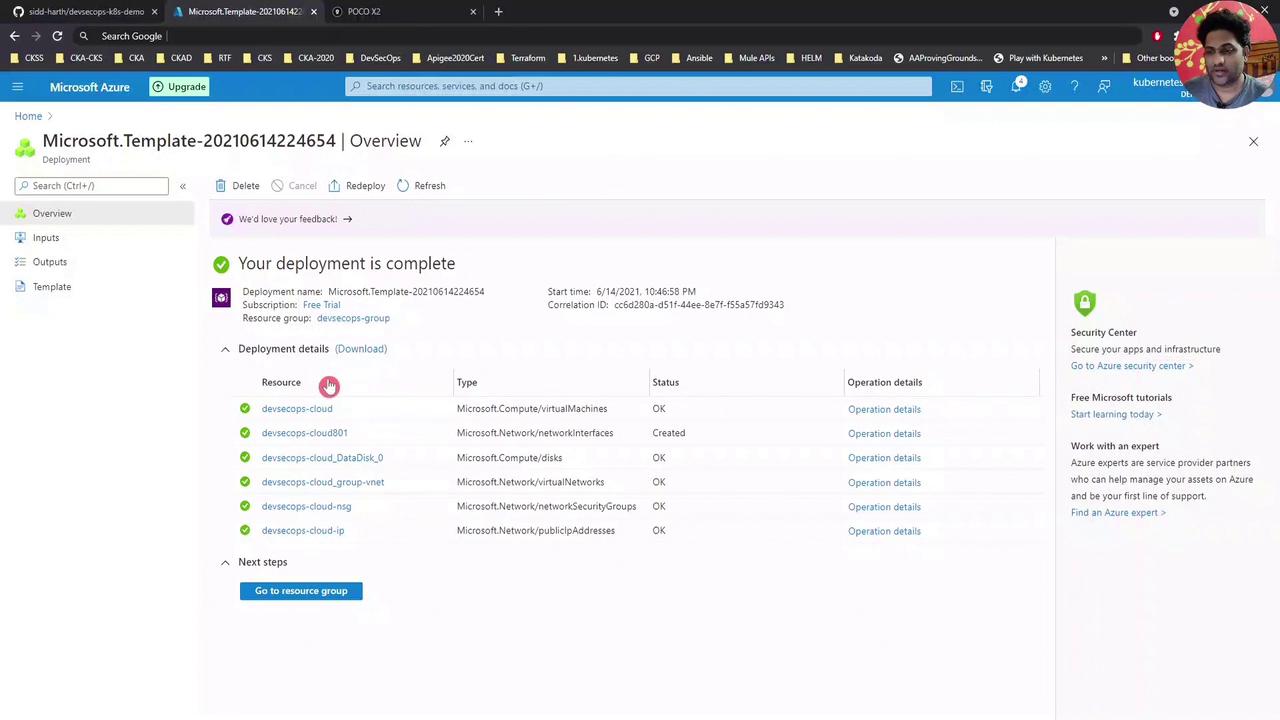
**Tip:** Use the Azure portal’s search and filter features to quickly locate resources in large subscriptions.
## Configuring a DNS Name
Assigning a DNS label to your VM’s public IP makes SSH and service URLs easier to remember:
1. In the Azure portal, go to your **Resource Group**.
2. Select the **Public IP** resource (e.g., `devsecops-cloud-ip`).
3. Under **Configuration**, enter a DNS name label (e.g., `DevSecOpsDemo`).
4. Click **Save**.
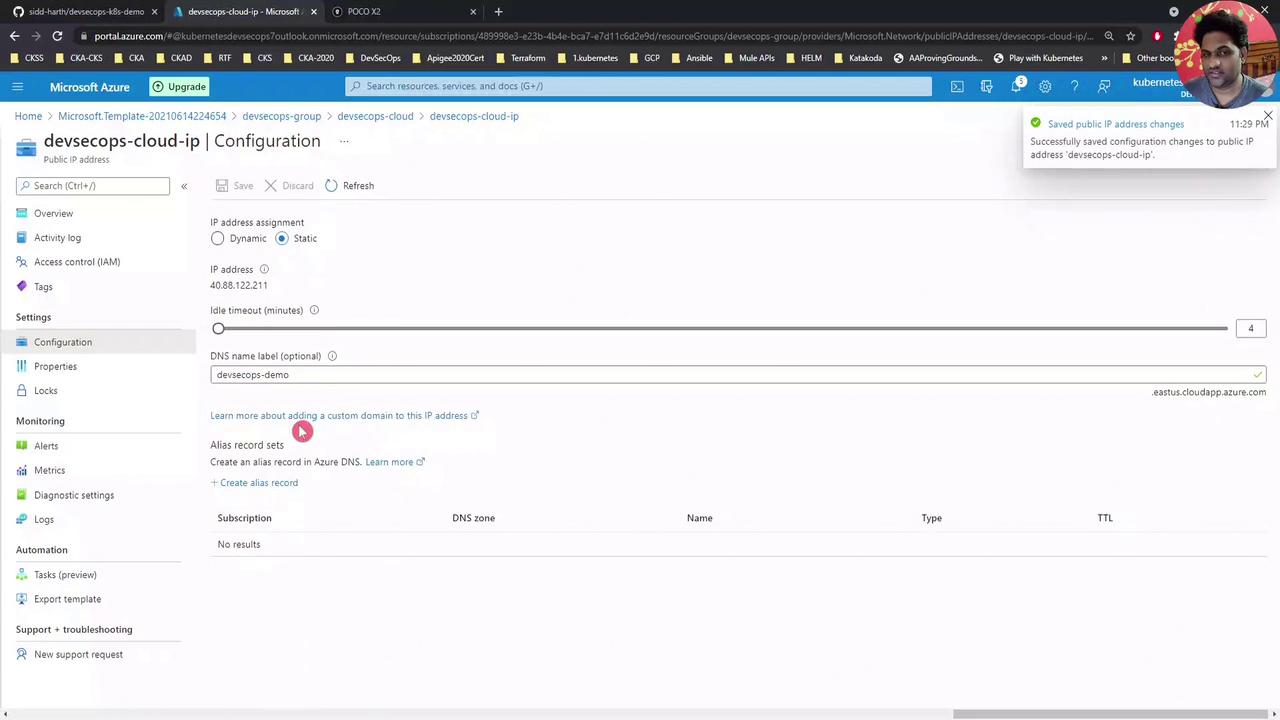
After saving, refresh the VM overview to see the FQDN:\
`DevSecOpsDemo.eastus.cloudapp.azure.com`
DNS changes can take a few minutes to propagate. Use `nslookup DevSecOpsDemo.eastus.cloudapp.azure.com` to verify resolution.
## Connecting via SSH
Use any SSH client. Here’s an example with MobaXterm:
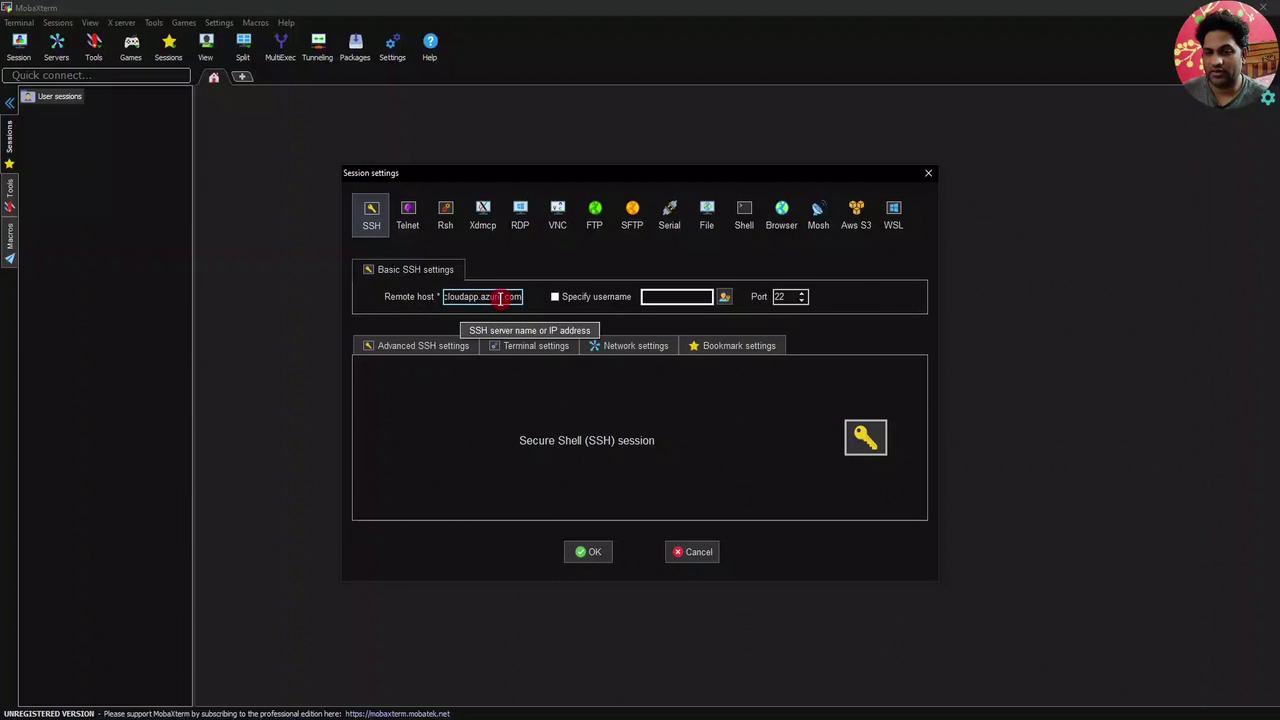
* Remote host: `DevSecOpsDemo.eastus.cloudapp.azure.com`
* Username: your VM admin (e.g., `devsecops`)
Enter your password or SSH key to log in.
## Preparing the VM
Switch to the root user to avoid typing `sudo` repeatedly:
```bash theme={null}
devsecops@devsecops-cloud:~$ sudo -i
root@devsecops-cloud:~#
```
## Cloning the Demo Repository
Download the demo scripts and navigate to the install script directory:
```bash theme={null}
root@devsecops-cloud:~# git clone https://github.com/sidd-harth/devsecops-k8s-demo.git
root@devsecops-cloud:~# cd devsecops-k8s-demo/setup/vm-install-script/
root@devsecops-cloud:~/devsecops-k8s-demo/setup/vm-install-script# ls -l
-rw-r--r-- 1 root root 3024 Jun 14 18:02 install-script.sh
```
## Running the Install Script
The `install-script.sh` automates installation of:
| Component | Installation Method | Version |
| ---------- | ------------------- | ------- |
| Docker | apt | Latest |
| Kubernetes | kubeadm, kubectl | v1.20.0 |
| Jenkins | apt | 2.289.1 |
| Maven | apt | 3.x |
Always review scripts from external sources before executing them on production systems.
Execute the installer (this may take several minutes):
```bash theme={null}
root@devsecops-cloud:~/devsecops-k8s-demo/setup/vm-install-script# bash install-script.sh
...
Setting up jenkins (2.289.1) ...
...
```
When finished, confirm your Kubernetes node is ready:
```bash theme={null}
root@devsecops-cloud:~# kubectl get node -o wide
NAME STATUS ROLES AGE VERSION INTERNAL-IP OS-IMAGE KERNEL-VERSION
devsecops-cloud Ready control-plane,master 4m v1.20.0 10.0.0.4 Ubuntu 18.04.5 LTS 5.4.0-1
```
## Deploying a Sample Nginx Application
1. Create the Nginx pod:
```bash theme={null}
root@devsecops-cloud:~# kubectl run nginx-pod --image=nginx
pod/nginx-pod created
```
2. Check pod status:
```bash theme={null}
root@devsecops-cloud:~# kubectl get pods
NAME READY STATUS RESTARTS AGE
nginx-pod 0/1 ContainerCreating 0 15s
```
Watch until it’s running:
```bash theme={null}
root@devsecops-cloud:~# kubectl get pods -w
NAME READY STATUS RESTARTS AGE
nginx-pod 1/1 Running 0 25s
```
3. Expose it via a NodePort service:
```bash theme={null}
root@devsecops-cloud:~# kubectl expose pod nginx-pod --type=NodePort --port=80
service/nginx-pod exposed
root@devsecops-cloud:~# kubectl get svc nginx-pod
NAME TYPE CLUSTER-IP EXTERNAL-IP PORT(S) AGE
nginx-pod NodePort 10.96.xxx.xxx 80:32325/TCP 1m
```
4. In your browser, go to:
```text theme={null}
http://DevSecOpsDemo.eastus.cloudapp.azure.com:32325
```
You should see the default Nginx welcome page.
***
Next, we’ll configure a Jenkins pipeline to automate builds and deployments in Kubernetes.
## Links and References
* [Azure Virtual Machines Documentation][azure-vm]
* [Docker Documentation][docker-docs]
* [Kubernetes Basics][k8s-basics]
* [Jenkins User Handbook][jenkins-docs]
* [Apache Maven Project][maven-docs]
[azure-vm]: https://docs.microsoft.com/azure/virtual-machines/
[docker-docs]: https://docs.docker.com/
[k8s-basics]: https://kubernetes.io/docs/concepts/overview/what-is-kubernetes/
[jenkins-docs]: https://www.jenkins.io/doc/
[maven-docs]: https://maven.apache.org/