> ## Documentation Index
> Fetch the complete documentation index at: https://notes.kodekloud.com/llms.txt
> Use this file to discover all available pages before exploring further.
# Maven Basics
> This guide explains Apache Maven, its role in Java project automation, and how to use its lifecycle and directory conventions for building, testing, and deploying applications.
In this guide, you’ll learn what Apache Maven is, why it’s essential for Java project automation, and how to leverage its lifecycle and directory conventions to streamline your build, test, and deployment processes.
## What Is Maven?
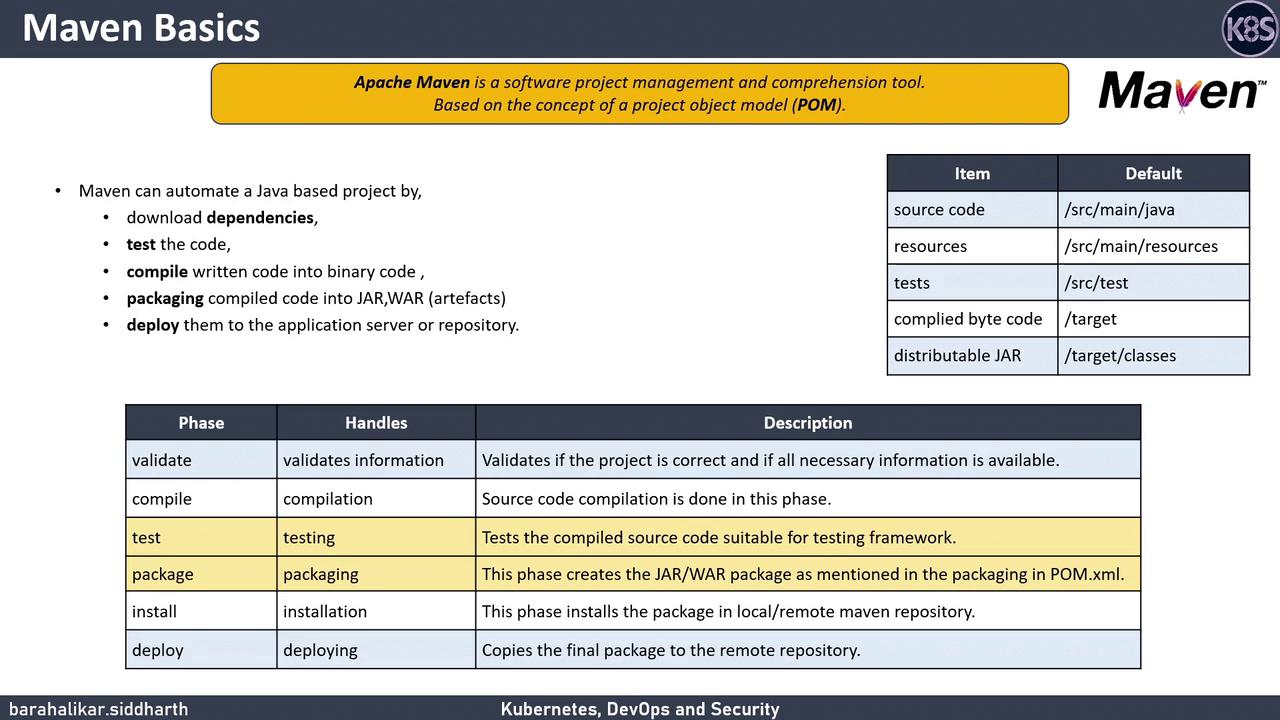
Apache Maven is a powerful build automation and project management tool based on the Project Object Model (POM). By defining dependencies and build settings in a `pom.xml` file, Maven handles:
* Downloading and managing third-party libraries
* Compiling Java source code
* Running unit tests
* Packaging artifacts (JAR, WAR)
* Deploying to local or remote repositories
Your `pom.xml` sits at the root of your project. It controls everything from dependency versions to plugin executions.
## Standard Project Structure
Maven enforces a conventional directory layout to keep builds predictable:
```text theme={null}
my-app
├── src
│ ├── main
│ │ ├── java # Application source code
│ │ └── resources # Configuration files & properties
│ └── test
│ ├── java # Unit test source code
│ └── resources # Test-specific resources
└── target # Compiled classes & packaged artifacts
```
## Core Lifecycle Phases
Maven executes build steps in a predefined sequence of lifecycle phases. Common phases you’ll use daily:
| Phase | Description | Outcome |
| -------- | --------------------------------------------------- | -------------------------------------------- |
| validate | Ensure project is correct and all info is available | Checks `pom.xml` validity |
| compile | Compile application source code | Generates `.class` files in `target/classes` |
| test | Run unit tests | Executes tests in `src/test/java` |
| package | Bundle compiled code into a JAR/WAR | Produces artifact in `target/` |
| install | Install package to local repository | Installs to `~/.m2/repository` |
| deploy | Copy final artifacts to remote repositories | Publishes for sharing across teams |
## Running Tests
To compile your code and run all unit tests:
```bash theme={null}
mvn test
```
This executes the **test** phase, compiling classes and running tests under `src/test/java`.
## Packaging Artifacts
When you’re ready to create your deployable artifact:
```bash theme={null}
mvn package
```
Maven runs up to the **package** phase, producing a JAR or WAR (depending on your packaging setting) in the `target` directory.
Ensure your `pom.xml` `` element matches your intended artifact type (`jar`, `war`, etc.) to avoid build failures.
## Integrating Maven with Jenkins
Automate your CI/CD pipeline by invoking Maven goals in a Jenkinsfile:
```groovy theme={null}
pipeline {
agent any
stages {
stage('Build') {
steps {
sh 'mvn clean compile'
}
}
stage('Test') {
steps {
sh 'mvn test'
}
}
stage('Package') {
steps {
sh 'mvn package'
}
}
}
post {
always {
junit 'target/surefire-reports/*.xml'
}
}
}
```
This pipeline runs through the compile, test, and package phases and archives test results automatically.
## Links and References
* [Apache Maven Official Documentation](https://maven.apache.org/)
* [Introduction to the POM](https://maven.apache.org/guides/introduction/introduction-to-the-pom.html)
* [Maven Lifecycle Reference](https://maven.apache.org/ref/3.8.4/maven-core/lifecycles.html)