> ## Documentation Index
> Fetch the complete documentation index at: https://notes.kodekloud.com/llms.txt
> Use this file to discover all available pages before exploring further.
# Section 2 Topics
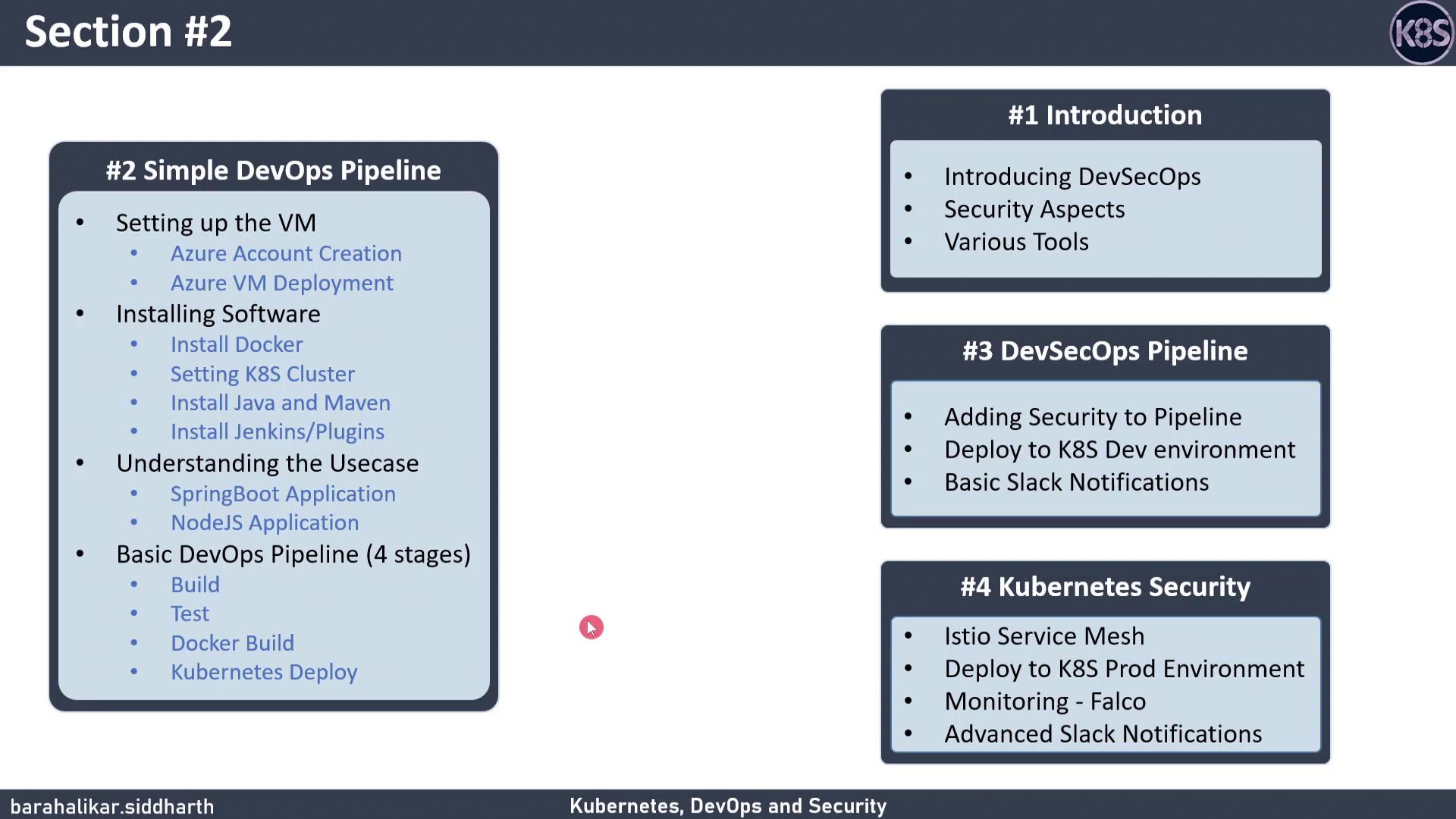
> This section covers setting up infrastructure, installing software, and building a Jenkins pipeline with four stages.
In this section, we’ll walk through the essential steps to provision your infrastructure, install necessary software, and build a simple Jenkins pipeline with four stages. By the end, you’ll have:
| Step | Description | Script Location |
| ---- | --------------------------------------- | --------------------------------- |
| 1 | Set up a free Azure account | `scripts/create-azure-account.sh` |
| 2 | Create a Linux virtual machine | `scripts/create-vm.sh` |
| 3 | Deploy a single-node Kubernetes cluster | `scripts/deploy-k8s-cluster.sh` |
| 4 | Install software for hands-on labs | `scripts/install-lab-software.sh` |
Make sure you have:
* A Microsoft account to sign up for [Azure Free Account](https://azure.microsoft.com/free/).
* `az` CLI installed locally.
* Basic familiarity with [Kubernetes Basics](https://kubernetes.io/docs/concepts/overview/what-is-kubernetes/) and [Jenkins Pipelines](https://www.jenkins.io/doc/book/pipeline/).
## 1. Set Up a Free Azure Account
1. Navigate to the Azure free tier page.
2. Complete the sign-up form to obtain \$200 in credits.
3. Verify your email and phone number.
Free credits expire after 30 days. Monitor your usage in the [Azure Portal](https://portal.azure.com/) to avoid unexpected charges.
## 2. Create a Virtual Machine
Use the Azure CLI to spin up a Linux VM:
```bash theme={null}
az login
az group create --name DevOpsRG --location eastus
az vm create \
--resource-group DevOpsRG \
--name DevNode \
--image UbuntuLTS \
--size Standard_B1s \
--admin-username azureuser \
--generate-ssh-keys
```
## 3. Deploy a Single-Node Kubernetes Cluster
Install Kubernetes with `kubeadm`:
```bash theme={null}
ssh azureuser@
sudo apt-get update && sudo apt-get install -y docker.io kubeadm
sudo kubeadm init --pod-network-cidr=10.244.0.0/16
mkdir -p $HOME/.kube
sudo cp /etc/kubernetes/admin.conf $HOME/.kube/config
sudo chown $(id -u):$(id -g) $HOME/.kube/config
kubectl apply -f https://raw.githubusercontent.com/coreos/flannel/master/Documentation/kube-flannel.yml
```
## 4. Install Software for Hands-On Labs
Install common DevOps tools:
```bash theme={null}
# Jenkins
wget -q -O - https://pkg.jenkins.io/debian-stable/jenkins.io.key | sudo apt-key add -
sudo sh -c 'echo deb https://pkg.jenkins.io/debian-stable binary/ > /etc/apt/sources.list.d/jenkins.list'
sudo apt-get update && sudo apt-get install -y openjdk-11-jdk jenkins
# Helm, Terraform, Azure CLI extensions
curl https://raw.githubusercontent.com/helm/helm/main/scripts/get-helm-3 | bash
sudo apt-get install -y unzip
curl https://releases.hashicorp.com/terraform/1.0.0/terraform_1.0.0_linux_amd64.zip -o tf.zip
unzip tf.zip && sudo mv terraform /usr/local/bin/
az extension add --name aks-preview
```
## 5. Create a Basic Jenkins Pipeline
Here’s a simple `Jenkinsfile` with four stages:
```groovy theme={null}
pipeline {
agent any
stages {
stage('Clone Repo') {
steps { git 'https://github.com/your-org/your-repo.git' }
}
stage('Build') {
steps { sh 'mvn clean package' }
}
stage('Test') {
steps { sh 'mvn test' }
}
stage('Deploy') {
steps { sh './scripts/deploy.sh' }
}
}
}
```
## References
* [Azure Free Account](https://azure.microsoft.com/free/)
* [Kubernetes Documentation](https://kubernetes.io/docs/)
* [Jenkins Pipeline Syntax](https://www.jenkins.io/doc/book/pipeline/)
* [Helm Charts](https://helm.sh/docs/topics/charts/)