> ## Documentation Index
> Fetch the complete documentation index at: https://notes.kodekloud.com/llms.txt
> Use this file to discover all available pages before exploring further.
# VM Configuration
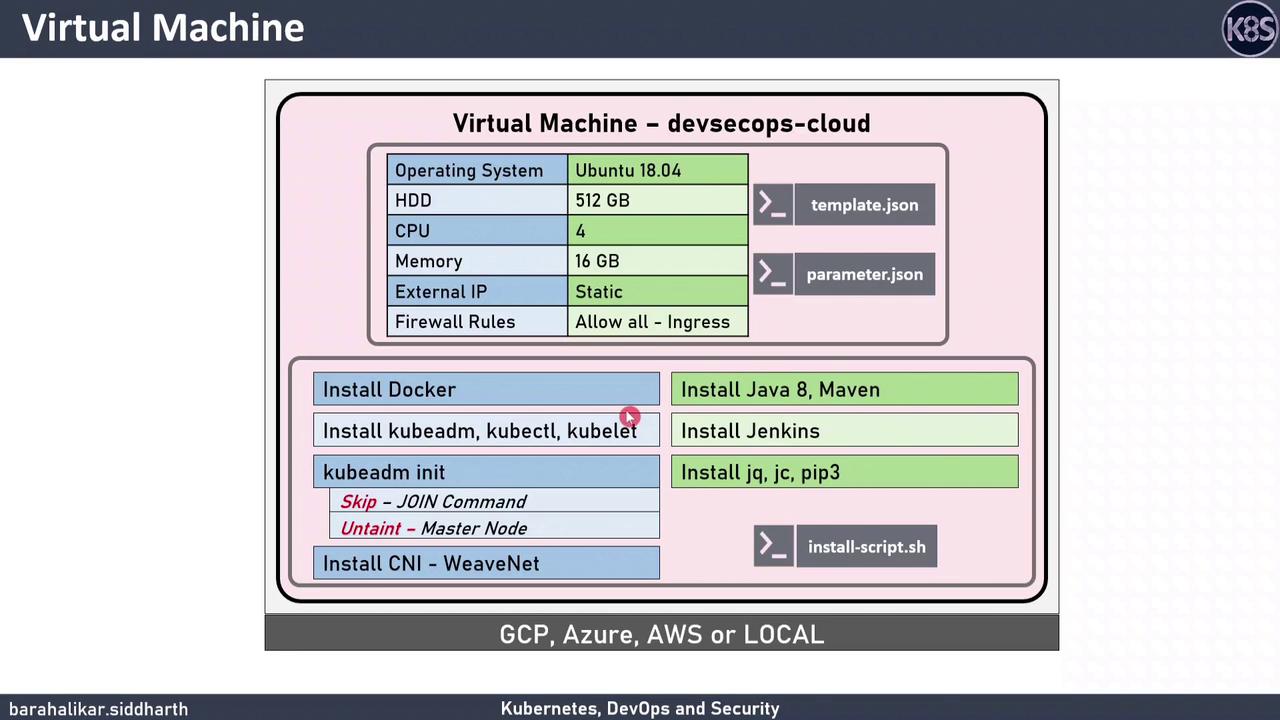
> This guide covers provisioning a DevSecOps Cloud virtual machine, installing tools, and configuring a single-node Kubernetes cluster for CI/CD and containerization learning.
In this guide, we’ll walk through provisioning a **DevSecOps Cloud** virtual machine, installing essential DevSecOps tools, and configuring a single-node Kubernetes cluster. This setup is perfect for learning CI/CD, containerization, and Kubernetes orchestration.
## Table of Contents
1. [Prerequisites](#prerequisites)
2. [VM Specifications](#vm-specifications)
3. [Provisioning the VM](#provisioning-the-vm)
* [Azure Resource Manager Template](#azure-resource-manager-template)
* [Google Cloud Platform (gcloud) Commands](#google-cloud-platform-gcloud-commands)
* [Local VirtualBox Deployment (Vagrant)](#local-virtualbox-deployment-vagrant)
4. [Software Installation](#software-installation)
5. [Cluster Configuration](#cluster-configuration)
6. [Download Resources](#download-resources)
## Prerequisites
* Azure CLI ≥ 2.20 or GCP SDK
* Vagrant & VirtualBox (for local testing)
* Basic Linux shell proficiency
## VM Specifications
| Specification | Details |
| ---------------- | ----------------------- |
| Operating System | Ubuntu 20.04 LTS |
| vCPUs | 4 |
| Memory | 16 GB RAM |
| Ingress Firewall | All traffic (demo only) |
The firewall rule allowing all inbound traffic is for demonstration only. **Do not** use such permissive settings in production environments.
## Provisioning the VM
### Azure Resource Manager Template
Use the provided ARM template and parameters:
```bash theme={null}
# Create a resource group
az group create \
--name DevSecOpsRG \
--location eastus
# Deploy the VM
az deployment group create \
--resource-group DevSecOpsRG \
--template-file azuredeploy.json \
--parameters @azuredeploy.parameters.json
```
### Google Cloud Platform (gcloud) Commands
Or spin up a GCP instance:
```bash theme={null}
gcloud compute instances create devsecops-cloud \
--zone=us-central1-a \
--machine-type=n1-standard-4 \
--image-family=ubuntu-2004-lts \
--image-project=ubuntu-os-cloud \
--tags=http-server,https-server
```
### Local VirtualBox Deployment (Vagrant)
For local testing with Vagrant:
```bash theme={null}
# Start the VM
vagrant up --provider=virtualbox
```
## Software Installation
SSH into your VM and run the installer:
```bash theme={null}
ssh ubuntu@
git clone https://github.com/yourrepo/devsecops-vm-setup.git
cd devsecops-vm-setup
chmod +x install.sh
./install.sh
```
### Installation Breakdown
| Component | Version | Purpose |
| ------------------------- | ------- | ----------------------------- |
| Docker CE | Latest | Container runtime |
| kubeadm, kubelet, kubectl | v1.21.x | Kubernetes cluster tools |
| OpenJDK | 8 | Jenkins runtime |
| Maven | 3.6.x | Java build automation |
| Jenkins LTS | 2.xx.x | Continuous Integration server |
The `install.sh` script updates packages, installs Docker CE, sets up Kubernetes tools, initializes a single-node cluster, and deploys Jenkins.
## Cluster Configuration
Enable pod scheduling on the master node:
```bash theme={null}
kubectl taint nodes --all node-role.kubernetes.io/master-
```
Verify node readiness:
```bash theme={null}
kubectl get nodes
```
## Download Resources
Grab all templates and scripts from the GitHub repo:
* [azuredeploy.json](https://github.com/yourrepo/devsecops-vm-setup/blob/main/azuredeploy.json)
* [azuredeploy.parameters.json](https://github.com/yourrepo/devsecops-vm-setup/blob/main/azuredeploy.parameters.json)
* [Vagrantfile](https://github.com/yourrepo/devsecops-vm-setup/blob/main/Vagrantfile)
* [install.sh](https://github.com/yourrepo/devsecops-vm-setup/blob/main/install.sh)
For more details, visit the [Azure Documentation](https://docs.microsoft.com/azure/) and [Kubernetes Documentation](https://kubernetes.io/docs/).