> ## Documentation Index
> Fetch the complete documentation index at: https://notes.kodekloud.com/llms.txt
> Use this file to discover all available pages before exploring further.
# Demo Integration Tests
> This guide explains how to add integration testing to a Jenkins Pipeline for a Kubernetes system using curl commands.
Integration tests ensure that individual components in your application communicate correctly when combined. This guide shows how to add an integration testing stage to a Jenkins Pipeline for a Kubernetes-based system using simple `curl` commands.
## What You Will Learn
* How to verify HTTP response codes and payloads with `curl`
* Embedding integration tests in a Jenkinsfile
* Rolling back failed deployments automatically
## Why Integration Testing Matters
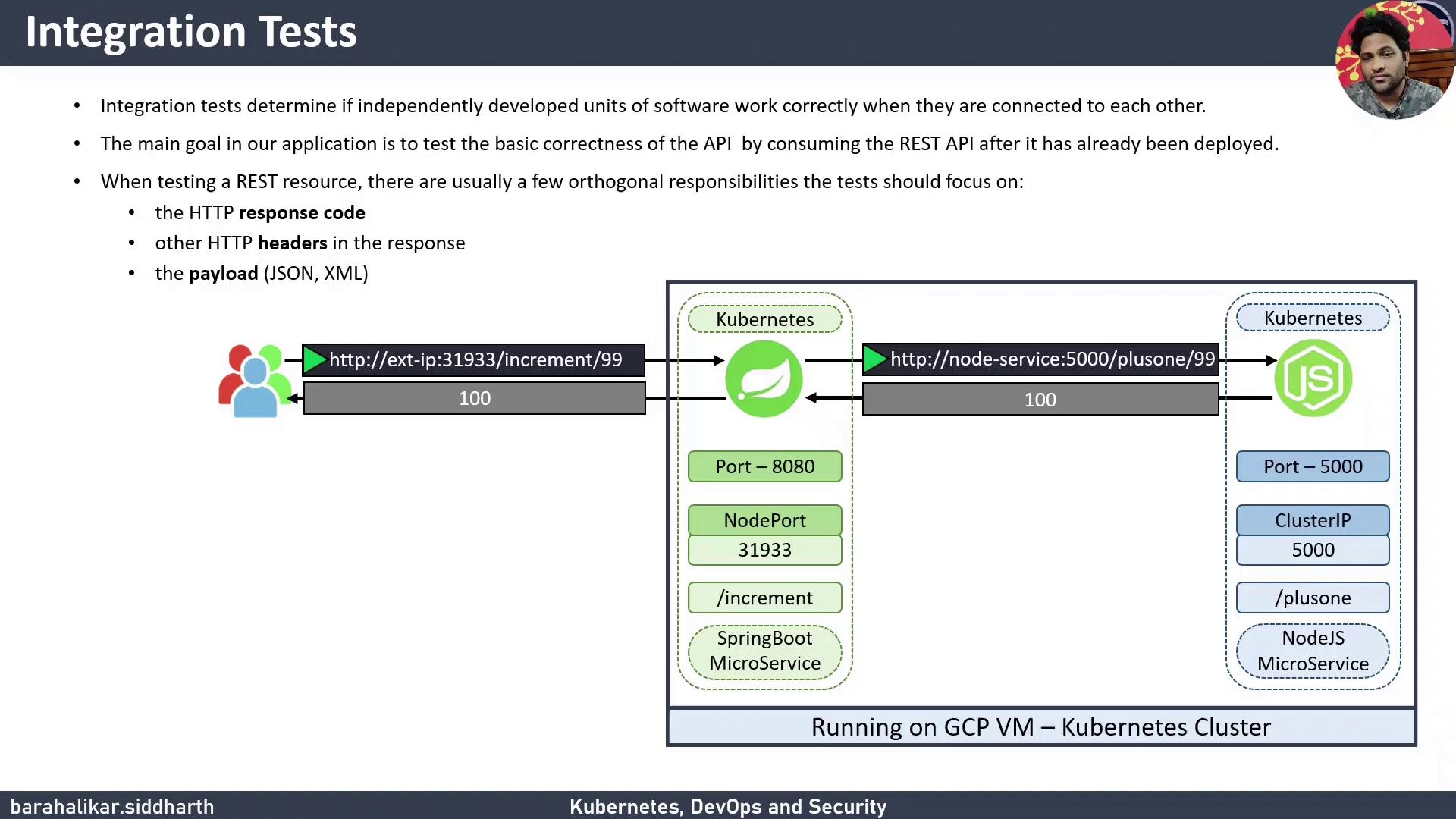
Integration testing catches issues that unit tests cannot, such as network connectivity, misconfigured services, or data serialization errors. For a REST API, common checks include:
* HTTP status codes
* Response headers
* Payload validation (JSON, XML, or plain text)
## Architecture Overview
Our demo application consists of two microservices:
1. A **Spring Boot** service listening on a NodePort (e.g., `31933`)
2. A **Node.js** service that processes business logic
The Spring Boot service forwards requests to the Node.js service. We will run two `curl`-based tests:
1. Check that `/increment/99` returns HTTP 200
2. Confirm payload increments 99 to 100
### Manual Curl Commands
Use these commands for a quick sanity check:
```bash theme={null}
# Check HTTP status code (should print 200)
curl -s -o /dev/null -w "%{http_code}" http://:31933/increment/99
# Check payload (should return 100)
curl -s http://:31933/increment/99
```
## Embedding Integration Tests in Jenkins Pipeline
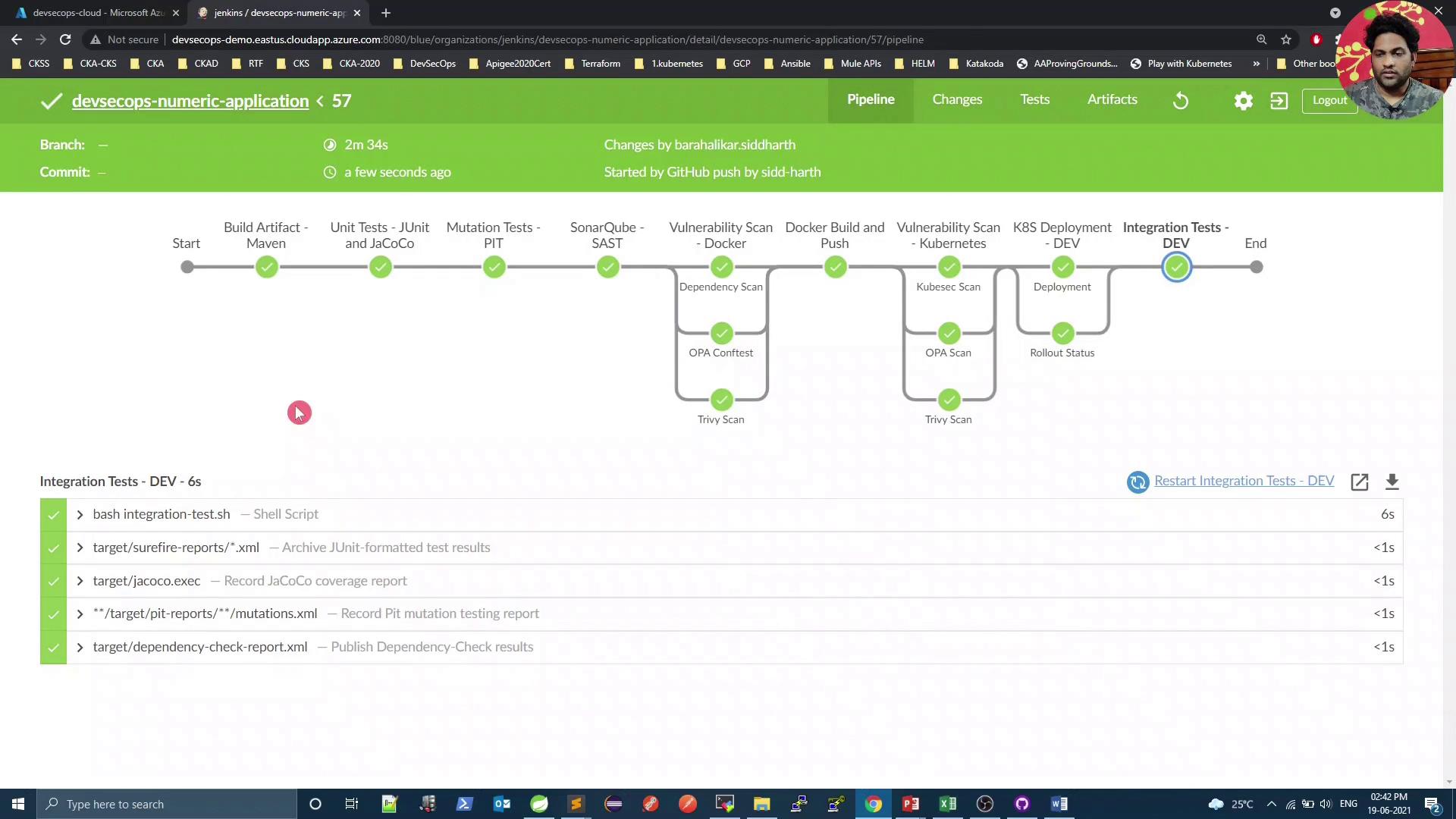
Add a dedicated `Integration Test - DEV` stage right after deploying to Kubernetes. The stage will:
* Execute `integration-test.sh` for `curl`-based checks
* Automatically roll back on failure using `kubectl rollout undo`
### Jenkins Pipeline Stages at a Glance
| Stage | Purpose | Command Example |
| --------------------------- | ----------------------------------------------------- | ------------------------------------------------------------------ |
| Build Artifact - Maven | Compile code & package JAR | `mvn clean package -DskipTests=true` |
| Unit Tests - JUnit & JaCoCo | Run unit tests | `mvn test` |
| Mutation Tests - PIT | Perform mutation testing | `mvn org.pitest:pitest-maven:mutationCoverage` |
| SonarQube - SAST | Static analysis & code quality | `mvn sonar:sonar` |
| K8S Deployment - DEV | Deploy to Kubernetes and monitor rollout | `bash k8s-deployment.sh` / `bash k8s-deployment-rollout-status.sh` |
| Integration Test - DEV | Validate connectivity and payload; rollback if needed | `bash integration-test.sh` |
### Jenkinsfile Snippet
```groovy theme={null}
pipeline {
agent any
environment {
deploymentEnv = "devsecops"
containerName = "devsecops-container"
serviceName = "devsecops-svc"
imageName = "siddharth67/numeric-app:${GIT_COMMIT}"
applicationURL = "http://devsecops-demo.eastus.cloudapp.azure.com"
applicationURI = "/increment/99"
}
stages {
stage('Build Artifact - Maven') {
steps {
sh "mvn clean package -DskipTests=true"
archiveArtifacts artifacts: 'target/*.jar'
}
}
stage('Unit Tests - JUnit & JaCoCo') {
steps {
sh "mvn test"
}
}
stage('Mutation Tests - PIT') {
steps {
sh "mvn org.pitest:pitest-maven:mutationCoverage"
}
}
stage('SonarQube - SAST') {
steps {
withSonarQubeEnv('SonarQube') {
sh """
mvn sonar:sonar \
-Dsonar.projectKey=numeric-application \
-Dsonar.host.url=http://devsecops-demo.eastus.cloudapp.azure.com:9000
"""
}
}
}
stage('K8S Deployment - DEV') {
parallel {
stage('Deployment') {
steps {
withKubeConfig([credentialsId: 'kubeconfig']) {
sh "bash k8s-deployment.sh"
}
}
}
stage('Rollout Status') {
steps {
withKubeConfig([credentialsId: 'kubeconfig']) {
sh "bash k8s-deployment-rollout-status.sh"
}
}
}
}
}
stage('Integration Test - DEV') {
steps {
script {
try {
withKubeConfig([credentialsId: 'kubeconfig']) {
sh "bash integration-test.sh"
}
} catch (e) {
withKubeConfig([credentialsId: 'kubeconfig']) {
sh "kubectl -n default rollout undo deploy ${serviceName}"
}
error("Integration tests failed, rolled back deployment.")
}
}
}
}
}
post {
always {
junit 'target/surefire-reports/*.xml'
jacoco execPattern: 'target/jacoco.exec'
}
}
}
```
Ensure that the `serviceName` environment variable matches your Kubernetes Deployment name. Replace `${serviceName}` if needed.
## integration-test.sh Script
Create an `integration-test.sh` file with executable permissions (`chmod +x integration-test.sh`):
```bash theme={null}
#!/usr/bin/env bash
set -euo pipefail
sleep 5
# Retrieve the NodePort for the service
PORT=$(kubectl -n default get svc "${serviceName}" -o jsonpath='{.spec.ports[0].nodePort}')
if [[ -z "$PORT" ]]; then
echo "Error: Service ${serviceName} has no NodePort."
exit 1
fi
URL="${applicationURL}:${PORT}${applicationURI}"
echo "Testing endpoint: $URL"
# Validate payload increments 99 to 100
response=$(curl -s "$URL")
if [[ "$response" != "100" ]]; then
echo "❌ Payload Test Failed: expected 100, got $response"
exit 1
else
echo "✅ Payload Test Passed"
fi
# Check HTTP status code 200
http_code=$(curl -s -o /dev/null -w "%{http_code}" "$URL")
if [[ "$http_code" != "200" ]]; then
echo "❌ HTTP Status Test Failed: expected 200, got $http_code"
exit 1
else
echo "✅ HTTP Status Test Passed"
fi
```
## Local Testing
Before committing to Jenkins, validate tests locally:
```bash theme={null}
# Get NodePort
kubectl -n default get svc "${serviceName}" -o jsonpath='{.spec.ports[0].nodePort}'
# Test status code
curl -s -o /dev/null -w "%{http_code}" http://localhost:/increment/99
# Test payload
curl -s http://localhost:/increment/99
```
If you see `200` and `100`, your integration test script is working.
***
After pushing changes, Jenkins will run the updated pipeline, including the new integration test stage.
## References
* [Kubernetes Basics](https://kubernetes.io/docs/concepts/overview/what-is-kubernetes/)
* [Jenkins Pipeline Syntax](https://jenkins.io/doc/book/pipeline/syntax/)
* [curl Manual](https://curl.se/docs/manual.html)
* [jq Manual](https://stedolan.github.io/jq/manual/)
Thank you!