> ## Documentation Index
> Fetch the complete documentation index at: https://notes.kodekloud.com/llms.txt
> Use this file to discover all available pages before exploring further.
# Demo OWASP ZAP Jenkins Scan
> Integrate OWASP ZAP security testing into Jenkins CI/CD workflow using OpenAPI spec for scanning and reporting vulnerabilities.
Integrate OWASP ZAP security testing into your Jenkins CI/CD workflow by leveraging the OpenAPI spec exposed at `/v3/api-docs` in your Spring Boot application. This guide walks you through updating your Jenkinsfile, creating a ZAP scan script, publishing HTML reports, and fixing security headers.
## Prerequisites
| Prerequisite | Description |
| ------------------------ | ---------------------------------------------------------------------- |
| Spring Boot + Springdoc | Exposes the OpenAPI JSON at `/v3/api-docs`. |
| Jenkins with Kubernetes | Uses `withKubeConfig` for running stages against a Kubernetes cluster. |
| jq | Parses JSON output from `kubectl`. |
| Docker & OWASP ZAP image | `owasp/zap2docker-weekly` for running the scan. |
## 1. Update the Jenkinsfile
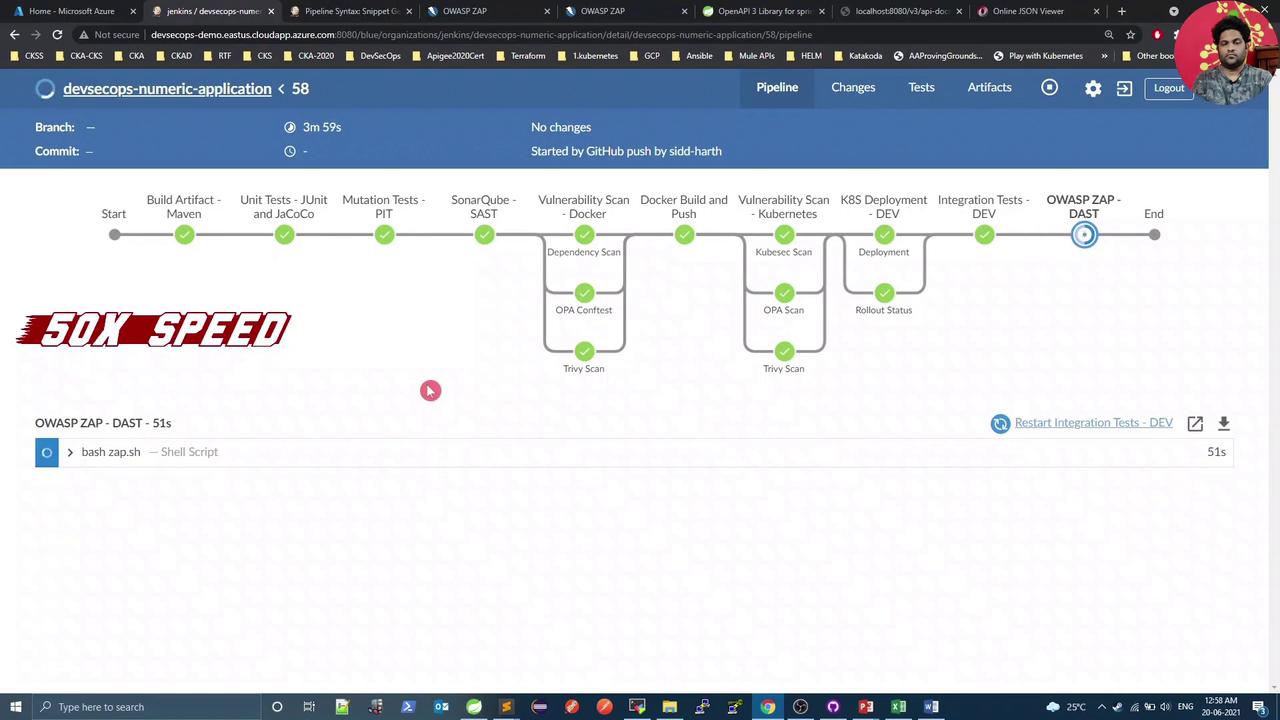
Add an **OWASP ZAP – DAST** stage after your integration tests, and configure the `post` section to publish the HTML report.
| Stage | Purpose |
| ----------------------- | -------------------------------------------------------------- |
| Integration Tests - DEV | Run `integration-test.sh` and rollback on failure. |
| OWASP ZAP - DAST | Execute `zap.sh` to scan the API endpoints defined in OpenAPI. |
```groovy theme={null}
pipeline {
agent any
stages {
stage('Integration Tests - DEV') {
steps {
script {
try {
withKubeConfig(credentialsId: 'kubeconfig') {
sh 'bash integration-test.sh'
}
} catch (e) {
withKubeConfig(credentialsId: 'kubeconfig') {
sh "kubectl -n default rollout undo deploy ${deploymentName}"
}
throw e
}
}
}
}
stage('OWASP ZAP - DAST') {
steps {
withKubeConfig(credentialsId: 'kubeconfig') {
sh 'bash zap.sh'
}
}
}
}
post {
always {
junit 'target/surefire-reports/*.xml'
jacoco execPattern: 'target/jacoco.exec'
pitmutation mutationStatsFile: '**/target/pit-reports/**/mutations.xml'
dependencyCheckPublisher pattern: 'target/dependency-check-report.xml'
publishHTML(
allowMissing: false,
alwaysLinkToLastBuild: true,
keepAll: true,
reportDir: 'owasp-zap-report',
reportFiles: 'zap_report.html',
reportName: 'OWASP ZAP HTML Report',
reportTitles: 'OWASP ZAP HTML Report'
)
}
}
}
```
## 2. Create the `zap.sh` Script
This script retrieves your service’s NodePort, invokes the ZAP API scan against the OpenAPI spec, and organizes the report for Jenkins.
```bash theme={null}
#!/bin/bash
# Fetch the NodePort that exposes our service
PORT=$(kubectl -n default get svc ${serviceName} -o json | jq .spec.ports[0].nodePort)
# Ensure write permissions for the report directory
chmod 777 $(pwd)
# Run the OWASP ZAP API scan against the OpenAPI spec
docker run \
-v $(pwd):/zap/wrk/:rw \
-t owasp/zap2docker-weekly \
zap-api-scan.py \
-t $applicationURL:$PORT/v3/api-docs \
-f openapi \
-r zap_report.html
exit_code=$?
# Move the HTML report into its own folder
mkdir -p owasp-zap-report
mv zap_report.html owasp-zap-report
echo "Exit Code: $exit_code"
if [[ $exit_code -ne 0 ]]; then
echo "OWASP ZAP found vulnerabilities. Please check the HTML report."
exit 1
else
echo "No vulnerabilities detected by OWASP ZAP."
fi
```
Save this as `zap.sh`, make it executable (`chmod +x zap.sh`), and commit it alongside your Jenkinsfile.
If OWASP ZAP exits with a non-zero code, the pipeline will fail. Review the HTML report to triage any findings.
## 3. Configure Jenkins to Publish HTML
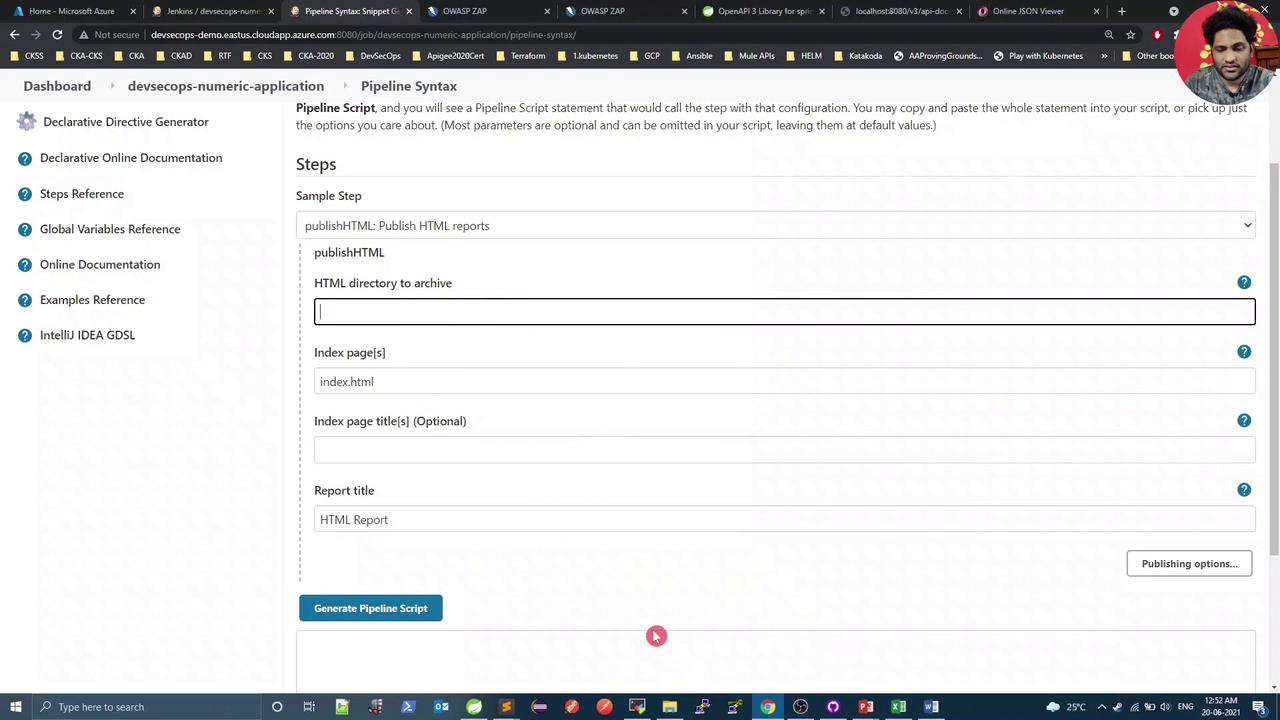
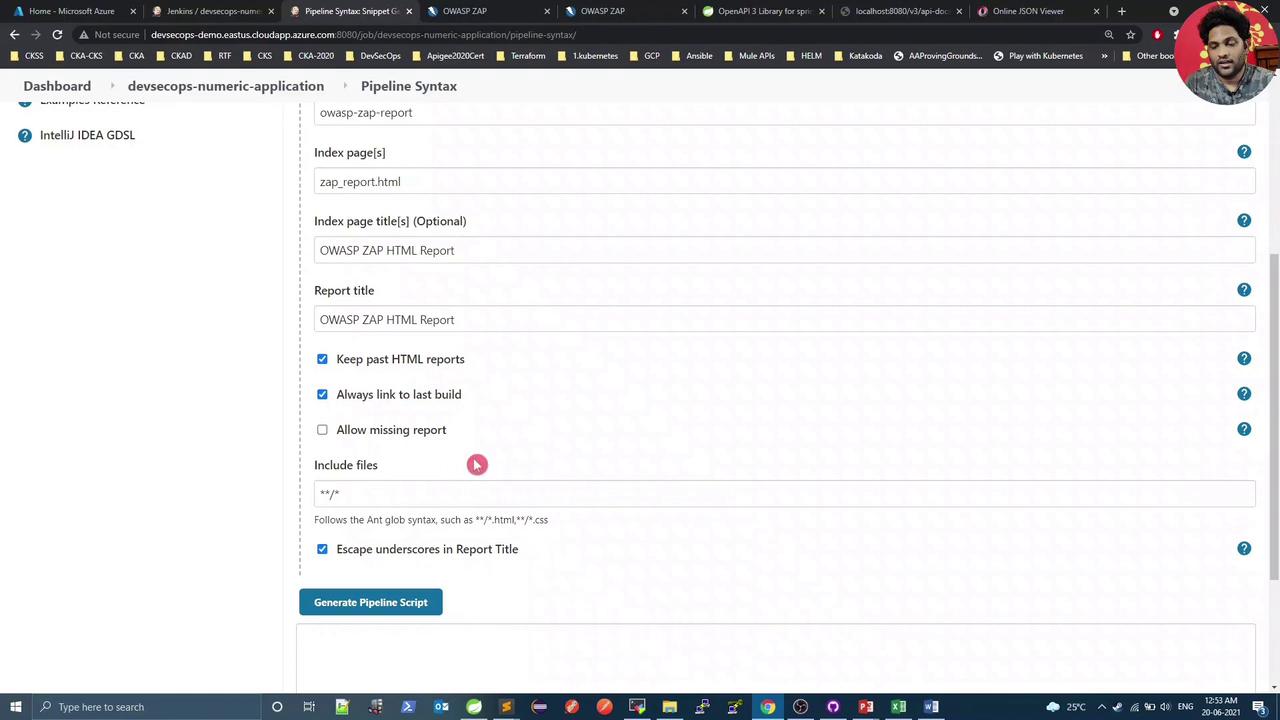
Use the **Pipeline Syntax Snippet Generator** in Jenkins to configure the `publishHTML` step:
* HTML directory: `owasp-zap-report`
* Index page(s): `zap_report.html`
* Report title: **OWASP ZAP HTML Report**
## 4. Trigger a Build and Review
After pushing your commits, Jenkins will run a new build including the OWASP ZAP – DAST stage:
In the console output, you will see ZAP importing your API endpoints and executing its security rules:
```text theme={null}
...
Number of Imported URLs: 8
PASS: Directory Browsing [0]
...
WARN-NEW: Unexpected Content-Type returned [100001] x 3
WARN-NEW: X-Content-Type-Options Header Missing [10021] x 4
FAIL-NEW: ? FAIL-IMPROG: 0 INFO: 0 IGNORE: 0 PASS: 114
Exit Code 2:
OWASP ZAP Report has either Low/Medium/High Risk. Please check the HTML Report
```
## 5. View the Published HTML Report
Open the **OWASP ZAP HTML Report** link on your Jenkins build page to explore vulnerabilities:
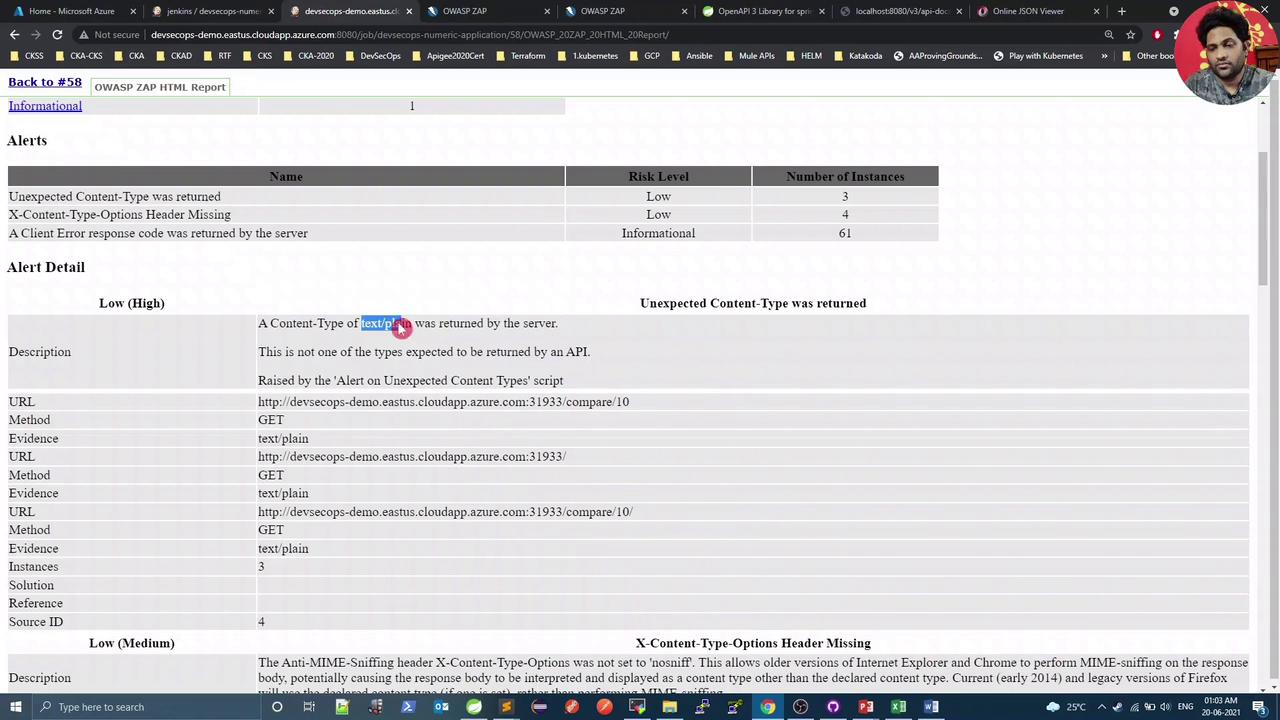
Select any alert for detailed information:
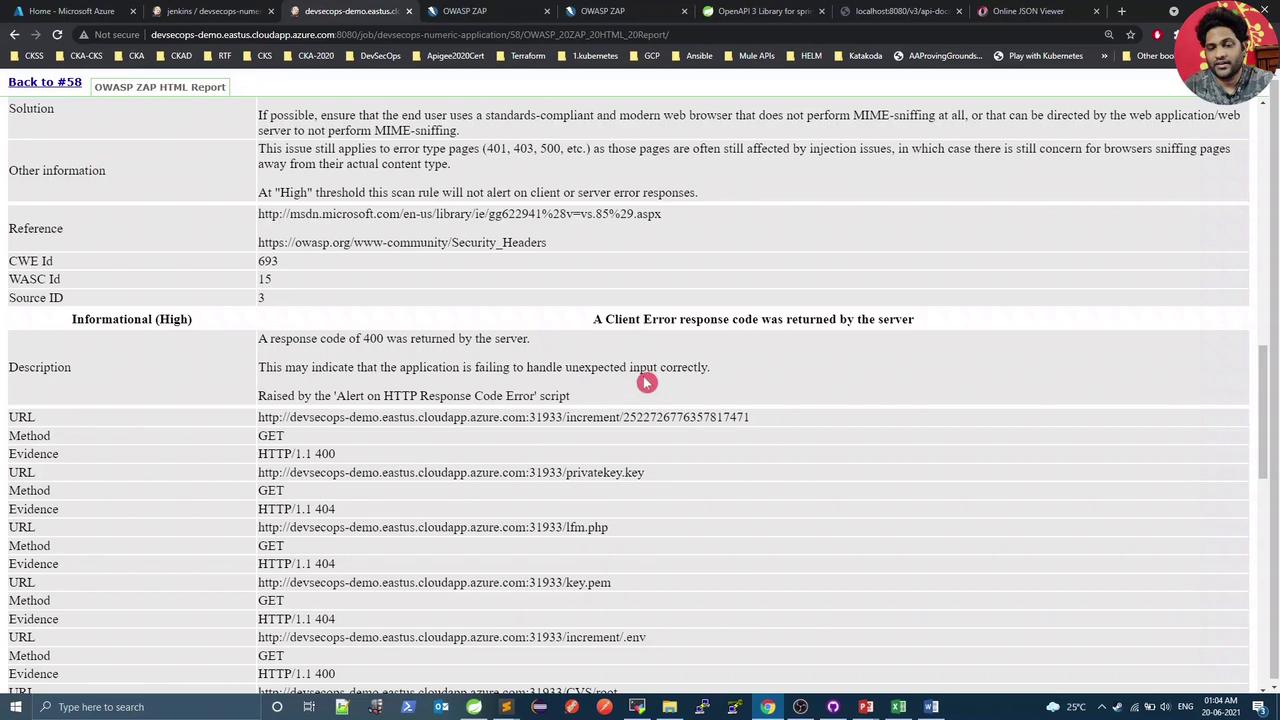
> In this demo, `text/plain` responses are expected and can be treated as false positives, but the missing `X-Content-Type-Options: nosniff` header is a genuine low-risk issue.
## 6. Verify and Fix the Missing Header
Open your application endpoint in a browser and inspect the response headers under Developer Tools → Network. You should see that `X-Content-Type-Options` is absent:
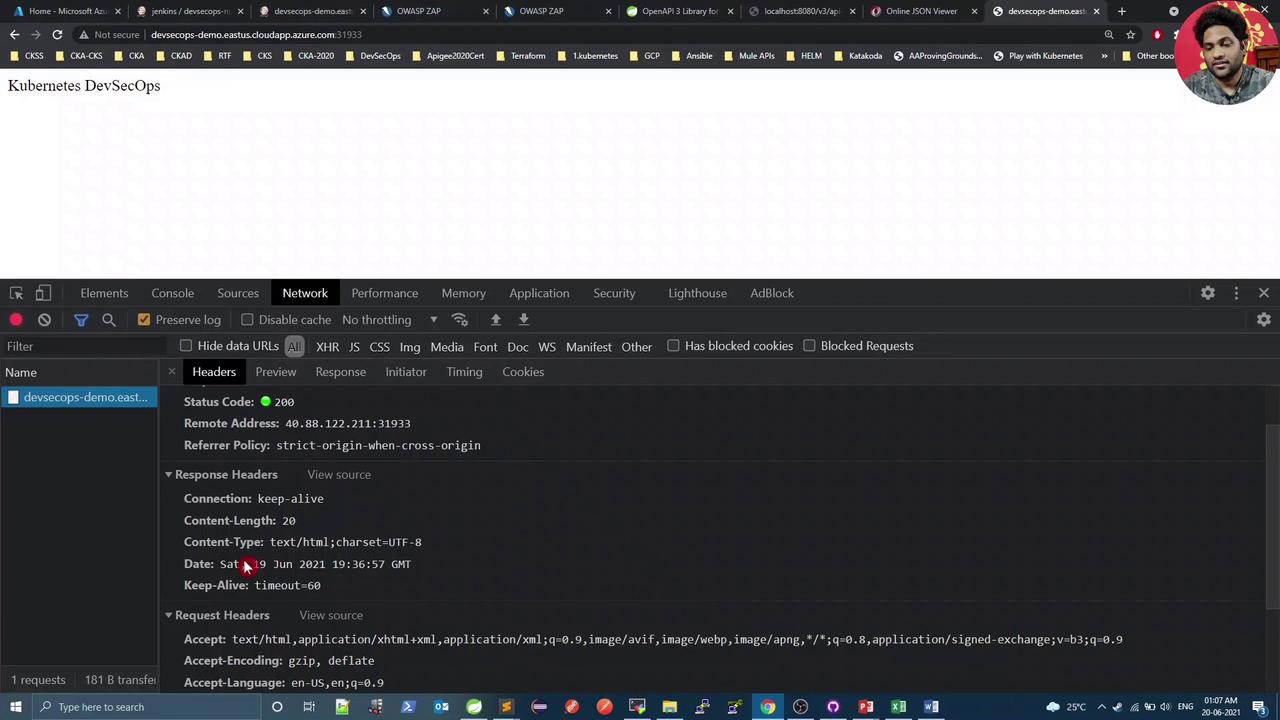
Next, enhance your Spring Boot security configuration to include the `X-Content-Type-Options: nosniff` header and eliminate the warning.
***
## Links and References
* [Springdoc OpenAPI](https://springdoc.org/)
* [OWASP ZAP DAST with Docker](https://www.zaproxy.org/docs/desktop/addons/docker/)
* [Jenkins Pipeline Syntax](https://www.jenkins.io/doc/book/pipeline/syntax/)
* [OWASP ZAP Official Documentation](https://www.zaproxy.org/docs/)
* [Jenkins HTML Publisher Plugin](https://plugins.jenkins.io/htmlpublisher/)