> ## Documentation Index
> Fetch the complete documentation index at: https://notes.kodekloud.com/llms.txt
> Use this file to discover all available pages before exploring further.

# Demo SonarQube

> This guide explains integrating SonarQube static analysis into a Jenkins pipeline for a Spring Boot application.

In this guide, you’ll learn how to integrate SonarQube static analysis into a Jenkins pipeline for a Spring Boot application. We’ll cover:

* Starting SonarQube in Docker
* Creating and configuring a SonarQube project
* Running analysis locally with Maven
* Embedding SonarQube in your Jenkinsfile
* Enforcing custom quality gates

## Prerequisites

* Docker installed and running
* Jenkins server with Docker and Pipeline plugins
* Maven project for your Spring Boot application

<Callout icon="lightbulb" color="#1CB2FE">
  Ensure your SonarQube Docker container always listens on port **9000** after VM restarts.
</Callout>

## 1. Start and Verify SonarQube Container

Run SonarQube in Docker:

```bash theme={null}
docker run -d --name sonarqube -p 9000:9000 sonarqube:latest
```

Confirm the container is up:

```bash theme={null}
docker ps -a | grep -i sonar
# Expected:
# 5b47910fdc73 sonarqube:latest "bin/run.sh bin/sona…" Up 13 minutes 0.0.0.0:9000->9000/tcp sonarqube
```

## 2. Log In and Create a New Project

Open your browser at `http://<VM_IP>:9000`. Log in with the default admin credentials:

* **Username:** admin
* **Password:** admin

<Callout icon="triangle-alert" color="#FF6B6B">
  Change the default password immediately to secure your SonarQube instance.
</Callout>

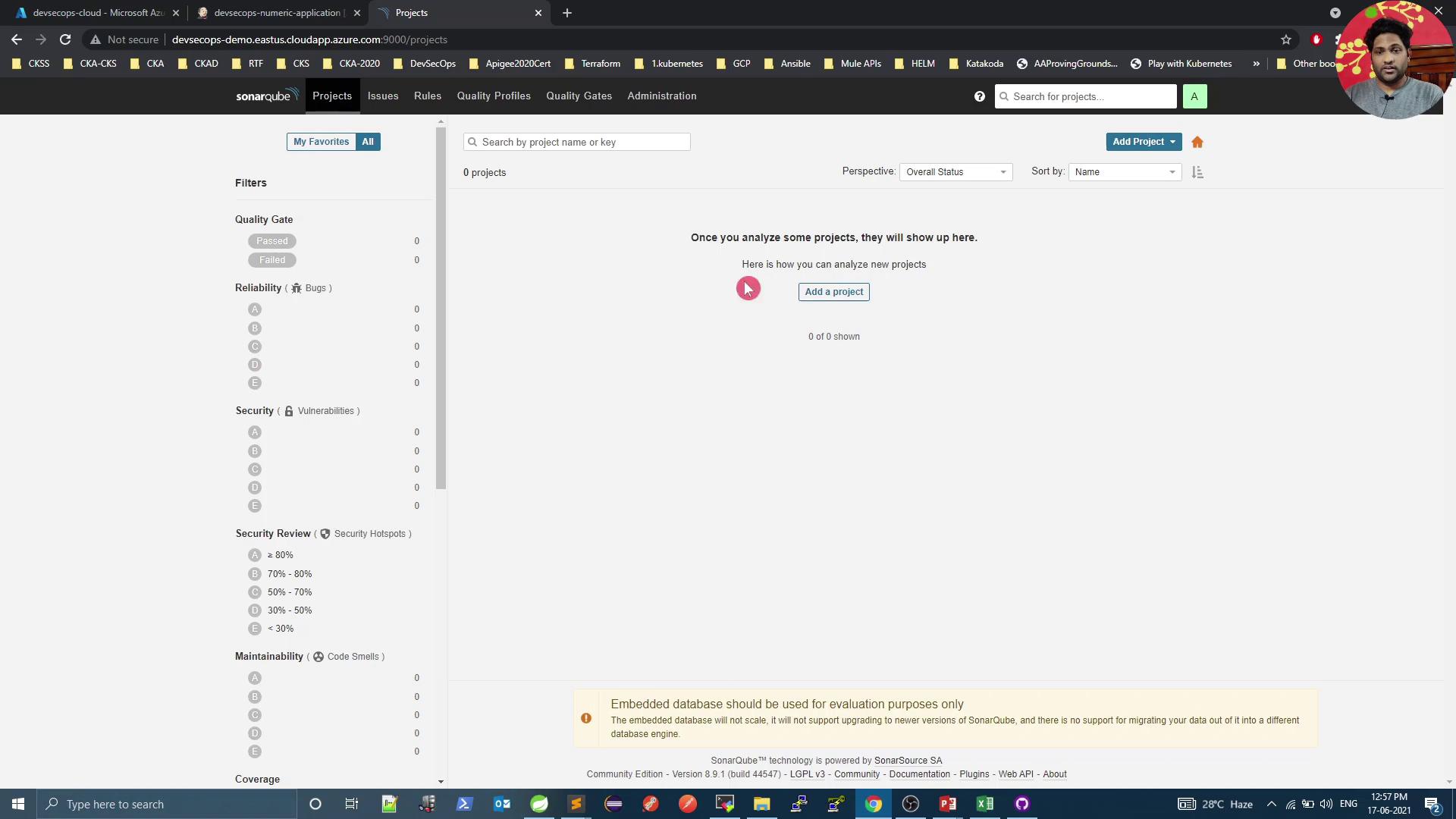
Once logged in, click **Create new project**:
<Frame>
  ![The image shows a SonarQube dashboard with no projects analyzed yet, prompting the user to add a project. The interface includes filters for quality gate, reliability, security, and maintainability metrics.](https://kodekloud.com/kk-media/image/upload/v1752873688/notes-assets/images/DevSecOps-Kubernetes-DevOps-Security-Demo-SonarQube/sonarqube-dashboard-no-projects-analyzed.jpg)
</Frame>

Fill in the **Project key** and **Display name** (e.g., `numeric-application`), then generate a token (e.g., `Jenkins Pipeline`):

<Frame>
  ![The image shows a SonarQube interface for creating a new project, with fields for "Project key" and "Display name" being filled out. The browser window displays various tabs and bookmarks.](https://kodekloud.com/kk-media/image/upload/v1752873689/notes-assets/images/DevSecOps-Kubernetes-DevOps-Security-Demo-SonarQube/sonarqube-new-project-interface.jpg)
</Frame>

## 3. Run Local Analysis with Maven

Select **Maven** as your build tool. Copy and customize the displayed command:

<Frame>
  ![The image shows a SonarQube dashboard for a project named "numeric-application," with options to run analysis using different build tools like Maven, Gradle, and .NET. A person’s profile picture is visible in the top right corner.](https://kodekloud.com/kk-media/image/upload/v1752873690/notes-assets/images/DevSecOps-Kubernetes-DevOps-Security-Demo-SonarQube/sonarqube-dashboard-numeric-application.jpg)
</Frame>

```bash theme={null}
mvn sonar:sonar \
  -Dsonar.projectKey=numeric-application \
  -Dsonar.host.url=http://devsecops-demo.eastus.cloudapp.azure.com:9000 \
  -Dsonar.login=YOUR_SONAR_TOKEN
```

You can run this locally to verify successful analysis before Jenkins integration.

## 4. Integrate SonarQube into Jenkins Pipeline

Add a **SonarQube** stage in your `Jenkinsfile` after unit and mutation test stages.

| Stage                 | Purpose                                     |
| --------------------- | ------------------------------------------- |
| Unit Tests            | Execute JUnit tests and collect coverage    |
| Mutation Tests        | Run PIT mutation testing                    |
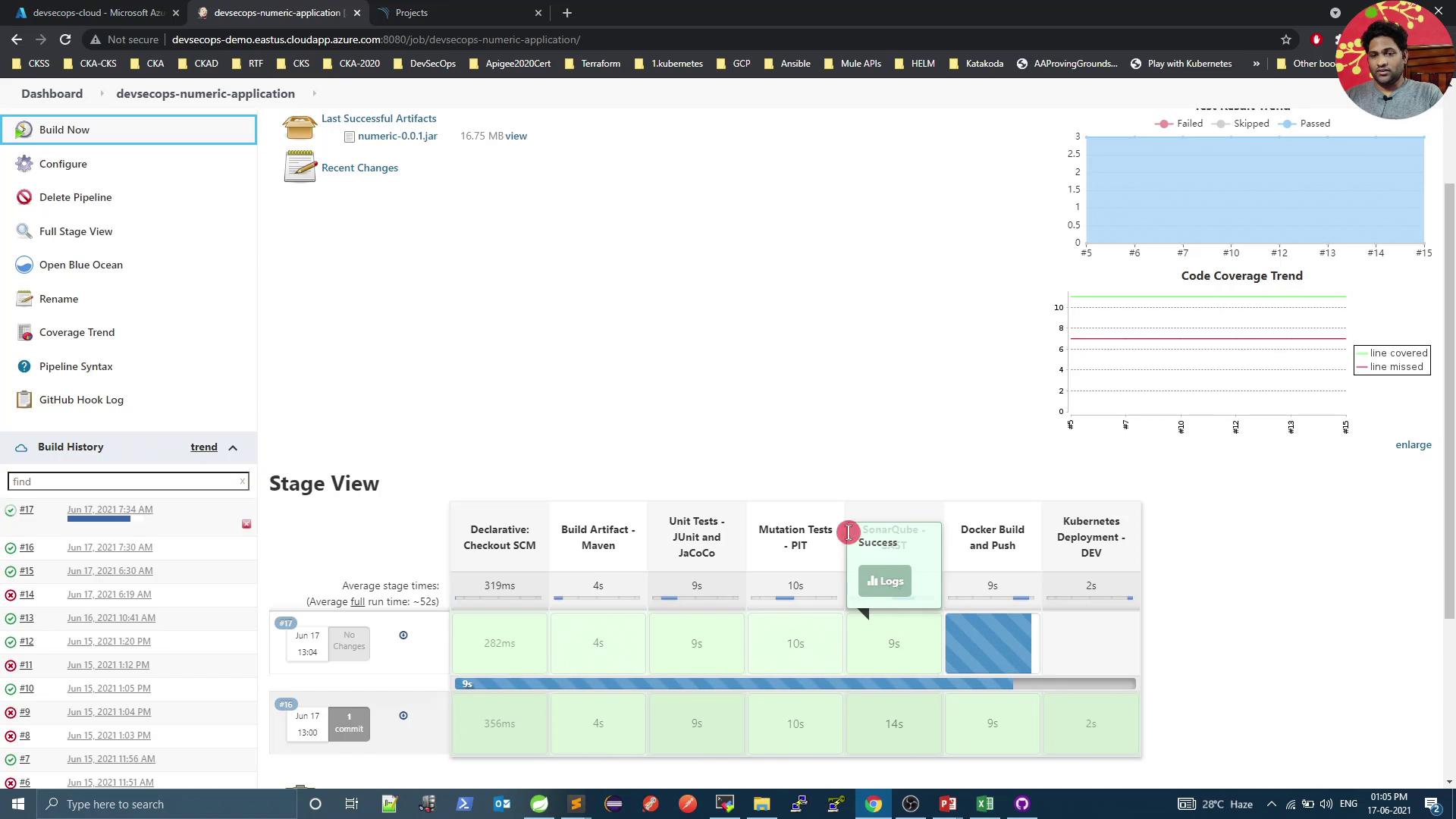
| SonarQube – SAST      | Perform static code analysis with SonarQube |
| Docker Build and Push | Build Docker image and push to registry     |

```groovy theme={null}
pipeline {
  agent any
  environment {
    SONAR_TOKEN = credentials('sonar-token')
  }
  stages {
    stage('Unit Tests - JUnit and JaCoCo') {
      steps {
        sh 'mvn test'
      }
      post {
        always {
          junit 'target/surefire-reports/*.xml'
          jacoco execPattern: 'target/jacoco.exec'
        }
      }
    }
    stage('Mutation Tests - PIT') {
      steps {
        sh 'mvn org.pitest:pitest-maven:mutationCoverage'
      }
      post {
        always {
          pitmutation mutationStatsFile: '**/target/pit-reports/**/mutations.xml'
        }
      }
    }
    stage('SonarQube - SAST') {
      steps {
        sh 'mvn clean package -DskipTests=true'
        archiveArtifacts artifacts: 'target/*.jar', fingerprint: true
        sh """
          mvn sonar:sonar \
            -Dsonar.projectKey=numeric-application \
            -Dsonar.host.url=http://devsecops-demo.eastus.cloudapp.azure.com:9000 \
            -Dsonar.login=${SONAR_TOKEN}
        """
      }
    }
    stage('Docker Build and Push') {
      steps {
        withDockerRegistry([credentialsId: 'docker-hub', url: '']) {
          sh 'docker build -t siddharth67/numeric-app:${GIT_COMMIT} .'
          sh 'docker push siddharth67/numeric-app:${GIT_COMMIT}'
        }
      }
    }
    // Add deployment stages below
  }
}
```

Commit and push your `Jenkinsfile`. Jenkins will trigger a build and execute the new **SonarQube** stage:
<Frame>
  ![The image shows a Jenkins pipeline dashboard with a stage view of a build process, including stages like "Checkout SCM," "Build Artifact," and "Unit Tests." There are graphs for test results and code coverage trends, and a sidebar with build history.](https://kodekloud.com/kk-media/image/upload/v1752873691/notes-assets/images/DevSecOps-Kubernetes-DevOps-Security-Demo-SonarQube/jenkins-pipeline-dashboard-build-process.jpg)
</Frame>

## 5. Review Analysis Results in SonarQube

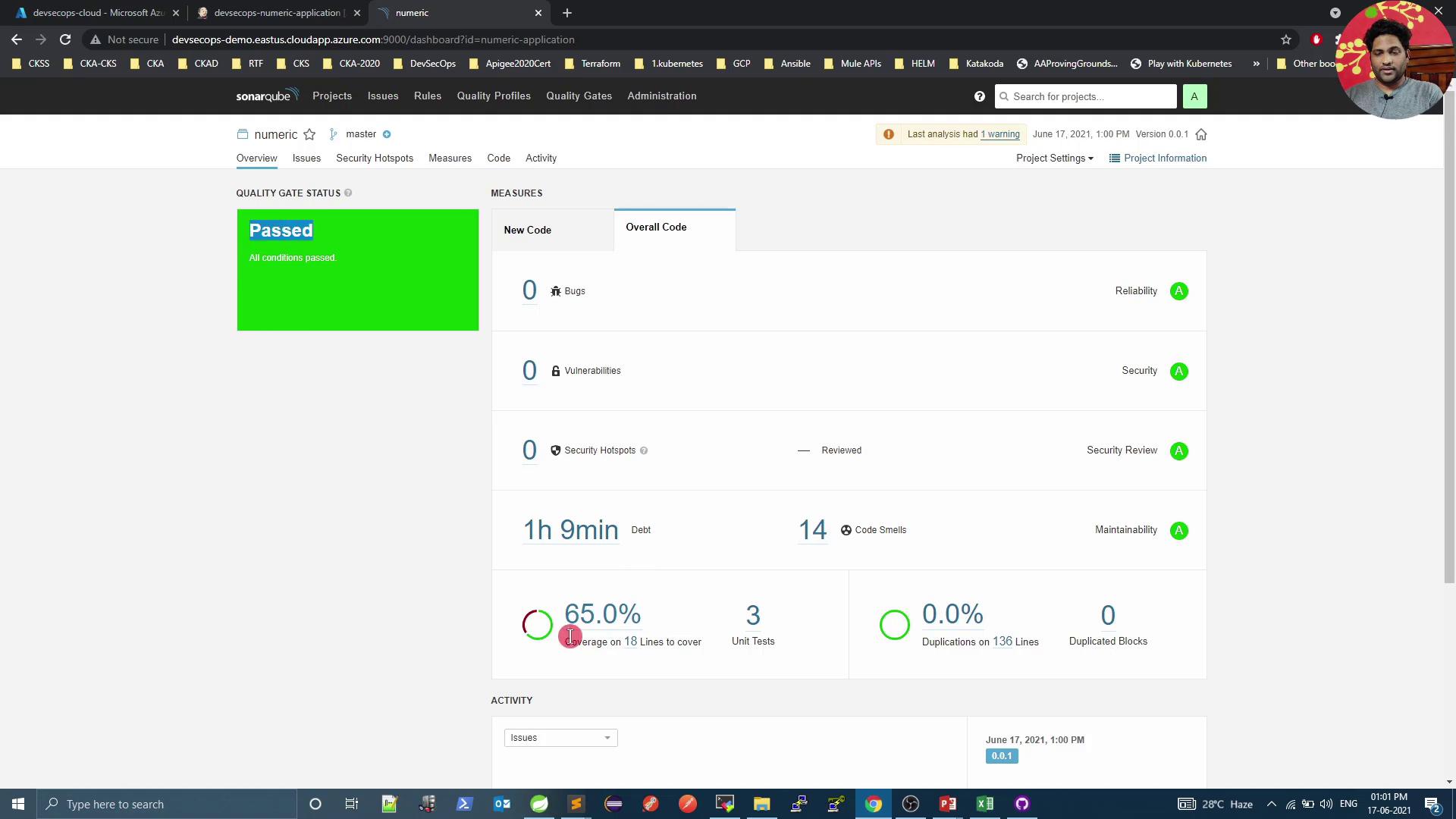
After pipeline completion, go back to SonarQube to inspect metrics and quality gate status:
<Frame>
  ![The image shows a SonarQube dashboard with a "Passed" quality gate status, indicating no bugs, vulnerabilities, or security hotspots, and displaying code metrics like coverage and code smells.](https://kodekloud.com/kk-media/image/upload/v1752873695/notes-assets/images/DevSecOps-Kubernetes-DevOps-Security-Demo-SonarQube/sonarqube-dashboard-passed-quality-gate.jpg)
</Frame>

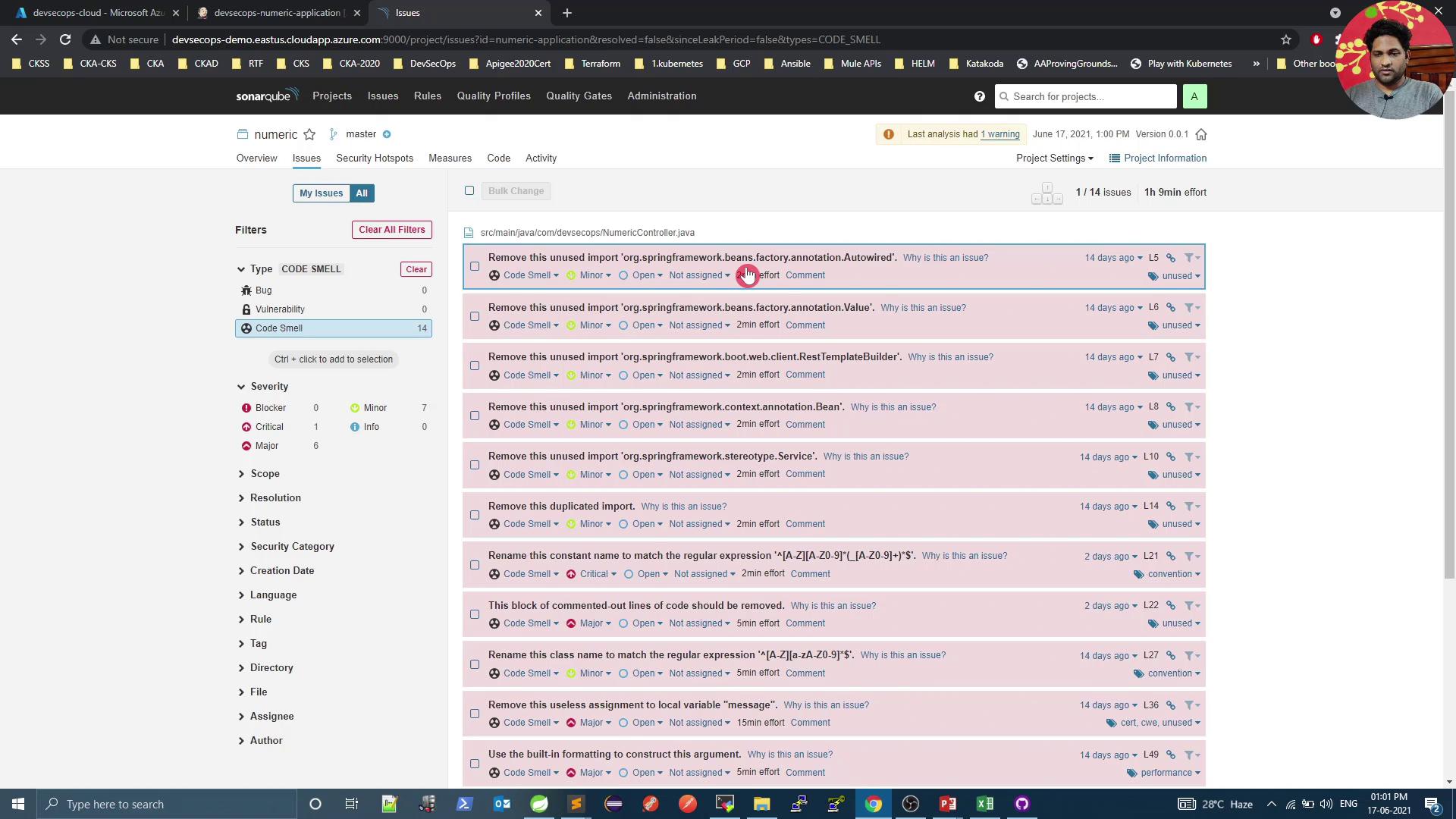
Click **Code Smells** to explore issues such as unused imports:
<Frame>
  ![The image shows a SonarQube dashboard displaying a list of code issues, specifically "Code Smells," with details such as severity, type, and suggested actions. The interface includes filters and navigation options on the left side.](https://kodekloud.com/kk-media/image/upload/v1752873697/notes-assets/images/DevSecOps-Kubernetes-DevOps-Security-Demo-SonarQube/sonarqube-dashboard-code-smells-issues.jpg)
</Frame>

## 6. Enforce Custom Quality Gates

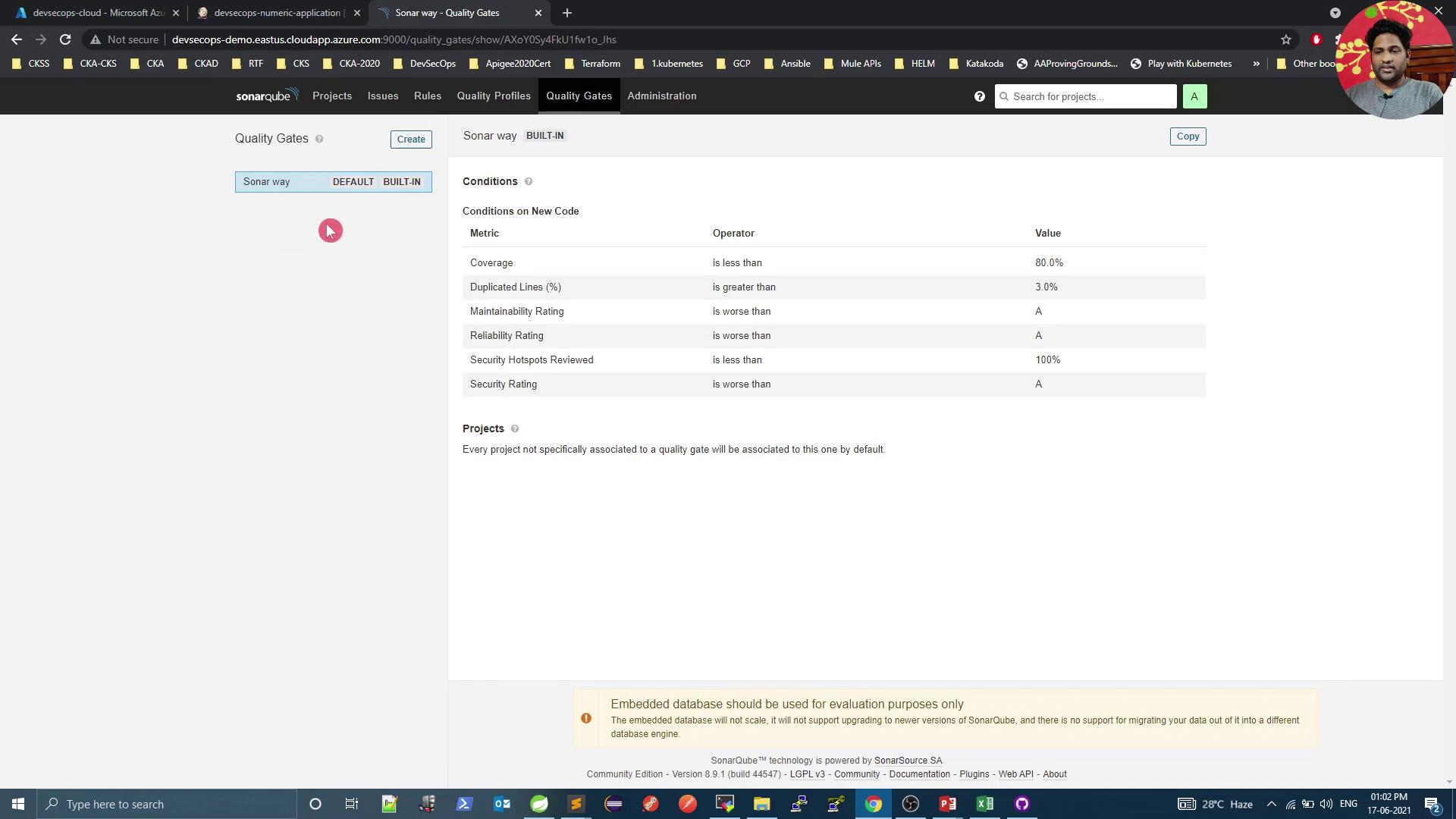
Navigate to **Quality Gates** to define or modify pass/fail criteria:
<Frame>
  ![The image shows a SonarQube Quality Gates interface with conditions for code quality metrics like coverage, duplicated lines, and ratings. It also includes a browser window with tabs and a user profile picture.](https://kodekloud.com/kk-media/image/upload/v1752873699/notes-assets/images/DevSecOps-Kubernetes-DevOps-Security-Demo-SonarQube/sonarqube-quality-gates-interface-metrics.jpg)
</Frame>

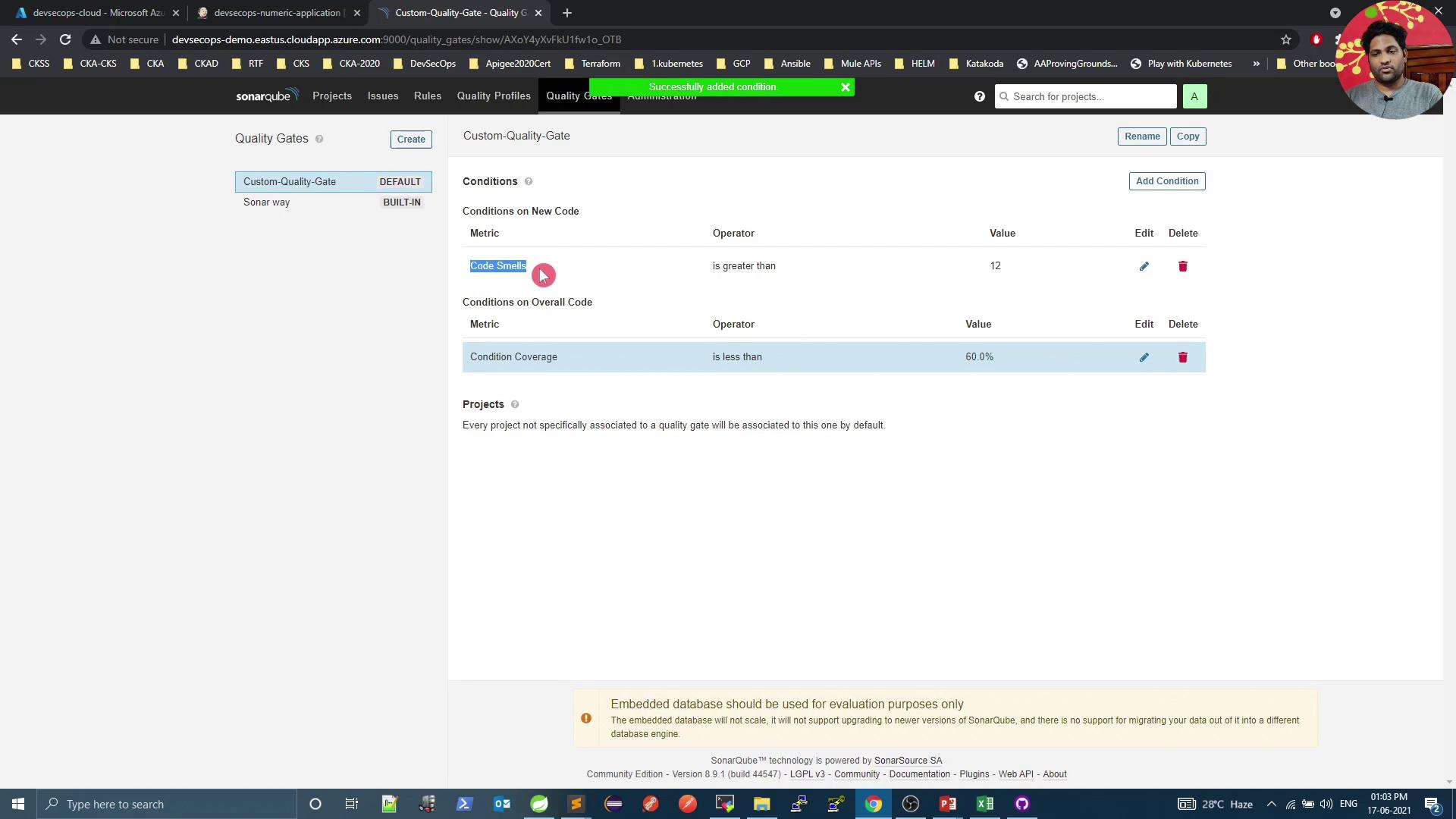
Create a new gate (e.g., **Custom Quality Gate**), set it as default, and add conditions:

* **Overall code smells** ≤ 12
* **Overall coverage** ≥ 60%
<Frame>
  ![The image shows a SonarQube interface displaying a custom quality gate with conditions for code metrics, such as "Code Smells" and "Condition Coverage." The interface includes options to edit or delete these conditions.](https://kodekloud.com/kk-media/image/upload/v1752873700/notes-assets/images/DevSecOps-Kubernetes-DevOps-Security-Demo-SonarQube/sonarqube-custom-quality-gate-interface.jpg)
</Frame>

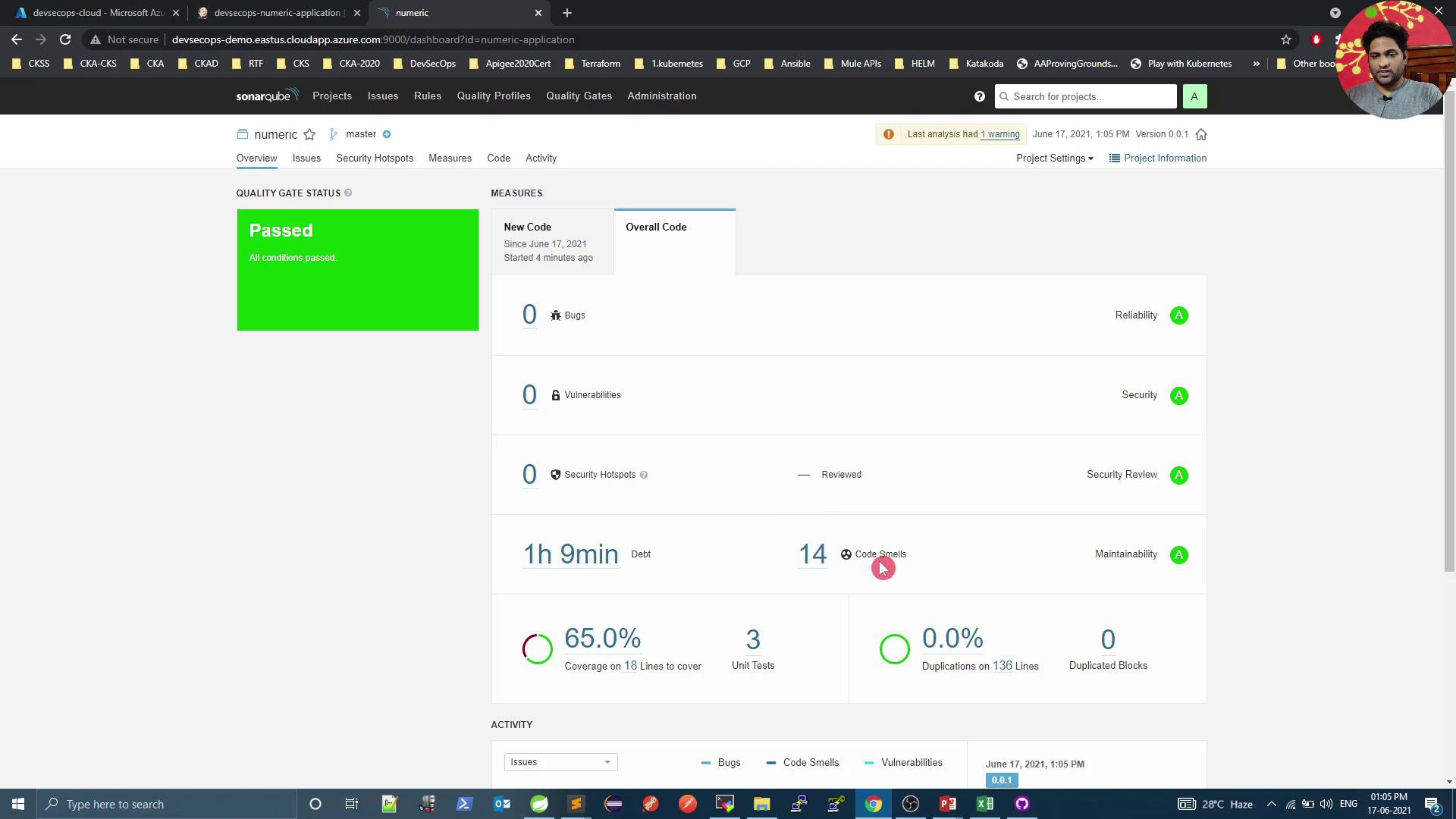
Rerun the pipeline. Initially, you may still see **Passed**—the first condition applies to new code only:
<Frame>
  ![The image shows a SonarQube dashboard with a "Passed" quality gate status, indicating no bugs, vulnerabilities, or security hotspots, but 14 code smells.](https://kodekloud.com/kk-media/image/upload/v1752873701/notes-assets/images/DevSecOps-Kubernetes-DevOps-Security-Demo-SonarQube/sonarqube-dashboard-passed-quality-gate-2.jpg)
</Frame>

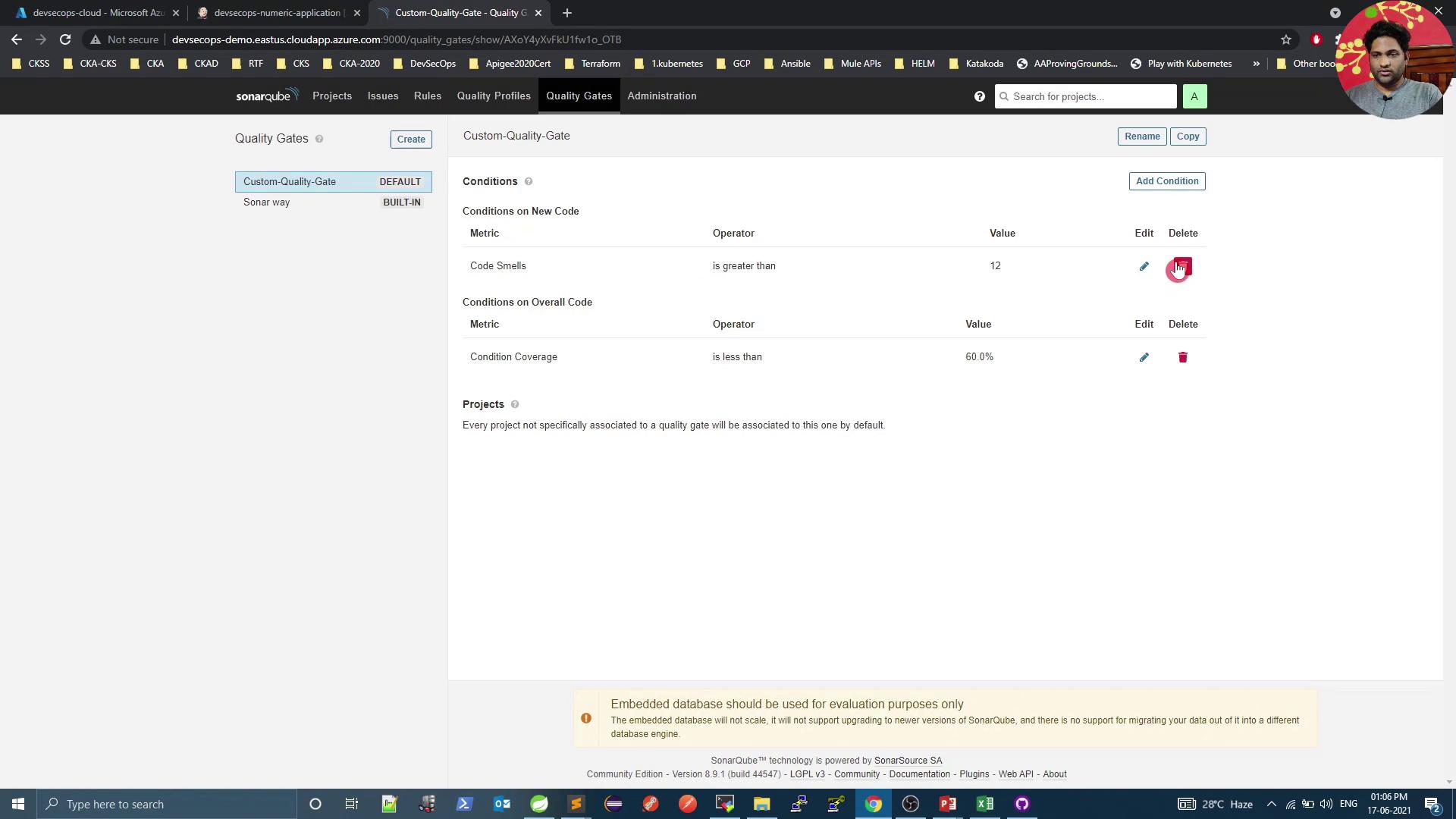
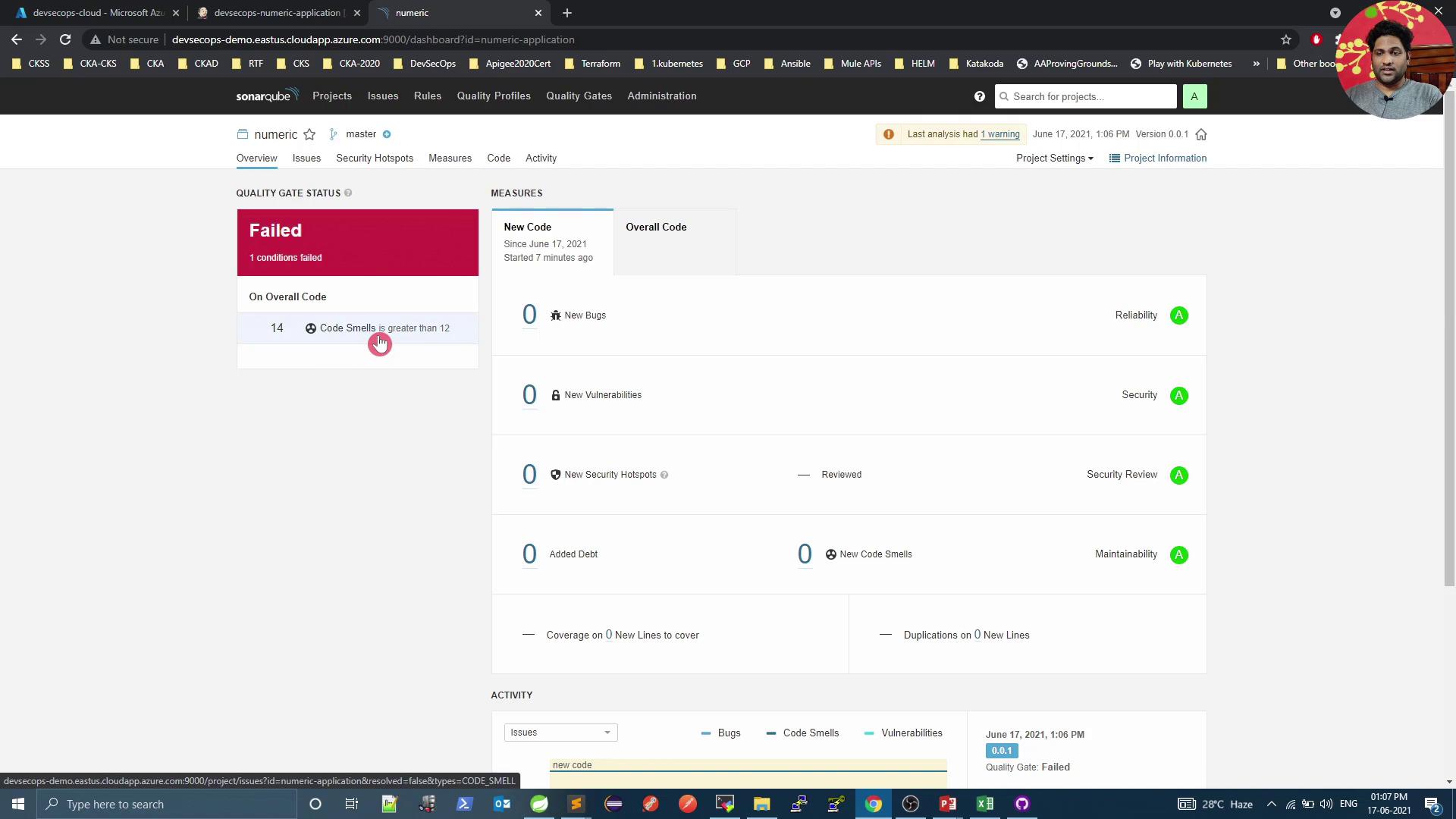
Adjust the code-smells condition to **Overall code smells > 12**:
<Frame>
  ![The image shows a SonarQube interface displaying a custom quality gate with conditions on new and overall code, including metrics for code smells and condition coverage. The interface includes options to edit or delete these conditions.](https://kodekloud.com/kk-media/image/upload/v1752873702/notes-assets/images/DevSecOps-Kubernetes-DevOps-Security-Demo-SonarQube/sonarqube-custom-quality-gate-interface-2.jpg)
</Frame>

Run the pipeline again. Once SonarQube processes the report, the gate will **Fail** due to excessive code smells:
<Frame>
  ![The image shows a SonarQube dashboard with a "Failed" quality gate status due to code smells exceeding the threshold. It displays metrics for new code, including no new bugs, vulnerabilities, or security hotspots.](https://kodekloud.com/kk-media/image/upload/v1752873703/notes-assets/images/DevSecOps-Kubernetes-DevOps-Security-Demo-SonarQube/sonarqube-dashboard-failed-quality-gate.jpg)
</Frame>

<Callout icon="lightbulb" color="#1CB2FE">
  By default, Jenkins does not fail the build on a failed quality gate. To enforce build failure, install the [Quality Gate Plugin][sonar-qg-plugin] or poll the [SonarQube REST API][sonar-rest-api] in your pipeline.
</Callout>

***

## References

* [SonarQube Official Docs](https://docs.sonarqube.org/)
* [Quality Gate Plugin][sonar-qg-plugin]
* [SonarQube Web API][sonar-rest-api]
* [Maven in 5 Minutes](https://maven.apache.org/guides/getting-started/maven-in-five-minutes.html)

[sonar-qg-plugin]: https://plugins.jenkins.io/sonar-quality-gates/

[sonar-rest-api]: https://docs.sonarqube.org/latest/extend/web-api/

<CardGroup>
  <Card title="Watch Video" icon="video" cta="Learn more" href="https://learn.kodekloud.com/user/courses/devsecops-kubernetes-devops-security/module/877bd662-968c-40a5-bda6-a42b600ea957/lesson/68cb9215-c527-4c3f-a76c-3acdc941e078" />
</CardGroup>
