> ## Documentation Index
> Fetch the complete documentation index at: https://notes.kodekloud.com/llms.txt
> Use this file to discover all available pages before exploring further.
# Demo Trivy Kubernetes
> This tutorial demonstrates integrating Trivy security scans into a Kubernetes CI/CD pipeline for vulnerability management and deployment.
In this tutorial, you’ll learn how to:
1. Build a Docker image and push it to [Docker Hub](https://hub.docker.com/).
2. Scan Kubernetes manifests with OPA and Kubescape.
3. Perform image vulnerability scans using Trivy.
4. Upgrade a vulnerable dependency (Tomcat) and verify the fix.
5. Deploy the hardened image to a Kubernetes cluster.
This end-to-end demo uses **Jenkins**, **Docker**, **OPA**, **Kubescape**, and **Trivy** to enforce security gates in your CI/CD pipeline.
***
## 1. Jenkins Pipeline Configuration
Define your pipeline with a reusable `imageName` environment variable:
```groovy theme={null}
pipeline {
agent any
environment {
imageName = "siddharth67/numeric-app:${GIT_COMMIT}"
}
stages {
stage('Build Artifact - Maven') { /* ... */ }
stage('Unit Tests - JUnit & JaCoCo') { /* ... */ }
stage('Mutation Tests - PIT') { /* ... */ }
stage('SonarQube - SAST') { /* ... */ }
stage('Docker Build & Push') { /* see below */ }
stage('Vulnerability Scan - Kubernetes') { /* see below */ }
stage('Trivy Scan') { /* see below */ }
stage('Kubernetes Deployment') { /* ... */ }
}
}
```
| Stage | Purpose |
| ------------------------------- | --------------------------------------------------- |
| Build Artifact - Maven | Compile code & package JAR |
| Unit Tests - JUnit & JaCoCo | Validate functionality & track code coverage |
| Mutation Tests - PIT | Assess test suite robustness |
| SonarQube - SAST | Static code analysis |
| Docker Build & Push | Build Docker image & push to registry |
| Vulnerability Scan - Kubernetes | Lint & security test K8s manifests (OPA, Kubescape) |
| Trivy Scan | Container image vulnerability scan |
| Kubernetes Deployment | Deploy to target cluster |
***
### 1.1 Docker Build & Push
```groovy theme={null}
stage('Docker Build & Push') {
steps {
withDockerRegistry([credentialsId: 'docker-hub', url: '']) {
sh 'docker build -t ${imageName} .'
sh 'docker push ${imageName}'
}
}
}
```
***
### 1.2 Kubernetes Manifest Scans
```groovy theme={null}
stage('Vulnerability Scan - Kubernetes') {
steps {
parallel(
'OPA Scan': {
sh '''
docker run --rm \
-v $(pwd):/project \
openpolicyagent/conftest test \
--policy opa-k8s-security.rego \
k8s_deployment_service.yaml
'''
},
'Kubescape Scan': {
sh 'bash kubescape-scan.sh'
}
)
}
}
```
***
### 1.3 Trivy Scan Stage
```groovy theme={null}
stage('Trivy Scan') {
steps {
sh 'bash trivy-k8s-scan.sh'
}
}
```
***
## 2. Trivy Scan Script
Create `trivy-k8s-scan.sh` at the root of your repo:
```bash theme={null}
#!/usr/bin/env bash
set -o errexit
echo "🔍 Scanning image: $imageName"
# 1. Report LOW, MEDIUM, HIGH (non-blocking)
docker run --rm \
-v "$WORKSPACE":/root/.cache/ \
aquasec/trivy:0.17.2 \
-q image \
--exit-code 0 \
--severity LOW,MEDIUM,HIGH \
--light "$imageName"
# 2. Fail on CRITICAL
docker run --rm \
-v "$WORKSPACE":/root/.cache/ \
aquasec/trivy:0.17.2 \
-q image \
--exit-code 1 \
--severity CRITICAL \
--light "$imageName"
exit_code=$?
echo "🛑 Exit Code: $exit_code"
if [[ $exit_code -ne 0 ]]; then
echo '❌ Image scanning failed: Critical vulnerabilities found'
exit 1
else
echo '✅ Image scanning passed: No critical issues'
fi
```
* `--light` mode skips non-OS packages for faster scans.
* Cache volume is mapped to reuse vulnerability data between runs.
***
## 3. Initial Trivy Scan Results
Running the scan for the first time may reveal CVEs in embedded libraries:
```bash theme={null}
bash trivy-k8s-scan.sh
siddharth67/numeric-app:a8830b58fa890c9dba275f843679598a3 (alpine 3.13.5)
Total: 5 (LOW: 0, MEDIUM: 2, HIGH: 3)
+-------------------------------------------+---------------+----------+-------------------+-------------------+
| LIBRARY | VULNERABILITY | SEVERITY | INSTALLED VERSION | FIXED VERSION |
+-------------------------------------------+---------------+----------+-------------------+-------------------+
| org.apache.tomcat.embed:tomcat-embed-core | CVE-2021-17527| HIGH | 9.0.39 | 9.0.40 |
| | CVE-2021-25122| HIGH | 9.0.39 | 9.0.43 |
| | CVE-2021-24112| MEDIUM | 9.0.39 | 9.0.61 |
+-------------------------------------------+---------------+----------+-------------------+-------------------+
Exit Code: 0
Image scanning passed. No vulnerabilities found
```
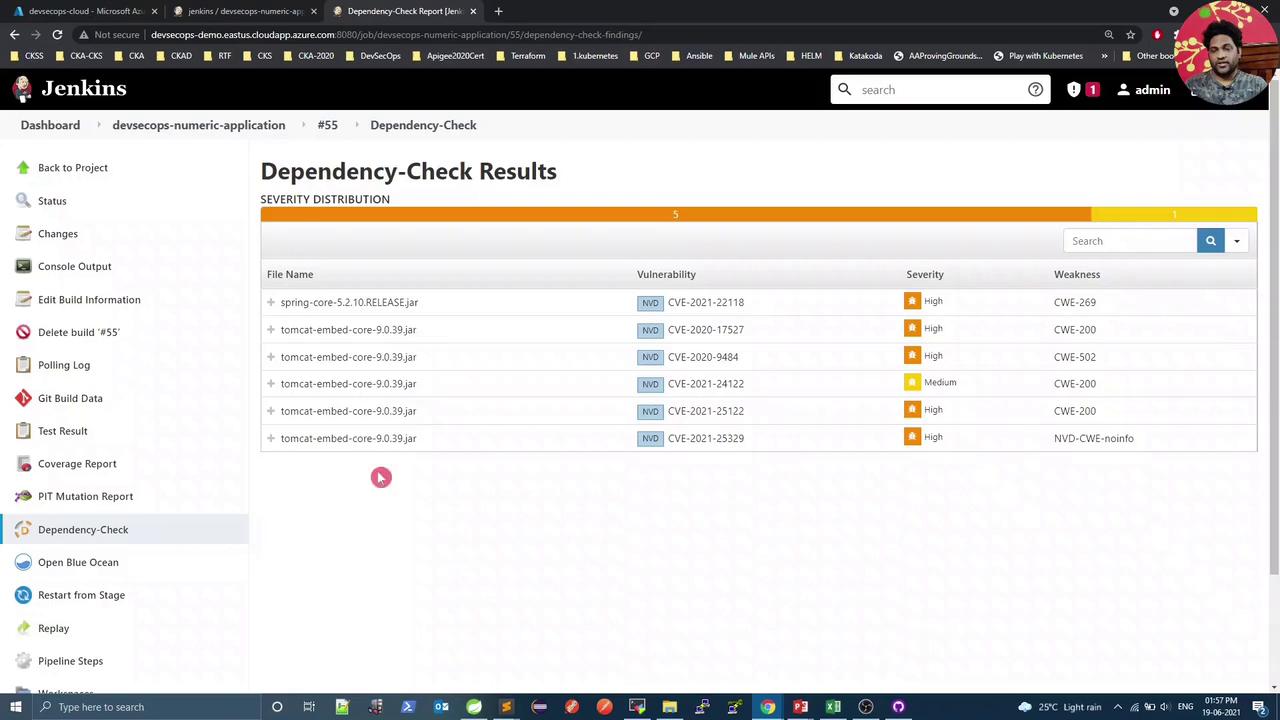
Upon seeing these CVEs, we’ll upgrade Tomcat in our `pom.xml`.
***
## 4. Update Tomcat Version in `pom.xml`
Open your Maven POM in Spring Tool Suite and override the `tomcat.version` property:
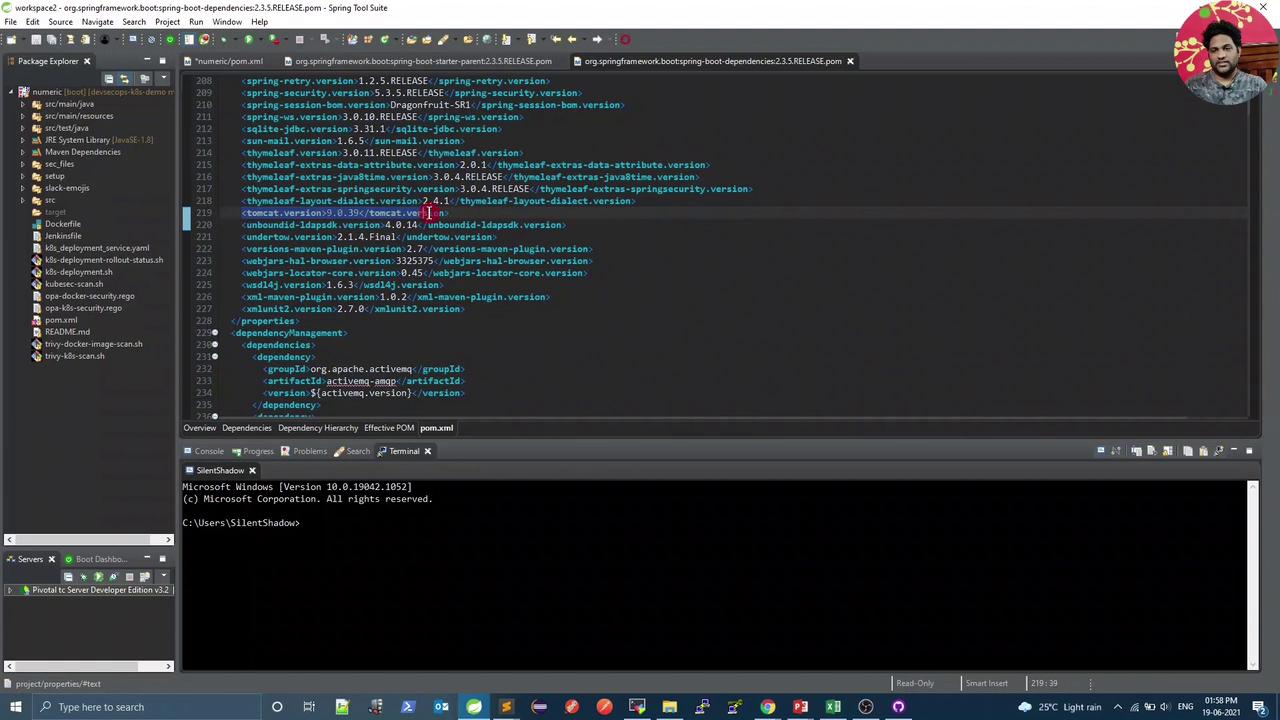
```xml theme={null}
UTF-8
UTF-8
1.8
9.0.43
```
Commit and push your changes. Jenkins will automatically trigger a new pipeline run.
***
## 5. Post-Upgrade Scan
After the Tomcat upgrade, rerun Trivy to confirm no vulnerabilities remain:
```bash theme={null}
bash trivy-k8s-scan.sh
siddharth67/numeric-app:68e6b5f456a28d3615ea1406c1b959f36c334cf6 (alpine 3.13.5)
==========================================
Total: 0 (LOW: 0, MEDIUM: 0, HIGH: 0)
==========================================
Total: 0 (CRITICAL: 0)
Exit Code: 0
Image scanning passed. No vulnerabilities found
```
With the image verified as clean, it’s now safe to proceed to the **Kubernetes Deployment** stage.
***
That’s it for this lesson—your CI/CD pipeline now enforces both manifest and image security checks before deploying to production.