> ## Documentation Index
> Fetch the complete documentation index at: https://notes.kodekloud.com/llms.txt
> Use this file to discover all available pages before exploring further.
# End of Section 3 and Promote to PROD namespace
> This article discusses the final steps in a DevSecOps pipeline, including security measures and a manual approval stage for production deployments.
Welcome to the wrap-up of our DevSecOps pipeline. We have:
* Secured the developer workstation with [Talisman Git Hooks][talisman]
* Run mutation tests, unit tests, and integration tests
* Performed static analysis (SAST) and dynamic analysis (DAST) using [OWASP ZAP][owasp-zap]
* Scanned dependencies with [Dependency Check][dependency-check] and [Trivy][trivy]
* Validated manifests via [OPA Conftest][opa] and [Kubesec][kubesec]
* Configured automatic rollbacks in Kubernetes deployments
* Sent build notifications to Slack for real-time visibility
Below is a quick overview of the tools and their purposes:
| Security Measure | Tool | Purpose |
| ---------------------------- | ----------------------- | ---------------------------------------------- |
| Git pre-commit Hook | Talisman | Prevents accidental secrets or high-risk files |
| Static Application Security | SAST | Detects code vulnerabilities early |
| Dynamic Application Security | DAST (OWASP ZAP) | Scans running applications for flaws |
| Dependency Scanning | Dependency Check, Trivy | Identifies vulnerable or outdated libraries |
| Policy as Code | OPA Conftest | Ensures infrastructure policies compliance |
| Manifest Linting | Kubesec | Validates Kubernetes manifest best practices |
## Adding a Manual Approval Stage
To ensure an architect or manager authorizes production deployments, we introduce a **Promote to PROD** stage with a two-day timeout. The snippet below shows how to integrate this into your `Jenkinsfile`:
```groovy theme={null}
stage('OWASP ZAP - DAST') {
steps {
withKubeConfig([credentialsId: 'kubeconfig']) {
sh 'bash zap.sh'
}
}
}
stage('Promote to PROD') {
steps {
timeout(time: 2, unit: 'DAYS') {
input message: 'Approve deployment to Production Environment/Namespace?'
}
}
}
stage('Testing Slack') {
steps {
// This intentional failure triggers our Slack notification
sh 'exit 1'
}
}
post {
always {
junit 'target/surefire-reports/*.xml'
jacoco execPattern: 'target/jacoco.exec'
mutation mutationStatsFile: '**/target/pit-reports/**/mutations.xml'
dependencyCheckPublisher pattern: 'target/dependency-check-report.xml'
publishHTML allowMissing: false, alwaysLinkToLastBuild: true, keepAll: true,
reportDir: 'owasp-zap-report', reportFiles: 'zap_report'
// Send a Slack notification with the current build result
sendNotification currentBuild.result
}
}
```
The pipeline will pause at the **Promote to PROD** stage until an approver selects **Proceed** or **Abort**. Aborting will stop the pipeline and notify the team via Slack.
Once committed and pushed, the pipeline executes all stages and halts at our manual approval gate:
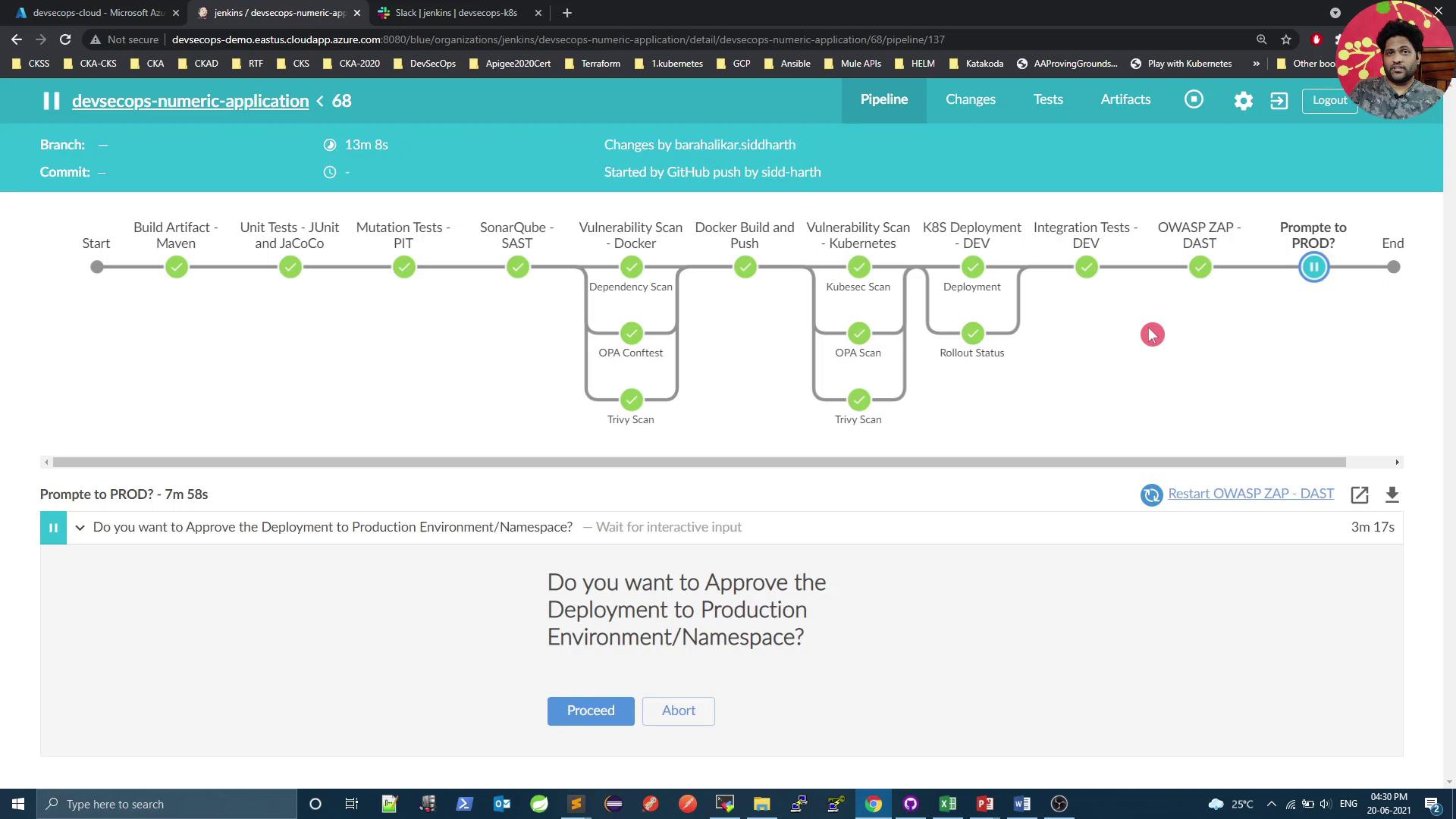
At this point, the designated approver clicks **Proceed** to deploy or **Abort** to cancel. If aborted, the stage turns gray, the pipeline stops, and a Slack alert is sent.
The screenshot below shows the completed pipeline with all checks passing and the approval prompt still active:
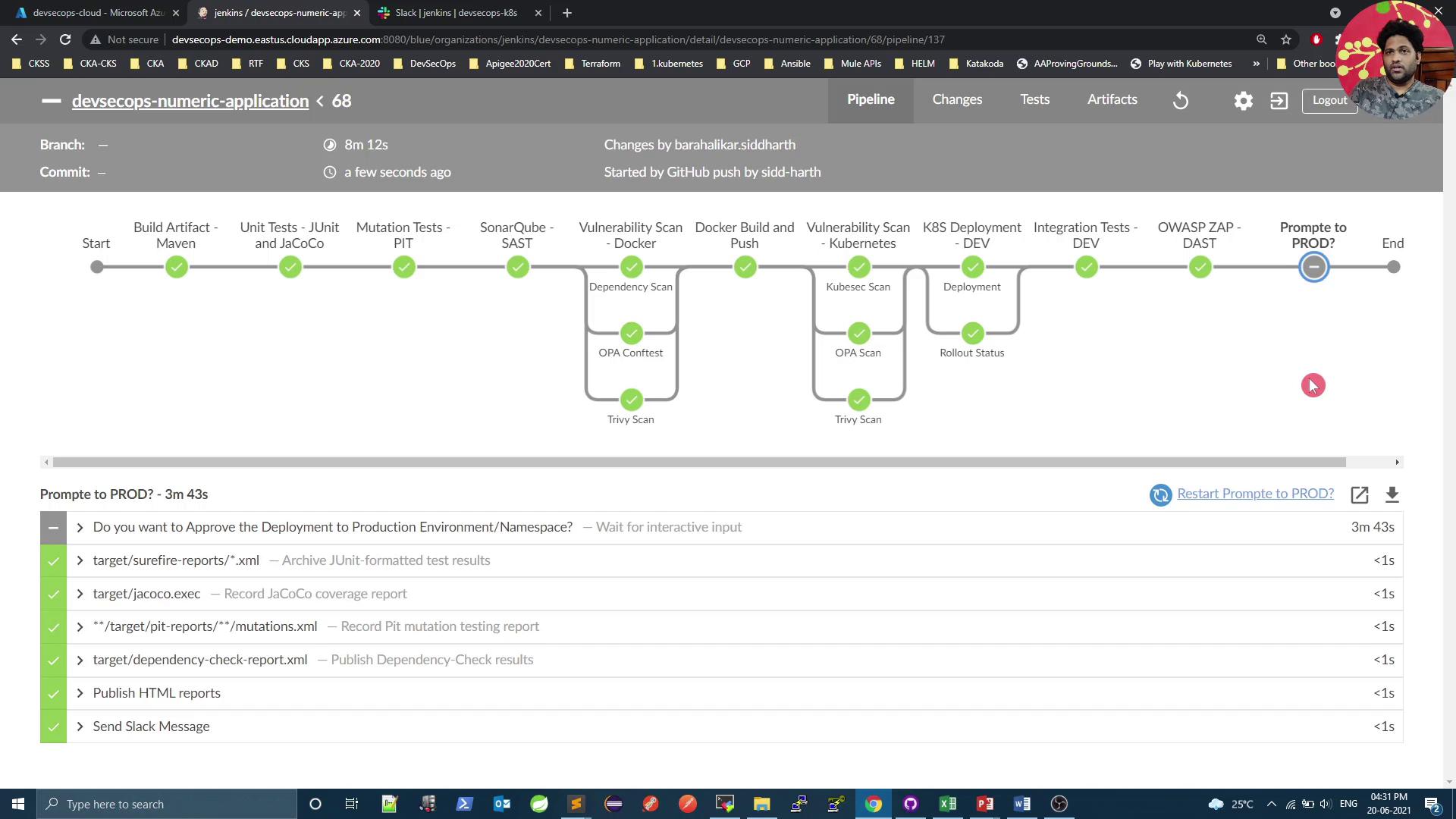
In the next section, we'll add cluster benchmarking with Kubebench, enforce pod-to-pod security using KubeScan, perform a Kubernetes cluster vulnerability audit, and then finalize the production rollout.
## Links and References
* [Talisman Git Hooks][talisman]
* [OWASP ZAP][owasp-zap]
* [Dependency Check][dependency-check]
* [Trivy][trivy]
* [OPA Conftest][opa]
* [Kubesec][kubesec]
* [Jenkins Pipeline Syntax][jenkins-pipeline]
[talisman]: https://github.com/thoughtworks/talisman
[owasp-zap]: https://www.zaproxy.org/
[dependency-check]: https://owasp.org/www-project-dependency-check/
[trivy]: https://github.com/aquasecurity/trivy
[opa]: https://www.conftest.dev/
[kubesec]: https://kubesec.io/
[jenkins-pipeline]: https://www.jenkins.io/doc/book/pipeline/syntax/