> ## Documentation Index
> Fetch the complete documentation index at: https://notes.kodekloud.com/llms.txt
> Use this file to discover all available pages before exploring further.
# OWASP ZAP Basics
> This lesson explores using OWASP ZAP for dynamic application security testing of a Spring Boot REST API, covering scan types, Docker usage, and result interpretation.
In this lesson, we’ll explore how to use OWASP ZAP (Zed Attack Proxy) for dynamic application security testing (DAST) of a Spring Boot REST API. You’ll learn about scan types, how to run an API scan with Docker, and how to interpret the results.
## What Is OWASP ZAP?
OWASP ZAP is an open-source web application security scanner that sits between your client and target application as a “man-in-the-middle proxy.” It can:
* Intercept and modify HTTP(S) requests and responses
* Perform **passive scans** to detect vulnerabilities without modifying traffic
* Launch **active scans** to probe for common attack vectors
* Import API definitions (OpenAPI, Swagger, SOAP, GraphQL) for targeted testing
You can install ZAP in multiple ways:
* Standalone GUI or CLI
* [Docker image on Docker Hub](https://hub.docker.com/r/owasp/zap2docker-weekly)
### ZAP Scan Types
| Scan Type | Description | Use Case |
| --------- | -------------------------------------------------------------------------------------- | ---------------------------------- |
| Baseline | Time-limited spidering + passive analysis | Smoke test before deployment |
| Full | Ajax spidering + both passive and active scans | Comprehensive web application test |
| API | Imports API definitions + active scan tuned for APIs (skips irrelevant tests like XSS) | REST/GraphQL/SOAP API testing |
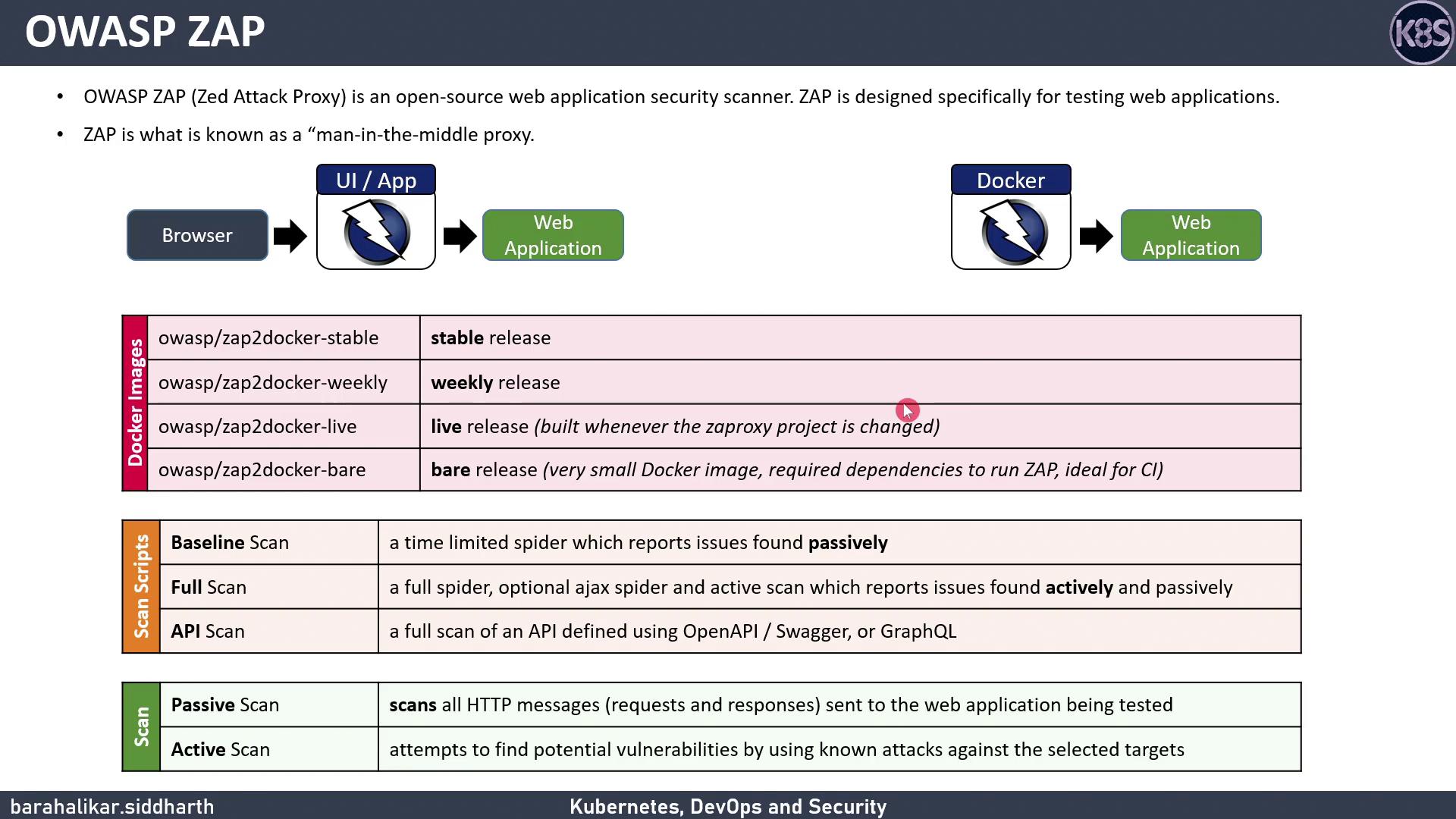
API scans skip UI-related tests (e.g., XSS) and focus on HTTP error codes or unusual content types.
***
## Running the API Scan with Docker
Since our Spring Boot service exposes only REST endpoints, we’ll use the **API scan**. This example mounts your working directory to collect reports and any custom rules.
```bash theme={null}
docker run \
-v $(pwd):/zap/wrk/:rw \
-t owasp/zap2docker-weekly \
zap-api-scan.py \
-t http://$HOST_URL:$PORT/v3/api-docs \
-f openapi \
-c custom_rules.conf \
-r zap-report.html
```
* `$HOST_URL` and `$PORT` should point to your running Spring Boot application.
* `-c custom_rules.conf` is optional; omit if you don’t need overrides.
Ensure the API definition is reachable (no authentication required) when running scans. Firewall or incorrect URLs can cause false failures.
### Sample Scan Output
```text theme={null}
PASS: Hash Disclosure [10007]
PASS: Cross-Domain Misconfiguration [10098]
PASS: Weak Authentication Method [10105]
PASS: Reverse Tabnabbing [10108]
PASS: Modern Web Application [10109]
PASS: Private IP Disclosure [2]
PASS: Session ID in URL Rewrite [13]
PASS: Script Passive Scan Rules [50001]
PASS: Insecure JSF ViewState [90001]
PASS: Charset Mismatch [90011]
PASS: Loosely Scoped Cookie [90023]
WARN NEW: Application Error Disclosure [90022] x 2
WARN: http://192.168.18.23:5000/update (500 INTERNAL SERVER ERROR)
WARN: http://192.168.18.23:5000/?_debugger=__yes&cmd=paste (500 INTERNAL SERVER ERROR)
FAIL-NEW: 0
FAIL-INPROG: 0
WARN-NEW: 6
PASS: 45
```
This summary shows how many tests **passed**, **failed**, or generated **warnings**. You can use these metrics to gate your CI/CD pipeline.
### Docker Command Arguments
| Flag | Description | Example |
| ---- | ----------------------------------------------------------------------------- | -------------------------------------- |
| -v | Mount current directory for reports and custom configs | `-v $(pwd):/zap/wrk/:rw` |
| -t | Target API definition URL (include protocol) | `-t http://localhost:8080/v3/api-docs` |
| -f | Format of API definition: `openapi`, `soap`, or `graphql` | `-f openapi` |
| -c | Custom rules configuration file | `-c custom_rules.conf` |
| -r | Output report format: `report.html`, `report.md`, `report.xml`, `report.json` | `-r zap-report.html` |
***
## References
* [OWASP ZAP Documentation](https://www.zaproxy.org/docs/)
* [Docker Hub: OWASP ZAP Weekly](https://hub.docker.com/r/owasp/zap2docker-weekly)
* [Spring Boot REST Docs](https://spring.io/guides/gs/rest-service/)
* [OpenAPI Specification](https://swagger.io/specification/)