> ## Documentation Index
> Fetch the complete documentation index at: https://notes.kodekloud.com/llms.txt
> Use this file to discover all available pages before exploring further.
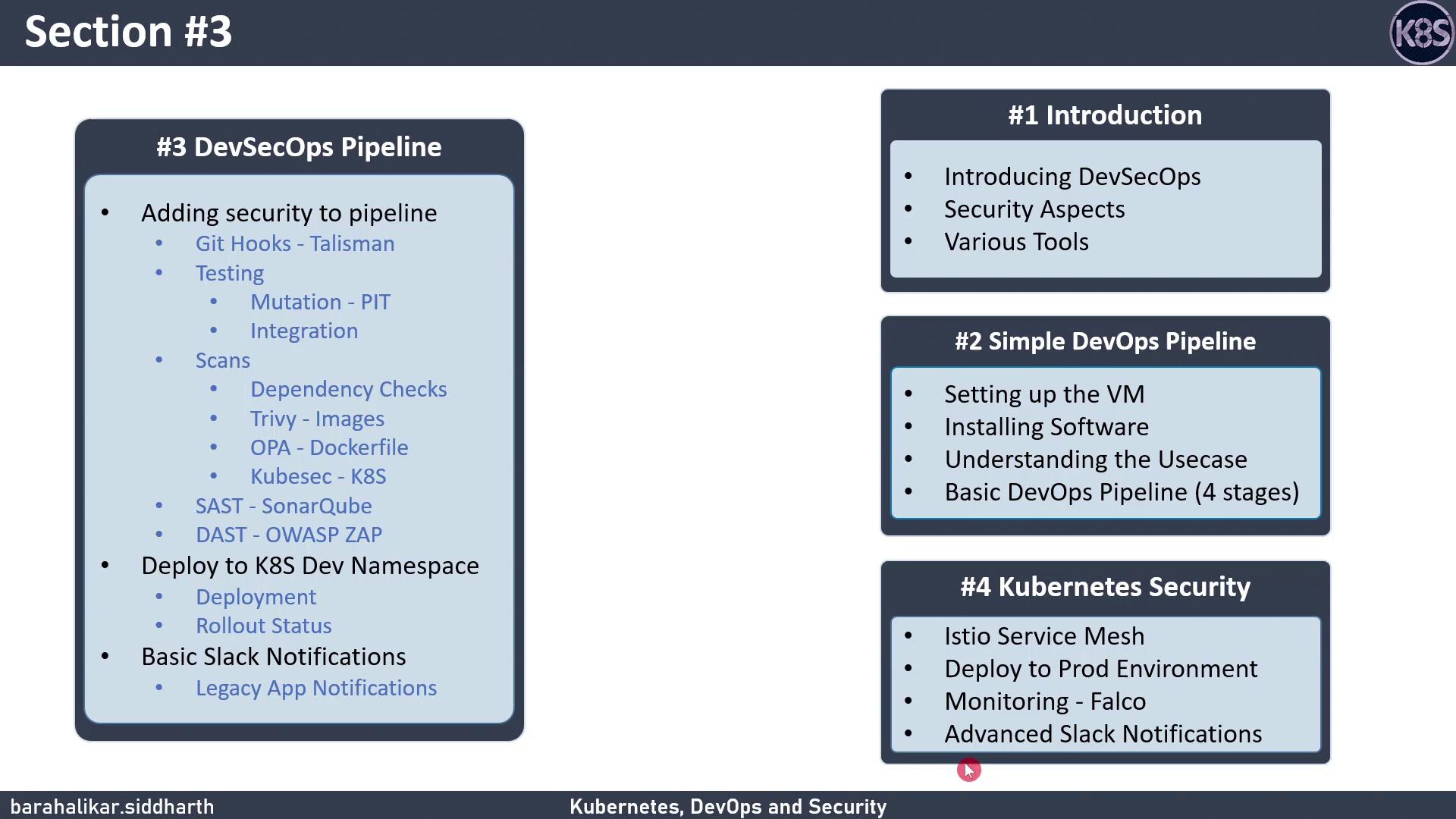
# Section 3 Topics
> This lesson strengthens CI/CD workflows by integrating security measures like testing stages and vulnerability scans.
Welcome to Section 3! In this lesson, we’ll strengthen our CI/CD workflow by:
* Connecting GitHub for source control
* Adding unit and integration testing stages
* Running vulnerability scans
* Performing dynamic application security testing (DAST)
Ensure you have a GitHub repository connected and a Jenkins server with the Kubernetes plugin installed.
## DevSecOps Pipeline Overview
Below is a high-level breakdown of each stage in our DevSecOps pipeline:
| Stage | Purpose | Tool(s) |
| ------------------------------------ | --------------------------------------------------- | ---------------------- |
| Source Control | Host and version application code | GitHub |
| Unit Testing | Validate individual functions and modules | JUnit, pytest |
| Integration Testing | Test interactions between services | Postman, Selenium |
| Vulnerability Scanning | Identify security flaws in code and dependencies | OWASP Dependency-Check |
| Dynamic Application Security Testing | Simulate real-world attacks against the running app | OWASP ZAP |
## 3.1 Verify Kubernetes Rollout Status
After deploying to Kubernetes, confirm that your pods have rolled out successfully:
```bash theme={null}
kubectl rollout status deployment/ -n
```
If the rollout stalls or fails, troubleshoot with:
```bash theme={null}
kubectl describe deployment/ -n
kubectl logs deployment/ -n
```
## 3.2 Configure Jenkins for Slack Notifications
Keep your team informed by sending build alerts to Slack. Add the following to your Jenkinsfile:
```groovy theme={null}
pipeline {
agent any
stages {
stage('Build') { /* build steps */ }
stage('Test') { /* test steps */ }
// ... other stages ...
}
post {
success {
slackSend(
channel: '#ci-cd',
message: "✅ Build successful: ${env.JOB_NAME} #${env.BUILD_NUMBER}"
)
}
failure {
slackSend(
channel: '#ci-cd',
message: "❌ Build failed: ${env.JOB_NAME} #${env.BUILD_NUMBER}"
)
}
}
}
```
Make sure the Slack plugin is installed in Jenkins and you have configured your Incoming Webhook URL under **Manage Jenkins → Configure System → Slack**.
## Next Steps
In Section 4, we’ll focus on Kubernetes security best practices: pod hardening, network policies, and runtime protection.
## Links and References
* [Kubernetes Rollout Commands](https://kubernetes.io/docs/reference/generated/kubectl/kubectl-commands#rollout)
* [Jenkins Slack Plugin](https://plugins.jenkins.io/slack/)
* [GitHub Documentation](https://docs.github.com/)