> ## Documentation Index
> Fetch the complete documentation index at: https://notes.kodekloud.com/llms.txt
> Use this file to discover all available pages before exploring further.
# DevOps vs DevSecOps
> This article compares DevOps and DevSecOps, highlighting the benefits of integrating security into the CI/CD pipeline for improved efficiency and risk management.
In this article, we compare traditional DevOps with DevSecOps and show how embedding security into your CI/CD pipeline can cut risks, reduce costs, and speed up delivery.
## What Is DevOps?
DevOps unifies development, testing, and operations to enable rapid, continuous software delivery. Core DevOps practices include:
* Automated provisioning
* Continuous integration (CI)
* Continuous delivery/deployment (CD)
* Test-driven development (TDD)
* Continuous monitoring
Despite these efficiencies, security is often treated as a final step—introduced only after development and testing are complete. This late-stage approach can leave critical vulnerabilities unaddressed until production.
## The Standard DevOps Pipeline
A typical DevOps workflow covers these stages:
| Stage | Description | Common Tools |
| ------------------------- | ----------------------------------------------------------- | ------------------- |
| Code Commit | Developers push code to a central repository | Git |
| Build & Unit Test | CI server builds artifacts and runs unit tests | Jenkins, Travis CI |
| Integration & E2E Testing | Deploy to staging; execute integration and end-to-end tests | Docker, Kubernetes |
| Production Deployment | Promote containers to production | Docker, Kubernetes |
| Monitoring & Logging | Track uptime, performance, and application logs | Prometheus, Grafana |
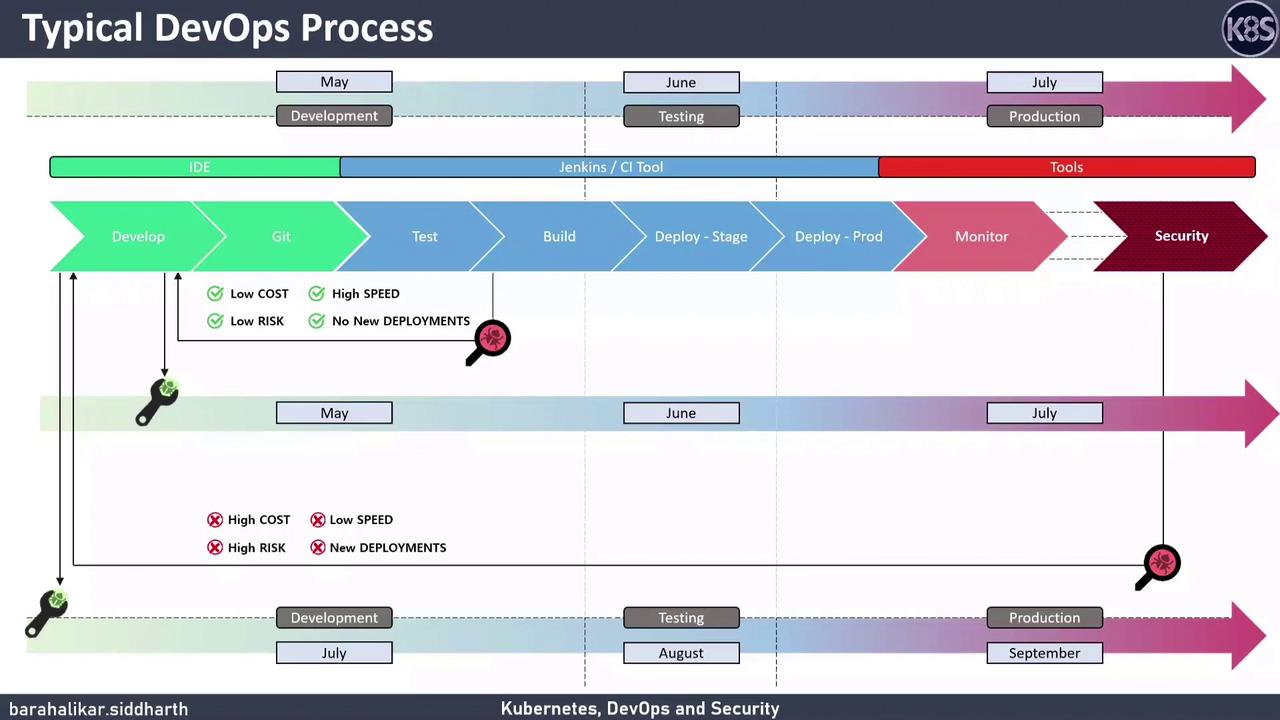
Security scans often happen only after production deployment, leading to late discovery of critical issues.
### The Cost of Late-Stage Security
Consider discovering an SQL injection in production:
* You must patch code, rebuild, retest, and redeploy.
* This repeats the entire CI/CD pipeline, consuming extra CPU, memory, storage, and network resources.
* It delays feature delivery and elevates business risk if exploitation occurs before the patch is live.
## Introducing DevSecOps
DevSecOps “shifts security left” by integrating automated security checks into each phase of the pipeline—rather than as a post-deployment step.
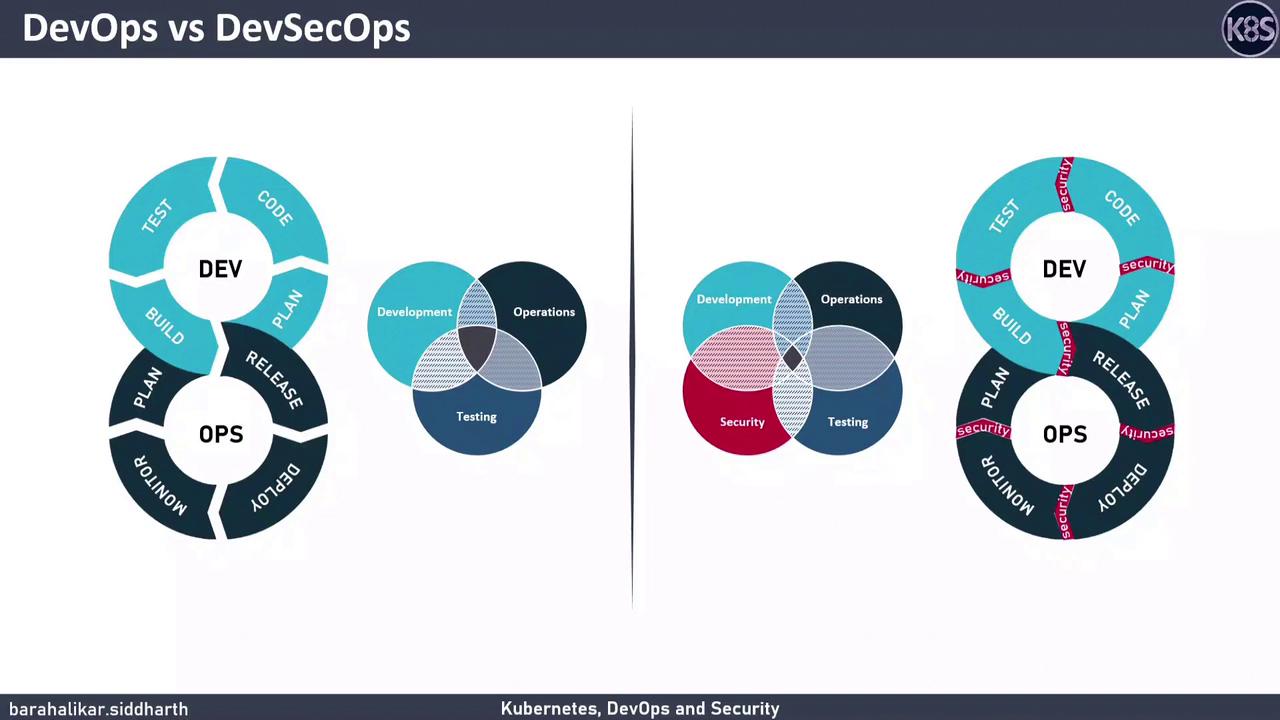
### Shift-Left Security in Action
* **Static Application Security Testing (SAST):** Scans source code for vulnerabilities during the build.
* **Dependency Scanning (SCA):** Detects known vulnerabilities in third-party libraries.
* **Configuration Validation:** Ensures infrastructure as code (IaC) follows security best practices.
* **Container & Runtime Security:** Monitors container behavior and flags anomalies.
By automating these steps alongside unit tests and linting, only secure builds advance to staging and production.
## Key Benefits of DevSecOps
1. **Lower Costs**\
Early detection means fewer rebuilds and redeployments.
2. **Faster Delivery**\
Security tests run in parallel with CI/CD steps, eliminating late-stage bottlenecks.
3. **Reduced Risk**\
Proactive vulnerability scanning prevents exploitable bugs from reaching production.
4. **Efficient Resource Usage**\
Blocking insecure builds saves CPU, memory, storage, and network overhead.
## Security Toolchain Overview
| Security Phase | Tool Category | Example Tools |
| ------------------- | ------------------ | ---------------------------- |
| Code Analysis | SAST | SonarQube, Checkmarx |
| Dependency Scanning | SCA | OWASP Dependency-Check, Snyk |
| IaC Configuration | IaC Security | Terraform Sentinel, Checkov |
| Container & Runtime | Container Security | Aqua Security, Falco |
Integrate security tools into pull requests and pipeline stages to ensure automated, consistent checks.
## Best Practices for a Robust DevSecOps Pipeline
* Embed security tests into every Git workflow (pre-commit, PR validation).
* Use policy-as-code to enforce security standards automatically.
* Centralize vulnerability reporting in dashboards for rapid triage.
* Continuously update security rules, signatures, and scanners.
## Links and References
* [Kubernetes Documentation](https://kubernetes.io/docs/)
* [OWASP Static Application Security Testing](https://owasp.org/www-community/Static_Application_Security_Testing)
* [Docker Security Best Practices](https://docs.docker.com/engine/security/)