> ## Documentation Index
> Fetch the complete documentation index at: https://notes.kodekloud.com/llms.txt
> Use this file to discover all available pages before exploring further.
# Demo Istio Injecting SideCar Container
> This guide explains how to automatically inject an Envoy sidecar into a Kubernetes pod for traffic management and telemetry using Istio.
## Introduction
Istio sidecar injection embeds an Envoy proxy alongside your application container to enable advanced traffic management, mutual TLS, and telemetry within Kubernetes. In this guide, you’ll learn how to:
* Inject an Envoy sidecar into a pod automatically
* Deploy a Node.js microservice in a dedicated namespace
* Verify the injected sidecar and inspect traffic flows
Sidecar proxy is also known as a sidecar container, proxy sidecar, or Envoy sidecar—these terms are used interchangeably.
## Sidecar Injection Methods
Istio offers two approaches to inject the Envoy proxy into your workloads:
| Method | Description | Commands |
| ------------------- | ----------------------------------------------------------------------------------- | ------------------------------------------------------------------------------------------------ |
| Automatic Injection | Labels a namespace so that any new pod includes the sidecar via a mutating webhook. | `bash
kubectl label namespace istio-injection=enabled
kubectl apply -f movies.yaml` |
| Manual Injection | Injects proxy settings directly into your YAML before applying with `istioctl`. | `bash
kubectl apply -f <(istioctl kube-inject -f movies.yaml)` |
We’ll use **Automatic Injection** for this demo, since it requires no modifications to your application manifests.
## Istio Demo Architecture
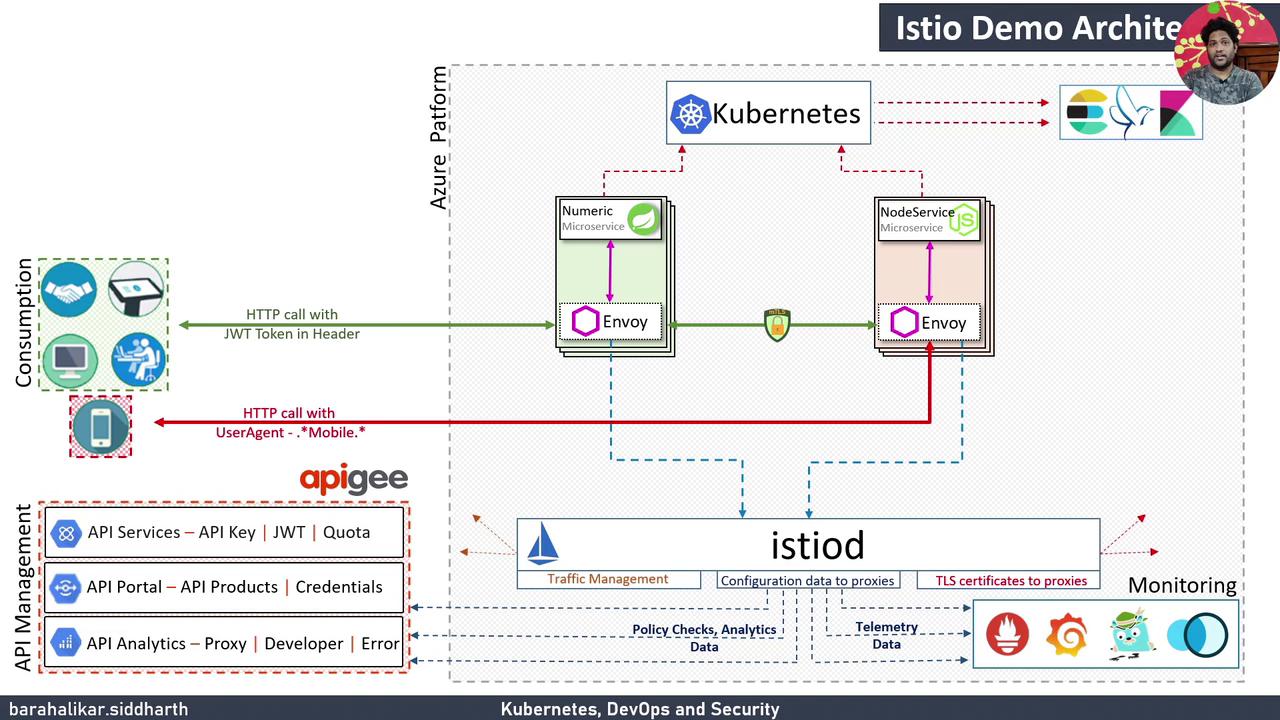
| Component | Role |
| --------------------------- | --------------------------------------------------------------------- |
| Azure VM Kubernetes Cluster | Hosts Istio control plane (Pilot, Citadel, Galley) and workloads |
| Istio Sidecar (Envoy) | Intercepts pod traffic for routing, mTLS, and telemetry |
| Telemetry & Visualization | Grafana, Prometheus, Kiali, Jaeger capture metrics and traces |
| API Management (Optional) | Apigee integration for API security, developer portals, and analytics |
## Prerequisites
* A Kubernetes cluster with Istio installed
* `kubectl` and `istioctl` CLI tools available
* Docker image `siddharth67/node-service:v1` pushed to a registry
## 1. Create and Label the `prod` Namespace
First, set a shorthand for `kubectl`:
```bash theme={null}
alias k=kubectl
```
List your namespaces:
```bash theme={null}
k get ns
```
Create `prod` and confirm:
```bash theme={null}
k create namespace prod
k get ns
```
## 2. Deploy the Node.js Service
Deploy the Node.js microservice with a single container initially:
```bash theme={null}
k -n prod create deployment node-app \
--image=siddharth67/node-service:v1
```
Expose it as a ClusterIP service on port 5000:
```bash theme={null}
k -n prod expose deployment node-app \
--name=node-service \
--port=5000 \
--target-port=5000 \
--type=ClusterIP
```
Verify the resources:
```bash theme={null}
k get all -n prod
```
## 3. Enable Automatic Sidecar Injection
Inspect existing namespace labels:
```bash theme={null}
kubectl get ns --show-labels
```
Label `prod` for Istio:
```bash theme={null}
kubectl label namespace prod istio-injection=enabled
kubectl get ns --show-labels
```
The `istio-system` namespace is generally labeled `istio-injection=disabled` to prevent sidecar injection into control plane components.
## 4. Restart the Deployment
Trigger pod recreation so the Envoy sidecar is injected:
```bash theme={null}
kubectl -n prod rollout restart deployment node-app
kubectl -n prod rollout status deployment/node-app
```
Confirm new pods show `2/2` READY:
```bash theme={null}
kubectl get pods -n prod
```
## 5. Verify the Sidecar Injection
Inspect one of the pods in detail:
```bash theme={null}
kubectl -n prod describe pod
```
Under **Containers:** you should see:
* `node-service` (your application)
* `istio-proxy` (Envoy sidecar, e.g., `docker.io/istio/proxyv2:1.9.0`)
List pods again:
```bash theme={null}
kubectl -n prod get pods
NAME READY STATUS RESTARTS AGE
node-app-597c464649-lgs82 2/2 Running 0 100s
```
## Next Steps
You can extend this workflow by deploying additional services—such as a Spring Boot app via Jenkins Pipeline—or by customizing traffic routing with Istio VirtualServices and DestinationRules.
## Links and References
* [Istio Documentation](https://istio.io/latest/docs/)
* [Kubernetes Concepts](https://kubernetes.io/docs/concepts/)
* [Grafana](https://grafana.com/) & [Prometheus](https://prometheus.io/) & [Kiali](https://kiali.io/) & [Jaeger](https://www.jaegertracing.io/)
* [Apigee on Google Cloud](https://cloud.google.com/apigee)