> ## Documentation Index
> Fetch the complete documentation index at: https://notes.kodekloud.com/llms.txt
> Use this file to discover all available pages before exploring further.
# Pod Pod Communication Need for mTLS
> This guide explains the risks of unencrypted pod-to-pod traffic and how Istio simplifies end-to-end encryption using mutual TLS.
Securing communication between pods is critical in a microservices architecture. By default, Kubernetes routes traffic in plaintext, exposing sensitive data to network eavesdroppers. This guide explains the risks of unencrypted pod-to-pod traffic and shows how a service mesh—specifically Istio—simplifies end-to-end encryption using mutual TLS (mTLS).
## Table of Contents
* [1. The Risk of Plaintext Pod-to-Pod Traffic](#1-the-risk-of-plaintext-pod-to-pod-traffic)
* [2. Challenges of Embedding TLS in Applications](#2-challenges-of-embedding-tls-in-applications)
* [3. Service Mesh Solution: Istio and mTLS](#3-service-mesh-solution-istio-and-mtls)
* [4. Comparing Approaches](#4-comparing-approaches)
* [5. Next Steps and References](#5-next-steps-and-references)
***
## 1. The Risk of Plaintext Pod-to-Pod Traffic
By default, Pod A sends HTTP requests directly to Pod B over the cluster network. An attacker on the same node—or any compromised network segment—can intercept and read this traffic.
```plaintext theme={null}
Pod A (HTTP) ───► Pod B (HTTP)
```
Plaintext HTTP between pods exposes API keys, tokens, and PII to packet sniffers. Always encrypt inter-service traffic in production.
## 2. Challenges of Embedding TLS in Applications
To secure traffic with TLS (HTTPS), every microservice must handle:
* Generating and rotating key pairs
* Securely storing private keys
* Performing TLS handshakes
* Updating certificates upon expiry
This creates significant operational complexity and duplicates effort across teams.
## 3. Service Mesh Solution: Istio and mTLS
A service mesh like Istio offloads TLS responsibilities to sidecar proxies, automating certificate issuance and mTLS handshakes.
### Prerequisites
Ensure you have:
* A running Kubernetes cluster (v1.20+)
* `kubectl` configured for your cluster
* Helm (optional) or `istioctl` CLI installed
### Step-by-Step Guide
1. **Install Istio**
```bash theme={null}
istioctl install --set profile=demo -y
```
2. **Enable Automatic Sidecar Injection**
```bash theme={null}
kubectl label namespace default istio-injection=enabled
```
3. **Deploy Your Applications**\
Any pod in the `default` namespace now includes an Istio sidecar.
4. **Verify mTLS is Enforced**
```bash theme={null}
istioctl authn tls-check
```
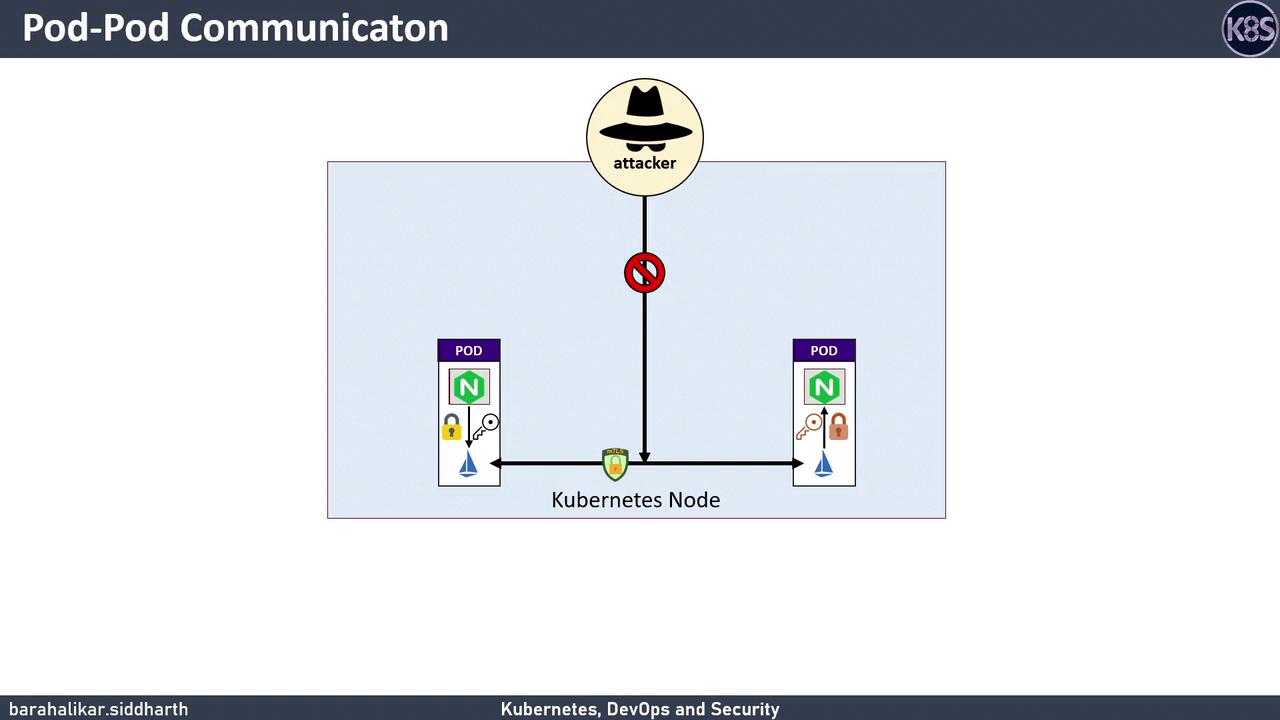
When Pod A calls Pod B:
* Pod A’s app → plaintext to Envoy sidecar
* Envoy (Pod A) → performs mTLS handshake → Envoy (Pod B)
* Envoy (Pod B) → decrypts → plaintext to Pod B’s app
## 4. Comparing Approaches
| Approach | TLS Management | Complexity | Encryption Type |
| --------------------- | ----------------------- | ---------- | --------------- |
| Manual TLS in Service | Developer | High | HTTPS |
| Istio Service Mesh | Sidecar Proxies (Envoy) | Low | mTLS |
## 5. Next Steps and References
We’ll dive deeper into advanced Istio features—custom mTLS policies, certificate rotation, and traffic observability.
## Links and References
* [Kubernetes Overview](https://kubernetes.io/docs/concepts/overview/what-is-kubernetes/)
* [Istio Official Documentation](https://istio.io/latest/docs/)
* [mTLS Explained](https://en.wikipedia.org/wiki/Mutual_authentication)