> ## Documentation Index
> Fetch the complete documentation index at: https://notes.kodekloud.com/llms.txt
> Use this file to discover all available pages before exploring further.
# Disaster Recovery DTR
> This guide covers planning and executing a disaster-recovery strategy for Docker Trusted Registry, including architecture design, metadata backup, and restoration processes.
In this guide, we’ll walk through planning and executing a comprehensive disaster-recovery strategy for Docker Trusted Registry (DTR). You’ll learn how to design a fault-tolerant DTR architecture, back up critical metadata, and restore your registry in the event of failure.
## Why You Need a Disaster-Recovery Plan for DTR
By default, a single-replica DTR using local filesystem storage provides no redundancy—if that node crashes, the registry goes offline. To avoid downtime and data loss, implement:
1. Multiple DTR replicas
2. A private overlay network (e.g., `DTR-OL`) connecting them
3. Quorum-based consensus (minimum three replicas)
4. An external object store (Amazon S3, Google Cloud Storage, or Azure Blob Storage) for image layers
Local filesystem storage on individual replicas is **not** fault-tolerant. Always use an external object store for image data at scale.
## DTR High Availability Architecture
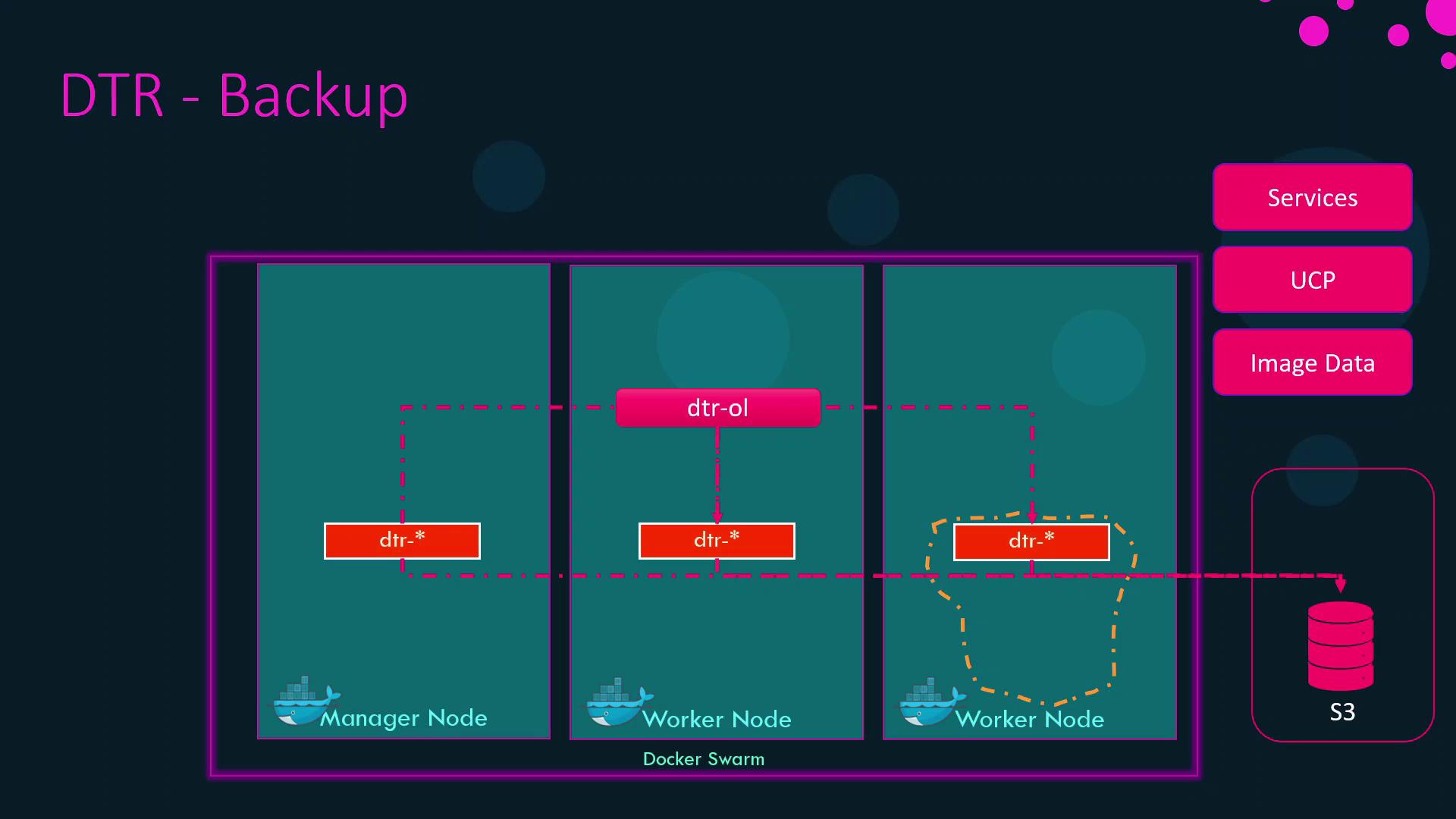
## What to Back Up in DTR
Even with image layers safely stored in S3 (or equivalent), you must preserve DTR’s metadata:
| Metadata Category | Description |
| -------------------------- | --------------------------------------------- |
| Configuration settings | Registry configuration, storage drivers, etc. |
| Repository definitions | Namespaces, repository tags |
| Access control policies | User and team permissions, LDAP/AD settings |
| Image signing data | Docker Content Trust keys |
| Vulnerability scan reports | Scan results and policy configurations |
| TLS certificates & keys | Registry TLS assets |
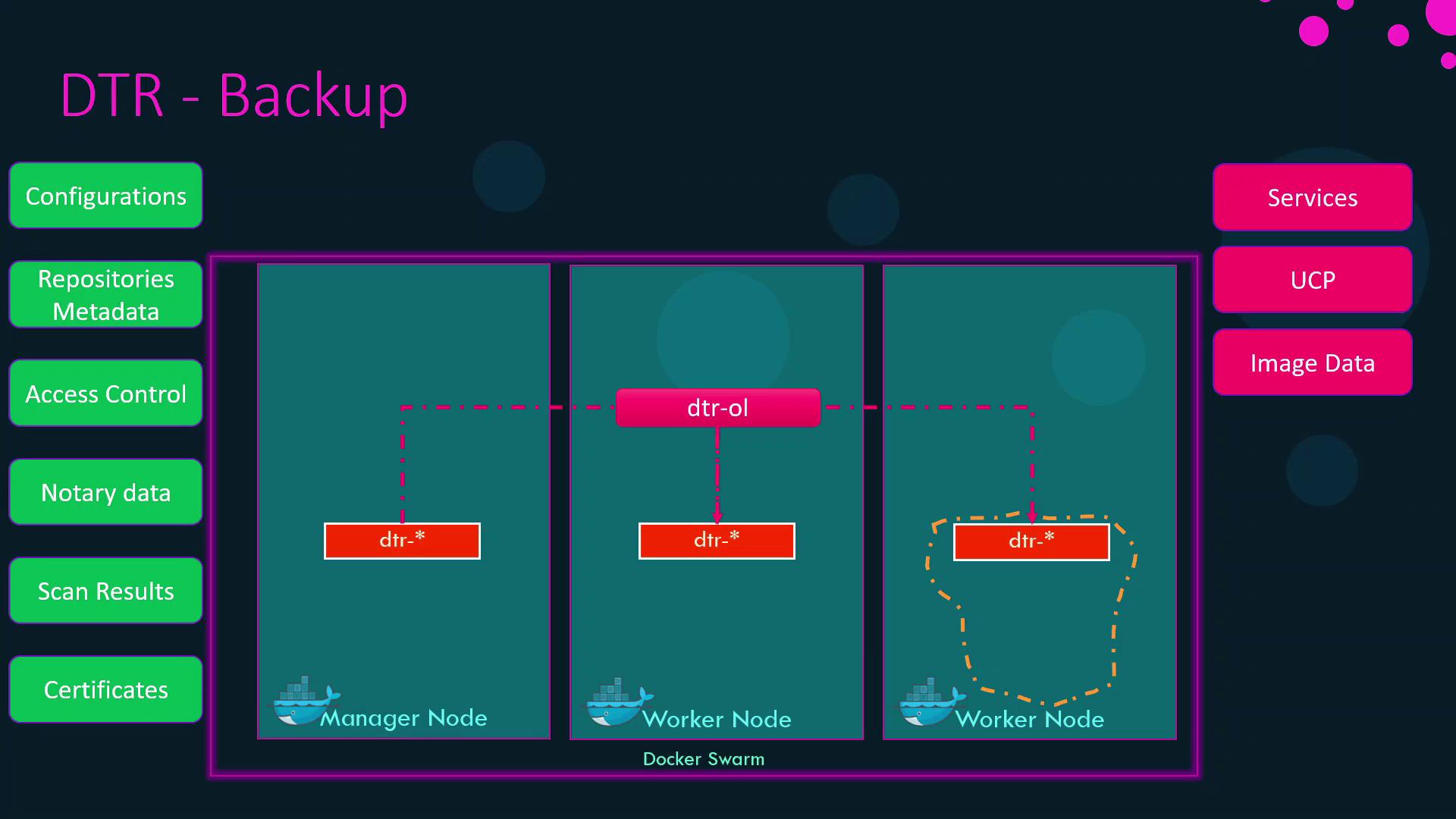
## Backing Up DTR Metadata
Run the DTR backup container against any existing replica to generate a tar archive of all metadata:
```bash theme={null}
docker run --rm docker/dtr backup \
--ucp-url $UCP_URL \
--ucp-ca-cert-path $CA_PATH \
--ucp-username $USERNAME \
--ucp-password $PASSWORD \
--existing-replica-id $REPLICA_ID \
> dtr-metadata-backup.tar
```
For a full list of backup flags and how to obtain credentials, see the [DTR disaster recovery documentation](https://docs.docker.com/ee/dtr/admin/backup-and-restore/).
## Restoring DTR Metadata
Follow these steps to restore your registry metadata after a failure:
1. Destroy existing DTR containers to clean up state:
```bash theme={null}
docker run --rm -it docker/dtr destroy \
--ucp-url $UCP_URL \
--ucp-insecure-tls
```
2. (If needed) Rehydrate image layers in your object store (e.g., re-upload to S3).
3. Import the metadata backup:
```bash theme={null}
docker run --rm -i docker/dtr restore < dtr-metadata-backup.tar
```
4. Re-deploy additional replicas and confirm quorum membership.
Refer to the [official restore guide](https://docs.docker.com/ee/dtr/admin/backup-and-restore/) for advanced options.
## Summary Table
Disaster recovery for Docker Enterprise encompasses three layers. Below is a high-level overview:
| Component | Backup Target | Tool / Storage Location |
| -------------- | ----------------------------------------- | -------------------------------------------------------------------------------------- |
| Swarm | Raft logs (nodes, services, overlay nets) | `docker swarm backup` or etcd snapshot |
| UCP | UCP config, access controls, Kubernetes | UCP CLI / API ([docs](https://docs.docker.com/ee/ucp/admin/configure/backup-restore/)) |
| DTR (images) | Container image layers | External Object Store (S3, GCS, Azure Blob) |
| DTR (metadata) | Config settings, repos, ACLs, scans, TLS | `docker run docker/dtr backup` |
With these backups in place, you can restore your entire Docker Enterprise environment—Swarm, UCP, and DTR—to full operation after an outage.