> ## Documentation Index
> Fetch the complete documentation index at: https://notes.kodekloud.com/llms.txt
> Use this file to discover all available pages before exploring further.
# Universal Control Plane Setup
> This article covers the setup and installation of Dockers Universal Control Plane for managing Docker Swarm clusters.
In this lesson, we’ll dive into Docker’s Universal Control Plane (UCP), an enterprise-grade solution for cluster management. You’ll learn about its architecture, core components, and a step-by-step installation guide.
***
## What Is Universal Control Plane?
The Universal Control Plane (UCP) provides a unified management portal—via a web UI or Docker CLI—to monitor and control your Docker Swarm clusters. UCP is designed for production environments, offering:
| Feature | Description |
| -------------------------------- | -------------------------------------------------------------------- |
| LDAP & Active Directory support | Centralized authentication and directory integration |
| Role-Based Access Control (RBAC) | Fine-grained permissions for users and teams |
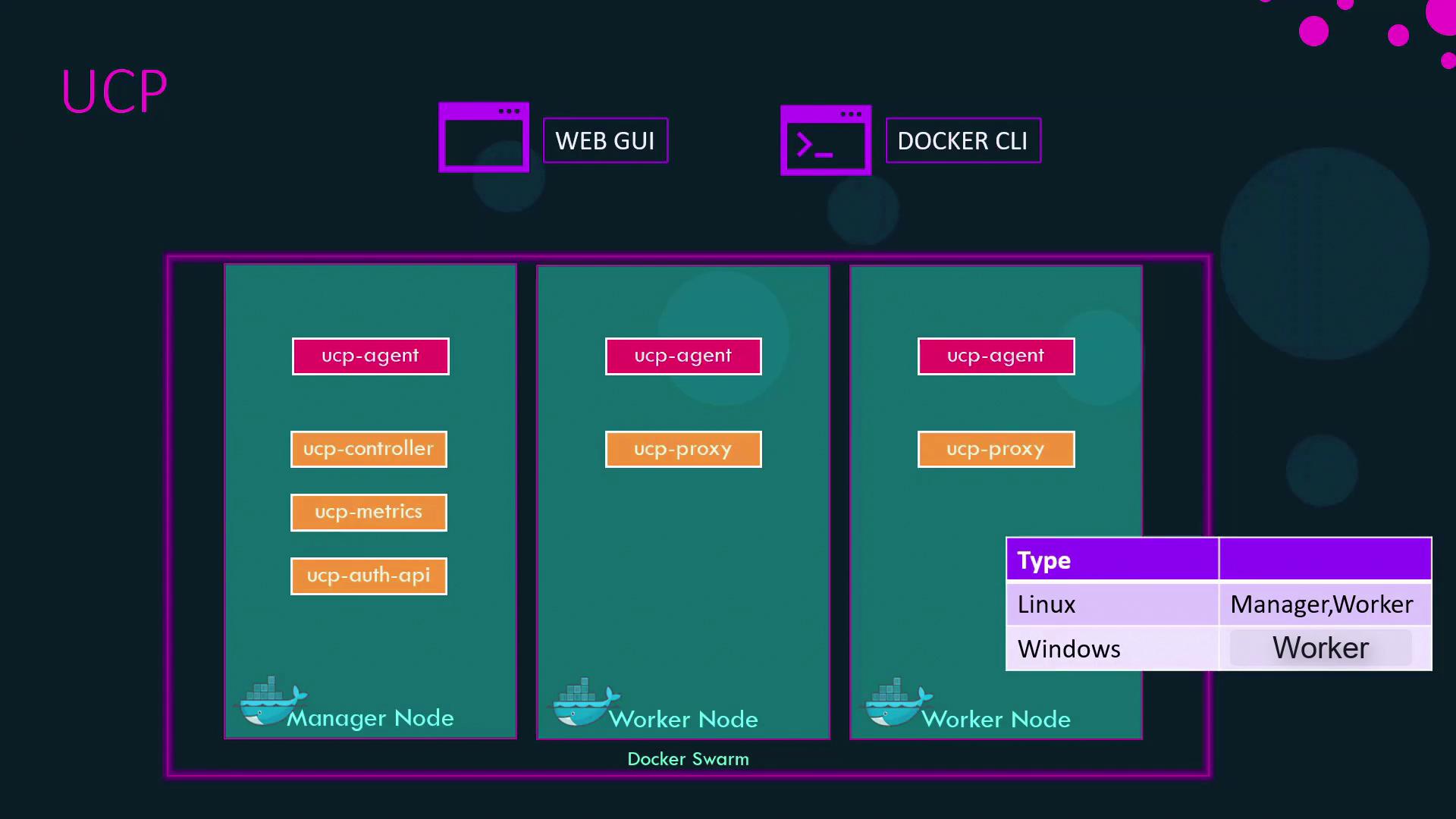
| Multi-Platform Workers | Manage Linux and Windows worker nodes (Linux only for manager nodes) |
| Web UI & CLI Management | Flexible control through a graphical interface or Docker commands |
UCP runs on [Docker Swarm](https://docs.docker.com/engine/swarm/) under the hood, extending it with enterprise security, monitoring, and governance features.
***
## UCP Architecture Overview
UCP deploys a **global** service called the UCP agent on every node—manager or worker. This agent orchestrates the following core components as containers:
* **Web UI**: Central dashboard for cluster health and resource usage
* **Authentication API**: Handles login, LDAP/AD integration, and token issuance
* **Metrics Server**: Collects and displays performance data
* **Proxy**: Routes API requests and enforces security policies
* **Data Stores**: Persist configuration, state, and audit logs
On worker nodes, the UCP agent also spins up a dedicated *ucp-proxy* that mediates all Docker API calls, ensuring only authorized users and services can execute commands.
In addition, UCP provisions essential Kubernetes binaries—like `kube-controller-manager` and `kubelet`—to enable optional Kubernetes orchestration alongside Docker Swarm. For a complete breakdown, see the [UCP architecture documentation](https://docs.docker.com/ee/ucp/latest/architecture/).
| Service Type | Role |
| ------------------ | ----------------------------------------------- |
| Global (UCP Agent) | Runs one container on each node |
| Replica | Scales specified containers across the cluster |
| Worker Proxy | Secures and filters Docker API calls on workers |
***
## Installing Universal Control Plane
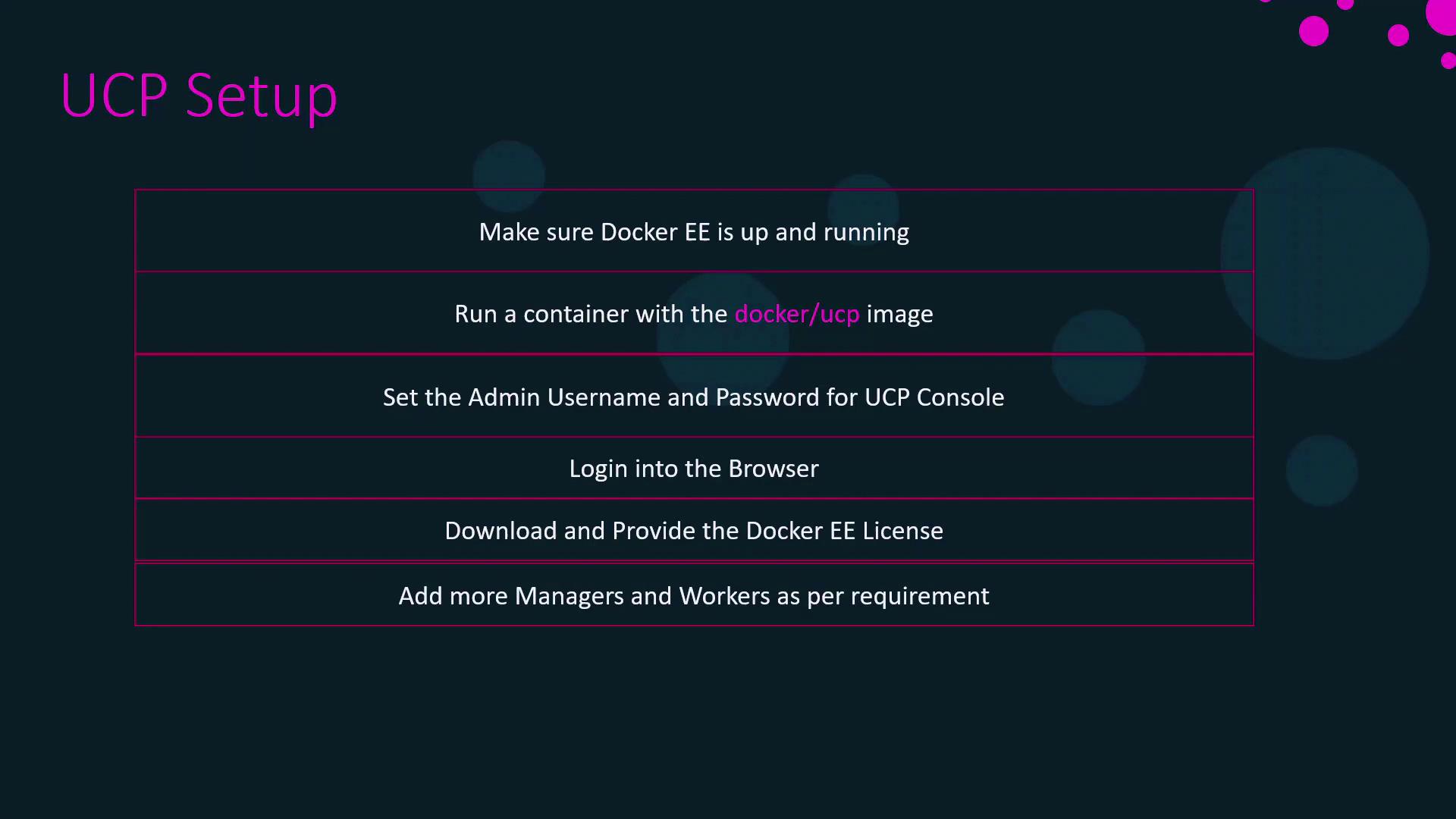
Follow these steps to deploy UCP on your Docker Enterprise Engine:
1. **Verify Prerequisites**
* Docker Enterprise Engine installed and running
* Network connectivity between nodes
2. **Pull the UCP Installer**
```bash theme={null}
docker pull docker/ucp:
```
3. **Run the Installer Container**
```bash theme={null}
docker run --rm -it \
--name ucp-install \
-v /var/run/docker.sock:/var/run/docker.sock \
docker/ucp: install \
--host-address \
--admin-username admin \
--admin-password
```
4. **Access the UCP Web UI**\
Navigate to `https://:8443` in your browser.
5. **Upload Docker License**\
When prompted, upload your Docker Enterprise license file to activate UCP.
6. **Join Additional Nodes**\
Use the “Add Node” option in the UCP console to onboard more managers or workers.
Keep your `admin-password` secure and rotate it periodically. Avoid using weak or reused passwords.
***
A hands-on demonstration will follow, illustrating these installation steps and best practices for scaling your UCP-managed cluster.