> ## Documentation Index
> Fetch the complete documentation index at: https://notes.kodekloud.com/llms.txt
> Use this file to discover all available pages before exploring further.
# Docker Engine Architecture
> This article explores Docker Engine architecture, its components, evolution, standards, key objects, registry model, container creation flow, and installation verification.
In this article, we dive into Docker Engine architecture, exploring its core components, how it evolved from LXC to Libcontainer, and the standards defined by the Open Container Initiative (OCI). You’ll also learn about key Docker objects, the registry model, the container creation flow, and how to verify your Docker installation.
***
## Key Components
Docker Engine consists of three primary parts that work together to build, ship, and run containers:
* **Docker Daemon (`dockerd`)**\
The background service that manages images, containers, networks, and volumes on your host.
* **REST API**\
A set of HTTP endpoints that expose the daemon’s functionality to clients and automation tools.
* **Docker CLI (`docker`)**\
The command-line interface that sends commands to the REST API.
***
## From LXC to Libcontainer
When Docker launched in 2013, it used [Linux Containers (LXC)](https://linuxcontainers.org/) to isolate processes via namespaces and cgroups. By version 0.9, Docker introduced **Libcontainer**, a Go library that interfaces directly with kernel primitives—eliminating the LXC dependency and simplifying container management.
***
## The Open Container Initiative (OCI)
Before 2015, container formats and runtimes were fragmented. Docker, CoreOS, and other industry leaders formed the **Open Container Initiative (OCI)** to standardize:
1. **Runtime Specification**\
Defines lifecycle operations (`create`, `start`, `delete`, etc.).
2. **Image Specification**\
Specifies how container images are formatted and distributed.
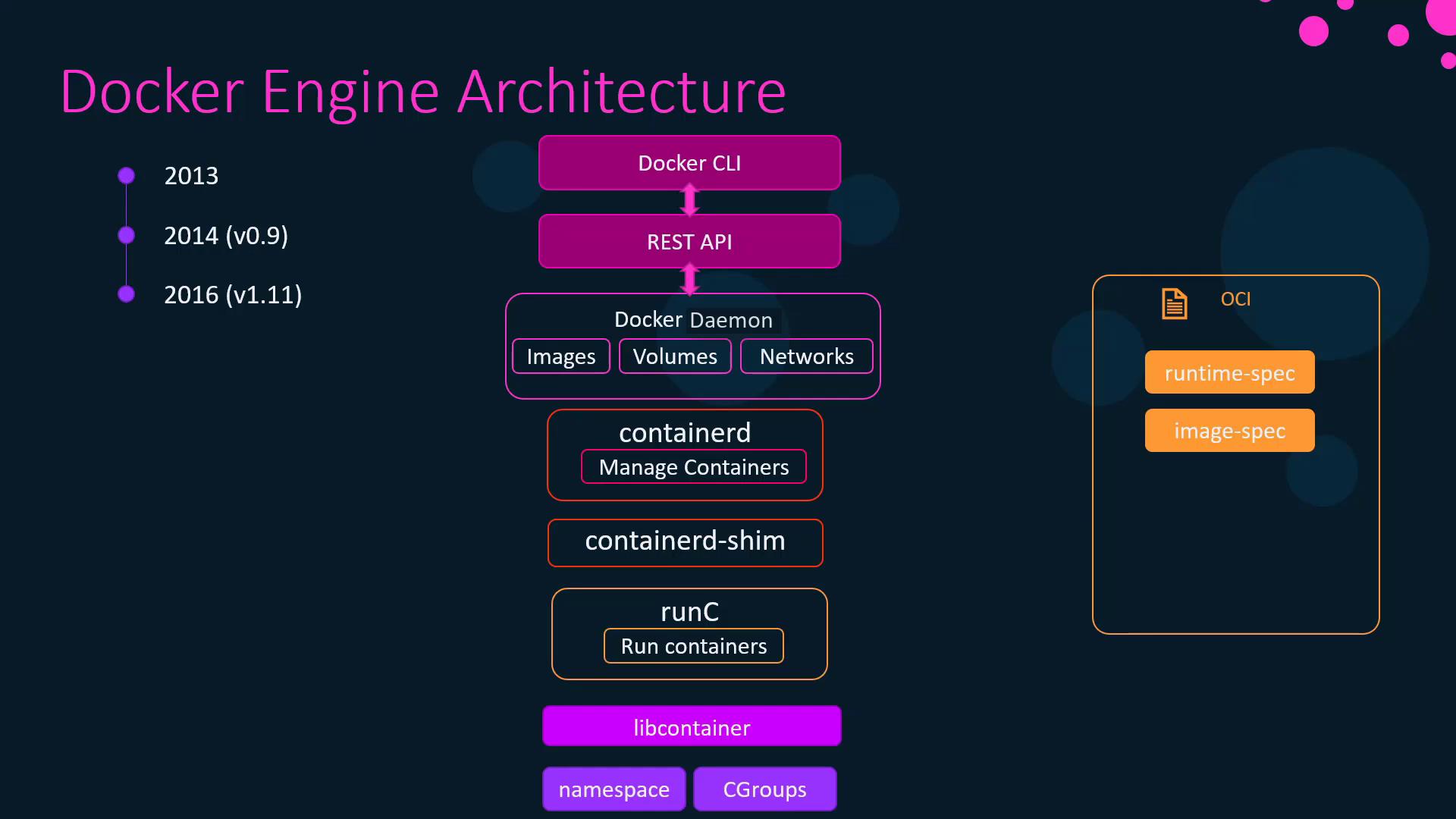
With these standards, Docker Engine 1.11 was refactored into modular components:
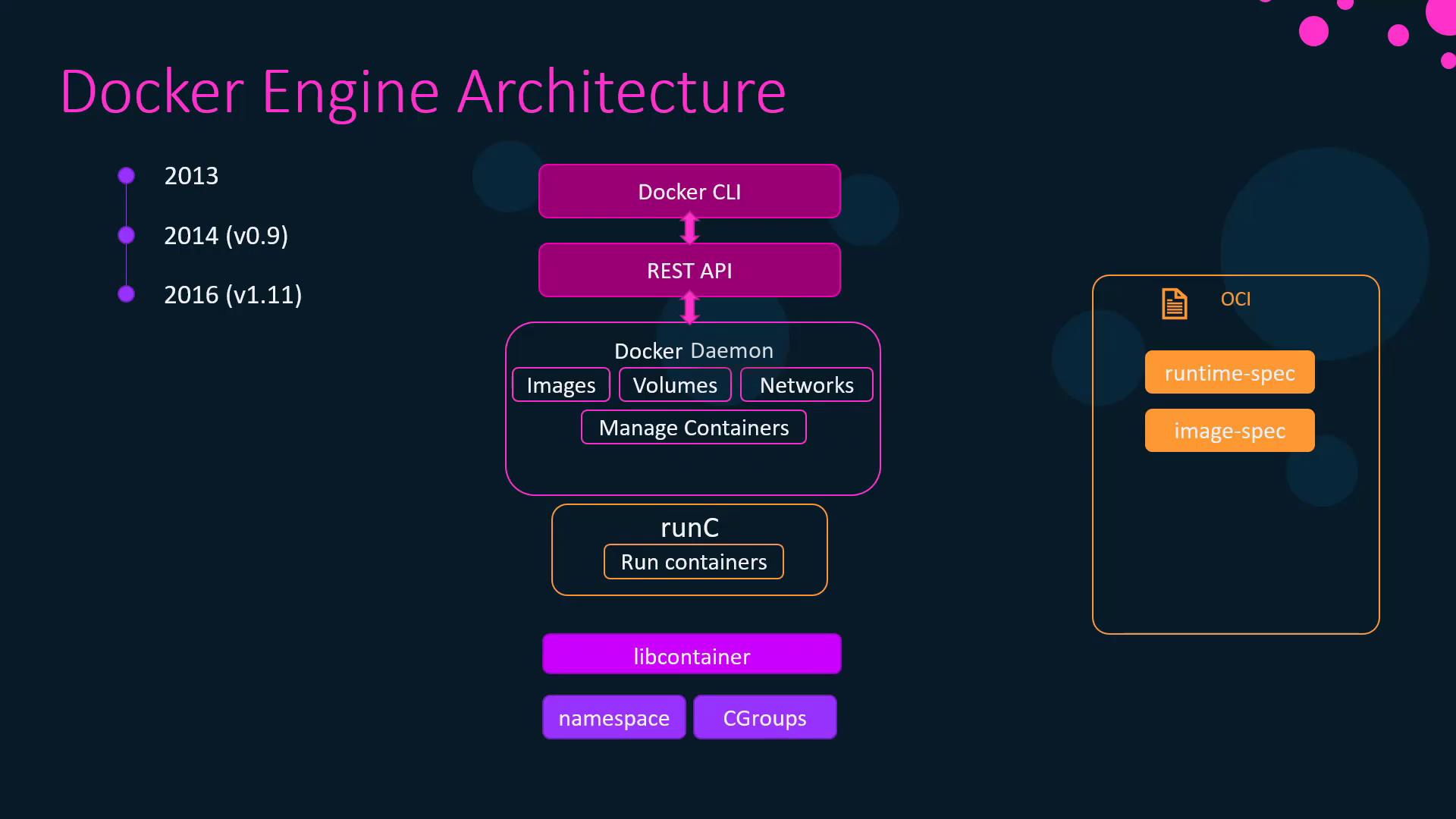
* **runC**\
The OCI-compliant runtime that handles low-level container operations.
* **containerd**\
A daemon responsible for managing runC instances, image transfer, and storage.
* **containerd-shim**\
Allows containers to keep running independently of containerd, ensuring resilience if the daemon restarts.
***
## Core Docker Objects
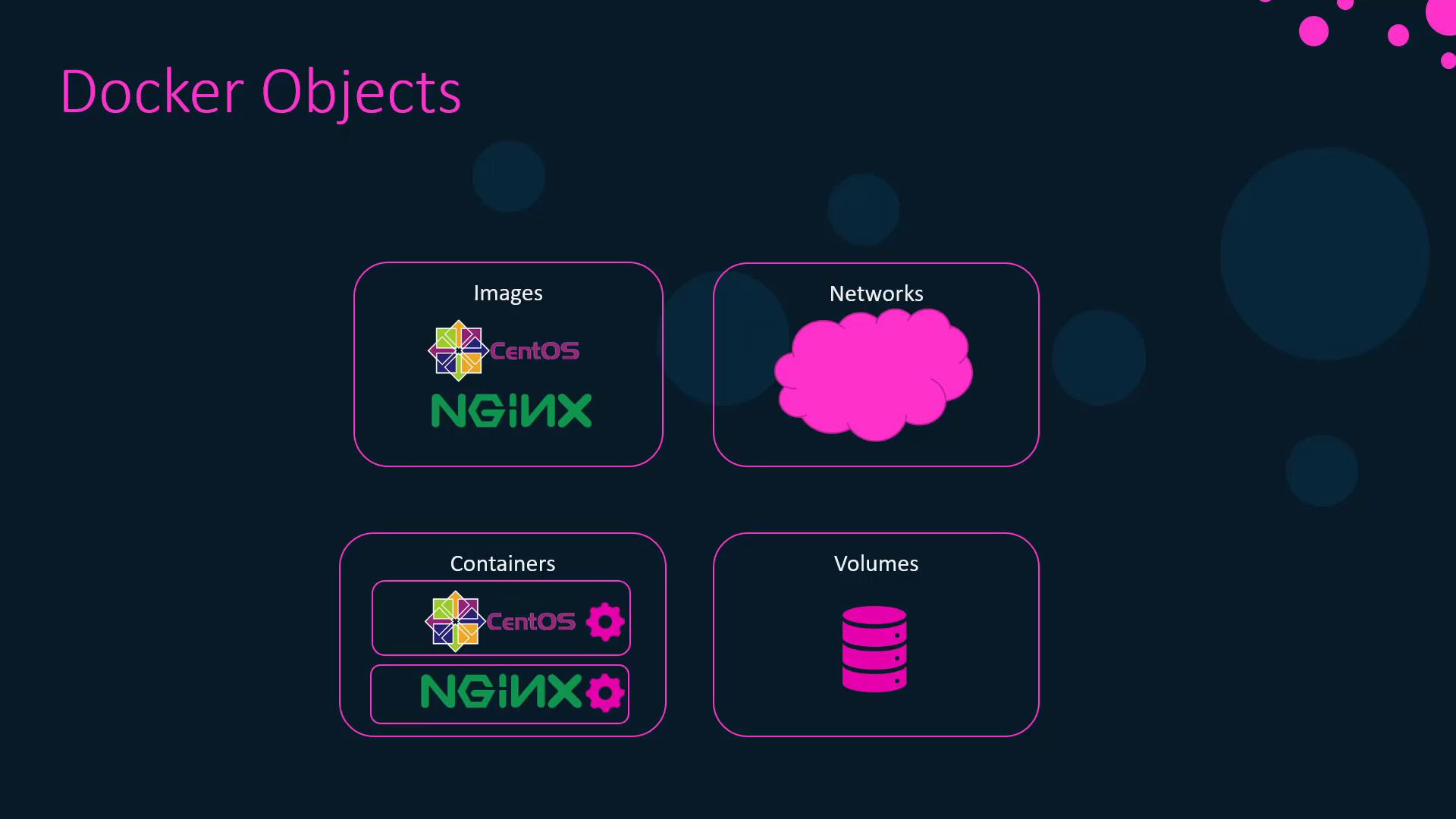
Docker Engine manages four primary resource types:
| Object | Description |
| -------------- | ---------------------------------------------------------------------------- |
| **Images** | Read-only templates composed of layered filesystem snapshots and metadata. |
| **Containers** | Instances of images providing a writable layer and running processes. |
| **Networks** | Virtual networks enabling container-to-container and external communication. |
| **Volumes** | Persistent storage volumes decoupled from container lifecycles. |
***
## Docker Registry
A **registry** is a service for storing and distributing Docker images:
* **Docker Hub** (default public registry)
* **Private Registry** (self-hosted)
* **Docker Trusted Registry (DTR)** (enterprise-grade, on-premises)
***
## Container Creation Flow
When you run `docker run`, Docker follows a series of steps:
1. **CLI to API**\
The Docker CLI translates your command into a REST API call.
2. **Daemon Processing**\
The daemon checks for the image locally or pulls it from the registry.
3. **containerd**\
Converts the image into an OCI bundle.
4. **containerd-shim**\
Hands off the bundle to runC and monitors the container’s lifecycle.
5. **runC**\
Uses kernel namespaces and cgroups to spawn and isolate the container.
Example:
```bash theme={null}
docker container run -it ubuntu
```
***
## Verifying Your Installation
After installing Docker on CentOS or Ubuntu, confirm that everything is set up correctly:
```bash theme={null}
docker version
```
Sample output:
```bash theme={null}
Client: Docker Engine - Community
Version: 19.03.5
API version: 1.40
Go version: go1.12.12
Server: Docker Engine - Community
Engine:
Version: 19.03.5
API version: 1.40 (minimum version 1.12)
containerd:
Version: 1.2.10
runc:
Version: 1.0.0-rc8+dev
```
Check the CLI version:
```bash theme={null}
docker --version
# Docker version 19.03.5, build 633a0ea
```
And get system-wide details:
```bash theme={null}
docker system info
```
Sample excerpt:
```bash theme={null}
Server:
Containers: 0
Running: 0
Images: 0
Server Version: 19.03.5
Storage Driver: overlay2
```
***
## References
* [Docker Official Documentation](https://docs.docker.com/)
* [Open Container Initiative](https://opencontainers.org/)
* [Docker Hub](https://hub.docker.com/)