> ## Documentation Index
> Fetch the complete documentation index at: https://notes.kodekloud.com/llms.txt
> Use this file to discover all available pages before exploring further.
# Base vs Parent Image
> This article explains the concepts of base and parent images in Docker, detailing their roles in image creation and hierarchy.
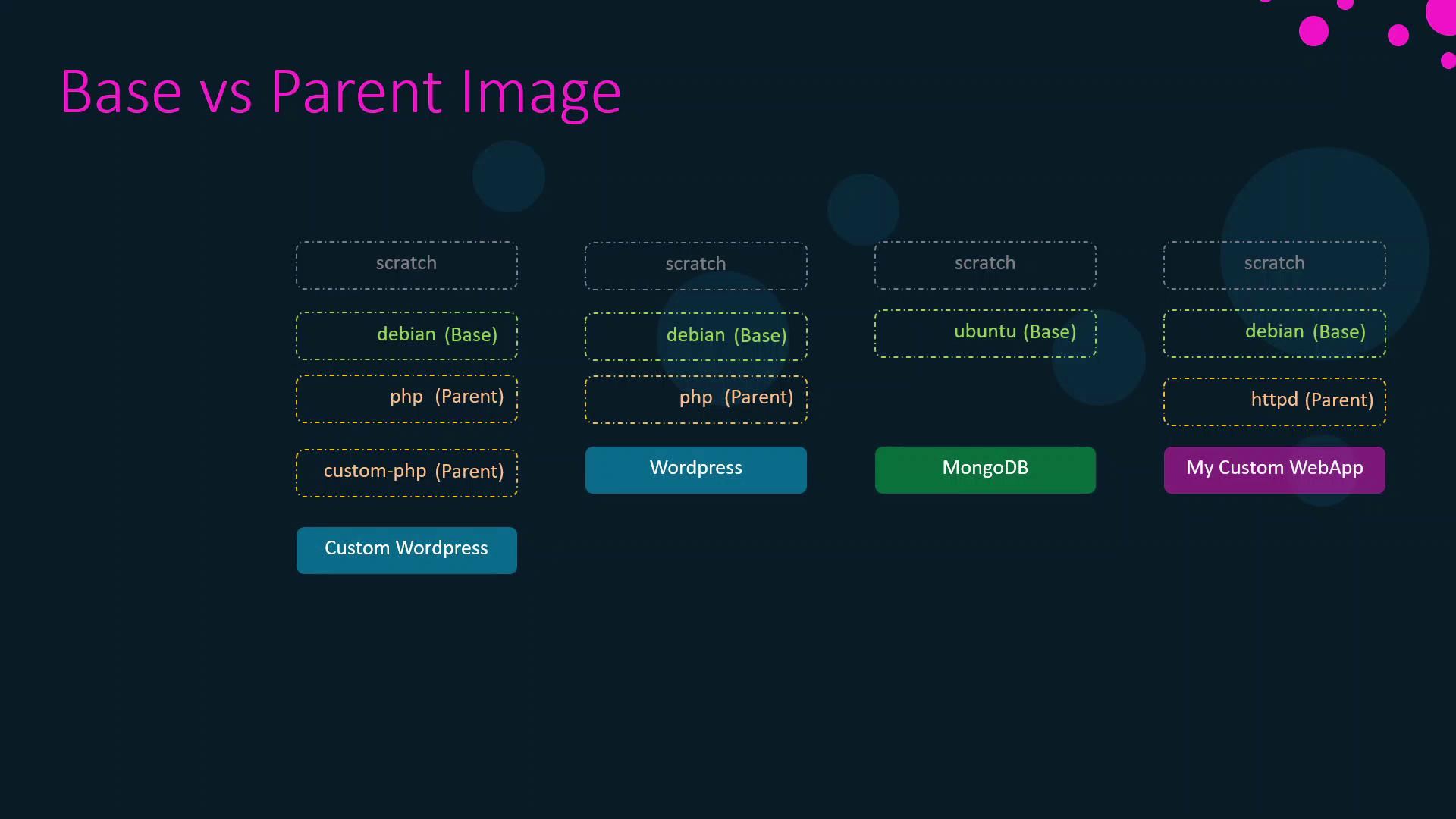
In Docker, every custom image starts “FROM” another image—its parent. Tracing this chain leads to the special `scratch` image, the true base for all builds.
A **base image** is the origin of an image chain (often `scratch`), while a **parent image** is the one directly referenced by your `FROM` instruction.
## 1. Custom Web Application Image
Create a minimal Apache-based web server by extending the official HTTPD image:
```dockerfile theme={null}
FROM httpd
COPY index.html /usr/local/apache2/htdocs/index.html
```
* **Parent image**: `httpd`
* Your `COPY` command layers application files on top of the Apache HTTPD server.
## 2. Inside the HTTPD Official Image
The official HTTPD image itself builds on Debian:
```dockerfile theme={null}
FROM debian:buster-slim
ENV HTTPD_PREFIX=/usr/local/apache2
ENV PATH=$HTTPD_PREFIX/bin:$PATH
WORKDIR $HTTPD_PREFIX
# Installation steps for Apache HTTPD...
```
* **Parent image**: `debian:buster-slim`
* Installs Apache HTTPD on a minimal Debian base.
## 3. Exploring the Debian Base Image
The Debian “slim” image originates from `scratch`:
```dockerfile theme={null}
FROM scratch
ADD rootfs.tar.xz /
CMD ["bash"]
```
* **Base image**: `scratch`
* Unpacks a minimal Debian filesystem from a tarball.
You cannot push or pull the `scratch` image—it's only referenced in `FROM scratch` directives.
### Table: Image Lineage at a Glance
| Layer | Image Tag | Parent | Description |
| -------------- | ----------------------- | -------------------- | ---------------------------------------- |
| Application | `custom-web-app:latest` | `httpd:latest` | Apache HTTPD plus your `index.html` |
| HTTPD Official | `httpd:latest` | `debian:buster-slim` | Official Apache HTTPD on Debian |
| Debian Base | `debian:buster-slim` | `scratch` | Minimal Debian filesystem from `scratch` |
## 4. Additional Official Image Chains
### Ubuntu → MongoDB
1. **Ubuntu minimal from scratch**:
```dockerfile theme={null}
FROM scratch
ADD ubuntu-xenial-core-cloudimg-amd64-root.tar.gz /
```
2. **MongoDB on Ubuntu**:
```dockerfile theme={null}
FROM ubuntu:xenial
RUN groupadd -r mongodb \
&& useradd -r -g mongodb mongodb
RUN set -eux; \
apt-get update; \
apt-get install -y --no-install-recommends \
ca-certificates jq numactl; \
if ! command -v ps >/dev/null; then \
apt-get install -y --no-install-recommends procps; \
fi
```
### WordPress → PHP → Debian
The [official WordPress image](https://hub.docker.com/_/wordpress) builds on the [official PHP image](https://hub.docker.com/_/php), which in turn uses Debian—demonstrating another `scratch` → Debian → PHP → WordPress chain.
## 5. The `scratch` Image: Docker’s True Base
* **`scratch`** is Docker’s reserved, empty image.
* It marks the very beginning of any build.
* By adding a minimal OS filesystem on top of `scratch`, maintainers create base images (Debian, Alpine, Ubuntu), which then serve as parents for application and service images.
For more details on building and using base images, see the [official Docker documentation on base images](https://docs.docker.com/develop/develop-images/baseimages/).
***
## Links and References
* [Docker Base Image Documentation](https://docs.docker.com/develop/develop-images/baseimages/)
* [HTTPD Official Image](https://hub.docker.com/_/httpd)
* [Debian Official Image](https://hub.docker.com/_/debian)
* [Ubuntu Official Image](https://hub.docker.com/_/ubuntu)
* [MongoDB Official Image](https://hub.docker.com/_/mongo)
* [WordPress Official Image](https://hub.docker.com/_/wordpress)
* [PHP Official Image](https://hub.docker.com/_/php)