> ## Documentation Index
> Fetch the complete documentation index at: https://notes.kodekloud.com/llms.txt
> Use this file to discover all available pages before exploring further.
# Docker Overlay Network
> Docker overlay networks enable seamless communication between containers across multiple hosts, covering network drivers, Swarm networks, and custom overlay creation.
Docker overlay networks provide a single, seamless virtual network across multiple Docker nodes, enabling containers on different hosts to communicate securely. This guide covers Docker’s built-in network drivers, the purpose of overlays, Swarm’s default networks, and how to create custom overlay networks.
## Revisiting Docker’s Built-In Networks
Below is a quick reference for Docker’s default network drivers:
| Driver | Use Case | Example Command |
| ------ | ------------------------------------ | -------------------------------------- |
| bridge | Container isolation on a single host | `docker run -p 8080:80 my-web-app` |
| host | Shares host network namespace | `docker run --network=host my-web-app` |
| none | No networking (full isolation) | `docker run --network=none ubuntu` |
### bridge
Docker’s default network driver. It creates a private bridge (usually `172.17.x.x`) on the host and connects containers to it:
```bash theme={null}
docker run -d --name web \
-p 8080:80 \
nginx
```
### host
Containers share the host’s network namespace—ports inside the container map directly to the host without `-p`:
```bash theme={null}
docker run -d --network=host \
--name api-server \
my-api-image
```
### none
Disables all networking for full isolation. Use this when you don’t need external access:
```bash theme={null}
docker run --network=none \
--name isolated-container \
ubuntu
```
## Why Overlay Networks?
Each Docker host has its own bridge, so containers on different machines can’t talk by default. Overlay networks use VXLAN to create a virtual layer 2 network across hosts, making them essential for:
* Multi-host container communication
* Docker Swarm service discovery
* Secure, encrypted traffic between containers
## Ingress Network in Docker Swarm
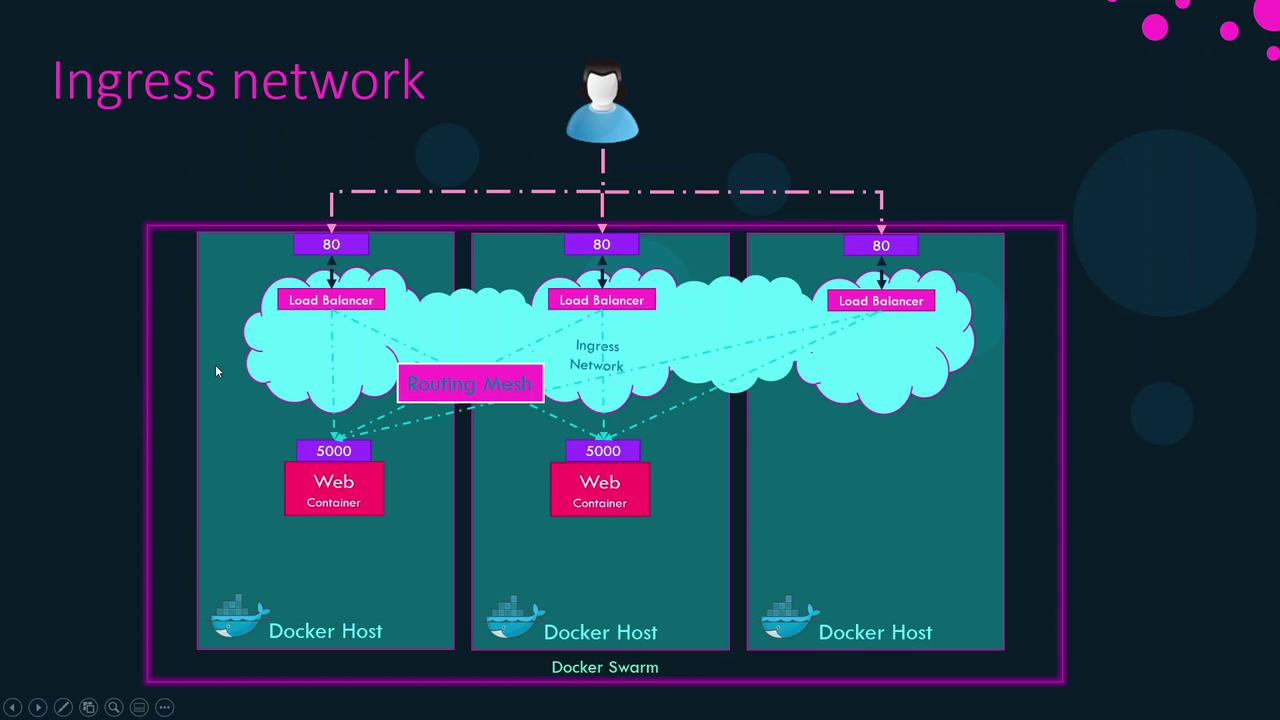
When you run `docker swarm init`, Swarm creates an **ingress** overlay network with a built-in load balancer and routing mesh:
```bash theme={null}
docker network ls
NETWORK ID NAME DRIVER SCOPE
68abeefb1f2e bridge bridge local
5bab4adc7d02 host host local
e43bd489dd57 none null local
mevcdh5b40zz ingress overlay swarm
```
### Single Node Service Publishing
Without Swarm, you’d expose a container port like this:
```bash theme={null}
docker run -p 80:5000 my-web-server
```
With Swarm and two replicas, use `--publish`:
```bash theme={null}
docker service create \
--replicas 2 \
--publish 80:5000 \
my-web-server
```
Ingress’s load balancer listens on port 80 and routes traffic to port 5000 on both replicas.
### Multi-Node Routing Mesh
In a multi-node Swarm, every node advertises the published port (80). Incoming requests on any node are automatically forwarded to an active replica, regardless of where it’s running.
## Default Swarm Networks
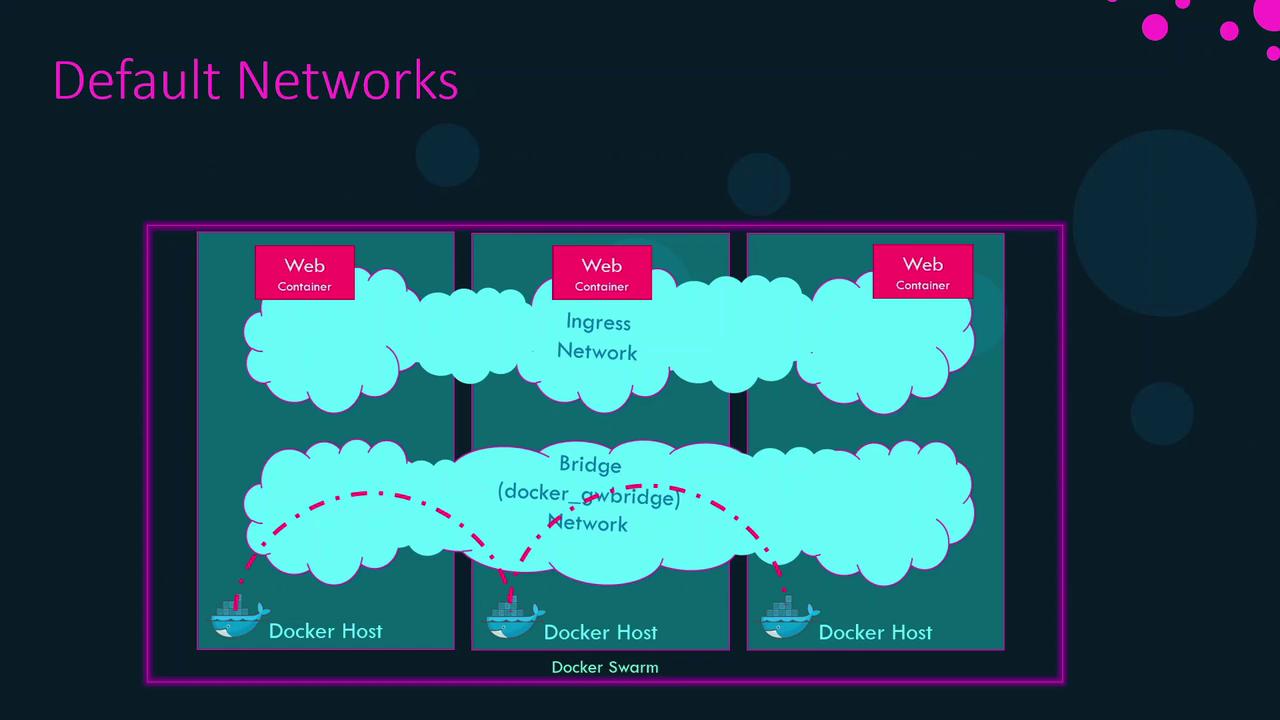
Swarm init creates two essential networks:
| Name | Driver | Purpose |
| ---------------- | ------- | -------------------------------------------------------------- |
| ingress | overlay | Publishes service ports cluster-wide via routing mesh |
| docker\_gwbridge | bridge | Connects each node’s Docker daemon to the Swarm’s gateway port |
```bash theme={null}
docker network ls
NETWORK ID NAME DRIVER SCOPE
68abeefb1f2e bridge bridge local
5bab4adc7d02 host host local
e43bd489dd57 none null local
mevcdh5b40zz ingress overlay swarm
c8fb2c361202 docker_gwbridge bridge local
```
## Creating Custom Overlay Networks
Create your own overlay network for services or standalone containers:
```bash theme={null}
docker network create \
--driver overlay \
my-overlay-network
```
* `--attachable`: Allows standalone containers to join the overlay.
* `--opt encrypted`: Enables AES-encrypted VXLAN for secure application traffic.
Remove an overlay network or prune unused ones:
```bash theme={null}
docker network rm my-overlay-network
docker network prune
```
Ensure all Swarm nodes can communicate on the required ports (2377, 7946, 4789) to avoid network disruptions.
### Required Swarm Ports

## Port Publishing Formats
| Syntax | Description |
| ------------------------------------------------- | ---------------------- |
| `-p 80:5000` | Legacy short form |
| `--publish published=80,target=5000` | Explicit new form |
| `-p 80:5000/udp` | Legacy with protocol |
| `--publish published=80,target=5000,protocol=udp` | New form with protocol |
```bash theme={null}
# Legacy
docker service create -p 80:5000 my-web-server
# New explicit
docker service create \
--publish published=80,target=5000 \
my-web-server
# With UDP protocol
docker service create \
--publish published=80,target=5000,protocol=udp \
my-web-server
```
## Links and References
* [Docker Networking Overview](https://docs.docker.com/network/)
* [Docker Swarm Mode](https://docs.docker.com/engine/swarm/)
* [Docker CLI Reference](https://docs.docker.com/engine/reference/commandline/cli/)
* [VXLAN Protocol](https://en.wikipedia.org/wiki/Virtual_Extensible_Local_Area_Network)