> ## Documentation Index
> Fetch the complete documentation index at: https://notes.kodekloud.com/llms.txt
> Use this file to discover all available pages before exploring further.
# Docker Stack
> This guide explains transitioning from single-host Docker Compose to multi-node orchestration using Docker Stack in a Swarm cluster.
In this comprehensive guide, you'll learn how to move from single-host Docker Compose deployments to robust, multi-node orchestration using Docker Stack on a Swarm cluster. We’ll compare `docker run` vs. Compose, introduce Docker Swarm concepts, and walk through a real-world voting application example—complete with replicas, placement constraints, resource limits, and health checks.
## 1. Docker Run vs. Docker Compose
When you start with containers, you often use `docker run` for each service:
```bash theme={null}
docker run simple-webapp
docker run mongodb
docker run redis:alpine
```
However, for multi-service applications, Docker Compose simplifies management by defining services in a single YAML file:
```yaml theme={null}
# docker-compose.yml
version: "3"
services:
web:
image: simple-webapp
database:
image: mongodb
messaging:
image: redis:alpine
```
Launch all services together:
```bash theme={null}
docker-compose up
```
This approach centralizes configuration but is limited to a single host.
## 2. Introducing Docker Swarm and Stacks
Docker Swarm enables clustering multiple Docker engines into a single, fault-tolerant Swarm cluster. Instead of `docker run`, you create services:
```bash theme={null}
docker service create --name web simple-webapp
docker service create --name database mongodb
docker service create --name messaging redis:alpine
```
With Docker Stack, you can use your Compose file to deploy across the Swarm:
```bash theme={null}
docker stack deploy --compose-file docker-compose.yml mystack
```
Docker Stack uses the same Compose file format (v3+), so you can reuse your existing `docker-compose.yml` with minimal changes.
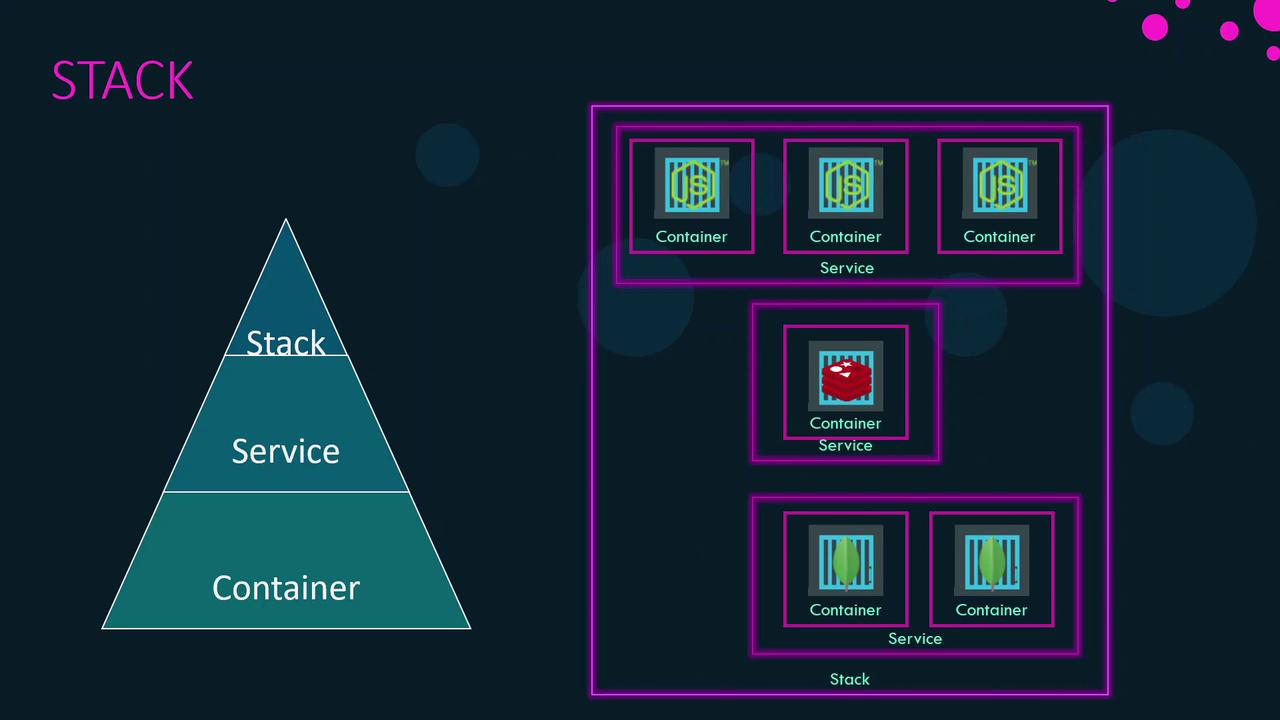
## 3. Containers, Services, and Stacks
* **Container**: A running instance of an image, isolated with its dependencies.
* **Service**: A scalable set of containers of the same image, distributed across Swarm nodes.
* **Stack**: A collection of related services that define an application.
## 4. Example: Voting Application
We’ll deploy a simple voting app with Redis, PostgreSQL, vote service, result service, and a worker.
### 4.1 Single-Host Deployment with Docker Compose
```yaml theme={null}
version: "3"
services:
redis:
image: redis
db:
image: postgres:9.4
vote:
image: voting-app
result:
image: result
worker:
image: worker
```
```bash theme={null}
docker-compose up
```
All services run on your local Docker host.
### 4.2 Multi-Node Deployment with Docker Stack
Assume a Swarm with one manager and two workers. Enhance the Compose file with a `deploy` section for Swarm-specific settings.
#### 4.2.1 Replicas
Scale services by defining replica counts:
```yaml theme={null}
version: "3"
services:
redis:
image: redis
deploy:
replicas: 1
db:
image: postgres:9.4
deploy:
replicas: 1
vote:
image: voting-app
deploy:
replicas: 2
result:
image: result
deploy:
replicas: 1
worker:
image: worker
deploy:
replicas: 1
```
Deploy the stack:
```bash theme={null}
docker stack deploy --compose-file docker-compose.yml voting
```
#### 4.2.2 Placement Constraints
Ensure critical services run only on manager nodes:
```yaml theme={null}
db:
image: postgres:9.4
deploy:
replicas: 1
placement:
constraints:
- node.role == manager
```
#### 4.2.3 Resource Limits
Protect node resources by setting CPU and memory limits:
```yaml theme={null}
vote:
image: voting-app
deploy:
replicas: 2
resources:
limits:
cpus: "0.01"
memory: 50M
```
#### 4.2.4 Health Checks
Automatically monitor container health:
```yaml theme={null}
vote:
image: voting-app
healthcheck:
test: ["CMD", "curl", "-f", "http://localhost"]
interval: 1m30s
timeout: 10s
retries: 3
start_period: 40s
deploy:
replicas: 2
resources:
limits:
cpus: "0.01"
memory: 50M
```
| Field | Description |
| -------------- | -------------------------------------------------------------------- |
| `test` | Command run inside the container to check health (e.g., `curl`). |
| `interval` | Time between health checks (e.g., `1m30s`). |
| `timeout` | Maximum time to wait before marking a check as failed (e.g., `10s`). |
| `retries` | Number of consecutive failures before marking unhealthy (e.g., `3`). |
| `start_period` | Grace period before starting health checks (e.g., `40s`). |
## 5. Common Stack Commands
| Command | Description |
| -------------------------------------------------- | ------------------------------------- |
| `docker stack deploy --compose-file ` | Deploy or update a stack |
| `docker stack ls` | List all stacks |
| `docker stack services ` | List services within a specific stack |
| `docker stack ps ` | List tasks (containers) for a stack |
| `docker stack rm ` | Remove an entire stack |
Removing a stack stops and removes all associated services and containers. Use with caution in production environments.
## References
* [Docker Stack Deploy](https://docs.docker.com/engine/reference/commandline/stack_deploy/)
* [Compose File Reference](https://docs.docker.com/compose/compose-file/)
* [Docker Swarm Overview](https://docs.docker.com/engine/swarm/)
* [Docker Healthcheck Documentation](https://docs.docker.com/engine/reference/builder/#healthcheck)