> ## Documentation Index
> Fetch the complete documentation index at: https://notes.kodekloud.com/llms.txt
> Use this file to discover all available pages before exploring further.
# Placement in Swarm
> Managing service placement in Docker Swarm to optimize workload distribution across nodes with different resource profiles.
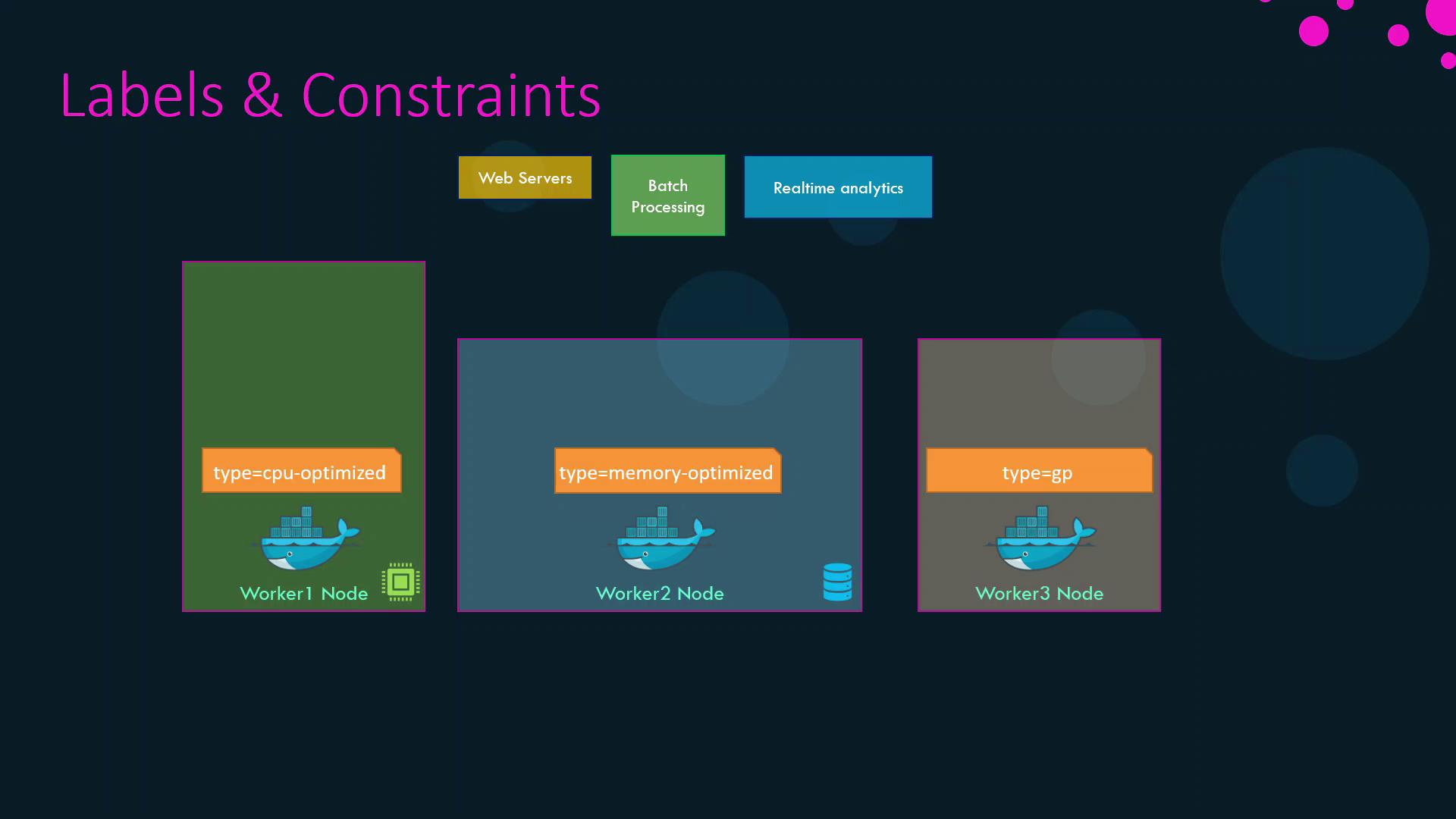
Managing service placement in Docker Swarm ensures that each workload runs on the best-suited node. By default, Swarm distributes tasks evenly across any node with available resources. In real-world clusters, however, you often have nodes optimized for different workloads:
| Node Name | Label | Profile |
| --------- | ----------------------- | -------------------------------------- |
| worker1 | `type=CPU-optimized` | CPU-optimized (batch processing) |
| worker2 | `type=memory-optimized` | Memory-optimized (real-time analytics) |
| worker3 | `type=GP` | General-purpose (web servers) |
And services such as:
| Service Name | Resource Profile |
| ------------------ | ---------------- |
| batch-processing | CPU-intensive |
| realtime-analytics | Memory-intensive |
| web | General-purpose |
Without explicit placement constraints, Swarm might schedule a CPU-heavy task on a memory-optimized node or vice versa, causing contention and inefficiency.
## 1. Labeling Nodes
Assign key-value labels to each node to reflect its resource profile:
```bash theme={null}
docker node update --label-add type=CPU-optimized worker1
docker node update --label-add type=memory-optimized worker2
docker node update --label-add type=GP worker3
```
After labeling, confirm with:
```bash theme={null}
docker node inspect --format '{{ .Description.Hostname }}: {{ .Spec.Labels }}' worker1
```
Below is a diagram illustrating the labeled nodes and associated workloads:
## 2. Applying Placement Constraints
Use the `--constraint` flag with `docker service create` to bind services to nodes based on labels or built-in properties.
### 2.1 Match a Label
Schedule CPU-intensive and memory-intensive services on their respective optimized nodes:
```bash theme={null}
docker service create \
--name batch-processing \
--constraint 'node.labels.type==CPU-optimized' \
batch-processing
docker service create \
--name realtime-analytics \
--constraint 'node.labels.type==memory-optimized' \
realtime-analytics
```
### 2.2 Exclude a Label
Prevent the web service from running on memory-optimized nodes:
```bash theme={null}
docker service create \
--name web \
--constraint 'node.labels.type!=memory-optimized' \
web
```
This ensures `web` is placed on either the CPU-optimized or general-purpose node.
Constraint expressions are case-sensitive and must be enclosed in quotes.\
For more options, see the [Service Create reference][service_create].
### 2.3 Using Built-in Node Properties
You can also constrain by node role. For example, to run a service only on worker nodes (excluding managers):
```bash theme={null}
docker service create \
--name worker-only-service \
--constraint 'node.role==worker' \
alpine:latest ping docker.com
```
## 3. Summary of Constraints
| Service Name | Constraint |
| ------------------- | ------------------------------------ |
| batch-processing | `node.labels.type==CPU-optimized` |
| realtime-analytics | `node.labels.type==memory-optimized` |
| web | `node.labels.type!=memory-optimized` |
| worker-only-service | `node.role==worker` |
By combining node labels with placement constraints, you guarantee that each workload in your Swarm cluster runs on the most suitable hardware, improving both performance and resource utilization.
## Links and References
* [Docker Swarm Overview](https://docs.docker.com/engine/swarm/)
* [Service Create reference][service_create]
* [Docker Engine CLI](https://docs.docker.com/engine/reference/commandline/)
[service_create]: https://docs.docker.com/engine/reference/commandline/service_create/