> ## Documentation Index
> Fetch the complete documentation index at: https://notes.kodekloud.com/llms.txt
> Use this file to discover all available pages before exploring further.
# Demo Deploy voting app on Kubernetes with Deployments
> This article demonstrates how to deploy a voting app on Kubernetes using Deployments for automated management and scaling.
Managing individual Pods poses challenges such as manual scaling and downtime during updates. Kubernetes **Deployments** resolve these by automating ReplicaSet management, rolling updates, and rollbacks.
Deployments provide declarative updates, automatic rollbacks, and easy scaling.\
Learn more: [Kubernetes Deployments](https://kubernetes.io/docs/concepts/workloads/controllers/deployment/).
## Voting App Architecture
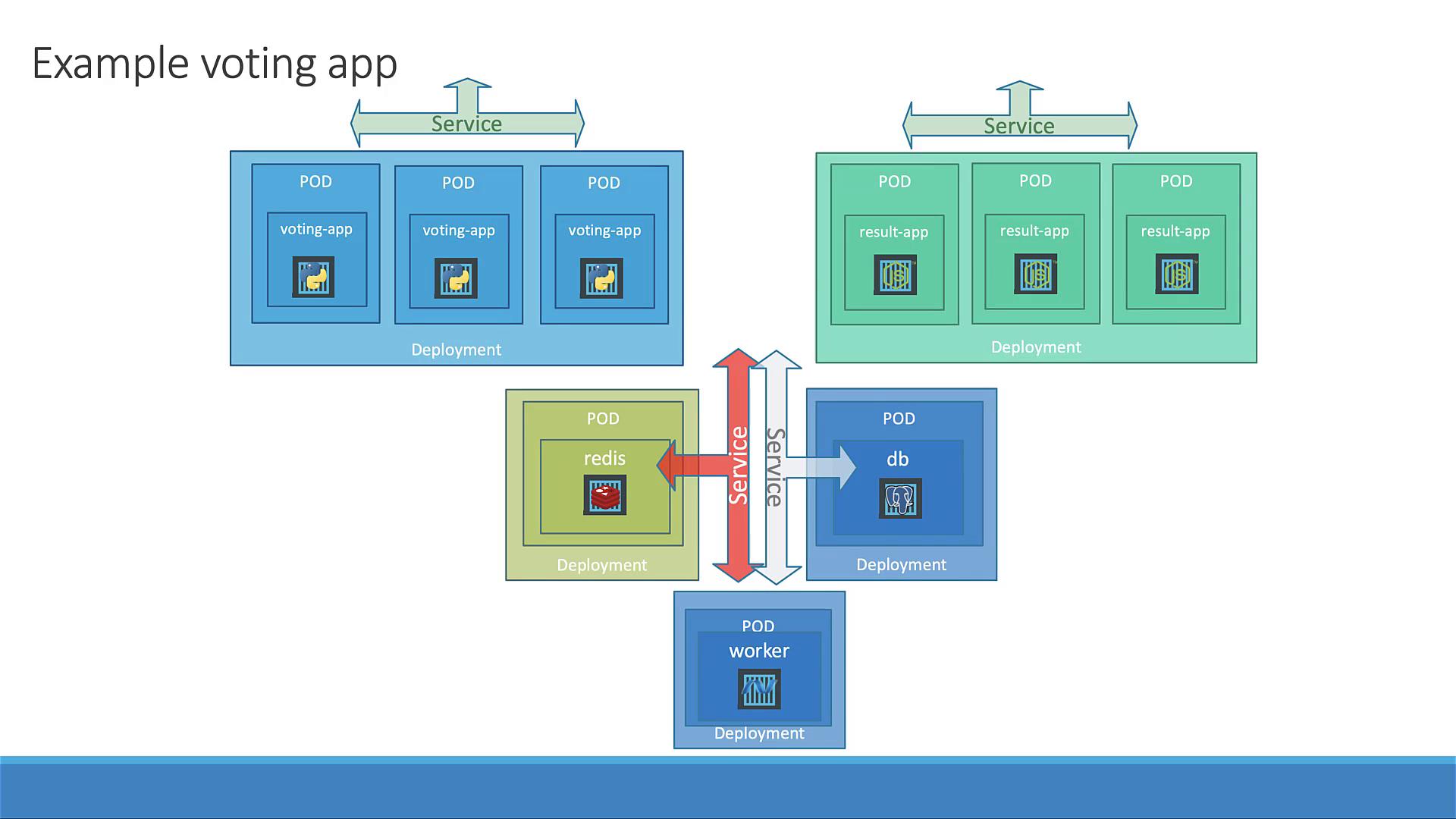
## 1. Define Deployment Manifests
Below is a summary of all Deployment YAML files:
| Manifest File | Component | Image |
| ---------------------- | ---------------- | -------------------------------------- |
| voting-app-deploy.yaml | Voting Frontend | `kodekloud/examplevotingapp_vote:v1` |
| redis-deploy.yaml | Redis Cache | `redis` |
| postgres-deploy.yaml | PostgreSQL DB | `postgres` |
| worker-app-deploy.yaml | Background Work | `kodekloud/examplevotingapp_worker:v1` |
| result-app-deploy.yaml | Results Frontend | `kodekloud/examplevotingapp_result:v1` |
### voting-app-deploy.yaml
```yaml theme={null}
apiVersion: apps/v1
kind: Deployment
metadata:
name: voting-app-deploy
labels:
app: demo-voting-app
component: voting
spec:
replicas: 1
selector:
matchLabels:
app: demo-voting-app
component: voting
template:
metadata:
labels:
app: demo-voting-app
component: voting
spec:
containers:
- name: voting-app
image: kodekloud/examplevotingapp_vote:v1
ports:
- containerPort: 80
```
### redis-deploy.yaml
```yaml theme={null}
apiVersion: apps/v1
kind: Deployment
metadata:
name: redis-deploy
labels:
app: demo-voting-app
component: redis
spec:
replicas: 1
selector:
matchLabels:
app: demo-voting-app
component: redis
template:
metadata:
labels:
app: demo-voting-app
component: redis
spec:
containers:
- name: redis
image: redis
ports:
- containerPort: 6379
```
### postgres-deploy.yaml
```yaml theme={null}
apiVersion: apps/v1
kind: Deployment
metadata:
name: postgres-deploy
labels:
app: demo-voting-app
component: postgres
spec:
replicas: 1
selector:
matchLabels:
app: demo-voting-app
component: postgres
template:
metadata:
labels:
app: demo-voting-app
component: postgres
spec:
containers:
- name: postgres
image: postgres
ports:
- containerPort: 5432
env:
- name: POSTGRES_USER
value: "postgres"
- name: POSTGRES_PASSWORD
value: "postgres"
```
### worker-app-deploy.yaml
```yaml theme={null}
apiVersion: apps/v1
kind: Deployment
metadata:
name: worker-app-deploy
labels:
app: demo-voting-app
component: worker
spec:
replicas: 1
selector:
matchLabels:
app: demo-voting-app
component: worker
template:
metadata:
labels:
app: demo-voting-app
component: worker
spec:
containers:
- name: worker-app
image: kodekloud/examplevotingapp_worker:v1
```
### result-app-deploy.yaml
```yaml theme={null}
apiVersion: apps/v1
kind: Deployment
metadata:
name: result-app-deploy
labels:
app: demo-voting-app
component: result
spec:
replicas: 1
selector:
matchLabels:
app: demo-voting-app
component: result
template:
metadata:
labels:
app: demo-voting-app
component: result
spec:
containers:
- name: result-app
image: kodekloud/examplevotingapp_result:v1
ports:
- containerPort: 80
```
## 2. Apply Deployments and Services
First, ensure no leftover Pods or Services:
```bash theme={null}
kubectl get pods,svc
# No resources found
```
Create each Deployment and its Service:
```bash theme={null}
kubectl apply -f voting-app-deploy.yaml
kubectl apply -f voting-app-service.yaml
kubectl apply -f redis-deploy.yaml
kubectl apply -f redis-service.yaml
kubectl apply -f postgres-deploy.yaml
kubectl apply -f postgres-service.yaml
kubectl apply -f worker-app-deploy.yaml
kubectl apply -f result-app-deploy.yaml
kubectl apply -f result-app-service.yaml
```
## 3. Verify Deployments and Services
Check Deployments and Pods:
```bash theme={null}
kubectl get deployments
kubectl get pods
```
Confirm Services:
```bash theme={null}
kubectl get svc
```
| SERVICE | TYPE | CLUSTER-IP | PORT(S) |
| -------------- | --------- | ---------- | ------------ |
| voting-service | NodePort | 10.100.x.y | 80:30004/TCP |
| result-service | NodePort | 10.105.x.z | 80:30005/TCP |
| redis | ClusterIP | 10.104.x.y | 6379/TCP |
| db | ClusterIP | 10.107.x.z | 5432/TCP |
## 4. Access Front-end Services
Retrieve and open URLs:
```bash theme={null}
minikube service voting-service --url
minikube service result-service --url
```
Visit the voting app, cast a vote, then check the result app to verify it’s recorded.
## 5. Scale the Front-end
Scaling with Deployments is straightforward. Increase replicas for the voting app:
```bash theme={null}
kubectl scale deployment voting-app-deploy --replicas=3
```
Verify three Pods are Running:
```bash theme={null}
kubectl get pods -l component=voting
```
Refresh the voting URL to observe traffic served by multiple replicas—no downtime required!
***
## Links and References
* [Kubernetes Deployments](https://kubernetes.io/docs/concepts/workloads/controllers/deployment/)
* [kubectl Cheat Sheet](https://kubernetes.io/docs/reference/kubectl/cheatsheet/)
* [Minikube Service Command](https://minikube.sigs.k8s.io/docs/commands/service/)