> ## Documentation Index
> Fetch the complete documentation index at: https://notes.kodekloud.com/llms.txt
> Use this file to discover all available pages before exploring further.
# Demo Deploy voting app on Kubernetes
> Tutorial showing how to deploy a multi-tier voting application on Minikube using Pod and Service YAML manifests for frontend, worker, Redis and Postgres components
In this tutorial you'll deploy the multi-tier voting application to a Minikube cluster. The app consists of five components: voting frontend, result frontend, redis, postgres, and a worker. We'll create one Pod manifest per component and Services to expose them. The project directory is named `voting-app`.
Prerequisites:
* Minikube or a Kubernetes cluster
* kubectl configured to target your cluster
* Files saved under the `voting-app` directory
Quick reference:
* Source for the sample images: [dockersamples/example-voting-app](https://github.com/dockersamples/example-voting-app)
* Kubernetes docs: [https://kubernetes.io/docs/](https://kubernetes.io/docs/)
## Pod manifests
Create the following Pod YAML files inside the `voting-app` directory.
Voting app Pod (voting-app-pod.yaml)
```yaml theme={null}
apiVersion: v1
kind: Pod
metadata:
name: voting-app-pod
labels:
name: voting-app-pod
app: demo-voting-app
spec:
containers:
- name: voting-app
image: kodekloud/examplevotingapp_vote:v1
ports:
- containerPort: 80
```
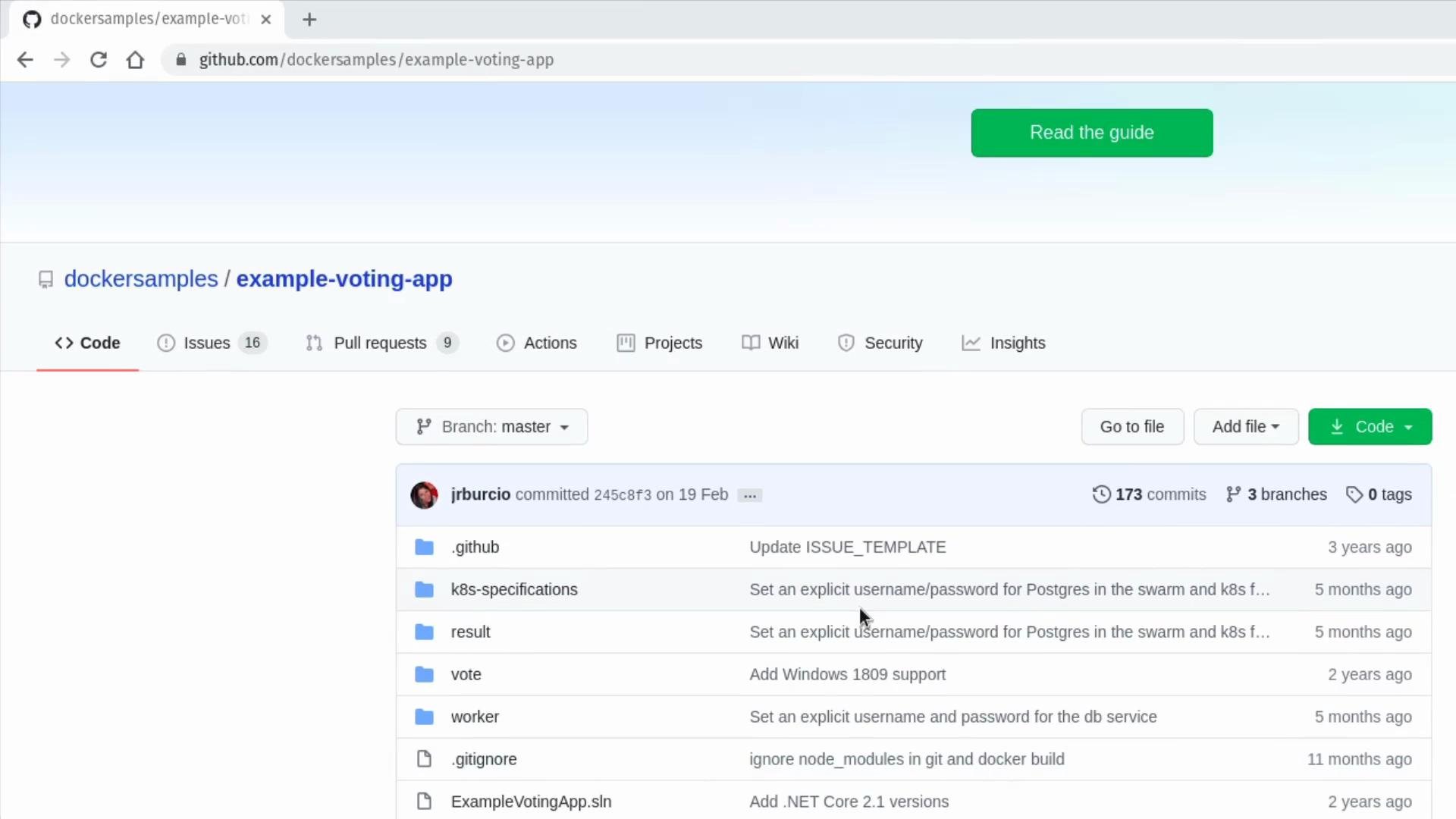
The voting app image referenced above comes from a sample repository similar to the one below: [dockersamples/example-voting-app](https://github.com/dockersamples/example-voting-app)
 Result app Pod (result-app-pod.yaml)
```yaml theme={null}
apiVersion: v1
kind: Pod
metadata:
name: result-app-pod
labels:
name: result-app-pod
app: demo-voting-app
spec:
containers:
- name: result-app
image: kodekloud/examplevotingapp_result:v1
ports:
- containerPort: 80
```
Redis Pod (redis-pod.yaml)
```yaml theme={null}
apiVersion: v1
kind: Pod
metadata:
name: redis-pod
labels:
name: redis-pod
app: demo-voting-app
spec:
containers:
- name: redis
image: redis
ports:
- containerPort: 6379
```
Postgres Pod (postgres-pod.yaml)
The worker and result components require a PostgreSQL database. For this demo we inject credentials via plain environment variables in the Pod manifest. In production, store credentials securely using Kubernetes Secrets or an external vault.
```yaml theme={null}
apiVersion: v1
kind: Pod
metadata:
name: postgres-pod
labels:
name: postgres-pod
app: demo-voting-app
spec:
containers:
- name: postgres
image: postgres
ports:
- containerPort: 5432
env:
- name: POSTGRES_USER
value: "postgres"
- name: POSTGRES_PASSWORD
value: "postgres"
```
Using plain text environment variables for database credentials is convenient for demos, but in production you should store credentials in Kubernetes Secrets or a vault solution.
Worker Pod (worker-app-pod.yaml)
The worker is an internal background process and does not expose network ports, so we omit the ports section.
```yaml theme={null}
apiVersion: v1
kind: Pod
metadata:
name: worker-app-pod
labels:
name: worker-app-pod
app: demo-voting-app
spec:
containers:
- name: worker-app
image: kodekloud/examplevotingapp_worker:v1
```
## Service manifests
Create Services to expose the Pods. Redis and Postgres use internal ClusterIP Services. The frontends are exposed via NodePort so they are accessible from your host/Minikube.
Redis Service (redis-service.yaml)
```yaml theme={null}
apiVersion: v1
kind: Service
metadata:
name: redis
labels:
name: redis-service
app: demo-voting-app
spec:
ports:
- port: 6379
targetPort: 6379
selector:
name: redis-pod
app: demo-voting-app
```
Postgres Service (postgres-service.yaml / named `db`)
```yaml theme={null}
apiVersion: v1
kind: Service
metadata:
name: db
labels:
name: postgres-service
app: demo-voting-app
spec:
ports:
- port: 5432
targetPort: 5432
selector:
name: postgres-pod
app: demo-voting-app
```
Voting Service (voting-app-service.yaml) — NodePort on 30004
```yaml theme={null}
apiVersion: v1
kind: Service
metadata:
name: voting-service
labels:
name: voting-service
app: demo-voting-app
spec:
type: NodePort
ports:
- port: 80
targetPort: 80
nodePort: 30004
selector:
name: voting-app-pod
app: demo-voting-app
```
Result Service (result-app-service.yaml) — NodePort on 30005
```yaml theme={null}
apiVersion: v1
kind: Service
metadata:
name: result-service
labels:
name: result-service
app: demo-voting-app
spec:
type: NodePort
ports:
- port: 80
targetPort: 80
nodePort: 30005
selector:
name: result-app-pod
app: demo-voting-app
```
## Resources summary
| Resource | Purpose | Service Type / Port |
| --------------------------- | ----------------------------------------------------- | ----------------------------------- |
| voting-app-pod (voting-app) | Frontend to submit votes | NodePort — 80 -> 30004 |
| result-app-pod (result-app) | Shows aggregated results | NodePort — 80 -> 30005 |
| redis-pod (redis) | Queue/storage for votes | ClusterIP — 6379 |
| postgres-pod (postgres) | Persistent storage for aggregated results | ClusterIP — 5432 (service name: db) |
| worker-app-pod (worker) | Background worker to move data from Redis -> Postgres | Internal, no service |
## Apply manifests and verify
From the `voting-app` directory (where all YAML files are saved), apply the manifests in the following recommended order (frontend first, then datastore services, then worker, then result frontend):
Example file listing
```bash theme={null}
admin@ubuntu-server voting-app# ls
postgres-pod.yaml postgres-service.yaml redis-pod.yaml
redis-service.yaml result-app-pod.yaml result-app-service.yaml
voting-app-pod.yaml voting-app-service.yaml worker-app-pod.yaml
```
Create resources
```bash theme={null}
# Create voting frontend
kubectl create -f voting-app-pod.yaml
kubectl create -f voting-app-service.yaml
# Create Redis and its Service
kubectl create -f redis-pod.yaml
kubectl create -f redis-service.yaml
# Create Postgres and its Service
kubectl create -f postgres-pod.yaml
kubectl create -f postgres-service.yaml
# Create worker (no service)
kubectl create -f worker-app-pod.yaml
# Create result frontend and its Service
kubectl create -f result-app-pod.yaml
kubectl create -f result-app-service.yaml
```
Check status of Pods and Services
```bash theme={null}
kubectl get pods,svc
```
Sample expected output (condensed)
```text theme={null}
NAME READY STATUS RESTARTS AGE
pod/postgres-pod 1/1 Running 0 2m20s
pod/redis-pod 1/1 Running 0 2m52s
pod/result-app-pod 1/1 Running 0 32s
pod/voting-app-pod 1/1 Running 0 6m44s
pod/worker-app-pod 1/1 Running 0 60s
NAME TYPE CLUSTER-IP EXTERNAL-IP PORT(S) AGE
service/db ClusterIP 10.105.81.36 5432/TCP 2m12s
service/kubernetes ClusterIP 10.96.0.1 443/TCP 2d4h
service/redis ClusterIP 10.110.47.42 6379/TCP 2m48s
service/result-service NodePort 10.101.220.79 80:30005/TCP 25s
service/voting-service NodePort 10.109.194.132 80:30004/TCP 4m31s
```
## Access the frontends (Minikube)
If using Minikube, get accessible URLs:
```bash theme={null}
minikube service voting-service --url
minikube service result-service --url
```
Example:
```text theme={null}
http://192.168.99.101:30004
http://192.168.99.101:30005
```
Open the voting service URL in a browser and cast votes.
Flow summary:
* Voting frontend records votes in Redis.
* Worker reads votes from Redis and writes aggregates into Postgres.
* Result frontend reads aggregated totals from Postgres and displays them.
If vote counts do not update:
* Verify Postgres env variables (POSTGRES\_USER, POSTGRES\_PASSWORD) match what worker/result expect.
* Ensure Service selectors match Pod labels exactly.
## Conclusion
You have successfully deployed the multi-tier voting application to Kubernetes:
* Created Pods for voting, result, redis, postgres, and worker.
* Provided ClusterIP services for internal components (redis, db).
* Exposed frontends via NodePort services (voting and result).
* Verified end-to-end behavior by casting votes and viewing results.
Further reading and references:
* [Kubernetes Concepts — Services](https://kubernetes.io/docs/concepts/services-networking/service/)
* [dockersamples/example-voting-app](https://github.com/dockersamples/example-voting-app)
Result app Pod (result-app-pod.yaml)
```yaml theme={null}
apiVersion: v1
kind: Pod
metadata:
name: result-app-pod
labels:
name: result-app-pod
app: demo-voting-app
spec:
containers:
- name: result-app
image: kodekloud/examplevotingapp_result:v1
ports:
- containerPort: 80
```
Redis Pod (redis-pod.yaml)
```yaml theme={null}
apiVersion: v1
kind: Pod
metadata:
name: redis-pod
labels:
name: redis-pod
app: demo-voting-app
spec:
containers:
- name: redis
image: redis
ports:
- containerPort: 6379
```
Postgres Pod (postgres-pod.yaml)
The worker and result components require a PostgreSQL database. For this demo we inject credentials via plain environment variables in the Pod manifest. In production, store credentials securely using Kubernetes Secrets or an external vault.
```yaml theme={null}
apiVersion: v1
kind: Pod
metadata:
name: postgres-pod
labels:
name: postgres-pod
app: demo-voting-app
spec:
containers:
- name: postgres
image: postgres
ports:
- containerPort: 5432
env:
- name: POSTGRES_USER
value: "postgres"
- name: POSTGRES_PASSWORD
value: "postgres"
```
Using plain text environment variables for database credentials is convenient for demos, but in production you should store credentials in Kubernetes Secrets or a vault solution.
Worker Pod (worker-app-pod.yaml)
The worker is an internal background process and does not expose network ports, so we omit the ports section.
```yaml theme={null}
apiVersion: v1
kind: Pod
metadata:
name: worker-app-pod
labels:
name: worker-app-pod
app: demo-voting-app
spec:
containers:
- name: worker-app
image: kodekloud/examplevotingapp_worker:v1
```
## Service manifests
Create Services to expose the Pods. Redis and Postgres use internal ClusterIP Services. The frontends are exposed via NodePort so they are accessible from your host/Minikube.
Redis Service (redis-service.yaml)
```yaml theme={null}
apiVersion: v1
kind: Service
metadata:
name: redis
labels:
name: redis-service
app: demo-voting-app
spec:
ports:
- port: 6379
targetPort: 6379
selector:
name: redis-pod
app: demo-voting-app
```
Postgres Service (postgres-service.yaml / named `db`)
```yaml theme={null}
apiVersion: v1
kind: Service
metadata:
name: db
labels:
name: postgres-service
app: demo-voting-app
spec:
ports:
- port: 5432
targetPort: 5432
selector:
name: postgres-pod
app: demo-voting-app
```
Voting Service (voting-app-service.yaml) — NodePort on 30004
```yaml theme={null}
apiVersion: v1
kind: Service
metadata:
name: voting-service
labels:
name: voting-service
app: demo-voting-app
spec:
type: NodePort
ports:
- port: 80
targetPort: 80
nodePort: 30004
selector:
name: voting-app-pod
app: demo-voting-app
```
Result Service (result-app-service.yaml) — NodePort on 30005
```yaml theme={null}
apiVersion: v1
kind: Service
metadata:
name: result-service
labels:
name: result-service
app: demo-voting-app
spec:
type: NodePort
ports:
- port: 80
targetPort: 80
nodePort: 30005
selector:
name: result-app-pod
app: demo-voting-app
```
## Resources summary
| Resource | Purpose | Service Type / Port |
| --------------------------- | ----------------------------------------------------- | ----------------------------------- |
| voting-app-pod (voting-app) | Frontend to submit votes | NodePort — 80 -> 30004 |
| result-app-pod (result-app) | Shows aggregated results | NodePort — 80 -> 30005 |
| redis-pod (redis) | Queue/storage for votes | ClusterIP — 6379 |
| postgres-pod (postgres) | Persistent storage for aggregated results | ClusterIP — 5432 (service name: db) |
| worker-app-pod (worker) | Background worker to move data from Redis -> Postgres | Internal, no service |
## Apply manifests and verify
From the `voting-app` directory (where all YAML files are saved), apply the manifests in the following recommended order (frontend first, then datastore services, then worker, then result frontend):
Example file listing
```bash theme={null}
admin@ubuntu-server voting-app# ls
postgres-pod.yaml postgres-service.yaml redis-pod.yaml
redis-service.yaml result-app-pod.yaml result-app-service.yaml
voting-app-pod.yaml voting-app-service.yaml worker-app-pod.yaml
```
Create resources
```bash theme={null}
# Create voting frontend
kubectl create -f voting-app-pod.yaml
kubectl create -f voting-app-service.yaml
# Create Redis and its Service
kubectl create -f redis-pod.yaml
kubectl create -f redis-service.yaml
# Create Postgres and its Service
kubectl create -f postgres-pod.yaml
kubectl create -f postgres-service.yaml
# Create worker (no service)
kubectl create -f worker-app-pod.yaml
# Create result frontend and its Service
kubectl create -f result-app-pod.yaml
kubectl create -f result-app-service.yaml
```
Check status of Pods and Services
```bash theme={null}
kubectl get pods,svc
```
Sample expected output (condensed)
```text theme={null}
NAME READY STATUS RESTARTS AGE
pod/postgres-pod 1/1 Running 0 2m20s
pod/redis-pod 1/1 Running 0 2m52s
pod/result-app-pod 1/1 Running 0 32s
pod/voting-app-pod 1/1 Running 0 6m44s
pod/worker-app-pod 1/1 Running 0 60s
NAME TYPE CLUSTER-IP EXTERNAL-IP PORT(S) AGE
service/db ClusterIP 10.105.81.36 5432/TCP 2m12s
service/kubernetes ClusterIP 10.96.0.1 443/TCP 2d4h
service/redis ClusterIP 10.110.47.42 6379/TCP 2m48s
service/result-service NodePort 10.101.220.79 80:30005/TCP 25s
service/voting-service NodePort 10.109.194.132 80:30004/TCP 4m31s
```
## Access the frontends (Minikube)
If using Minikube, get accessible URLs:
```bash theme={null}
minikube service voting-service --url
minikube service result-service --url
```
Example:
```text theme={null}
http://192.168.99.101:30004
http://192.168.99.101:30005
```
Open the voting service URL in a browser and cast votes.
Flow summary:
* Voting frontend records votes in Redis.
* Worker reads votes from Redis and writes aggregates into Postgres.
* Result frontend reads aggregated totals from Postgres and displays them.
If vote counts do not update:
* Verify Postgres env variables (POSTGRES\_USER, POSTGRES\_PASSWORD) match what worker/result expect.
* Ensure Service selectors match Pod labels exactly.
## Conclusion
You have successfully deployed the multi-tier voting application to Kubernetes:
* Created Pods for voting, result, redis, postgres, and worker.
* Provided ClusterIP services for internal components (redis, db).
* Exposed frontends via NodePort services (voting and result).
* Verified end-to-end behavior by casting votes and viewing results.
Further reading and references:
* [Kubernetes Concepts — Services](https://kubernetes.io/docs/concepts/services-networking/service/)
* [dockersamples/example-voting-app](https://github.com/dockersamples/example-voting-app)