> ## Documentation Index
> Fetch the complete documentation index at: https://notes.kodekloud.com/llms.txt
> Use this file to discover all available pages before exploring further.
# Deployments
> This article explains Kubernetes Deployments, covering their features, how they manage resources, and how to create and inspect Deployment manifests.
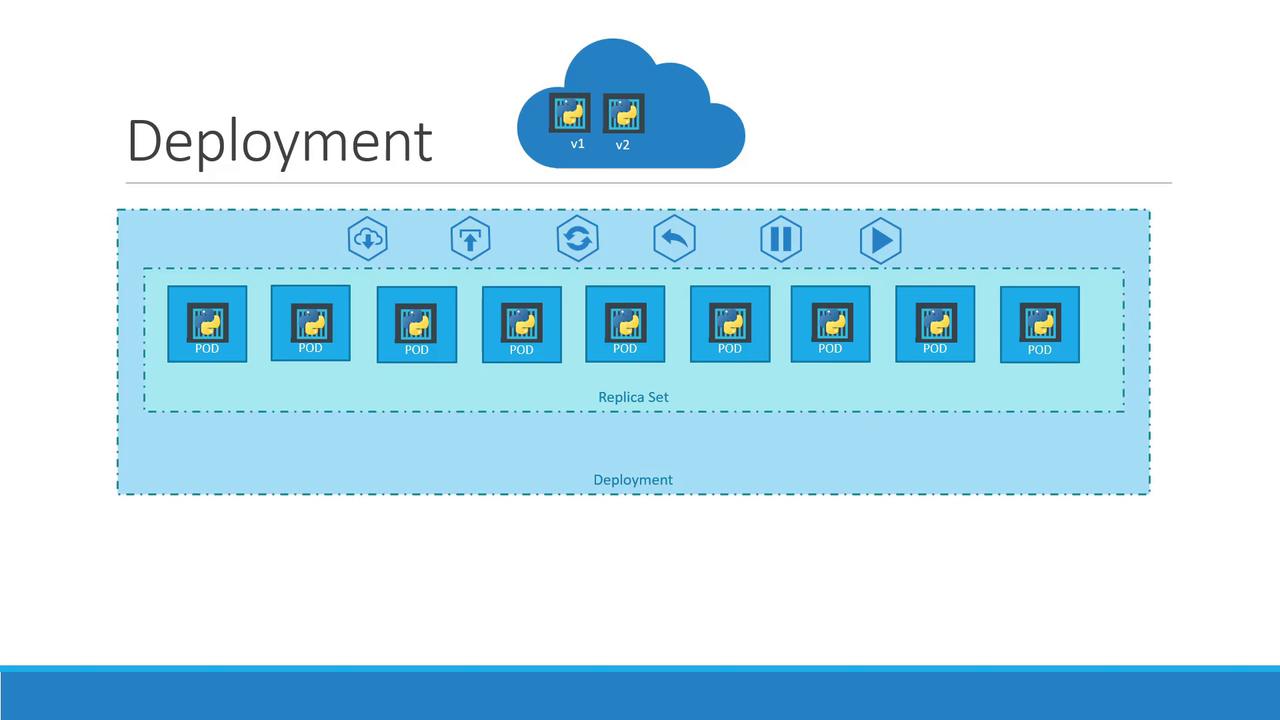
Kubernetes Deployments automate application upgrades, scaling, and self-healing in production environments. They enable rolling updates, controlled rollbacks, and pause/resume capabilities—all without downtime. In this guide, you’ll learn how Deployments manage ReplicaSets and Pods, define a Deployment manifest, and inspect your resources using `kubectl`.
## Why Use a Deployment?
* **Rolling Updates**: Replace pods one by one to avoid service interruption.
* **Rollbacks**: Instantly revert to a previous version if something goes wrong.
* **Pause & Resume**: Apply several changes as a batch and resume when ready.
* **Declarative Scaling**: Increase or decrease replicas in your manifest.
## How Deployments Work
A Deployment sits above ReplicaSets and Pods:
1. **Pod**: The basic execution unit (one or more containers).
2. **ReplicaSet**: Ensures a specified number of pod replicas run at any time.
3. **Deployment**: Manages ReplicaSets and orchestrates updates, rollbacks, and scaling.
## Resource Comparison
| Resource Type | Purpose | Example Command |
| ------------- | ----------------------------------------- | --------------------------------------------- |
| Pod | Single instance of one or more containers | `kubectl run nginx --image=nginx` |
| ReplicaSet | Maintains desired pod replicas | `kubectl create -f replicaset-definition.yml` |
| Deployment | Declarative updates and rollbacks | `kubectl apply -f deployment-definition.yml` |
## Writing a Deployment Manifest
Create a YAML file (`deployment-definition.yml`) to declare your desired state:
```yaml theme={null}
apiVersion: apps/v1
kind: Deployment
metadata:
name: myapp-deployment
labels:
app: myapp
type: front-end
spec:
replicas: 3
selector:
matchLabels:
type: front-end
template:
metadata:
labels:
app: myapp
type: front-end
spec:
containers:
- name: nginx-container
image: nginx:latest
ports:
- containerPort: 80
```
* **apiVersion**: The API group (`apps/v1`).
* **kind**: Must be `Deployment`.
* **metadata**: Identifies the Deployment (`name` and `labels`).
* **spec.replicas**: Desired number of pods.
* **spec.selector**: Matches labels on pods.
* **spec.template**: Defines the pod spec, just like a ReplicaSet.
Using `kubectl apply -f` is recommended for idempotent updates. It creates or updates resources based on your manifest.
## Deploying and Inspecting Resources
1. **Create or update the Deployment**
```bash theme={null}
kubectl apply -f deployment-definition.yml
```
2. **View Deployments**
```bash theme={null}
kubectl get deployments
```
Example output:
```text theme={null}
NAME READY UP-TO-DATE AVAILABLE AGE
myapp-deployment 3/3 3 3 30s
```
3. **List ReplicaSets**
```bash theme={null}
kubectl get rs
```
4. **Check Pods**
```bash theme={null}
kubectl get pods
```
5. **See All Resources**
```bash theme={null}
kubectl get all
```
If an update fails, rollback immediately:
```bash theme={null}
kubectl rollout undo deployment/myapp-deployment
```
## Next Steps & References
* Learn more about [Kubernetes Deployments](https://kubernetes.io/docs/concepts/workloads/controllers/deployment/)
* Explore the [kubectl Cheat Sheet](https://kubernetes.io/docs/reference/kubectl/cheatsheet/)
* Official [Kubernetes Documentation](https://kubernetes.io/docs/)