> ## Documentation Index
> Fetch the complete documentation index at: https://notes.kodekloud.com/llms.txt
> Use this file to discover all available pages before exploring further.
# Networking in Kubernetes
> This guide covers core concepts of Kubernetes networking, including IP assignment, CNI plugins, and cluster-wide virtual networks.
In this guide, you’ll learn the core concepts of Kubernetes networking—from a single-node setup to a multi-node cluster. We’ll cover how Pods receive IP addresses, why a Container Network Interface (CNI) plugin is required, and how Kubernetes builds a cluster-wide virtual network.
## Single-Node Cluster Networking
On a single-node cluster, the Kubernetes node itself has an IP address (e.g., `192.168.1.2`). You use this address to SSH into the host or connect to the API server. However, each Pod you create is allocated its own IP from a private Pod network—by default, something like `10.244.0.0/16`.
```yaml theme={null}
# Example Pod network CIDR
podCIDR: 10.244.0.0/16
```
When you spin up a Pod, Kubernetes assigns it an IP, such as `10.244.0.2`, which all containers in that Pod share.
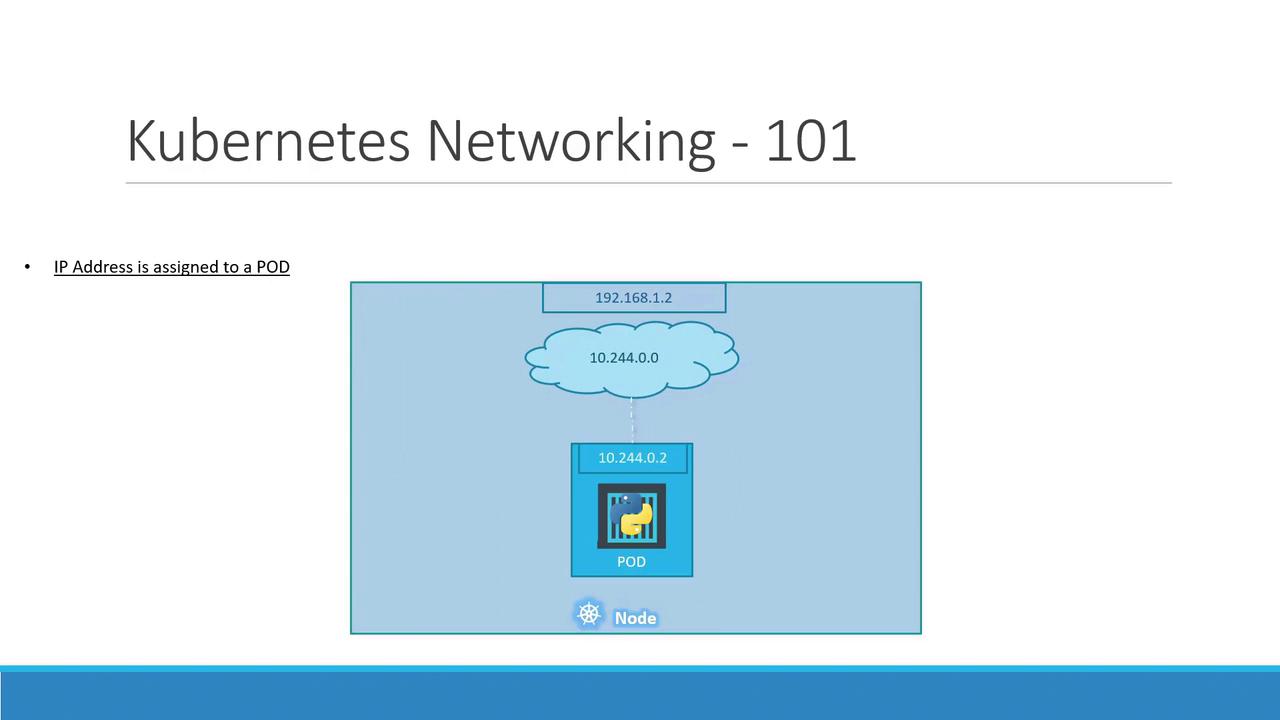
If you deploy several Pods on this node, each receives a unique IP in the same `10.244.0.0/16` range. They can communicate directly using these IPs:
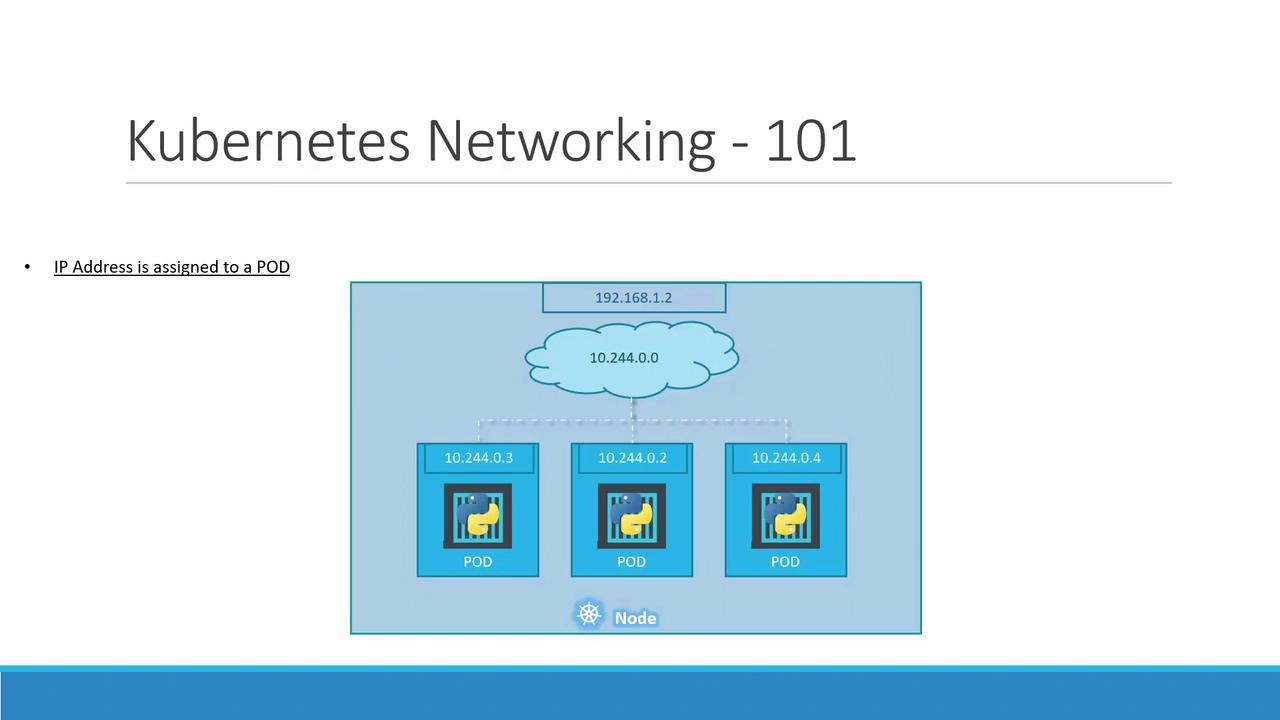
Pod IP addresses are ephemeral. When a Pod is deleted and recreated, it may receive a different IP.
## Multi-Node Cluster Networking
As your cluster scales to multiple nodes, each host must carve out a non-overlapping slice of the Pod network to avoid IP conflicts.
Consider two nodes:
* Host IP: `192.168.1.2` → Pod subnet `10.244.0.0/24`
* Host IP: `192.168.1.3` → Pod subnet `10.244.1.0/24`
Without a CNI plugin, Kubernetes does not set up inter-node Pod routing. A CNI plugin handles:
| Requirement | Description |
| ----------- | ---------------------------------------------------------- |
| Pod-to-Pod | All Pods communicate directly across nodes without NAT |
| Node-to-Pod | Nodes can reach any Pod IP without SNAT |
| Pod-to-Node | Pods can reach any node IP address |
| Non-overlap | Each node gets a unique Pod subnet to prevent IP conflicts |
If you skip installing a proper CNI, Pods on different nodes may end up with overlapping IPs, causing connectivity failures.
### Popular CNI Plugins
| Plugin | Type | Description | Link |
| ------------ | ------------- | ------------------------------------------------------------ | -------------------------------------------------------------------------------------------------------------------------------- |
| Calico | Layer 3 | Advanced network policy, IP-in-IP or VXLAN overlay | [https://docs.projectcalico.org/](https://docs.projectcalico.org/) |
| Flannel | VXLAN/Host-gw | Simple overlay networking, ideal for labs and small clusters | [https://github.com/flannel-io/flannel](https://github.com/flannel-io/flannel) |
| Cilium | eBPF | High-performance networking, built-in security policies | [https://cilium.io/](https://cilium.io/) |
| Weave Net | VXLAN | Automatic mesh networking, easy to deploy | [https://www.weave.works/docs/net/latest/kubernetes/kube-addon/](https://www.weave.works/docs/net/latest/kubernetes/kube-addon/) |
| Cisco ACI | SDN | Enterprise-grade, integrates with Cisco data center fabrics | [https://developer.cisco.com/docs/aci/](https://developer.cisco.com/docs/aci/) |
| VMware NSX-T | SDN | Micro-segmentation, multi-cloud networking | [https://docs.vmware.com/en/VMware-NSX-T/index.html](https://docs.vmware.com/en/VMware-NSX-T/index.html) |
Once your CNI is in place, each node’s CNI daemon (e.g., `flanneld` or `calico-node`) allocates a unique `/24` Pod subnet and programs the host routes. The result is a seamless overlay network:
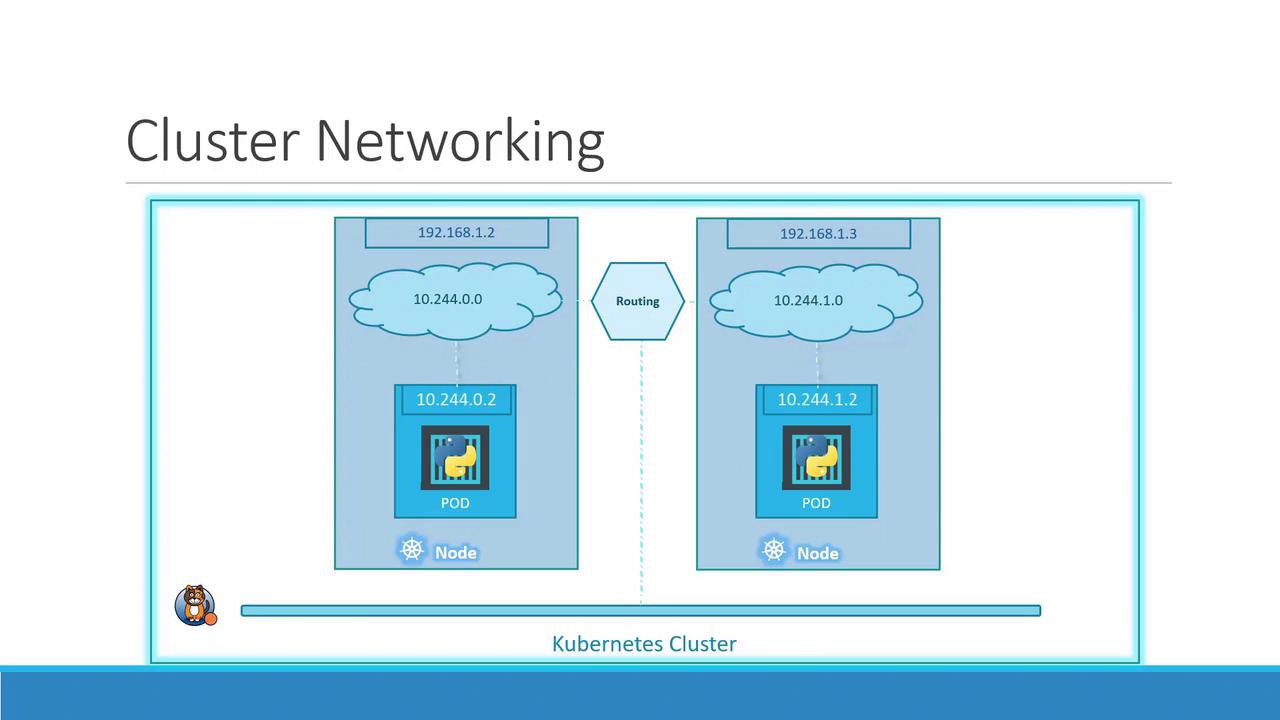
With this virtual network, Pods on different nodes can communicate directly using stable Pod IPs, satisfying Kubernetes’ flat network model.
## Links and References
* [Kubernetes Networking Concepts](https://kubernetes.io/docs/concepts/cluster-administration/networking/)
* [Container Network Interface (CNI)](https://github.com/containernetworking/cni)
* [Flannel GitHub Repository](https://github.com/flannel-io/flannel)
* [Calico Documentation](https://docs.projectcalico.org/)