> ## Documentation Index
> Fetch the complete documentation index at: https://notes.kodekloud.com/llms.txt
> Use this file to discover all available pages before exploring further.
# Services ClusterIP
> This article explains the Kubernetes Service type ClusterIP for stable in-cluster communication and load balancing among Pods.
In this lesson, we’ll deep-dive into the Kubernetes Service of type **ClusterIP**—the default Service type for in-cluster communication. In a typical multi-tier application (front-end, back-end, in-memory cache like [Redis](https://redis.io/), and a database such as [MySQL](https://www.mysql.com/)), each component lives in its own set of Pods. Since Pod IPs are ephemeral, you need a stable endpoint for reliable, load-balanced communication between tiers.
A **ClusterIP Service** assigns a virtual IP and DNS name inside the cluster. Pods can address the Service by name (e.g., `back-end`), and Kubernetes will distribute traffic across the matching Pods.
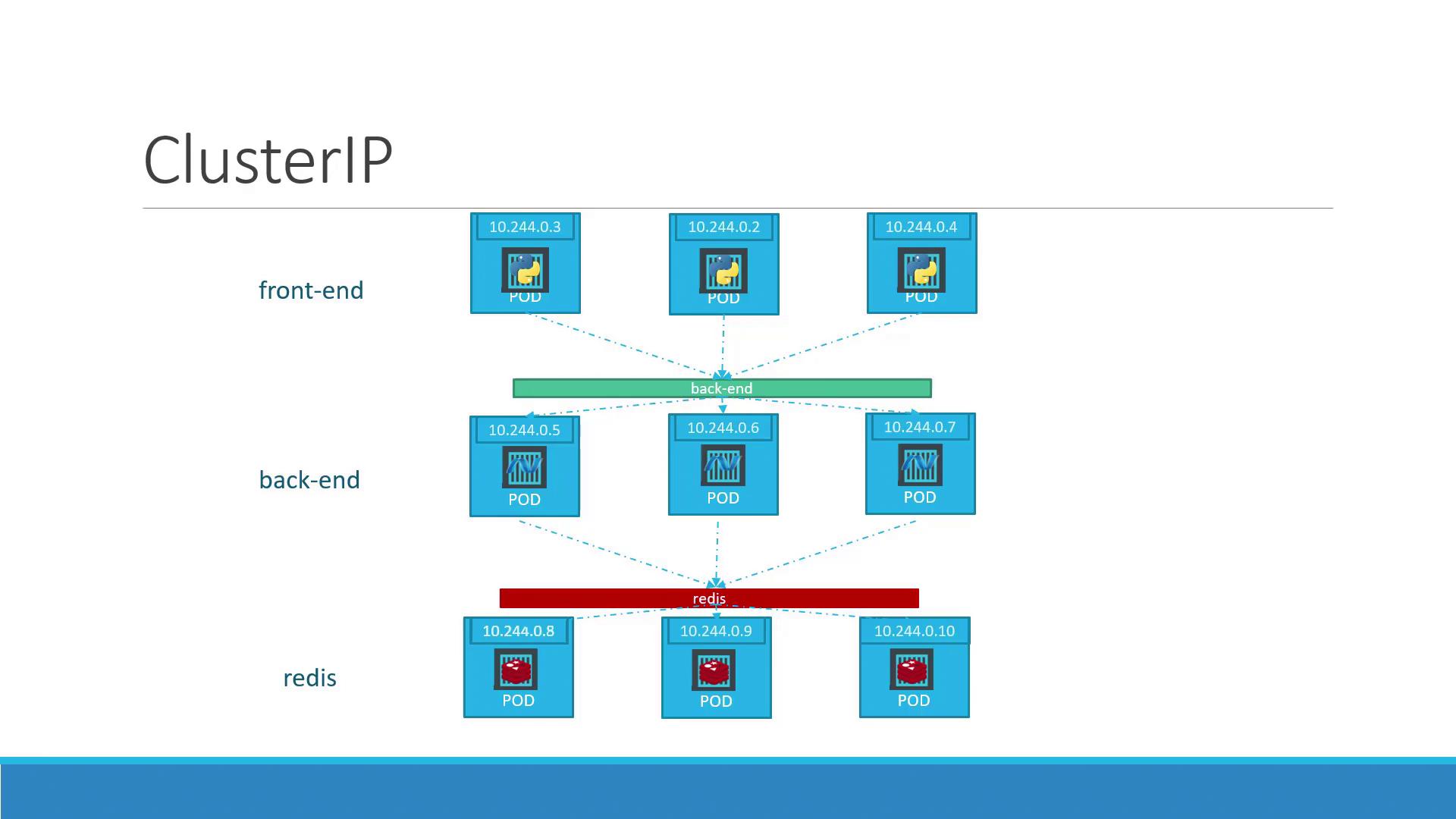
## Why Use a ClusterIP Service?
| Benefit | Description |
| ------------------------- | --------------------------------------------------------------------------- |
| Stable in-cluster address | Pods reference a single virtual IP and DNS name instead of changing Pod IPs |
| Built-in load balancing | Distributes traffic evenly across all healthy Pods |
| Decoupling components | Front-end, back-end, cache, and DB tiers communicate via service names |
## Defining a ClusterIP Service
Create `service-definition.yml` to expose your back-end Pods:
```yaml theme={null}
# service-definition.yml
apiVersion: v1
kind: Service
metadata:
name: back-end
spec:
selector:
app: myapp
tier: back-end
ports:
- port: 80 # Service port exposed inside the cluster
targetPort: 80 # Port on the container
protocol: TCP
```
By default, `spec.type` is `ClusterIP`. If you omit it, Kubernetes will still create a ClusterIP Service unless you specify another type.
### Key Fields
| Field | Description |
| --------------- | ----------------------------------------------- |
| `metadata.name` | Name of the Service (DNS name within cluster) |
| `spec.selector` | Labels used to identify the target Pods |
| `spec.ports` | List of ports the Service exposes and routes to |
## Pod Definition with Matching Labels
Ensure your Pods carry labels that match the Service’s selector:
```yaml theme={null}
# pod-definition.yml
apiVersion: v1
kind: Pod
metadata:
name: myapp-backend-pod
labels:
app: myapp
tier: back-end
spec:
containers:
- name: nginx-container
image: nginx
ports:
- containerPort: 80
```
## Deploying and Verifying
Apply the Service and check its status:
```bash theme={null}
kubectl apply -f service-definition.yml
kubectl get services
```
Example output:
```plain theme={null}
NAME TYPE CLUSTER-IP EXTERNAL-IP PORT(S) AGE
back-end ClusterIP 10.96.123.45 80/TCP 30s
```
Now, any Pod in the cluster can reach the back-end tier by calling:
```text theme={null}
http://back-end:80
```
Kubernetes will automatically load-balance requests across all matching Pods.
## Links and References
* [Kubernetes Services Overview](https://kubernetes.io/docs/concepts/services-networking/service/)
* [Redis Official Site](https://redis.io/)
* [MySQL Official Site](https://www.mysql.com/)
* [Kubernetes Documentation](https://kubernetes.io/docs/)
* [Docker Hub](https://hub.docker.com/)
Avoid mapping Service ports directly to host ports in production; use `ClusterIP` for secure, in-cluster traffic and consider `Ingress` or `LoadBalancer` types for external access.