> ## Documentation Index
> Fetch the complete documentation index at: https://notes.kodekloud.com/llms.txt
> Use this file to discover all available pages before exploring further.
# Services NodePort
> This tutorial focuses on Kubernetes NodePort services, enabling external traffic to access Pods through a port on each Node.
Welcome to this tutorial on Kubernetes Services. In this guide, we'll focus on the NodePort type, which enables external traffic to reach Pods through a port on each Node. Kubernetes Services provide stable network endpoints for Pods, enabling reliable communication both within the cluster and from outside clients.
## Why Use Kubernetes Services?
Kubernetes Services decouple the front-end, back-end, and data-layer Pods, offering:
* **Stable endpoints**: Consistent IPs or DNS names for Pods that may be recreated.
* **Load balancing**: Distributes traffic evenly across multiple Pods.
* **Discoverability**: Native service discovery within the cluster network.
Applications typically consist of:
* Front-end Pods serving user interfaces
* Back-end Pods processing business logic
* Pods connecting to external data sources
With Services, these components can communicate without hardcoding Pod IPs.
## External Access Use Case
By default, Pod IPs (e.g., 10.244.0.2) are only reachable inside the cluster network. To access a web server Pod from your laptop (192.168.1.10) without SSH’ing into the Node (192.168.1.2), you need a NodePort Service which maps a port on the Node to the Pod’s port.
```bash theme={null}
curl http://192.168.1.2:30008
Hello World!
```
| Service Type | Use Case | Example Configuration |
| ------------ | --------------------------------------------------------------- | --------------------------------------- |
| ClusterIP | Internal-only service for Pod-to-Pod communication | `type: ClusterIP` |
| NodePort | Exposes Pod on a port across all Nodes for external access | `type: NodePort`
`nodePort: 30008` |
| LoadBalancer | Provisions a cloud load balancer to distribute external traffic | `type: LoadBalancer` |
`NodePort` ranges from 30000 to 32767 by default. You can customize this in the API server flags.
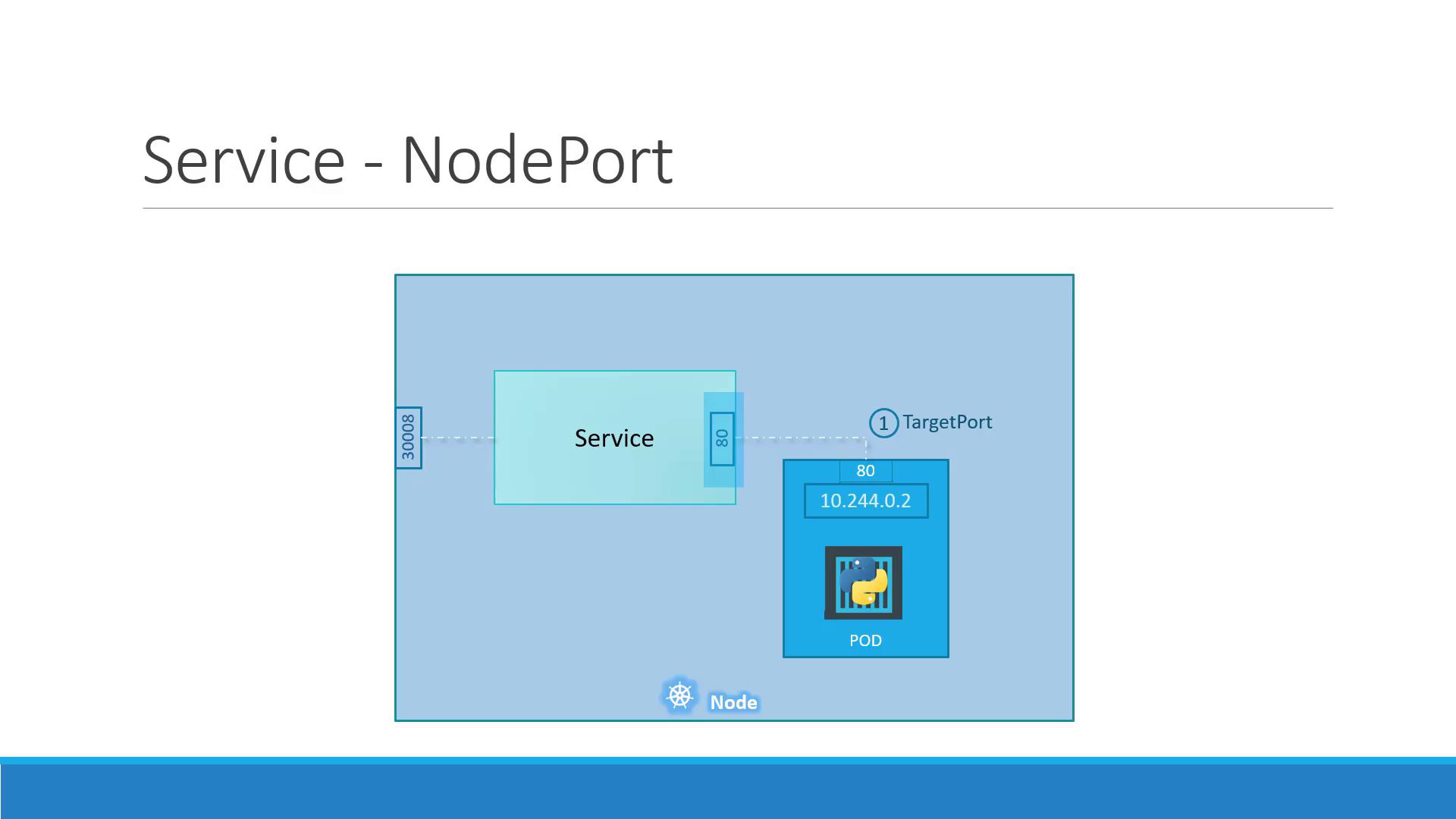
## NodePort Service Ports Explained
A NodePort Service uses three port definitions:
* **targetPort**: Port on the Pod (e.g., 80)
* **port**: Virtual Service port inside the cluster (e.g., 80)
* **nodePort**: Port on each Node, accessible externally (e.g., 30008)
Traffic to `:` → Service → `port` → Pod at `targetPort`.
## Defining a NodePort Service
1. **Create a Pod** with labels:
```yaml theme={null}
# pod-definition.yaml
apiVersion: v1
kind: Pod
metadata:
name: myapp-pod
labels:
app: myapp
component: frontend
spec:
containers:
- name: nginx
image: nginx:latest
ports:
- containerPort: 80
```
2. **Define the NodePort Service**, matching the Pod labels:
```yaml theme={null}
# service-definition.yaml
apiVersion: v1
kind: Service
metadata:
name: myapp-service
spec:
type: NodePort
selector:
app: myapp
component: frontend
ports:
- port: 80
targetPort: 80
nodePort: 30008
```
3. **Deploy and Verify**:
```bash theme={null}
kubectl apply -f pod-definition.yaml
kubectl apply -f service-definition.yaml
kubectl get svc
```
Expected output:
```text theme={null}
NAME TYPE CLUSTER-IP EXTERNAL-IP PORT(S) AGE
kubernetes ClusterIP 10.96.0.1 443/TCP 16d
myapp-service NodePort 10.106.127.123 80:30008/TCP 5m
```
Access the application:
```bash theme={null}
curl http://192.168.1.2:30008
Welcome to nginx!
Welcome to nginx!
```
Exposing high ports on Nodes can pose security risks. Ensure proper firewall rules and network policies are in place.
## Scaling with Multiple Pods and Nodes
In production, you’ll run multiple Pod replicas for high availability. A NodePort Service automatically load-balances incoming traffic across all Pods that match its selector, even when spread across multiple Nodes.
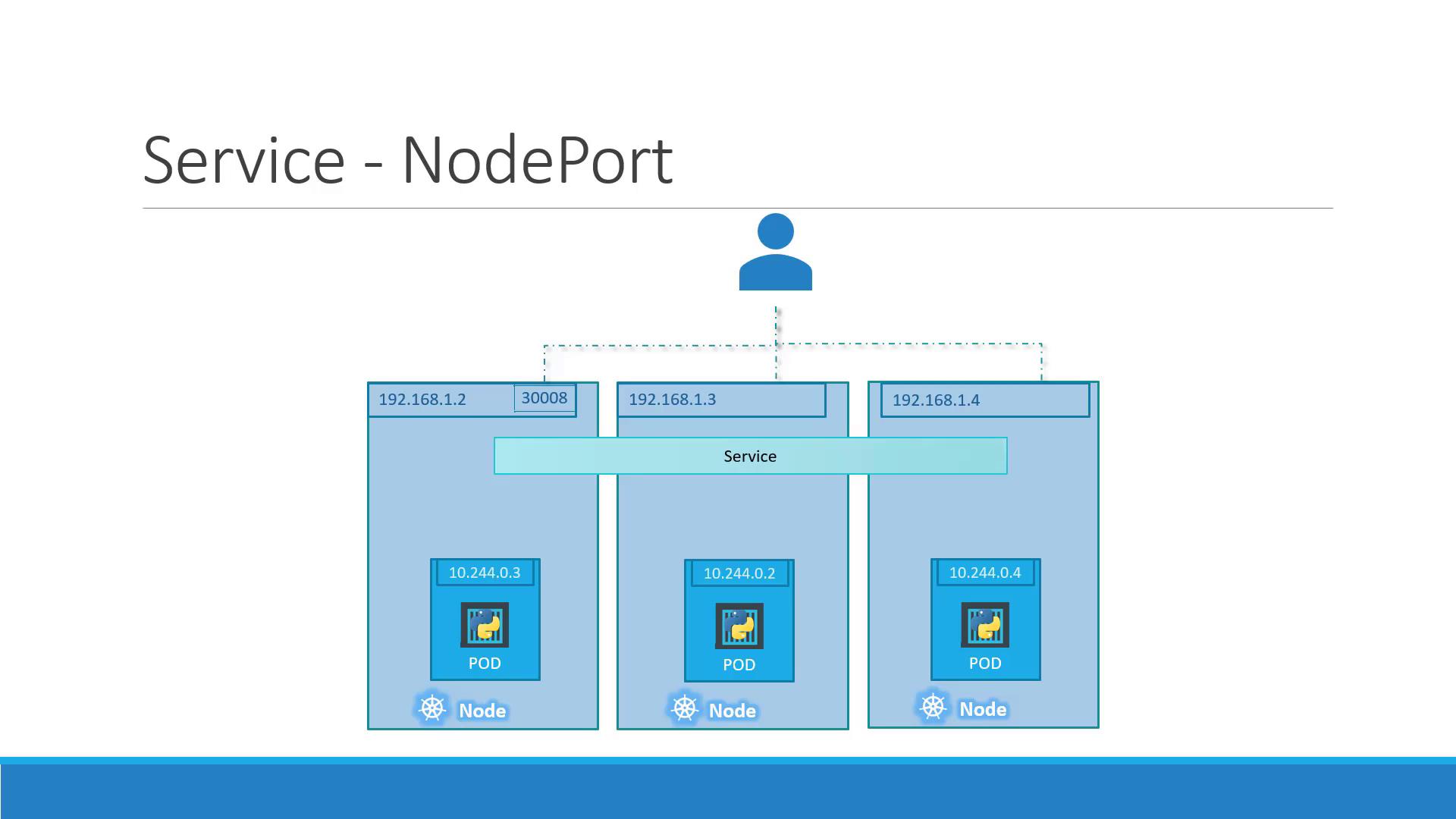
Simply scale your Deployment or Pod replicas:
```bash theme={null}
kubectl scale deployment myapp-deployment --replicas=3
```
Now, requests to any Node at `NodeIP:30008` are distributed across all 3 Pods.
## Summary
* **NodePort Services** expose Pod ports on each Node for external access.
* Key fields: `type: NodePort`, `port`, `targetPort`, and `nodePort`.
* Match Services to Pods via label `selector`.
* Kubernetes handles load balancing across Pods and Nodes automatically.
Next, explore the demo to see NodePort Services in action!
## Links and References
* [Kubernetes Services Documentation](https://kubernetes.io/docs/concepts/services-networking/service/)
* [Exposing Services in Kubernetes](https://kubernetes.io/docs/tasks/access-application-cluster/service-access-application-cluster/)
* [Kubernetes API Reference: Service](https://kubernetes.io/docs/reference/generated/kubernetes-api/v1.24/#service-v1-core)