> ## Documentation Index
> Fetch the complete documentation index at: https://notes.kodekloud.com/llms.txt
> Use this file to discover all available pages before exploring further.
# namespaces
> Describes how Docker uses Linux namespaces to isolate containers from the host kernel, with emphasis on PID namespaces and container process network and filesystem isolation
In this lesson we explain how Docker uses Linux namespaces to isolate container workspaces from the host kernel. Understanding namespaces is essential to grasp how containers provide process, network, and filesystem isolation while still sharing the host kernel.
Docker leverages several Linux namespace types to partition kernel resources for containers. Each namespace type creates a view of a resource that appears independent inside the container while the underlying kernel remains the same. Common namespace types include PID (process IDs), Network (interfaces/routing/firewall), IPC (shared memory/semaphores), Mount (filesystem mounts), UTS (hostname/domain), and User (user/group IDs).
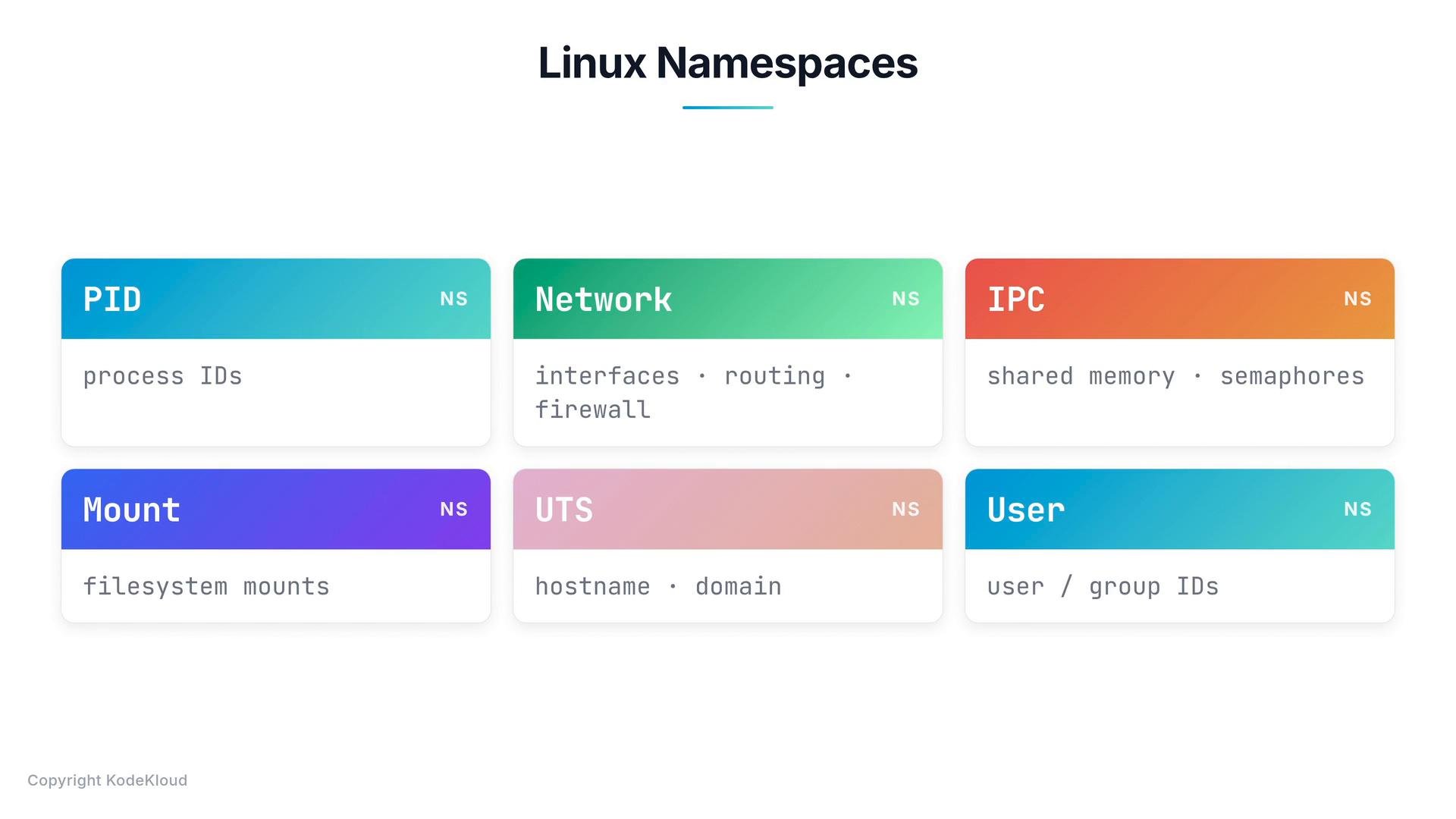 Summary table of common namespace types
| Namespace | Kernel resource isolated | Typical container effect |
| -: | -: | - |
| PID | Process IDs | Container sees its own PID numbering (PID 1 inside) |
| Network | Network interfaces/routes/firewall | Container has an independent network stack |
| IPC | Shared memory, semaphores | Processes in container isolated IPC resources |
| Mount | Filesystem mount points | Container can have its own filesystem view |
| UTS | Hostname and domain | Container can set its own hostname/domain |
| User | User and group IDs | UID/GID mapping between host and container |
Focus: PID namespaces
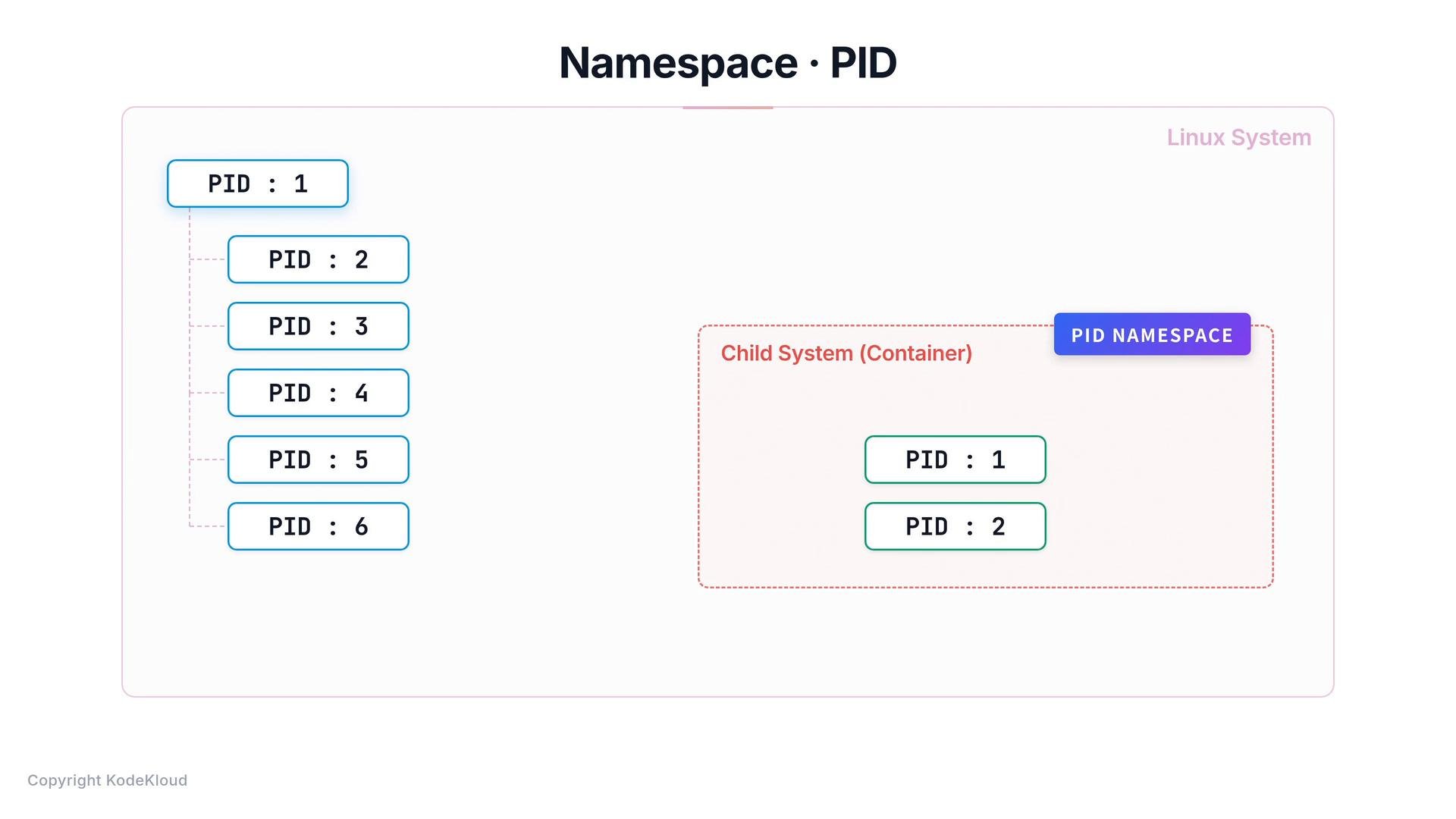
When Linux boots it creates a single initial process (PID 1) from which other processes spawn. PID namespaces let processes in a child namespace have a separate PID numbering that starts at 1. This is why a container appears to have its own init/service process (PID 1) and its own independent process tree even though those processes are actually running on the host kernel.
How PID namespaces behave in practice
* Inside the container: an init/service process appears as PID 1 and all container processes are numbered relative to that namespace.
* On the host: the same container processes exist as normal host processes and are assigned host PIDs from the host PID namespace.
* A single process can therefore have different numeric PIDs depending on which PID namespace view you use.
PID numbers are unique within a given PID namespace. A process may appear as PID 1 inside its container namespace while having a different PID on the host.
Summary table of common namespace types
| Namespace | Kernel resource isolated | Typical container effect |
| -: | -: | - |
| PID | Process IDs | Container sees its own PID numbering (PID 1 inside) |
| Network | Network interfaces/routes/firewall | Container has an independent network stack |
| IPC | Shared memory, semaphores | Processes in container isolated IPC resources |
| Mount | Filesystem mount points | Container can have its own filesystem view |
| UTS | Hostname and domain | Container can set its own hostname/domain |
| User | User and group IDs | UID/GID mapping between host and container |
Focus: PID namespaces
When Linux boots it creates a single initial process (PID 1) from which other processes spawn. PID namespaces let processes in a child namespace have a separate PID numbering that starts at 1. This is why a container appears to have its own init/service process (PID 1) and its own independent process tree even though those processes are actually running on the host kernel.
How PID namespaces behave in practice
* Inside the container: an init/service process appears as PID 1 and all container processes are numbered relative to that namespace.
* On the host: the same container processes exist as normal host processes and are assigned host PIDs from the host PID namespace.
* A single process can therefore have different numeric PIDs depending on which PID namespace view you use.
PID numbers are unique within a given PID namespace. A process may appear as PID 1 inside its container namespace while having a different PID on the host.
 Example: running NGINX inside a container
From inside the container you might list processes with a simple `ps`:
```bash theme={null}
$ ps
PID COMMAND
1 nginx
9 nginx-worker
10 nginx-worker
```
From the Docker host, the same running processes show host-assigned PIDs (and co-exist with other host processes):
```bash theme={null}
$ ps
PID COMMAND
1 /sbin/init
892 sshd
1402 systemd-journal
8472 nginx
8479 nginx-worker
8480 nginx-worker
```
This demonstrates two key points:
* Container processes are real host processes managed by the kernel.
* PID namespaces provide an isolated PID numbering and a container-local process tree (with PID 1 inside the container).
How to inspect PID namespaces and processes
* View host processes: `ps aux` or `ps -ef`.
* View processes inside a running container: `docker exec -it ps aux` (or use `docker top `).
* See namespace details on the host: `lsns -t pid` shows existing PID namespaces.
* Run an interactive shell in a new PID namespace for testing: `sudo unshare --pid --fork --mount-proc bash` (creates a new PID namespace where the new shell is PID 1).
Links and references
* [Docker: Namespaces and cgroups](https://docs.docker.com/engine/security/)
* [Linux Kernel Namespaces (man page)](https://man7.org/linux/man-pages/man7/namespaces.7.html)
* [Understanding PID namespaces](https://lwn.net/Articles/531114/)
If you want examples or commands tailored to your environment (e.g., how to inspect namespaces on a specific distro), tell me your OS and Docker version and I’ll provide step-by-step commands.
This documentation is built and hosted on [Mintlify](https://mintlify.com), a developer documentation platform.
Example: running NGINX inside a container
From inside the container you might list processes with a simple `ps`:
```bash theme={null}
$ ps
PID COMMAND
1 nginx
9 nginx-worker
10 nginx-worker
```
From the Docker host, the same running processes show host-assigned PIDs (and co-exist with other host processes):
```bash theme={null}
$ ps
PID COMMAND
1 /sbin/init
892 sshd
1402 systemd-journal
8472 nginx
8479 nginx-worker
8480 nginx-worker
```
This demonstrates two key points:
* Container processes are real host processes managed by the kernel.
* PID namespaces provide an isolated PID numbering and a container-local process tree (with PID 1 inside the container).
How to inspect PID namespaces and processes
* View host processes: `ps aux` or `ps -ef`.
* View processes inside a running container: `docker exec -it ps aux` (or use `docker top `).
* See namespace details on the host: `lsns -t pid` shows existing PID namespaces.
* Run an interactive shell in a new PID namespace for testing: `sudo unshare --pid --fork --mount-proc bash` (creates a new PID namespace where the new shell is PID 1).
Links and references
* [Docker: Namespaces and cgroups](https://docs.docker.com/engine/security/)
* [Linux Kernel Namespaces (man page)](https://man7.org/linux/man-pages/man7/namespaces.7.html)
* [Understanding PID namespaces](https://lwn.net/Articles/531114/)
If you want examples or commands tailored to your environment (e.g., how to inspect namespaces on a specific distro), tell me your OS and Docker version and I’ll provide step-by-step commands.
This documentation is built and hosted on [Mintlify](https://mintlify.com), a developer documentation platform.