> ## Documentation Index
> Fetch the complete documentation index at: https://notes.kodekloud.com/llms.txt
> Use this file to discover all available pages before exploring further.
# Image Tags
> Explains Docker image tags, defaulting to latest, listing and removing tagged images, and best practices for pinning tags or digests for reproducible deployments
This lesson explains how Docker image tags work, how Docker chooses a tag when you don't specify one, and best practices for pinning images in development and production.
When you run an image without an explicit tag, Docker uses the `latest` tag by default. For example, this command:
```bash theme={null}
$ docker run redis
Using default tag: latest
latest: Pulling from library/redis
Status: Downloaded newer image for redis:latest
1:M Redis version=8.6.1 just started
```
pulled and ran the image referenced by the `latest` tag (at the time of writing, that pointed to Redis 8.6.1). To request a specific version, append the tag after a colon. For example, to run Redis 7.4:
```bash theme={null}
$ docker run redis:7.4
Unable to find image 'redis:7.4' locally
7.4: Pulling from library/redis
Status: Downloaded newer image for redis:7.4
1:M Redis version=7.4 just started
```
The portion after the colon is the image tag. If you omit it, Docker assumes `latest`.
To discover available tags and what each one represents, visit the image's page on Docker Hub and check the "Tags" tab. That listing often includes short/long tags and descriptions so you can choose the correct variant (for example, `alpine`, `slim`, or a specific version).
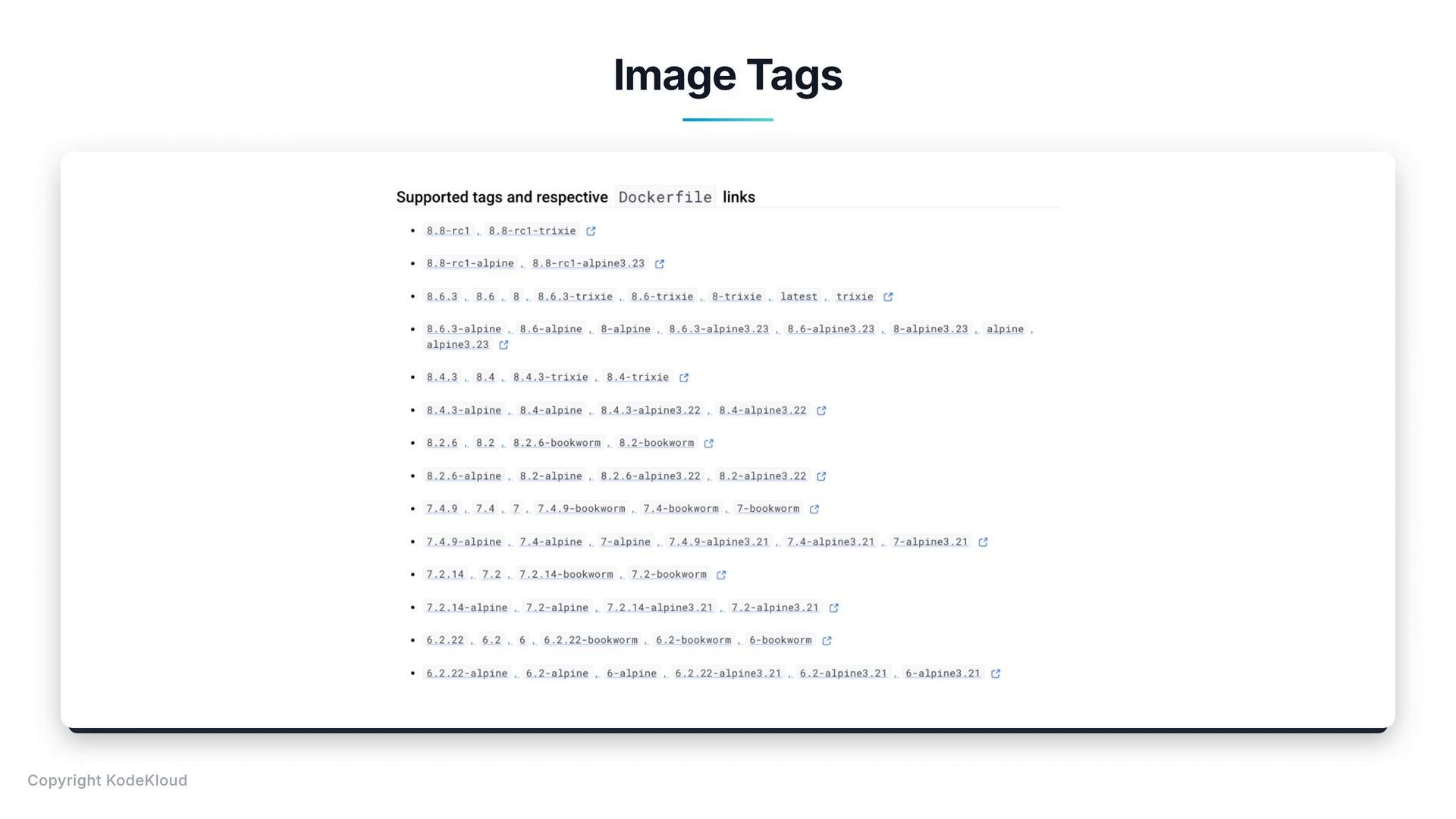 Each image:tag you pull is stored separately on the host. If you pull both `redis:6.1` and `redis:7.4`, both will appear in your local image list.
To list images on your host:
```bash theme={null}
$ docker images
REPOSITORY TAG IMAGE ID CREATED SIZE
redis latest a1b2c3d4e5f6 2 weeks ago 150MB
redis 7.4 0f1e2d3c4b5a 3 months ago 140MB
```
To remove a specific tagged image:
```bash theme={null}
$ docker rmi redis:7.4
Untagged: redis:7.4
Deleted: sha256:0f1e2d3c4b5a...
```
This deletes only the specified tag/image; other tags of the same repository remain intact.
Tip: For reproducible builds and deployments, prefer versioned and variant tags (for example, `redis:7.4-alpine`). You can also pin to an image digest using the manifest digest (for example, `redis@sha256:`) to guarantee the exact image content.
Common commands and their purpose:
| Command | Purpose | Example |
| - | - | - |
| List local images | Show images stored on the host | `docker images` |
| Run an image | Start a container from an image; defaults to `latest` if no tag specified | `docker run redis` |
| Run a specific tag | Start a container from a specific tag | `docker run redis:7.4` |
| Remove an image tag | Delete a specific tagged image from the host | `docker rmi redis:7.4` |
In production, avoid relying on the `latest` tag. `latest` is a moving target and may change when image authors push new releases. Pin deployments to a specific, immutable tag (for example, `redis:7.4-alpine`) or to an image digest (`redis@sha256:`) so you deploy the same image every time.
Examples of pinned tags:
```text theme={null}
redis:9.0
redis:7.4-alpine
```
Links and references:
* [Docker Hub - Tags](https://hub.docker.com/)
* [Docker Run reference](https://docs.docker.com/engine/reference/commandline/run/)
* [Docker image management (`docker images`, `docker rmi`)](https://docs.docker.com/engine/reference/commandline/images/)
This documentation is built and hosted on [Mintlify](https://mintlify.com), a developer documentation platform.
Each image:tag you pull is stored separately on the host. If you pull both `redis:6.1` and `redis:7.4`, both will appear in your local image list.
To list images on your host:
```bash theme={null}
$ docker images
REPOSITORY TAG IMAGE ID CREATED SIZE
redis latest a1b2c3d4e5f6 2 weeks ago 150MB
redis 7.4 0f1e2d3c4b5a 3 months ago 140MB
```
To remove a specific tagged image:
```bash theme={null}
$ docker rmi redis:7.4
Untagged: redis:7.4
Deleted: sha256:0f1e2d3c4b5a...
```
This deletes only the specified tag/image; other tags of the same repository remain intact.
Tip: For reproducible builds and deployments, prefer versioned and variant tags (for example, `redis:7.4-alpine`). You can also pin to an image digest using the manifest digest (for example, `redis@sha256:`) to guarantee the exact image content.
Common commands and their purpose:
| Command | Purpose | Example |
| - | - | - |
| List local images | Show images stored on the host | `docker images` |
| Run an image | Start a container from an image; defaults to `latest` if no tag specified | `docker run redis` |
| Run a specific tag | Start a container from a specific tag | `docker run redis:7.4` |
| Remove an image tag | Delete a specific tagged image from the host | `docker rmi redis:7.4` |
In production, avoid relying on the `latest` tag. `latest` is a moving target and may change when image authors push new releases. Pin deployments to a specific, immutable tag (for example, `redis:7.4-alpine`) or to an image digest (`redis@sha256:`) so you deploy the same image every time.
Examples of pinned tags:
```text theme={null}
redis:9.0
redis:7.4-alpine
```
Links and references:
* [Docker Hub - Tags](https://hub.docker.com/)
* [Docker Run reference](https://docs.docker.com/engine/reference/commandline/run/)
* [Docker image management (`docker images`, `docker rmi`)](https://docs.docker.com/engine/reference/commandline/images/)
This documentation is built and hosted on [Mintlify](https://mintlify.com), a developer documentation platform.